New: Lay Out Your Airtable Record Pages in Sections and Columns
Arrange the page a record opens on in your CollabPortals portal: group fields into sections with headings, choose one, two or three columns, make long fields full width, and let people fold away sections they rarely need.

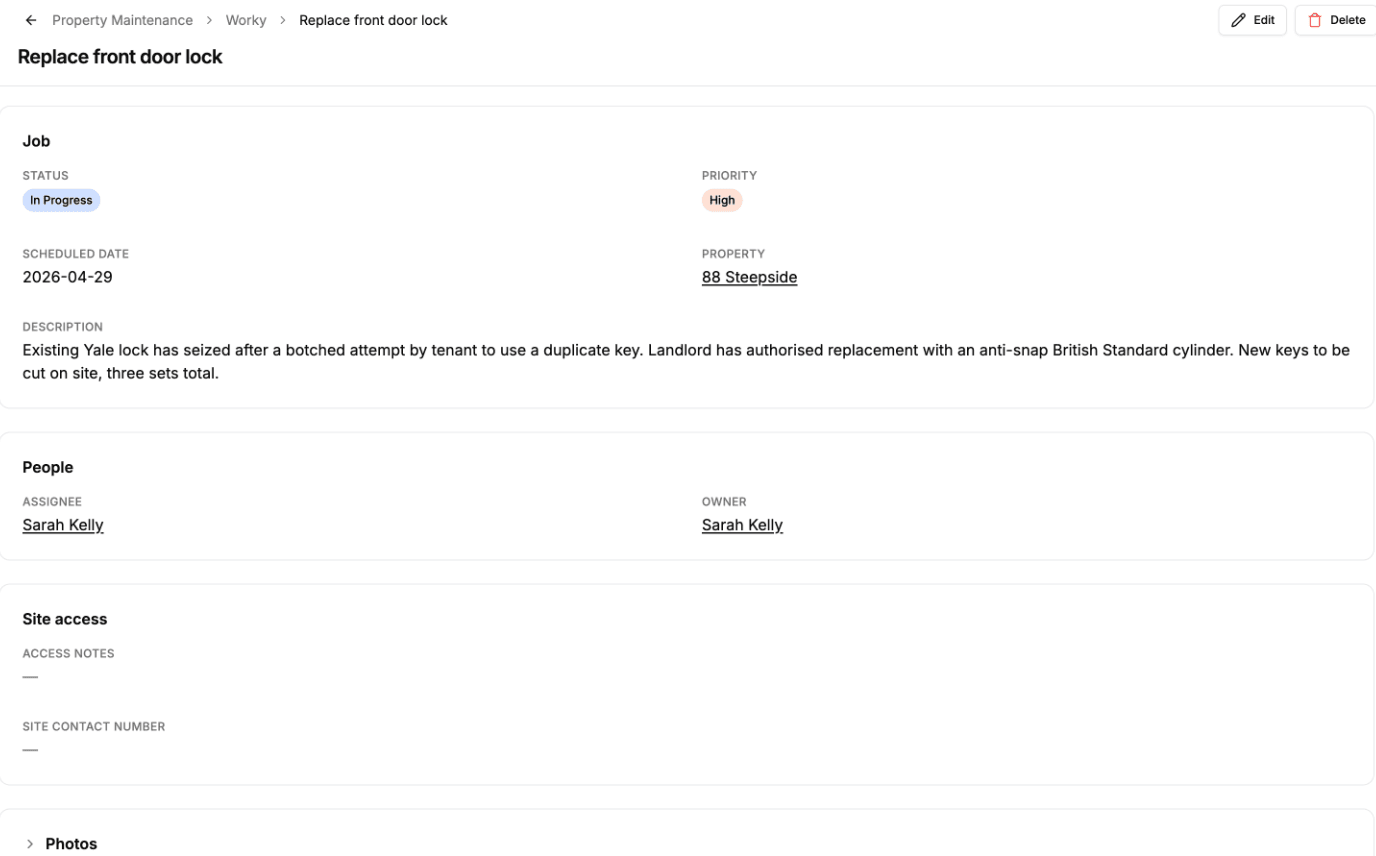
When someone opens a record in your portal, they get its detail page: every field they can see, in one grid, in your field order. For a record with eight fields that is fine. For a work order with thirty, it is a wall of labels that people scroll up and down looking for the one they need.
You can now lay that page out yourself. Each page in the portal editor has a new Record tab, where you group fields into sections, choose the columns, and decide what starts open.
What You Can Do
- Group fields into sections under headings like Job, People and Site access. Each section is its own card on the page.
- Choose one, two or three columns per section. A section of short values can sit three across, while one with long text can use a single column.
- Make a field full width. A description or notes field can span the whole section instead of being squeezed into a column.
- Fold sections away. Turn on Collapsible and readers open and close the section by clicking its heading. Choose whether it starts open or closed, so the fields people check every day are in view and the rest are one click away.
On phones every section shows one column, with a band between sections so the groups are easy to tell apart.
How It Works
Open a page in the editor and click the Record tab, next to Display. You see the page as it looks today: one section holding every field, with values from the first record in the table so you can tell which fields are long.
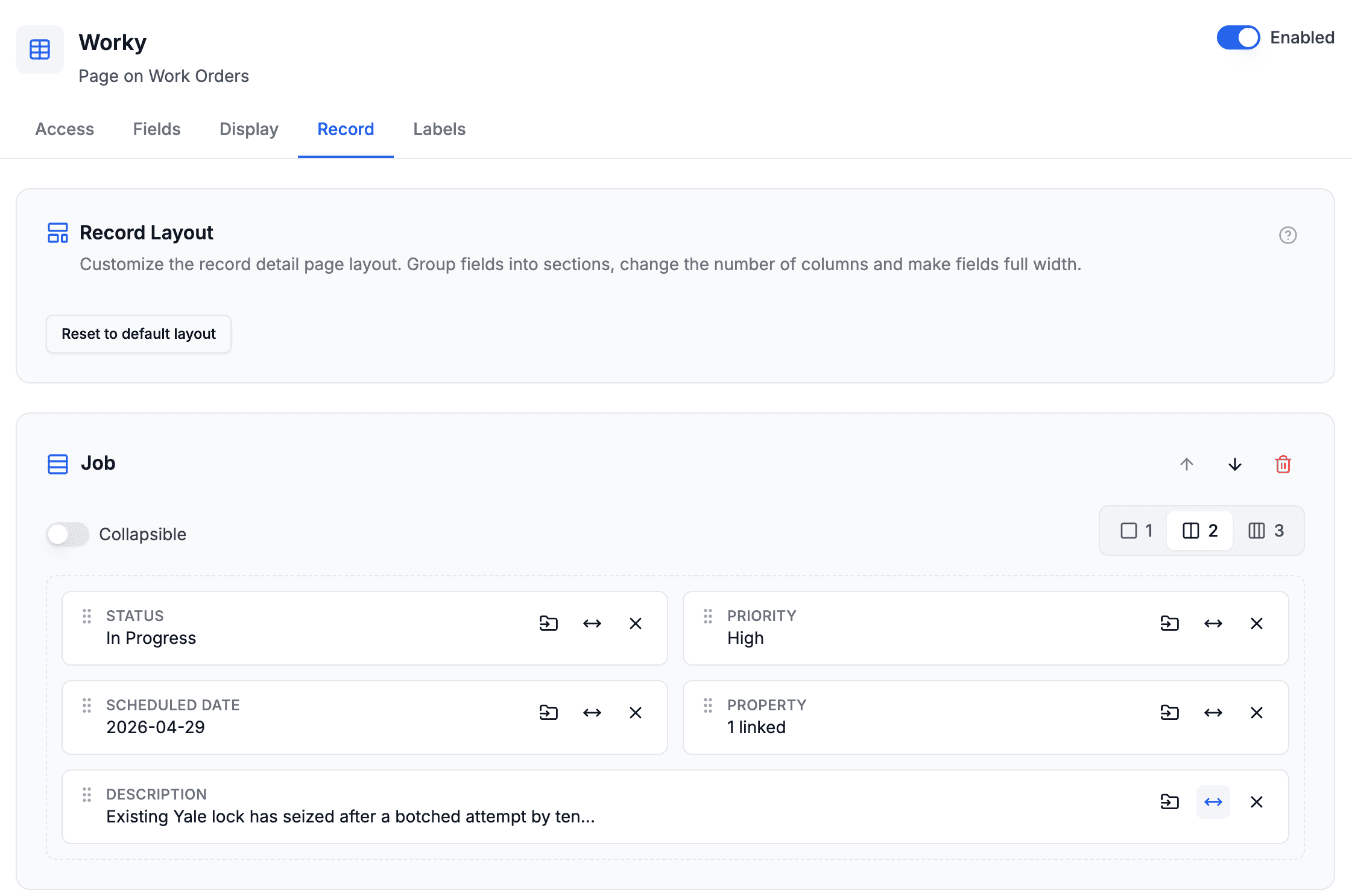
Click Add section, type a heading, and drag fields into it. The page rearranges as you drag, so you can see where a field will land before you let go. If you'd rather not drag, every field has a button to move it to another section.
Any field you don't place stays in one section that collects the rest. That includes fields you add in Airtable later, so a new column never disappears from the page because the layout didn't know about it. If all you want is one column instead of the standard grid, change it on that one section and you're done.
The full walkthrough is in the record page layout guide.
Roles and Pages
With roles, each role has its own layout. A site manager might see the job and the people first, while a contractor sees site access at the top. A role you add later starts with a copy of your Default role's layout.
A layout only arranges fields a role can already see. It never shows a field the role's field permissions hide, and a section whose fields a role can't see doesn't appear for that role at all, heading included.
Each page has its own layout too, so two pages of the same table can lay out their records differently.
Who This Helps
Anyone whose records have more fields than fit comfortably in one grid:
- Maintenance and field service. A work order has the job, the property, the people, access notes and photos. Grouping them means a contractor finds the access code without scrolling past the parts list. See maintenance portals.
- Client and CRM records. Contact details, account details and notes read better as separate sections than as one long list. See CRM portals.
- Applications and submissions. Long forms read better as sections that match the parts of the form, with the reviewer's notes full width. See application portals.
How It Compares
Airtable Interfaces lets you arrange a record detail page into collapsible groups of fields, and if your team works inside Airtable, that is a good way to read records. Record layouts bring the same idea to your portal, for the people outside your base: clients, contractors and members who sign in to your portal and see only what their role allows. See CollabPortals vs Airtable Interfaces for how the two differ on access and pricing.
Get Started
Open any page in your portal editor and click the Record tab. Nothing changes on the live portal until you save, and Reset to default layout puts the page back to a single grid.

About the author
Matt Shepherd
Founder, CollabPortals
Matt is the founder of CollabPortals. A software engineer and Airtable power user who kept running into the same frustration: no easy way to give external users a simple and secure view to edit their data. He built CollabPortals as the lightweight solution to that problem, allowing you to set up a secure, permissioned portal in a few clicks.
Related reading
Record Detail Pages: Layout and Summary Fields
Lay out each record's detail page in sections with headings, columns and full-width fields, and choose which fields appear on the row or card, so a list stays readable and a long record stays easy to scan.
Use caseMaintenance
Let tenants, clients, or building occupants submit fault reports with photos and track repair status through a portal connected to your Airtable maintenance database.
Use caseCRM
Give your clients a branded portal to view their account data, deals, contacts, sites, activity, directly from your Airtable CRM. No extra seats, no code.
ComparisonCollabPortals vs Airtable Interface Designer: Can You Use Interfaces as a Portal?
Airtable Interface Designer is free, but can it replace a dedicated portal? Compare it to CollabPortals for sharing data with external users.