Build an Airtable Internal Request and Ordering Portal
Let employees submit hardware requests, IT tickets, supply orders, and internal service requests through a portal connected to your Airtable operations base.

See it working, then start from a ready-made Airtable base.
See a live demoCopy the Airtable templateThe Problem: Internal Requests Are a Mess
Every organization has internal request workflows, hardware ordering, IT support tickets, office supply requests, facilities maintenance, travel approvals. These processes often live in Airtable because it is flexible enough to model any request type with custom fields, statuses, and approval stages.
But collecting requests from employees is the weak link:
- Email requests are unstructured, missing information, no tracking, lost in inboxes
- Slack or Teams messages get buried in channels. No audit trail, no status tracking.
- Google Forms work for collection but create a disconnect, employees submit but cannot see their request status. Data has to be synced to Airtable manually or via Zapier.
- Giving everyone Airtable access means $20/month per person. For a company of 100 employees, that is $2,000/month just so people can submit a laptop request.
What you need is a simple portal where employees log in, submit a request using your Airtable schema (so data goes directly into your base), and check the status of their existing requests, without seeing other people's requests or your internal operations.
How CollabPortals Works for Internal Requests
CollabPortals creates a portal connected to your Airtable operations base. Employees log in with their work email, get matched to their record, and can submit requests and view their history. The operations team works in Airtable as usual.
Example: Hardware Ordering Portal
An SAP consulting firm uses CollabPortals so employees can order hardware (laptops, monitors, peripherals) through a structured portal instead of email.
| Table | Employee Access | Purpose |
|---|---|---|
| Hardware Requests | View, create, edit | Employees submit and track their hardware orders |
| Product Catalog | View only | Employees see available hardware options and specifications |
| Employees (Profile) | View, edit | Employees maintain their department, location, and contact info |
| Approvals | Hidden | Managers review and approve requests in Airtable |
| Budget Tracking | Hidden | Finance tracks spending per department |
| Vendor Orders | Hidden | Procurement manages supplier relationships |
Employees see a clean interface: browse the catalog, submit a request, track its status. The operations team sees the full picture in Airtable: approvals, budgets, vendor orders.
Build an Internal Request Portal Step by Step
Here is how the live demo above is put together. It takes about an hour the first time, with no code involved.
- 1
Set up your Airtable base
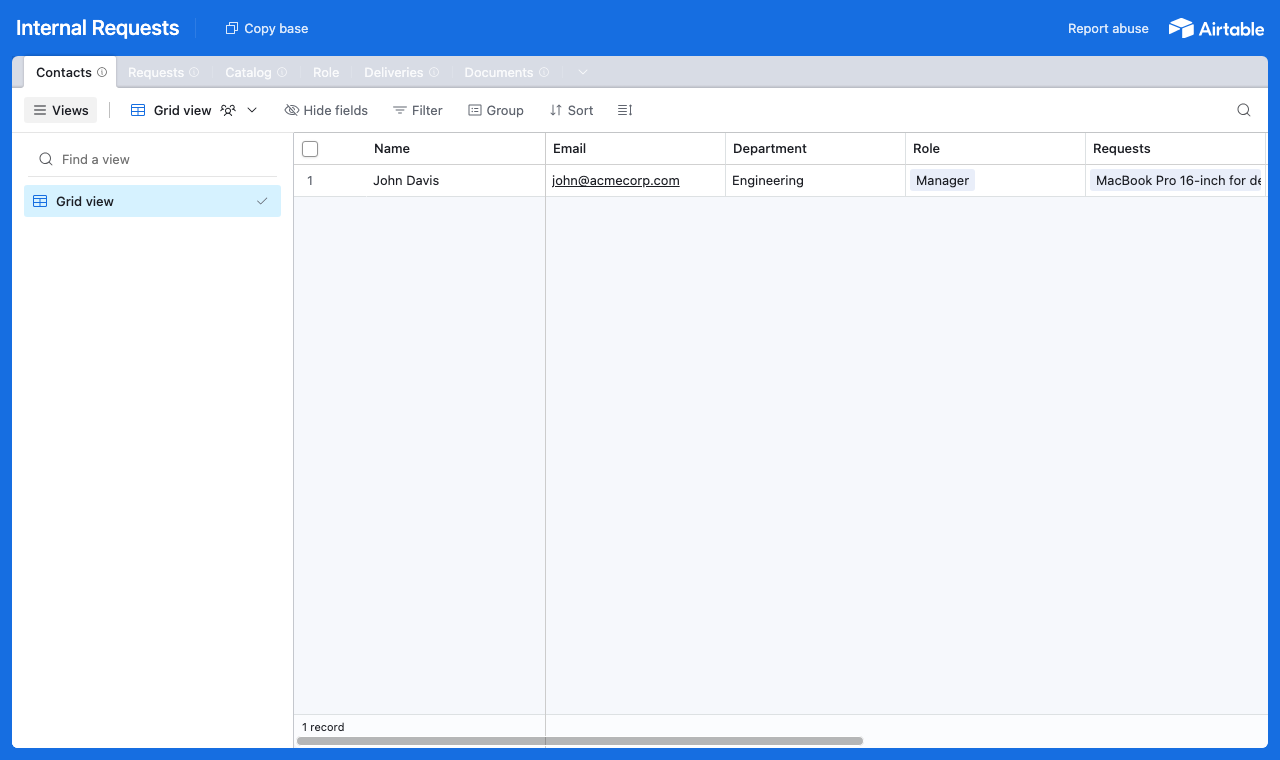
Start in Airtable with a table for each part of the process: a Requests table for what people submit, a Catalog of orderable items, a Deliveries schedule, a Documents library, and a Contacts table for your employees. Contacts is the hub. It holds each person's work email, and the Requests table links back to it, so every request is tied to the person who raised it. That link is what later lets the portal show each employee only their own requests.
A table for each part of the process, with a Contacts table every request links back to. - 2
Connect the base and pick the user table
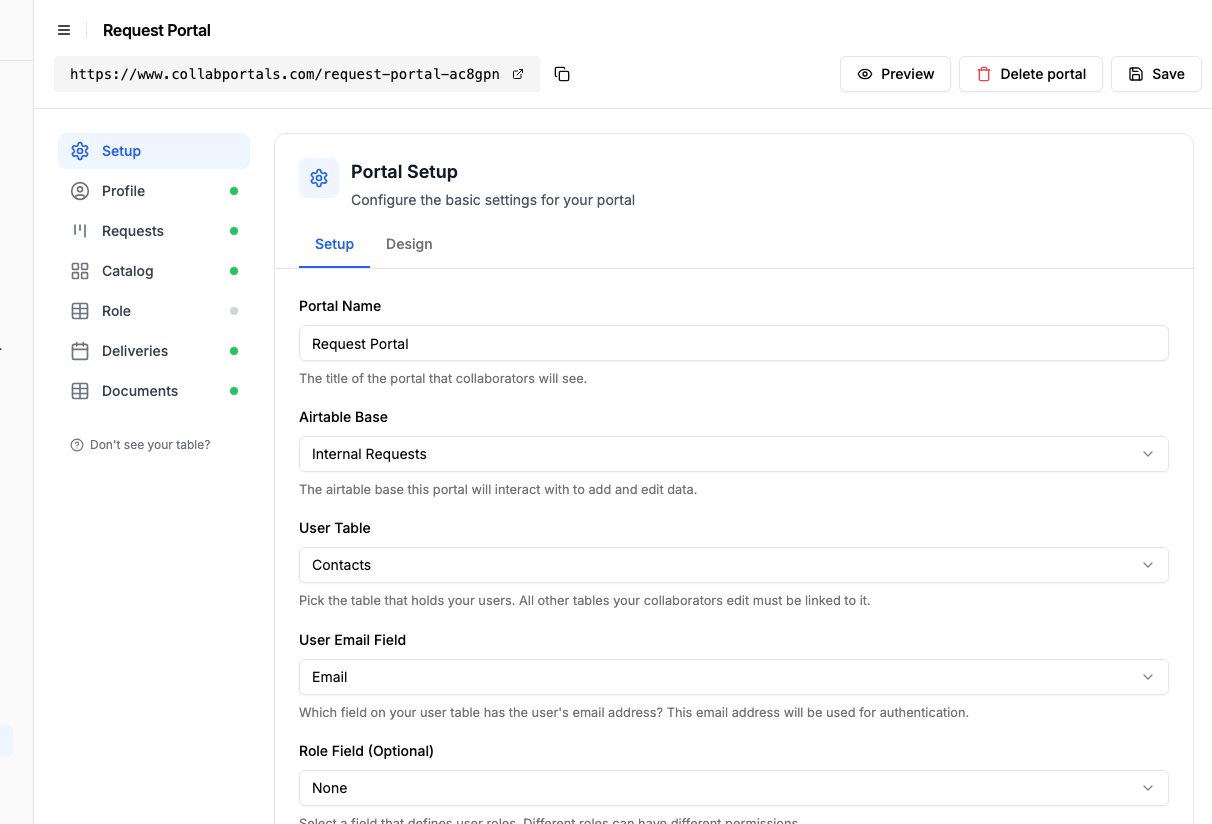
Point CollabPortals at that base, then choose Contacts as your user table and Email as the login field. Each employee signs in with their work email and is matched to their own record.
Connect the base, then point CollabPortals at the Contacts table and its email field. - 3
Let employees submit, hide the internal fields
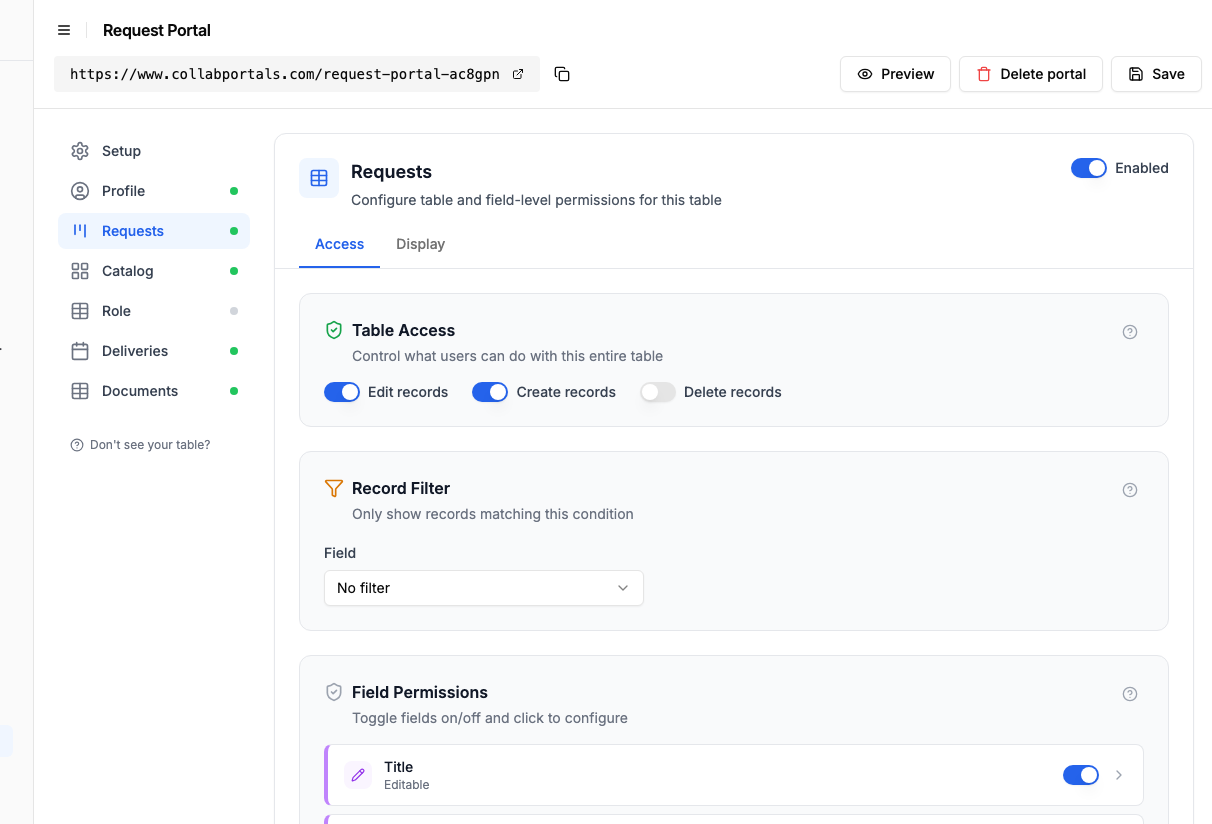
On the Requests table, turn on create and edit so people can raise and update a request, and leave delete off. Show the fields they fill in, like title, category and description, and hide the internal ones, approval status, assignee, budget and cost, which stay with your operations team.
Let employees create and edit requests, while approvals and costs stay hidden. - 4
Give each table the view that fits
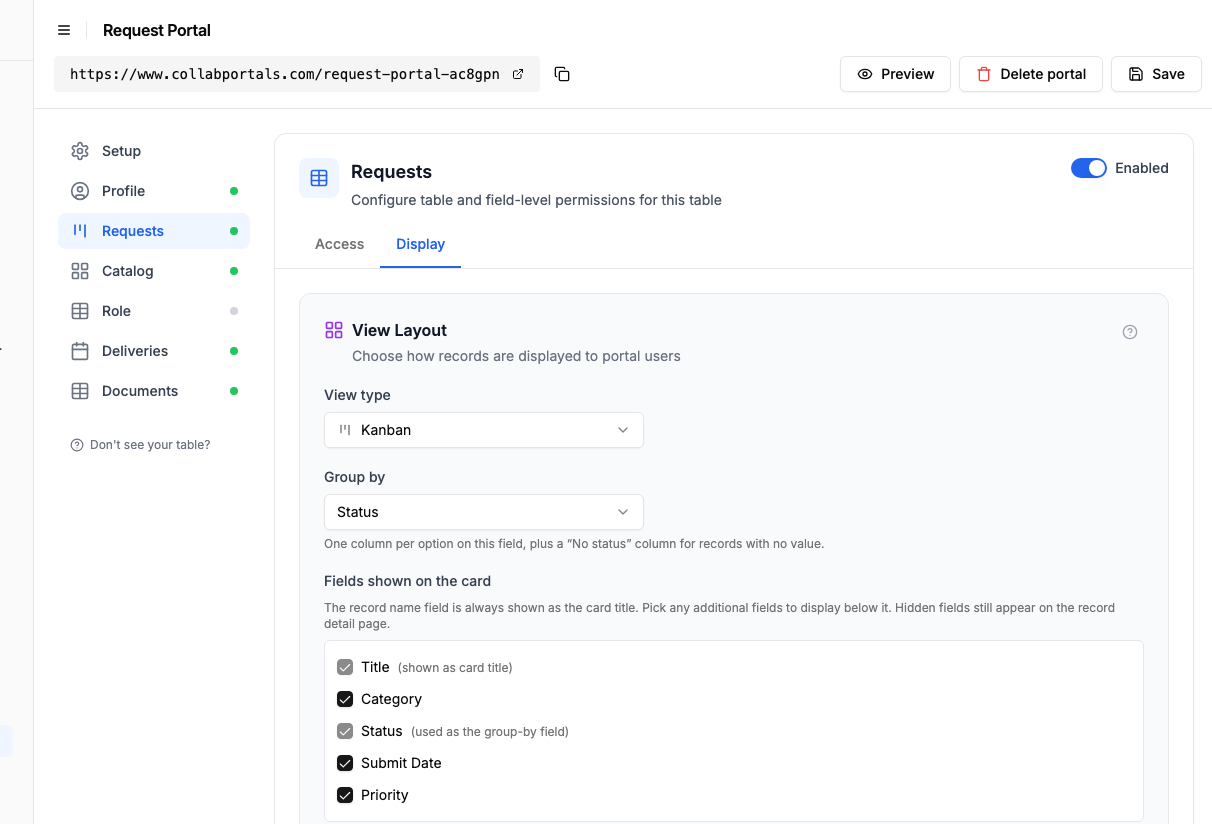
Pick how each table appears. Requests as a kanban grouped by status, so a card moves from Pending to Under Review to Approved as it is processed. The Catalog works as a gallery of orderable items, Deliveries as a calendar, Documents as a table.
The Display tab lays the Requests table out as a kanban grouped by status. - 5
Employees get a simple request portal
The result is a clean, branded portal. Employees browse the catalog, submit a request, and watch it move across the board as it is reviewed and approved, all writing straight into your Airtable base.
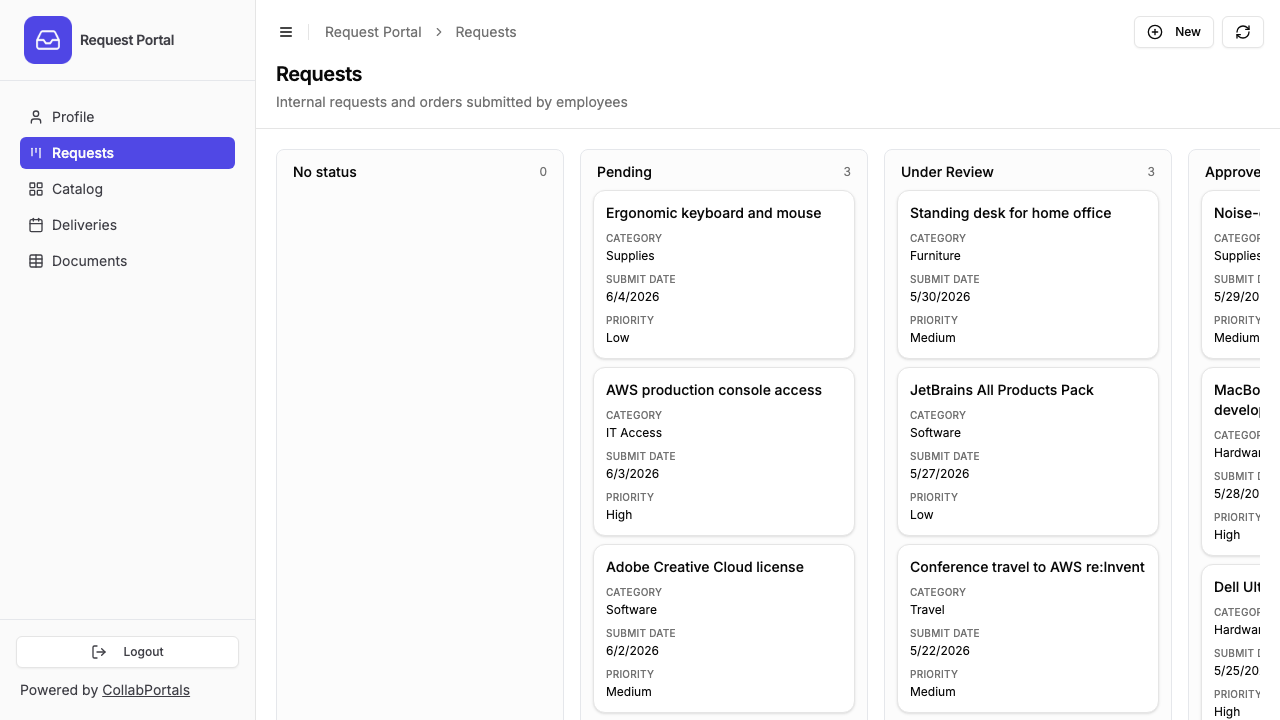
The requests board as employees see it: submit, then track each one from Pending to Approved. - 6
They log in with their work email
Share the link on your intranet or in onboarding. Each employee signs in with their work email and a one-time code, so there are no passwords to manage and no Airtable seats to buy.
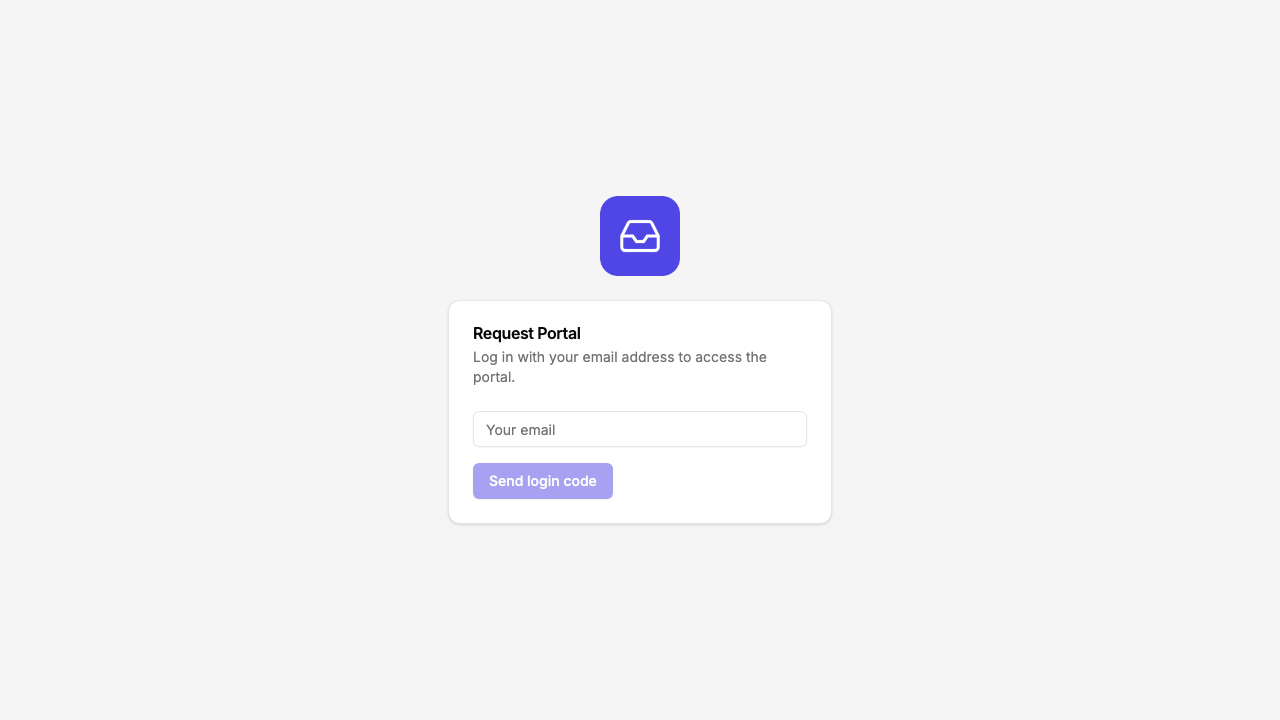
Email and one-time code login, branded with your logo and colour.
Want to start from this exact setup? Open the live demo or copy the Airtable template and connect it to your own base in minutes.
Common Internal Request Portal Types
IT Service Request Portal
Employees submit IT support tickets that land directly in your Airtable IT operations base.
- Tickets table (create, edit), employees describe their issue, select a category, attach screenshots
- My Requests table (view only), employees see status of their open and resolved tickets
- Knowledge Base / FAQ table (view only), common solutions employees can check before submitting, shown as an FAQ page so each answer sits under its question rather than truncated in a row
- Internal triage fields hidden, priority, assigned technician, resolution notes, SLA tracking
Office Supply / Equipment Request Portal
Employees order supplies or equipment without emailing an office manager.
- Requests table (create, edit), item needed, quantity, urgency, justification
- Catalog table (view only), available items with descriptions
- Order Status table (view only), employees track whether their request is approved, ordered, or delivered
- Hidden fields for cost, supplier, and approval chain
Facilities / Maintenance Request Portal
Employees report issues or request facilities services.
- Requests table (create), location, description of issue, photo attachment field, urgency
- My Requests (view only), employees check status of their submitted requests
- Locations table (view only), building, floor, room reference data
- Hidden tables for work orders, vendor assignments, and cost tracking
Travel Request Portal
Employees submit travel requests for approval and booking.
- Travel Requests table (create, edit), destination, dates, purpose, estimated cost
- My Requests (view only), employees see approval status and booking confirmations
- Hidden tables for budget allocation, policy compliance checks, and booking details
Why a Portal Instead of a Form?
Forms are one-directional, employees submit data and never see it again. A portal is bidirectional:
| Capability | Google Forms / Typeform | CollabPortals Portal |
|---|---|---|
| Structured data collection | Yes | Yes |
| Data goes to Airtable | Via Zapier/Make ($20+/month) | Directly (native connection) |
| Employee sees request status | No | Yes |
| Employee can edit a submitted request | No | Yes (if you allow it) |
| Employee sees only their own requests | N/A | Yes |
| Authentication | Optional | Email verification |
| Cost | Free to $50+/month + integration | $10/month |
The portal approach means employees submit requests and come back to check status, all in one place, all backed by your Airtable base. For a deeper look at the portal-vs-form question, see CollabPortals vs Fillout.
Take It Further
The walkthrough above is the whole build. A few options are worth knowing once you are up and running:
- Required fields. Make category, description or justification required so every request comes in complete, with nothing to chase.
- Roles. If your Contacts table has a role field, give managers their own permissions, for example approving in a view that regular employees never see, while everyone else just submits and tracks.
- One portal, many request types. The same portal can carry IT tickets, hardware orders, facilities jobs and travel, each its own table with its own permissions.
After the first day of set-up, every request an employee raises lands straight in your Airtable base, where your operations team already works.
For the generic version that applies to any base, see the setup guide.
Frequently Asked Questions
Can employees only see their own requests?
Yes. Each employee is matched to their record in your Airtable Users table via email. They only see requests linked to them. An employee cannot see other people's hardware orders or IT tickets.
Can managers approve requests through the portal?
You could set up a separate portal with different permissions for managers, or keep approvals in Airtable where your operations team already works. Most teams find it simpler to approve in Airtable and let the portal reflect the updated status to employees.
Can I require certain fields when submitting a request?
Yes. CollabPortals supports required fields at the portal level. You can ensure employees always provide a category, description, and justification before submitting.
How is this different from Jira or ServiceNow?
If you already manage your operations in Airtable, CollabPortals adds a front-end for employees without switching to a different system. No migration, no new tool for your team to learn. Your Airtable base is the single source of truth.
Can I use this for multiple request types?
Yes. A single portal can include tables for IT requests, hardware orders, facilities maintenance, and travel, each with their own permissions. Or create separate portals for different departments.

About the author
Matt Shepherd
Founder, CollabPortals
Matt is the founder of CollabPortals. A software engineer and Airtable power user who kept running into the same frustration: no easy way to give external users a simple and secure view to edit their data. He built CollabPortals as the lightweight solution to that problem, allowing you to set up a secure, permissioned portal in a few clicks.
Related use cases and guides
Issue Tracking
Let tenants, customers, or end users report issues and track resolution status through a portal connected to your Airtable maintenance database.
Use caseMaintenance
Let tenants, clients, or building occupants submit fault reports with photos and track repair status through a portal connected to your Airtable maintenance database.
ComparisonCollabPortals vs Fillout: Portal or Form Builder?
Compare CollabPortals ($10/month portal builder) with Fillout (form builder from $0/month). Understand when you need a portal vs a form for Airtable data collection.
ComparisonCollabPortals vs Miniextensions: Which Airtable Portal Tool Is Right for You?
A detailed comparison of CollabPortals and Miniextensions for building Airtable portals. Compare pricing, features, and limitations to find the best fit.