Build an Airtable Insurance and Underwriting Portal
Give agents, brokers, and clients a secure portal to submit applications, track policy status, and manage underwriting data, powered by your Airtable base.

See it working, then start from a ready-made Airtable base.
See a live demoCopy the Airtable templateThe Problem: Insurance Data Collection Is Fragmented
Insurance workflows involve collecting structured data from multiple parties, agents submit applications, clients provide documentation, underwriters assess risk, and claims adjusters record findings. This data often lives in Airtable because it handles complex, multi-table schemas well.
But the collaboration layer is broken:
- PDF forms emailed back and forth, data has to be manually re-entered into Airtable. Errors are common, turnaround is slow.
- Shared spreadsheets, no access control. Agents see other agents' submissions. Clients see underwriting notes.
- Adding external users to Airtable, $20/month per person. For a network of 30 agents plus their clients, costs escalate quickly.
- Dedicated insurance platforms, expensive, rigid, and require data migration away from Airtable where your workflow already works.
What you need is a portal where agents and clients submit structured data directly into your Airtable schema, track their submission status, and see only the data relevant to them.
How CollabPortals Works for Insurance
CollabPortals creates branded portals connected to your Airtable underwriting or policy management base. External users log in with their email, get matched to their record, and interact with only the tables and fields you allow.
Example: Underwriting Submission Portal
An underwriting firm uses two CollabPortals portals, one for their general workspace and one for a specific insurance product type.
General Agent Portal (6 tables, full CRUD):
| Table | Agent Access | Purpose |
|---|---|---|
| Applications | View, create, edit, delete | Agents submit new policy applications and update existing ones |
| Applicant Details | View, create, edit | Agents enter client information, financials, and documentation |
| Policy Status | View only | Agents track where their applications are in the pipeline |
| Document Checklists | View, edit | Agents check off submitted documents |
| Risk Profiles | Hidden | Internal underwriting risk assessments |
| Premium Calculations | Hidden | Rate calculations, loss ratios, and pricing models |
Product-Specific Portal (5 tables, full CRUD):
A separate portal for apartment and mercantile insurance forms, same Airtable base, different permission configuration tailored to that product line.
Common Insurance Portal Patterns
Agent Submission Portal
Insurance agents submit applications and track their pipeline.
- Applications table (create, edit), coverage type, applicant info, requested limits, effective dates
- Document tracking table (view, edit), checklist of required documents with status
- Pipeline view (read-only), submission status (received, in review, quoted, bound, declined)
- Hidden: underwriting notes, risk scores, loss history analysis, premium breakdown
Client Self-Service Portal
Policyholders view their coverage details and submit claims or changes.
- My Policies (view only), coverage summary, effective dates, premium amount
- Claims (create, edit), incident details, date, description, supporting documents
- Claims Status (read-only), submitted, under review, approved, settled, denied
- Contact / Profile (edit), policyholder updates their contact information
- Hidden: coverage limits detail, claim reserves, adjuster notes, fraud flags
Broker Portal
Managing general agents (MGAs) or wholesale brokers submit and manage business on behalf of their retail agents.
- Submissions table (create, edit), insured name, coverage type, limits, premium estimate
- Quotes (view only), broker views quotes from underwriters
- Bound Policies (view only), broker tracks active policies they placed
- Commission table (view only), broker sees their commission on each policy
- Hidden: carrier relationships, reinsurance arrangements, internal pricing
Why Airtable + CollabPortals for Insurance
Insurance is a data-intensive industry, but most small to mid-size agencies and MGAs do not need enterprise software. Airtable provides the flexible schema, and CollabPortals adds the controlled external access.
| Approach | Cost for 20 Agents | Custom Forms | Status Tracking | Data in Airtable |
|---|---|---|---|---|
| CollabPortals | $10/month | Yes (from Airtable schema) | Yes | Yes (native) |
| Airtable seats | $400/month | Yes | Yes | Yes |
| PDF forms + email | Free | No (manual re-entry) | No | After manual entry |
| Google Forms + Zapier | $20+/month | Limited | No | Via automation |
| Applied Epic / AMS360 | $100+/user/month | Yes | Yes | No (separate system) |
For detailed comparisons with these alternatives, see CollabPortals vs Airtable Portals and CollabPortals vs Softr, or the roundup of the best Airtable portal builders.
For agencies already running their operations in Airtable, CollabPortals is the fastest path to giving agents and clients structured access without changing systems.
Build an Insurance Portal Step by Step
Here is how the live demo above is put together. It takes about an hour the first time, with no code involved.
- 1
Set up your Airtable base
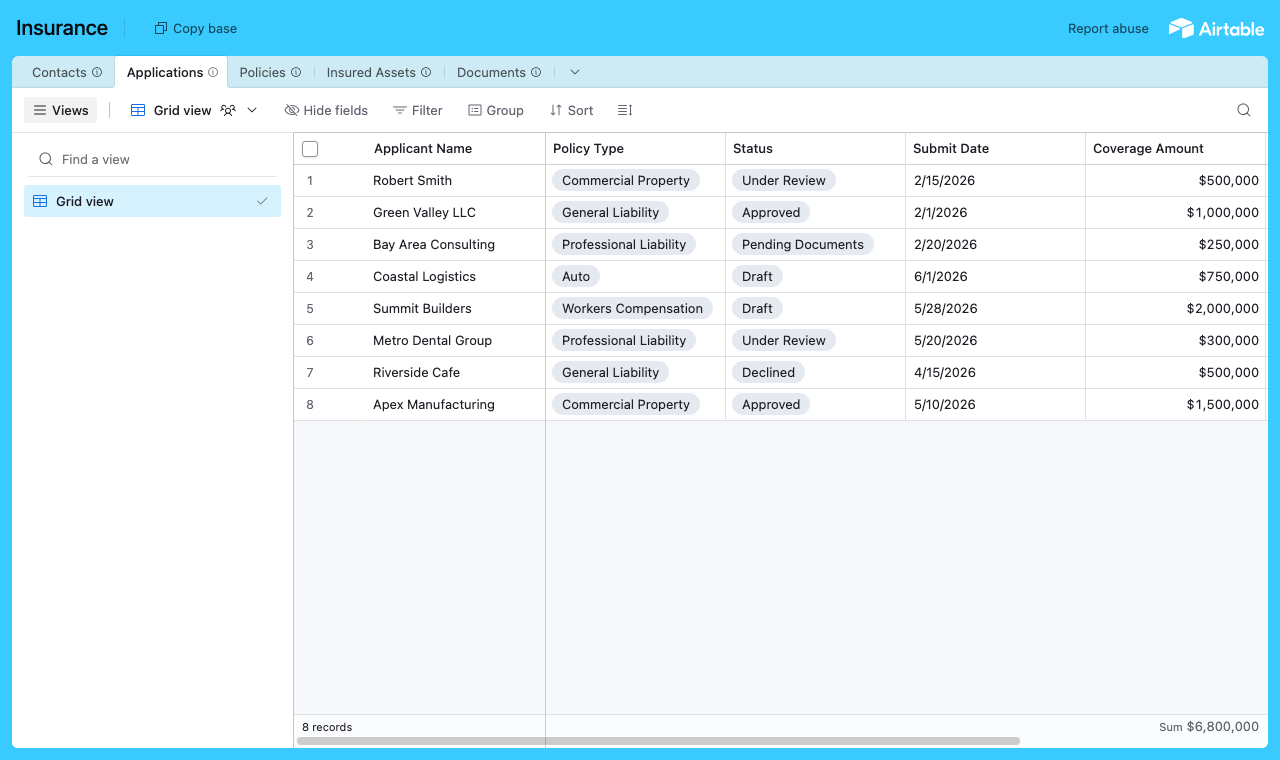
Start with a table for each part of the operation: an Applications table for submissions, a Policies table for active cover, an Insured Assets library for the property and vehicles you cover, a Documents table for certificates and claim forms, and a Contacts table for the people who log in. Contacts is the hub. It holds each person's email, and their applications, policies and documents link back to it, so each one only ever sees their own business.
A table for each part of the operation, with a Contacts table every application links back to. - 2
Connect the base and pick the user table
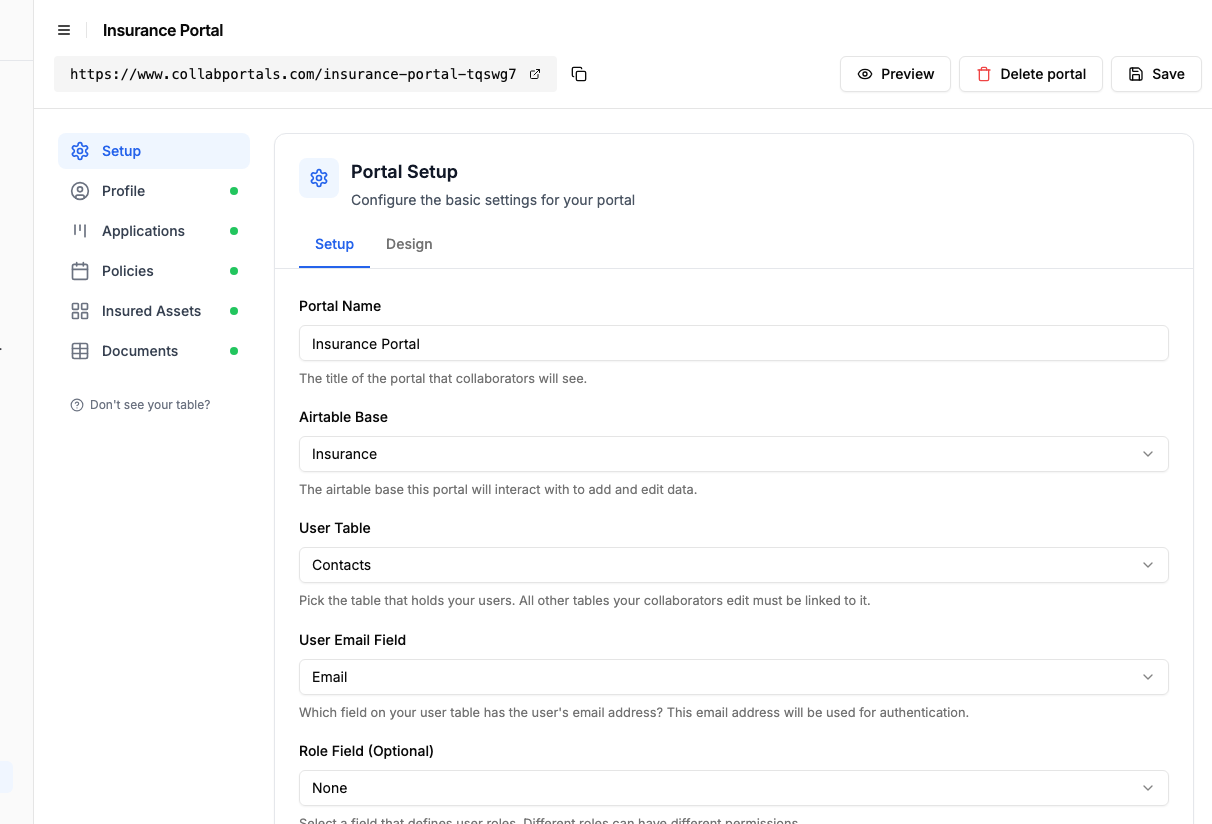
Point CollabPortals at that base, then choose Contacts as your user table and Email as the login field. Each agent or client signs in with their email and is matched to their own record.
Connect the base, then point CollabPortals at the Contacts table and its email field. - 3
Let agents submit, hide your underwriting
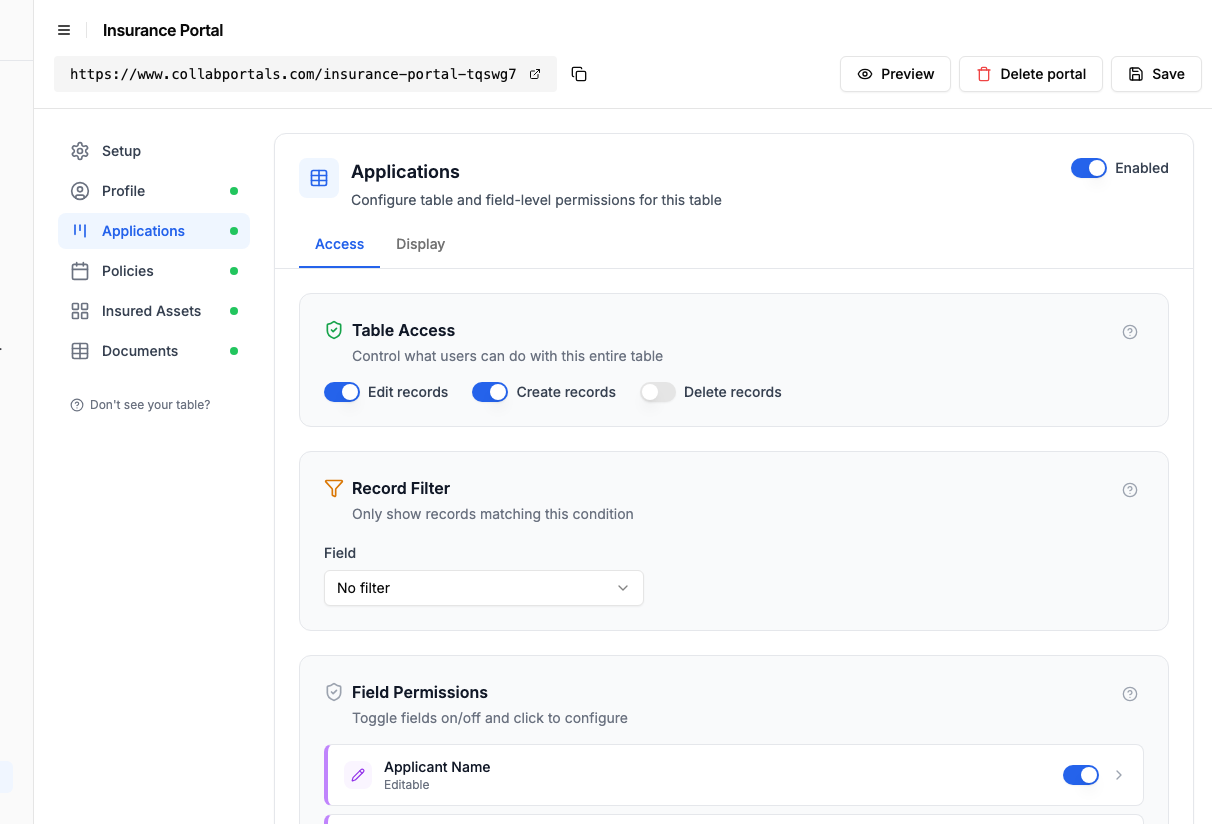
On the Applications table, turn on create and edit so agents can submit a new application and update it, and leave delete off. Show the fields they fill in, like applicant name, policy type and coverage amount, and hide internal ones such as risk scores and premium calculations. Keep Policies view only so agents track status without changing cover.
Let agents submit and update applications, while risk scores and pricing stay hidden. - 4
Give each table the view that fits
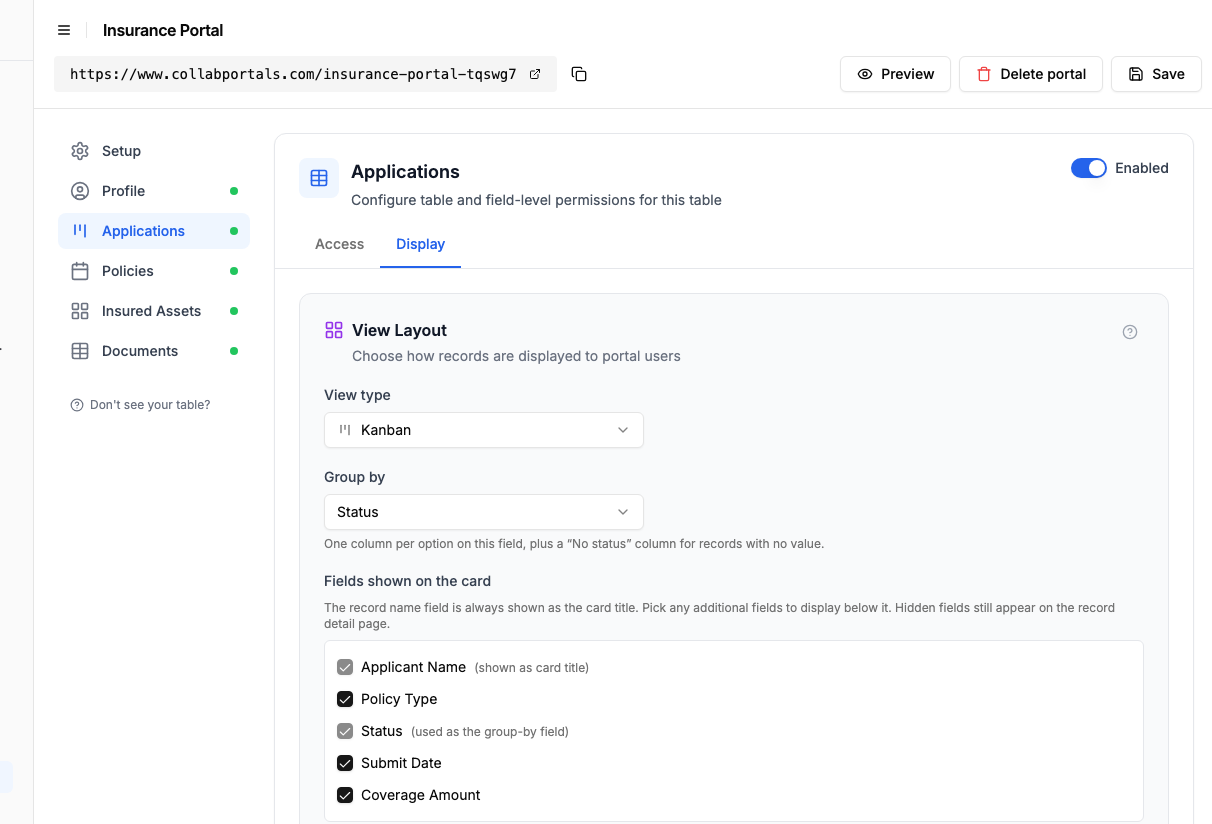
Pick how each table appears. Applications as a board so an agent watches a submission move from Draft to Under Review to Approved, Policies on a calendar by renewal date, Insured Assets as a gallery of covered property, Documents as a table to download. Same Airtable data, shaped for each audience.
The Display tab lays the Applications table out as a board grouped by status. - 5
Agents track their pipeline
The result is a clean, branded portal. Each agent signs in, sees only their own submissions with coverage amounts and dates, and watches each one move across the board as your underwriters work, all writing straight into your Airtable base.
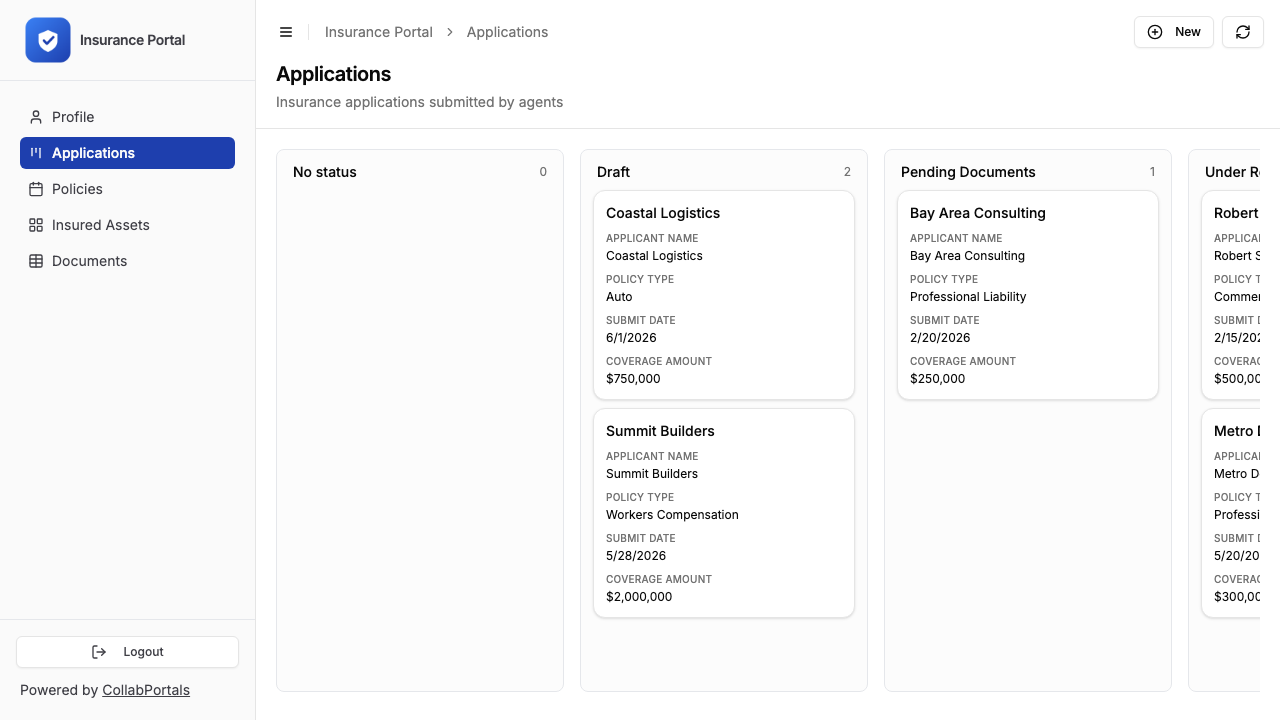
Agents see their own applications on a board, with policy type and coverage amount on every card. - 6
They log in with their email
Share the link with your agents and clients. Each one signs in with their email and a one-time code, so there are no passwords to manage and no Airtable seats to buy.
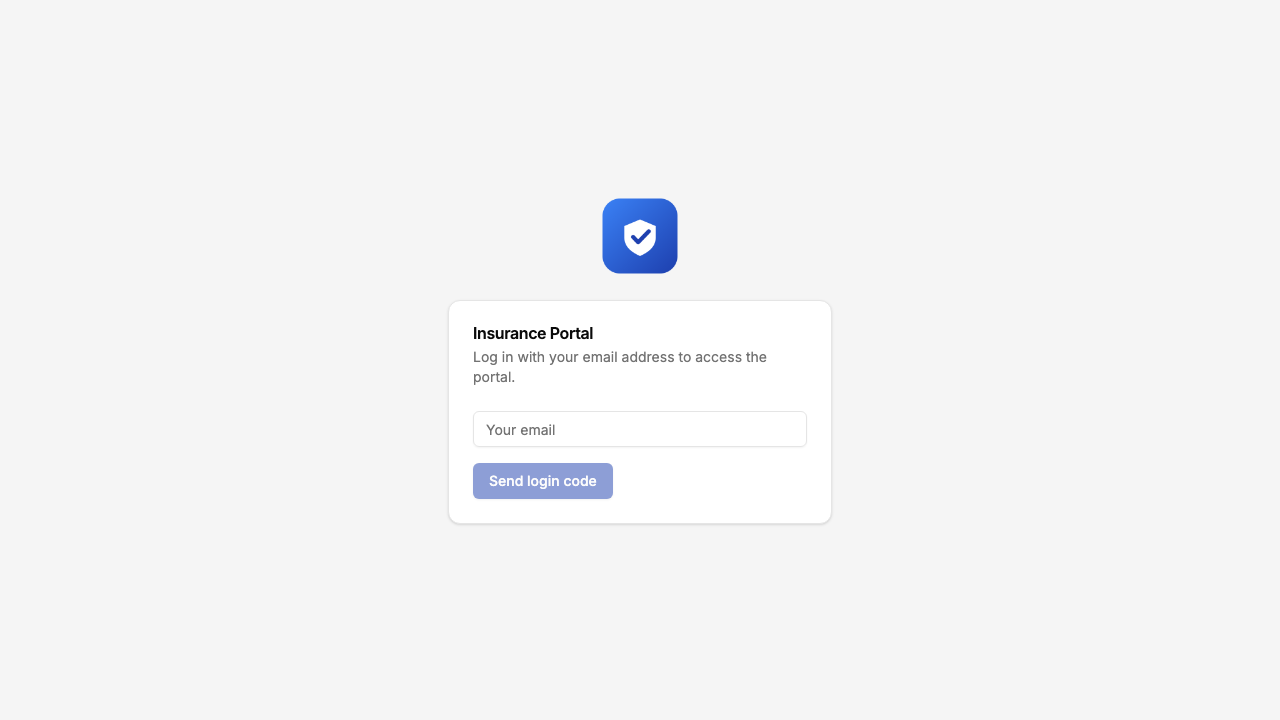
Email and one-time code login, branded with your logo and colour.
Want to start from this exact setup? Open the live demo or copy the Airtable template and connect it to your own base in minutes.
Field-Level Permissions for Insurance Data
Insurance data requires careful access control. Some fields in the same table serve different audiences:
- Show to agents: Application status, applicant name, coverage type, effective date, premium (quoted)
- Hide from agents: Loss ratio, risk score, underwriting notes, competitor quotes, internal priority
- Show to clients: Policy number, coverage summary, premium, claim status
- Hide from clients: Agent commission, underwriting notes, fraud indicators, claim reserves
- Editable by agents: Application fields, document checklist
- Read-only for agents: Premium calculations, binding status
CollabPortals gives you field-level control on every table, so each portal exposes exactly the right data for its audience.
Take It Further
The walkthrough above is the whole build. A few options are worth knowing once you are up and running:
- Separate roles. Add a role field on Contacts so agents see the submission pipeline with edit rights while policyholders see their own policies read-only, both from the same base with no duplicated setup.
- Insured assets gallery. Show covered property, vehicles and equipment as a gallery with photos, so clients confirm exactly what is on cover at a glance.
- Document downloads. Keep certificates and policy schedules in a Documents table clients can download, and turn on create if you want them to upload claim forms themselves.
- Nest assets and claims under each policy. Turn on related tabs so a policy's insured assets, documents and claims show as tabs on the policy record, scoped to it, so a client sees everything tied to one policy on a single page.
- Say claim, not record. The Labels tab sets what one row is called on each table, so the Claims table asks "Delete claim?" and reads "No claims to display." rather than talking about records. See renaming your portal's wording.
After set-up, every application and document lands in your Airtable base, where your underwriting team already works.
For the generic version that applies to any base, see the setup guide.
Frequently Asked Questions
Can agents and policyholders have different permissions?
Yes. The quickest path is roles in a single portal: an "Agent" role sees the submission pipeline with edit rights, a "Policyholder" role sees their own coverage and claims read-only. Roles carry their own table and field permissions plus an optional record filter, so you stop configuring from scratch each time. If you prefer fully separate URLs, you can also create multiple portals on the same plan.
Can agents only see their own submissions?
Yes. Each agent is matched to their record in your Airtable Users table via email. They only see applications and policies linked to them. Agent A cannot see Agent B's pipeline.
Is this secure enough for insurance data?
CollabPortals uses email verification for authentication and reads/writes directly to your Airtable base via the Airtable API with OAuth 2.0. Your data stays in Airtable, CollabPortals does not store insurance records. For specific compliance requirements (SOC 2, state regulations), review with your compliance team.
Can agents upload documents through the portal?
Yes, if your Airtable table includes attachment fields and you make them editable in the portal. Agents can upload PDFs, images, and other documents directly.
How do agents get notified about status changes?
CollabPortals itself does not send notifications, but you can use Airtable automations to email agents when a status field changes. Many teams already have these automations in place.
Can I use this for claims management?
Yes. A claims table with create and edit access lets policyholders or agents submit claims directly. Read-only status fields show claim progress. Internal fields like reserves, adjuster notes, and fraud flags remain hidden.

About the author
Matt Shepherd
Founder, CollabPortals
Matt is the founder of CollabPortals. A software engineer and Airtable power user who kept running into the same frustration: no easy way to give external users a simple and secure view to edit their data. He built CollabPortals as the lightweight solution to that problem, allowing you to set up a secure, permissioned portal in a few clicks.
Related use cases and guides
Clients
Give your clients secure, branded access to their project data in Airtable. No extra seats, no code, no complex setup, just share a link.
Use caseRegulatory Compliance
Give clients, members, and auditors secure access to compliance data, certifications, and regulatory filings in your Airtable base. No extra seats, no spreadsheets, no custom software.
ComparisonCollabPortals vs Airtable Portals: Third-Party Tool or Native Feature?
Compare CollabPortals ($10/month, unlimited users) with Airtable's native Portals, where read-only guests are free and editing guests are sold in packs from $120/month. See which fits how your users actually work.
ComparisonCollabPortals vs Softr: Lightweight Portal or Full App Builder?
Compare CollabPortals and Softr for Airtable portals. See how a $10/month focused portal tool stacks up against a full no-code app builder starting at $49/month.