Build an Airtable Project Management Portal for Clients and Teams
Give clients and external collaborators a branded view into their projects in Airtable, with controlled access to tasks, timelines, and deliverables.

See it working, then start from a ready-made Airtable base.
See a live demoCopy the Airtable templateThe Problem: Sharing Project Data with External Stakeholders
You manage projects in Airtable, tasks, timelines, budgets, deliverables, team assignments. It works well internally. But when clients or external collaborators need visibility into their projects, things break down:
- Adding them to Airtable costs $20/month per person and exposes your entire workspace. They see other clients' projects, internal cost data, and team notes.
- Exporting status reports means creating spreadsheets or slide decks every week. They are outdated the moment you send them.
- Giving view-only Airtable links shows too much. Shared views cannot isolate data per client or hide sensitive fields.
- Building a custom dashboard takes engineering time you would rather spend on client work.
Agencies, consultancies, and technology firms hit this problem constantly: clients want real-time project visibility, but Airtable was not designed for controlled external access.
How CollabPortals Solves This
CollabPortals creates a branded portal connected to your Airtable base where external users log in with their email and see only the project data linked to them. Upload your logo, and you configure exactly which tables and fields are visible. With several project areas in one portal, users land on a navigation page of cards for the tables they can open, so they can see everything at a glance and jump straight to the right one.
Typical Project Management Portal Setup
| Table | External Access | Purpose |
|---|---|---|
| Projects | View, edit | Clients see their project details, update requirements or feedback |
| Tasks / Deliverables | View only | Clients track what is in progress, completed, or upcoming |
| Timeline / Milestones | View only | Clients check key dates and deadlines |
| Files / Assets | View only | Clients access delivered files or shared resources |
| Internal Notes | Hidden | Team discussions, retrospectives, and internal priorities stay private |
| Budget / Costs | Hidden | Margins, hourly rates, and cost breakdowns are not exposed |
| Team Assignments | Hidden | Which team member is assigned to what stays internal |
What Clients See vs What Stays Internal
Field-level permissions let you fine-tune each table:
- Show "Status" but hide "Internal Priority"
- Show "Due Date" but hide "Estimated Hours"
- Show "Client Feedback" (editable) but hide "Team Response" (internal)
- Show "Deliverable Name" but hide "Cost"
This means you share a single Airtable base with your team and your clients, no duplicate data, no manual syncing. Your team sees everything. Clients see exactly what you allow.
Real-World Patterns
Agency Client Portal
Digital marketing agencies, design studios, and development shops use project portals to give clients self-service visibility into active campaigns and deliverables.
- 4 to 8 visible tables covering projects, tasks, assets, and feedback
- Most tables are read-only (clients check status)
- One feedback or requests table with create/edit access
- Budget and resource tables completely hidden
- Field restrictions hide internal effort estimates and margin data
Technology Consulting Portal
IT consultancies and technology firms share project milestones, issue trackers, and documentation with clients.
- 3 to 6 visible tables for projects, issues, and documentation
- Issues table may allow clients to create new tickets
- Resolution details visible but internal triage fields hidden
- SLA tracking visible but internal escalation notes hidden
Construction / Manufacturing Project Portal
Firms tracking physical projects share progress, inspections, and delivery schedules with clients.
- Projects and milestones tables as read-only
- Inspection or quality tables as read-only (clients see pass/fail, not detailed notes)
- Change request table with create access (clients submit requests)
- Subcontractor and cost tables hidden
Why Not Use Airtable Interfaces or Shared Views?
| Capability | CollabPortals | Airtable Interfaces | Airtable Shared Views |
|---|---|---|---|
| External access without Airtable seat | Yes | No ($20/user/month) | Yes (but no auth) |
| Per-client data isolation | Yes (email matching) | Manual view configuration | No |
| Field-level permissions | Yes | Tied to Airtable permissions | No |
| Authentication | Email verification | Airtable login required | Anyone with link can view |
| Create/edit by external users | Yes (configurable) | Yes (if they have a seat) | No (read-only) |
| Cost for 20 clients | $10/month | $400/month | Free (but no access control) |
Airtable Interfaces requires each client to have a paid Airtable seat. Shared Views are free but have no authentication, no per-client filtering, and no write access. CollabPortals fills the gap: authenticated, per-client, read-write access for $10/month flat. For the full breakdown, see CollabPortals vs Airtable Portals and CollabPortals vs Airtable Interfaces.
Build a Project Management Portal Step by Step
Here is how the live demo above is put together. It takes about an hour the first time, with no code involved.
- 1
Set up your Airtable base
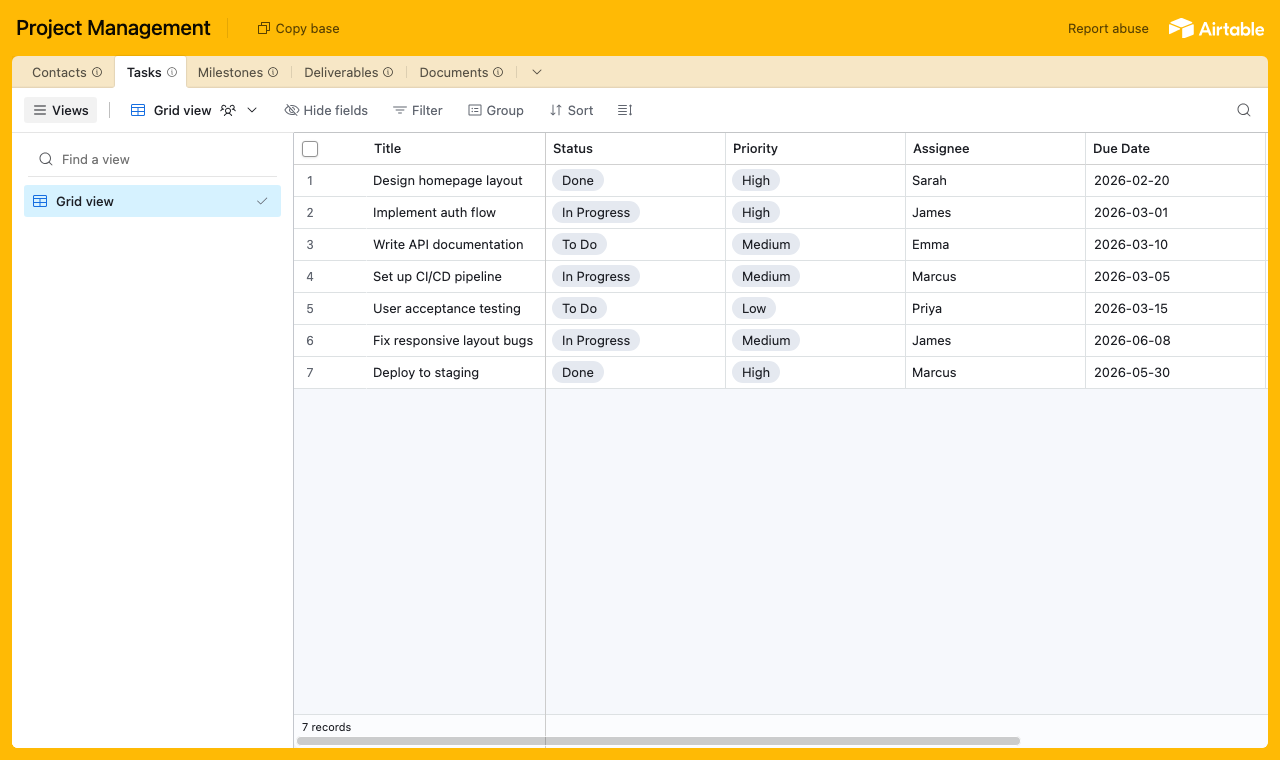
Start with a table for each part of the work: a Tasks table with status and priority, a Milestones table for key dates, a Deliverables library, a Documents table for briefs and contracts, and a Contacts table for the people who log in. Contacts is the hub. It holds each person's email, and their tasks, milestones and deliverables link back to it, so each one only ever sees their own project.
A table for each part of the work, with a Contacts table every task links back to. - 2
Connect the base and pick the user table
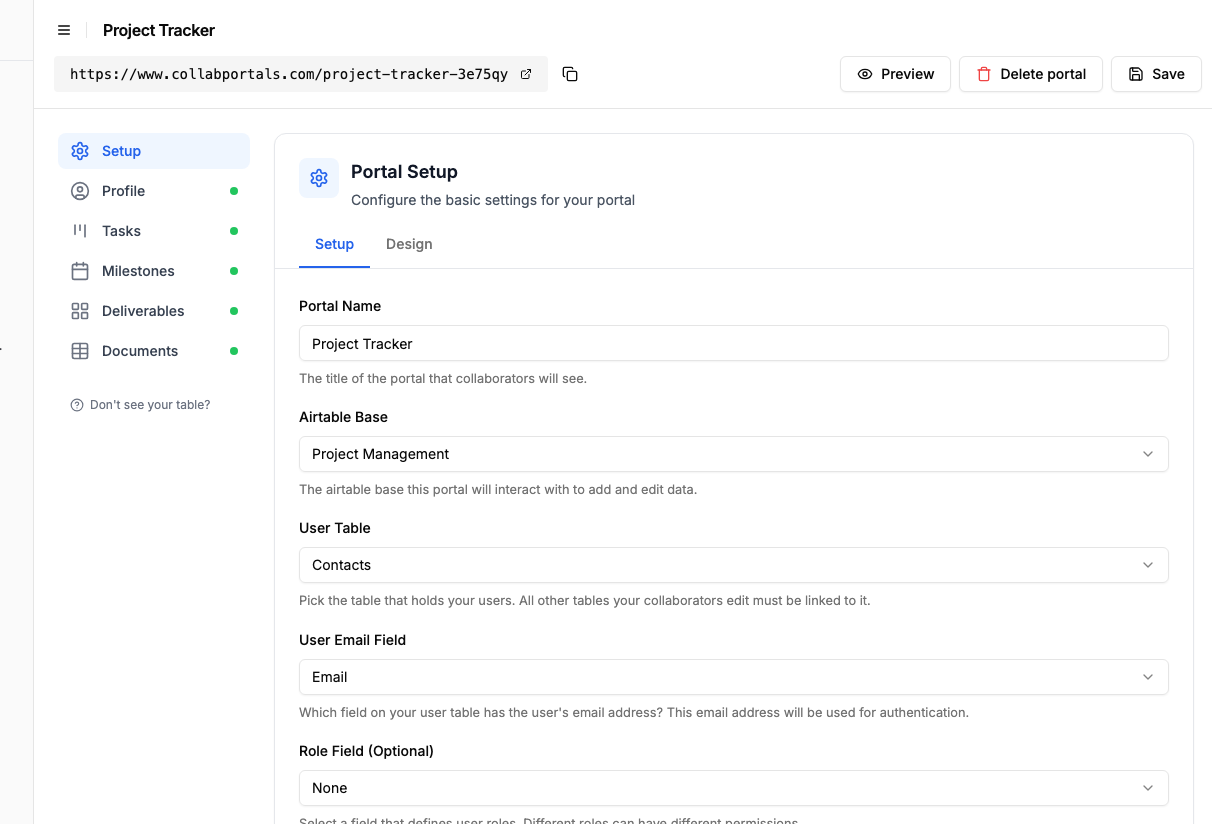
Point CollabPortals at that base, then choose Contacts as your user table and Email as the login field. Each client or collaborator signs in with their email and is matched to their own record.
Connect the base, then point CollabPortals at the Contacts table and its email field. - 3
Let collaborators update tasks, hide your effort and cost
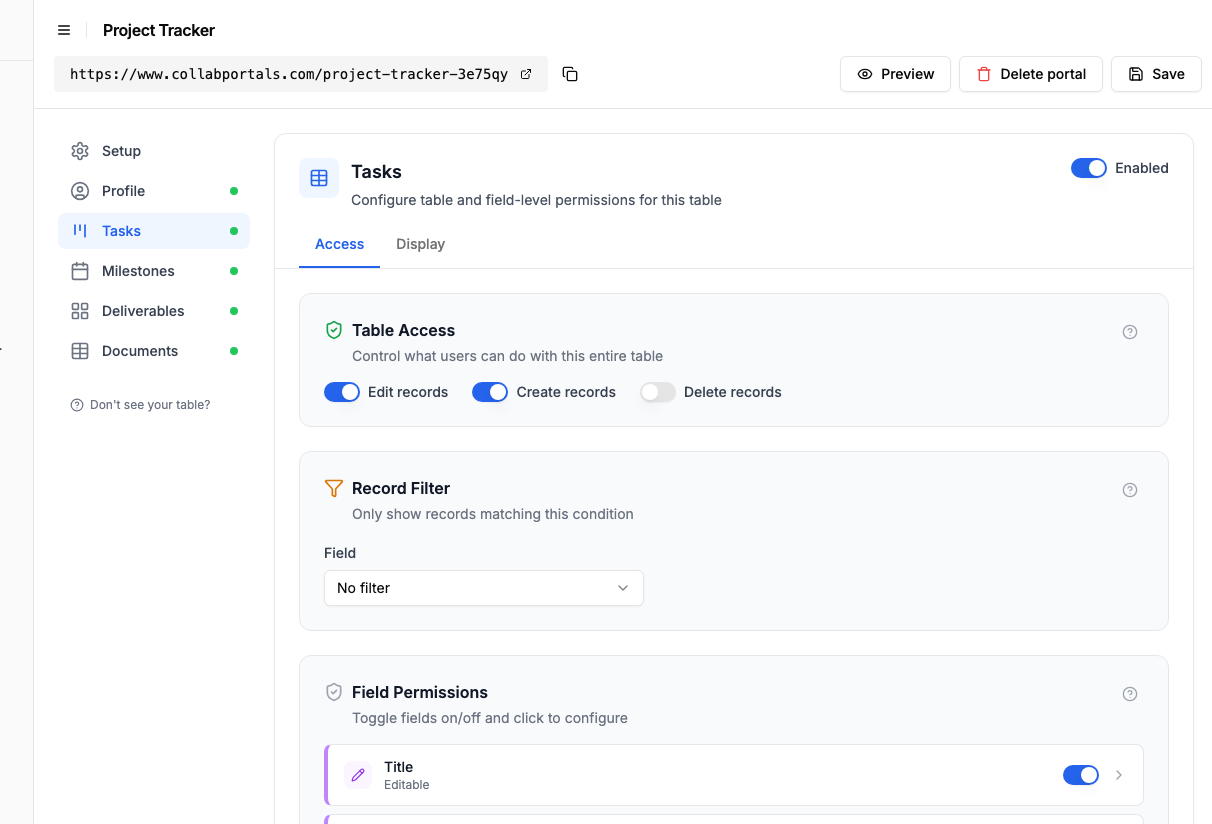
On the Tasks table, turn on create and edit so collaborators move a task along and add detail, and leave delete off. Show the fields they work with, like title, status, priority and due date, and hide internal ones such as effort estimates and cost. Keep Milestones and Deliverables view only so clients track them without changing them.
Let collaborators move tasks along, while effort estimates and cost stay hidden. - 4
Give each table the view that fits
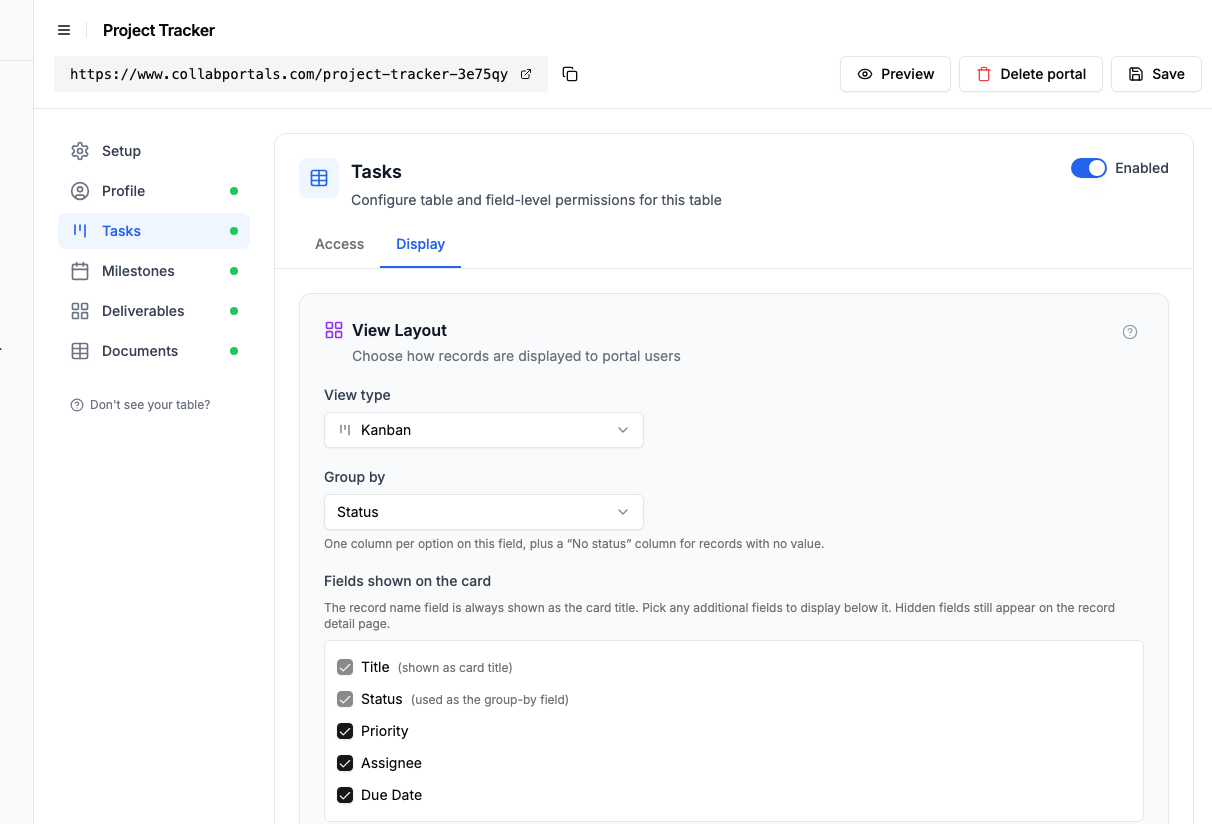
Pick how each table appears. Tasks as a board so a task moves from To Do to In Progress to Done, or as a table grouped by status with a count on each group, Milestones on a calendar by target date, Deliverables as a gallery of design and build work, Documents as a table to download. Same Airtable data, shaped for each audience. You do not have to pick between the board and the grouped table: add a second page on Tasks and have both.
The Display tab lays the Tasks table out as a board grouped by status. - 5
Clients track the project
The result is a clean, branded portal. Each client signs in, sees only their own tasks, milestones and deliverables, and watches work move across the board as your team delivers, all reading straight from your Airtable base.
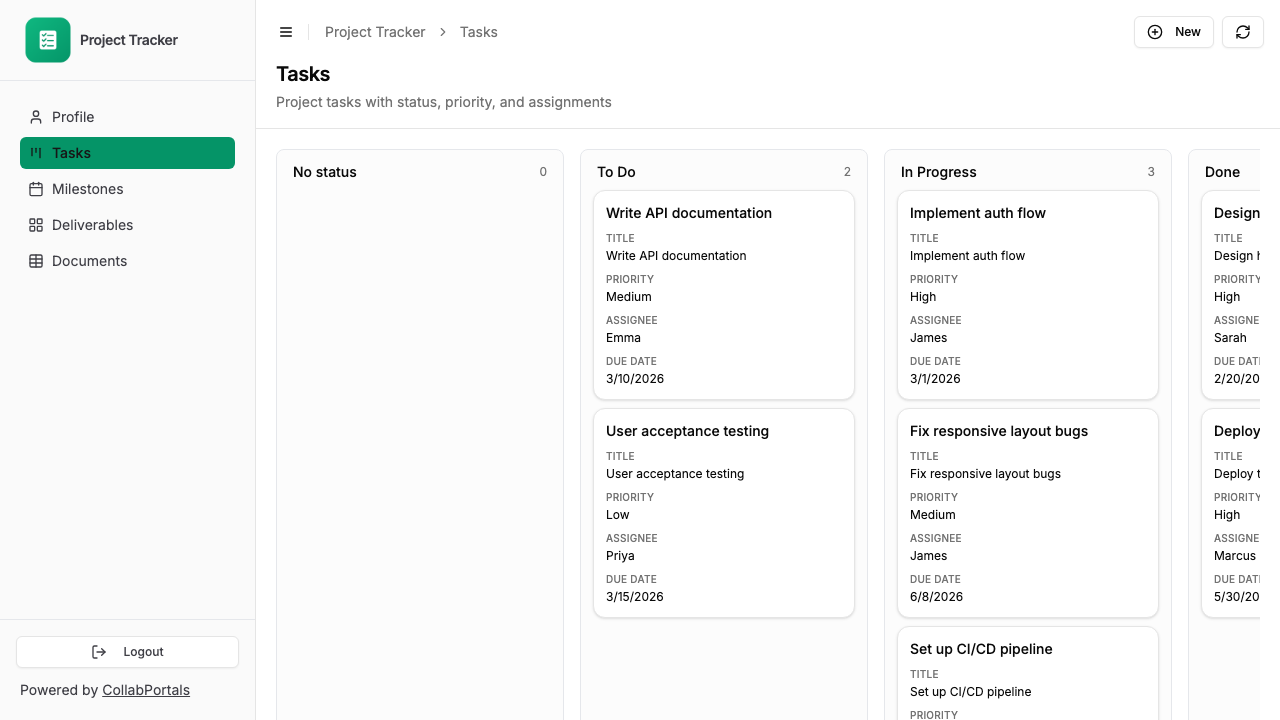
Clients track their project on a board, with priority, assignee and due date on every card. - 6
They log in with their email
Share the link with your clients and collaborators. Each one signs in with their email and a one-time code, so there are no passwords to manage and no Airtable seats to buy.
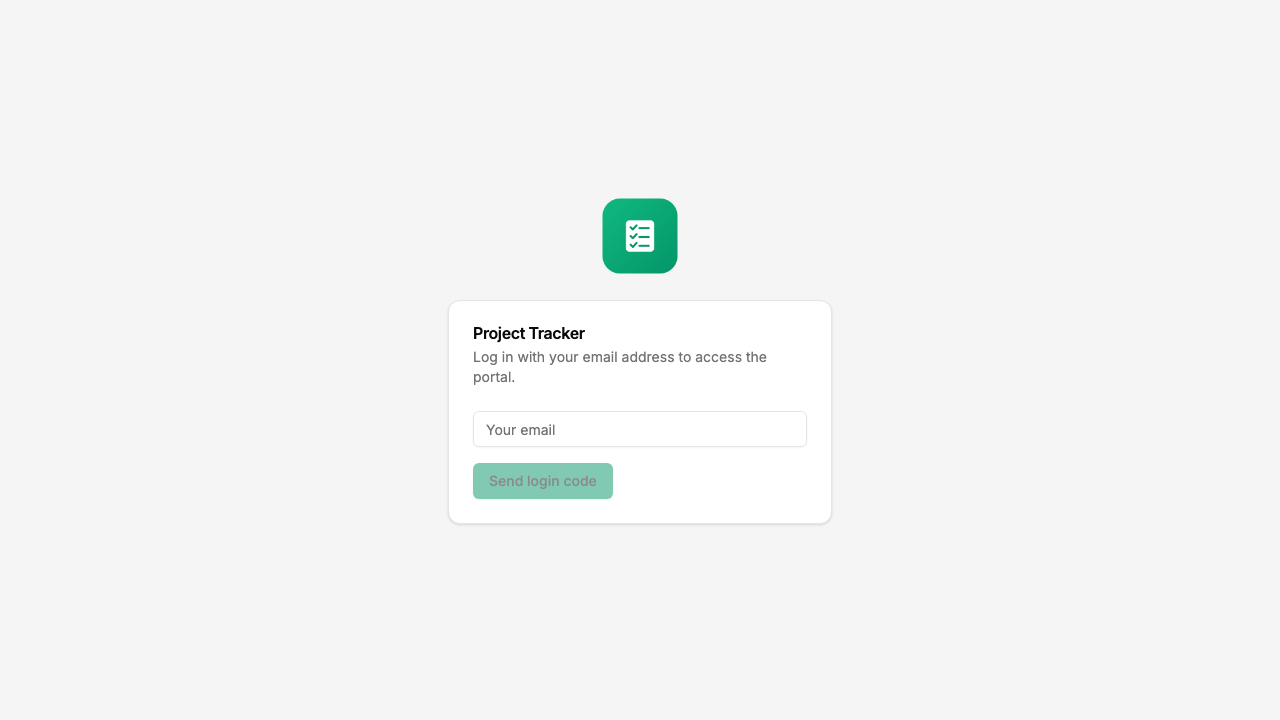
Email and one-time code login, branded with your logo and colour.
Want to start from this exact setup? Open the live demo or copy the Airtable template and connect it to your own base in minutes.
Take It Further
The walkthrough above is the whole build. A few options are worth knowing once you are up and running:
- Scope each client to their project. Set a record filter so a client only sees tasks and milestones linked to them, while your team sees every project in Airtable.
- Deliverables gallery. Show design and build work as a gallery with preview images, so clients see what has been delivered at a glance.
- Document downloads. Keep briefs, contracts and status reports in a Documents table clients can download, with create access if you want them to submit their own files.
- Show tasks on each project. Turn on related tabs so a project's tasks and milestones show as tabs on the project record, scoped to it, instead of a separate page clients have to cross-reference.
After set-up, every task update and document lands in your Airtable base, where your team already works.
For the generic version that applies to any base, see the setup guide.
Frequently Asked Questions
Can each client only see their own projects?
Yes. CollabPortals matches each user's email to their record in your Airtable Users table. They only see records linked to them. Client A cannot see Client B's projects.
Can clients submit requests or feedback through the portal?
Yes. You can enable create and edit permissions on specific tables. A common pattern is a read-only project status view combined with an editable feedback or requests table where clients can submit new entries.
Does the portal update in real time?
The portal reads directly from your Airtable base. When you update a record in Airtable, the change is visible in the portal on the next page load. There is a short cache period (about 60 seconds) for performance.
Can I have multiple project portals for different clients?
You can create unlimited portals on a single plan. Many teams run a single portal and let roles plus linked-record scoping do the work: each client has a record in the Users table, sees only projects linked to them, and gets permissions based on their role. Separate portals make sense when clients use different Airtable bases entirely.
What if a project ends and I want to remove client access?
Remove or update the client's record in your Airtable Users table. They will no longer be able to log in to the portal.

About the author
Matt Shepherd
Founder, CollabPortals
Matt is the founder of CollabPortals. A software engineer and Airtable power user who kept running into the same frustration: no easy way to give external users a simple and secure view to edit their data. He built CollabPortals as the lightweight solution to that problem, allowing you to set up a secure, permissioned portal in a few clicks.
Related use cases and guides
Clients
Give your clients secure, branded access to their project data in Airtable. No extra seats, no code, no complex setup, just share a link.
Use caseFreelancers
Give freelancers and contractors a self-service portal to manage their profiles, track projects, and log timesheets, all powered by your Airtable base.
ComparisonCollabPortals vs Airtable Portals: Third-Party Tool or Native Feature?
Compare CollabPortals ($10/month, unlimited users) with Airtable's native Portals, where read-only guests are free and editing guests are sold in packs from $120/month. See which fits how your users actually work.
ComparisonCollabPortals vs Noloco: Focused Portal or Full-Featured App Builder?
Compare CollabPortals ($10/month) with Noloco ($49+/month) for building Airtable portals. See which tool matches your budget, features, and complexity needs.