Show a Record's Linked Records as Tabs in Your Portal
A record's linked records can show as a tab on its detail page or underneath the record's own fields, scoped to that record, with inline create, edit and delete. Here is how related tabs and nested tables work, and how to turn them on.

A record's linked records can now show as tabs on its detail page. Open a project in your portal and you find a Tasks tab next to its details, listing only that project's tasks. Open a property and find its reports. Open a company and find its deals, contacts and notes, each its own tab.
The data was always there in your linked record fields. Until now it was a list of names you clicked through one at a time. Now it reads where it belongs: the children of a record, on that record's page, scoped to it.
What It Does
Turn a linked record field into a related tab and the parent's detail page gains a tab for it:
- The tab lists only the children of the record you opened. A project's tasks, not every task.
- It uses the child table's own setup: its view type, fields, filters, sorting and permissions. A Tasks table set up as a kanban shows as a kanban inside the tab.
- You can create, edit and delete in the tab. A New button adds a child already linked to the parent, so a task added from a project is attached to that project for you.
A record can have several related tabs. A company can show Deals, Contacts and Notes side by side, each a different linked table.
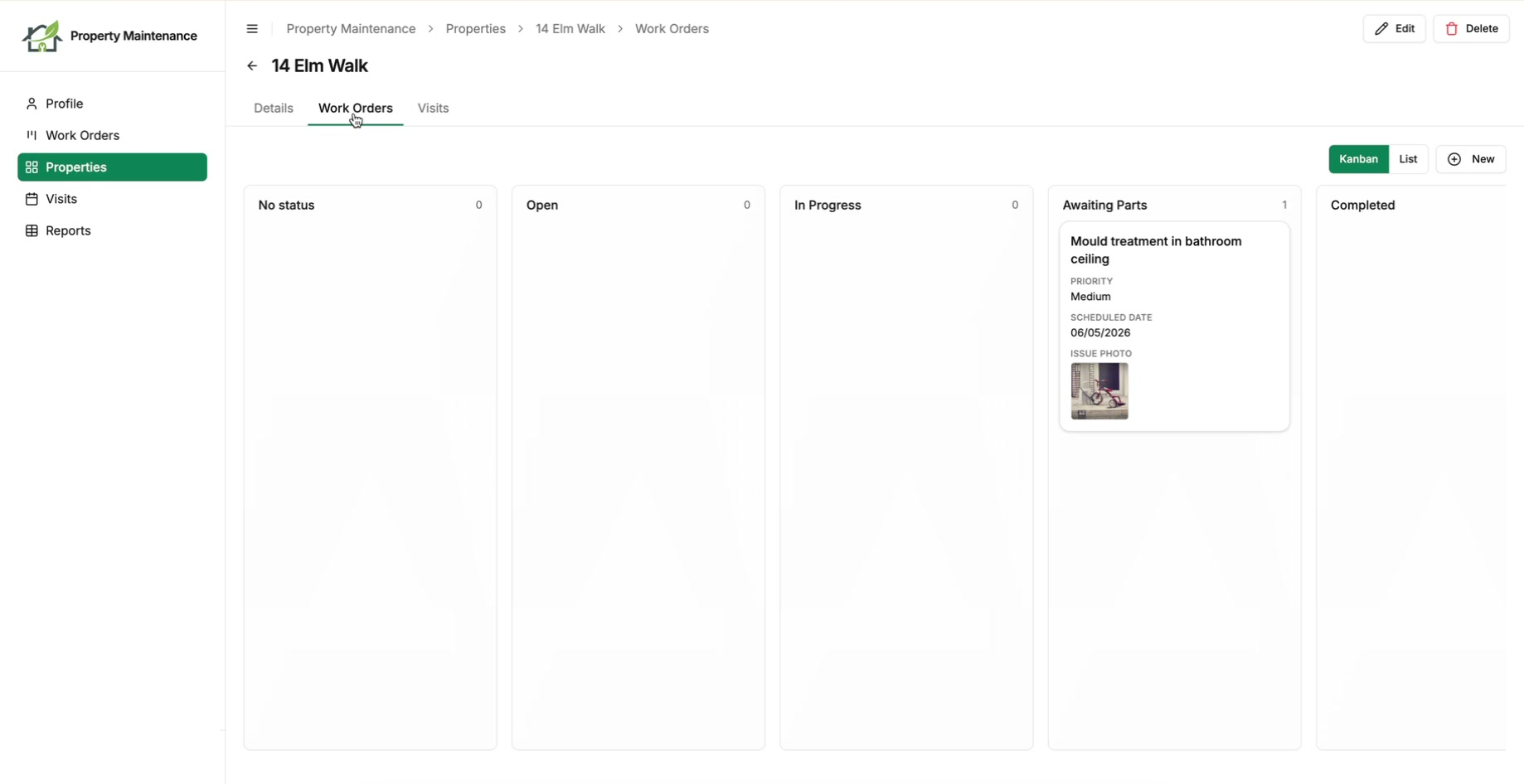
Each tab has its own URL, so a useful tab can be bookmarked or sent to a colleague and it opens on the same tab. The active tab shows in the breadcrumb too, so a user always knows where they are inside a nested record.
Or Under the Record's Own Fields
A tab is the right shape when a record has several sets of children and a user dips into one at a time. It is one click too many when a single set is the reason the record gets opened at all. An invoice and its line items are one document. A conversation and its messages are one thread. Put either behind a tab and the two halves are never on screen together.
So the same linked field can render underneath the record's own fields instead, headed by the field's name. Set Linked records display to Under details rather than As a tab.
Nothing else about it changes. The rows are still scoped to the record on screen, the child table's view type and permissions still apply, the New button still links the new record to its parent, and search and filter controls still work if you have turned them on.
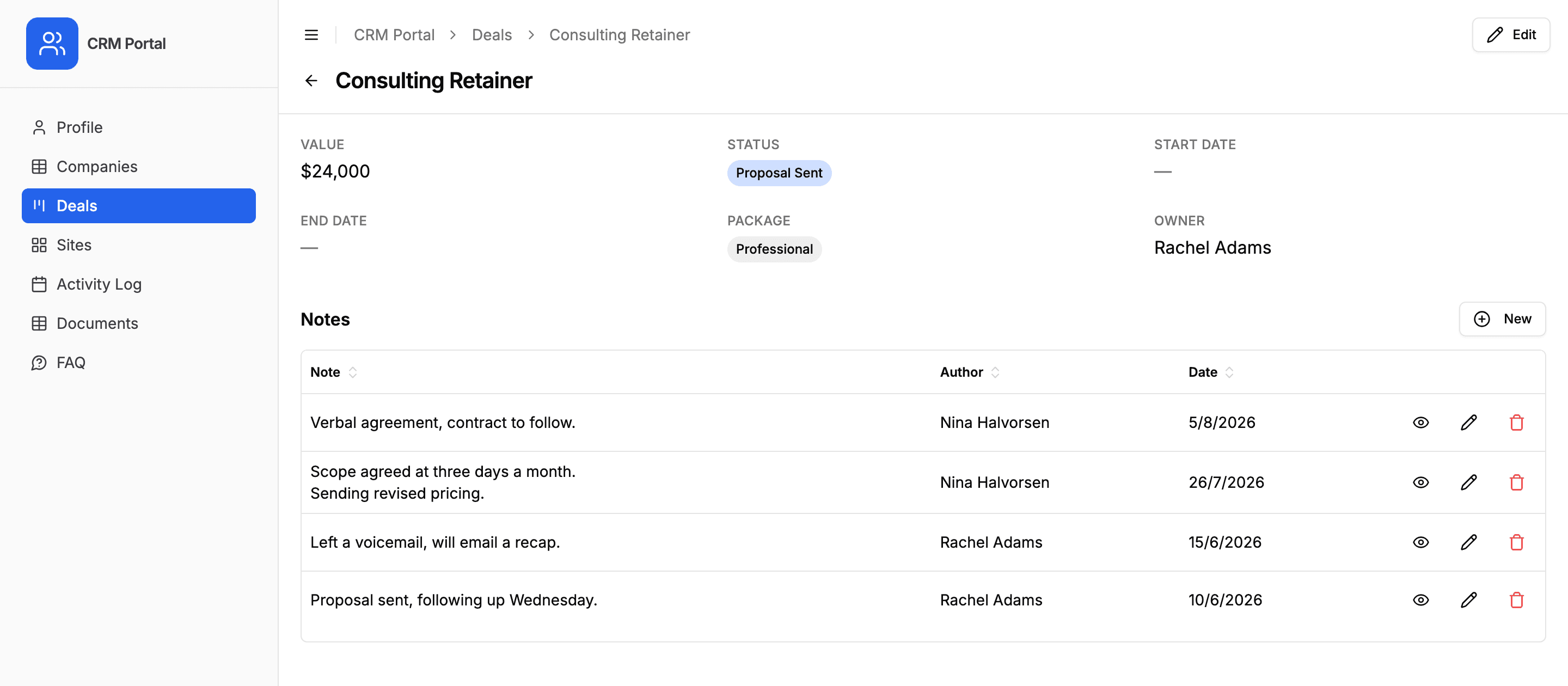
A record can mix the two. A company can keep Deals as a tab and put Notes on the page, or stack several linked fields down the page in the order they appear in Airtable. Both placements work on a user's own profile page as well as on a record.
See It in Action
A short walkthrough: related tabs on a record, what your users see, and how to turn them on.
How to Turn It On
The child table needs no link to your user table. The tab follows the parent's link, so it is scoped to the parent for you.
- 1
Set up the child table
Configure the child table (Work Orders) the way you want it: view type, fields, filters and permissions. The tab inherits this, so there is nothing extra to set up for the tab.
- 2
Turn on the related tab
Open the parent table (Properties), find the linked record field pointing at the child (the Work Orders field), and set Linked records display to As a tab.
- 3
Open a parent record
Open a property in the portal. A Work Orders tab now sits next to its details, listing that property's work orders, ready to add to and edit in place.
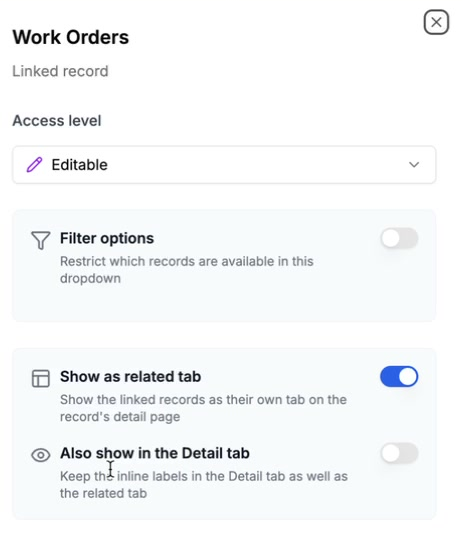
The same change lets you surface any linked table as a top-level page, even one with no direct link to your user table, using Show as page on the table's Display tab. Useful for shared reference tables everyone should see. Full setup detail is in the related tabs and nested tables docs.
Who This Helps
Any portal with parent and child data benefits, especially:
- Project management portals: tasks, milestones and comments under a project.
- Real estate portals: reports, documents and viewings under a property.
- CRM portals: deals, contacts and notes under a company, an account-360 view on one page.
- Client portals: deliverables, files and updates under an engagement.
It pairs with roles and the record filter: set what a role can see with those, then nest the related detail where it reads best.
How It Compares
Showing a record's children on its own page is something most portal tools either skip or charge a platform fee for. Airtable Interface Designer can show linked records, but every viewer needs a paid Airtable seat. App builders like Softr and Noloco support related lists as part of a broader, pricier build.
CollabPortals gives you per-table, per-role related tabs, with inline create, edit and delete, and portal users signing in by email code rather than an Airtable seat. The tab can never widen what a role is allowed to see: it only ever shows that parent's children.
Get Started
Related tabs and nested tables are available now on all plans. Open a table in your portal admin, find its linked record field, and set Linked records display to As a tab, or to Under details if that set of children is the reason people open the record. New to CollabPortals? Start with the getting started guide.

About the author
Matt Shepherd
Founder, CollabPortals
Matt is the founder of CollabPortals. A software engineer and Airtable power user who kept running into the same frustration: no easy way to give external users a simple and secure view to edit their data. He built CollabPortals as the lightweight solution to that problem, allowing you to set up a secure, permissioned portal in a few clicks.
Related reading
Project Management
Give clients and external collaborators a branded view into their projects in Airtable, with controlled access to tasks, timelines, and deliverables.
Use caseReal Estate
Give clients and agents a branded portal to track property listings, transactions, and documents, all powered by your existing Airtable base.
Use caseCRM
Give your clients a branded portal to view their account data, deals, contacts, sites, activity, directly from your Airtable CRM. No extra seats, no code.
Use caseClients
Give your clients secure, branded access to their project data in Airtable. No extra seats, no code, no complex setup, just share a link.