Build an Airtable Student Portal for Education Programs
Give students self-service access to their records, licensing progress, and program status through a secure portal connected to your Airtable base.

See it working, then start from a ready-made Airtable base.
See a live demoCopy the Airtable templateThe Problem: Student Access to Program Data
Education programs track a lot of data per student, enrollment status, background checks, assessments, licensing progress, certifications, and professional development records. This data lives in Airtable because it is flexible enough to model complex academic workflows.
But students need to see their own records. The typical workarounds are painful:
- Email updates, staff manually send status updates, fielding dozens of "where am I at?" emails per week
- Shared Airtable views, students see each other's records, creating FERPA and privacy concerns
- Add students as Airtable users, $20/month per student on Team plans. For a program with 50 students, that is $1,000/month just for read access
- Build a custom student portal, months of development for a feature set that already exists in your Airtable schema
What you need is a way for each student to log in, see only their own records across multiple tables, and update specific fields you allow, without seeing other students' data or your internal notes.
How CollabPortals Works for Education
CollabPortals connects to your Airtable base and creates a student-facing portal. Each student authenticates with their email, and CollabPortals matches them to their record in your Users table. They only see data linked to them.
A Real Example: University Licensing Program
A university credentialing program uses CollabPortals to give students self-service access to their licensing checklist. Here is how their portal is configured:
| Table | Student Access | What Students See |
|---|---|---|
| Users (Student Profile) | View, create, edit, delete | Their own UCA ID, status, name, email, program |
| Background Check | View only | Their name, licensing status, last check date |
| Assessments | View only | Their name, license exams, status |
| Licensing | View only | Their name, degree status, license application status |
| Ethics & Professional Development | Hidden | Admin manages ethics certificates and PD records internally |
The pattern is clear: students manage their own profile and view read-only status across multiple credential tracking tables. The program administrator controls all the underlying data.
Why This Pattern Works
- Students stop emailing for updates, they log in and check their own status anytime
- FERPA compliance, each student sees only their own records, not other students' data
- No Airtable seats required, students authenticate via email verification codes, not Airtable accounts
- Staff update one place, Airtable remains the single source of truth. Portal updates automatically.
- Granular control, show background check status but hide the detailed notes. Show assessment results but hide grading rubrics.
Common Education Portal Configurations
Credential Tracking Portal
For programs that track students through multi-step certification, licensing, or accreditation processes.
- Users table with full edit access (students maintain their contact info and program details)
- Multiple read-only tracking tables for each credential stage (background checks, exams, clinical hours, certifications)
- Hidden administrative tables for internal review notes, committee decisions, and compliance documentation
- Field-level restrictions on status tables, students see their result but not the reviewer's notes
Course or Cohort Portal
For programs where students need to view course materials, submit assignments, or track their progress through a curriculum.
- Assignments table with create and edit access (students submit and update their work)
- Schedule or syllabus table as read-only reference
- Grades or feedback table as read-only
- Roster or cohort table hidden from students
Research or Thesis Portal
For graduate programs tracking student research progress, committee feedback, and milestone completion.
- Milestones table with read-only access (students see what is due and what is complete)
- Submissions table with create and edit access (students upload or link their deliverables)
- Committee feedback table as read-only (students see feedback without editing it)
- Internal review table hidden from students
Comparison with Other Approaches
| Approach | Cost for 50 Students | Privacy | Setup Time | Maintenance |
|---|---|---|---|---|
| CollabPortals | $10/month (flat) | Per-student data isolation | Minutes | None, reads from Airtable |
| Airtable seats | $1,000/month | Requires careful view configuration | Hours | Ongoing permission management |
| Google Sheets sharing | Free | Poor, hard to isolate per student | Hours | Manual syncing from Airtable |
| Custom web app | $5,000+ to build | Full control | Months | Ongoing development |
| Softr / Stacker | $59 to $170+/month | Possible with configuration | Hours to days | Moderate |
For detailed comparisons with these alternatives, see CollabPortals vs Softr and CollabPortals vs Stacker, or the roundup of the best Airtable portal builders.
Build a Student Portal Step by Step
Here is how the live demo above is put together. It takes about an hour the first time, with no code involved.
- 1
Set up your Airtable base
Start with a table for each part of the programme: an Assignments table for coursework, a Courses library, a Schedule of classes and exams, a Documents table for transcripts and certificates, and a Students table for the people who log in. Students is the hub. It holds each student's email, and their assignments, courses and schedule link back to it, so each one only ever sees their own records.
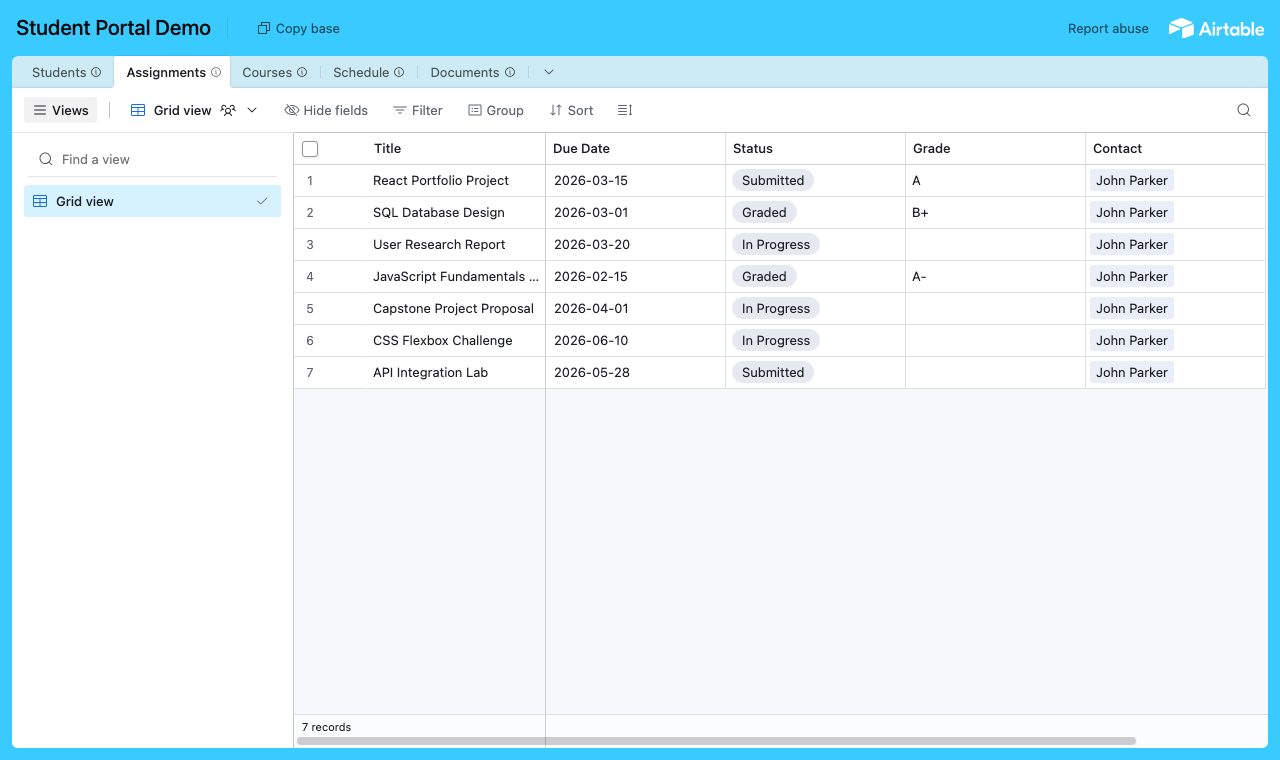
A table for each part of the programme, with a Students table every assignment links back to. - 2
Connect the base and pick the user table
Point CollabPortals at that base, then choose Students as your user table and Email as the login field. Each student signs in with their email and is matched to their own record.
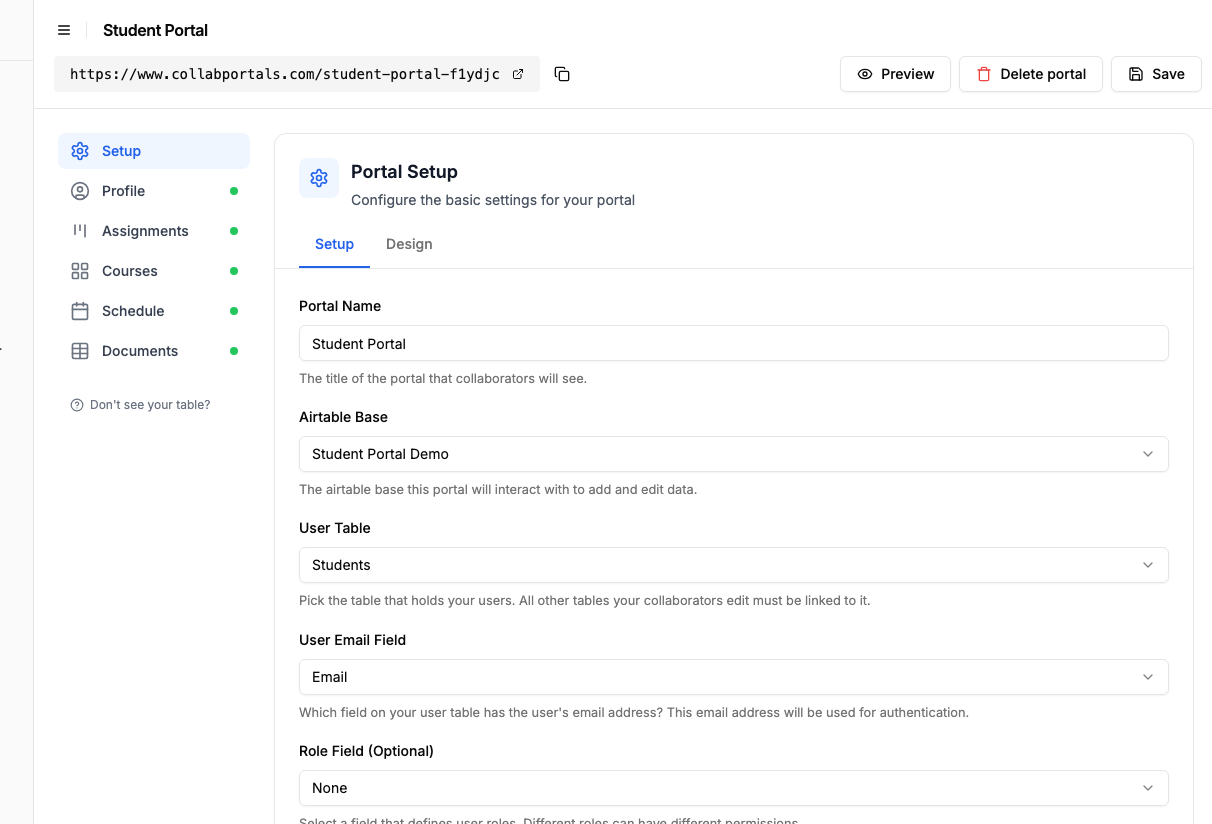
Connect the base, then point CollabPortals at the Students table and its email field. - 3
Let students submit, keep grades read-only
On the Assignments table, turn on create and edit so students submit work and update their status, and leave delete off. Keep the Grade field read-only so only staff set it, and hide internal grading notes. Leave Courses and Schedule view only, so students see them without changing them.
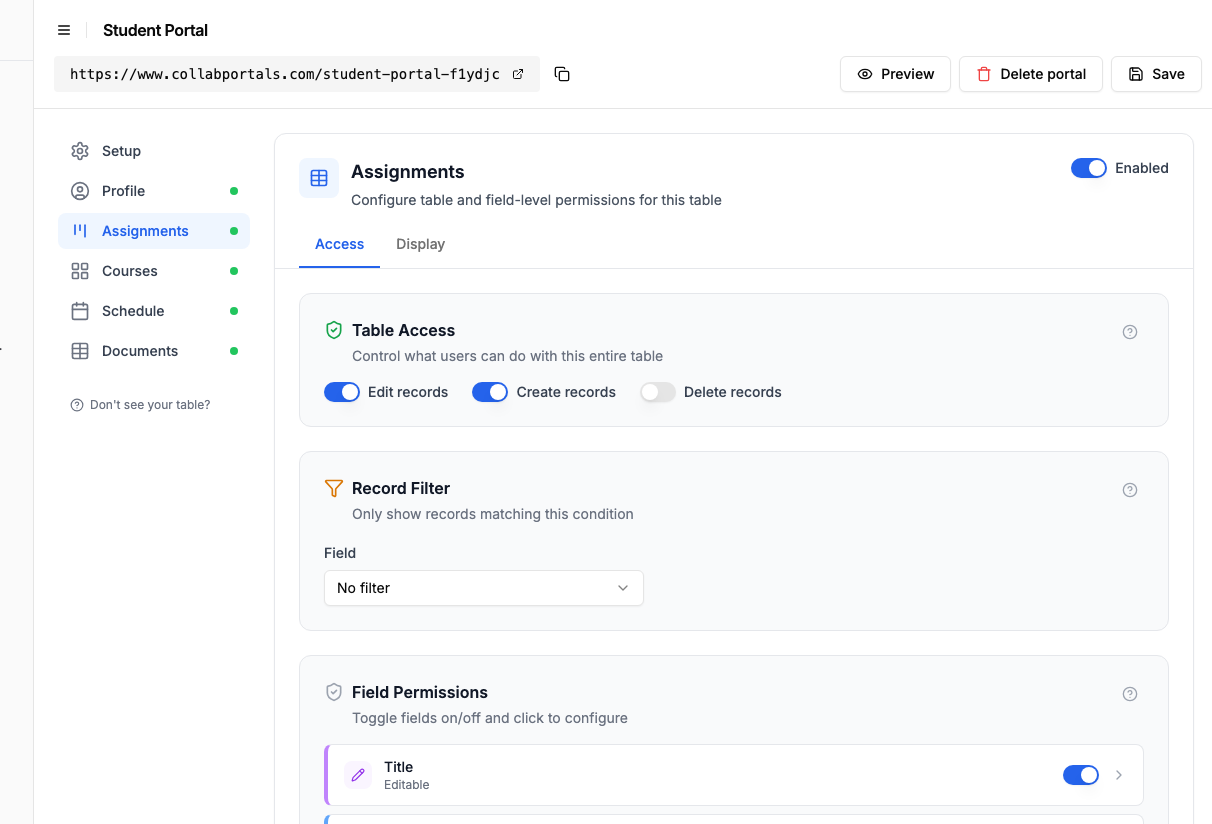
Let students submit and track assignments, while grades stay read-only and set by staff. - 4
Give each table the view that fits
Pick how each table appears. Assignments as a board so a student watches work move from In Progress to Submitted to Graded, Courses as a gallery, Schedule on a calendar of classes and exams, Documents as a table to download. Same Airtable data, shaped for the student.
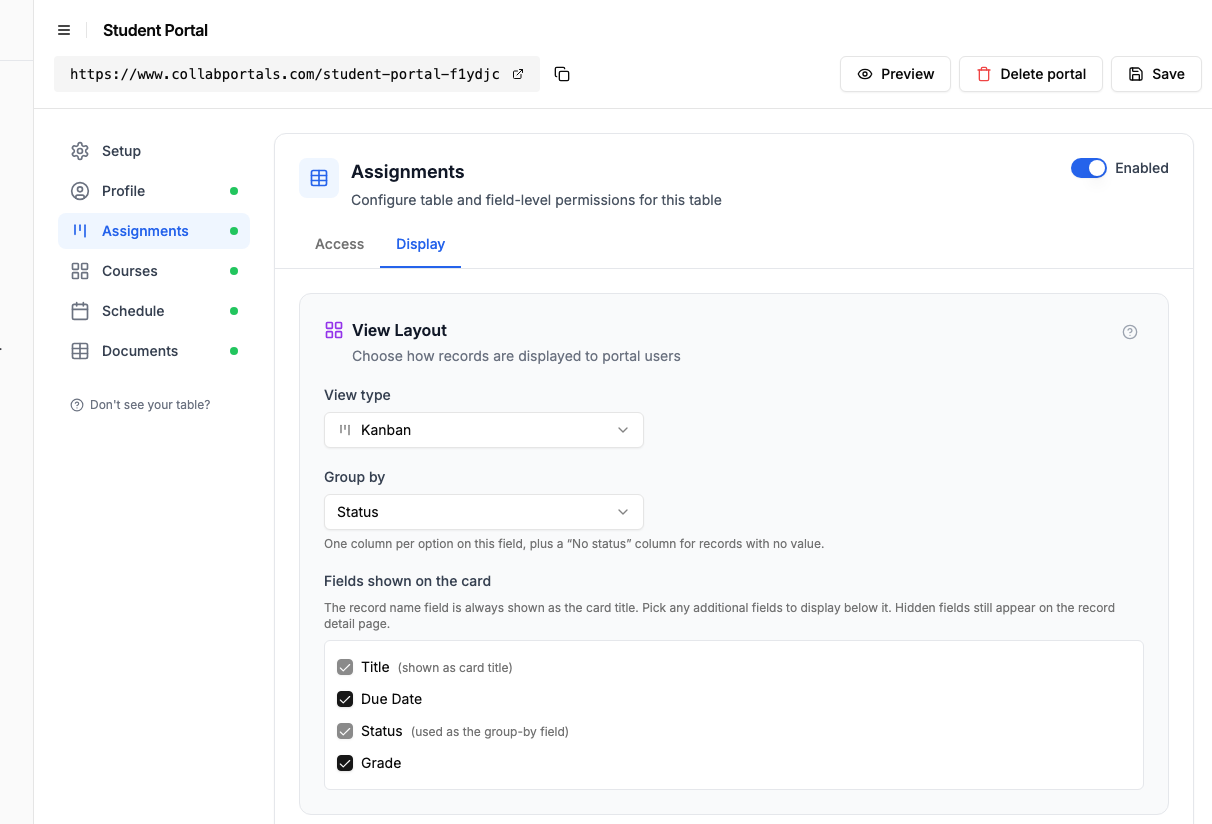
The Display tab lays the Assignments table out as a board grouped by status. - 5
Students track their own progress
The result is a clean, branded portal. Each student signs in, sees only their own assignments, courses and schedule, and watches each assignment move from In Progress to Graded, all reading straight from your Airtable base.
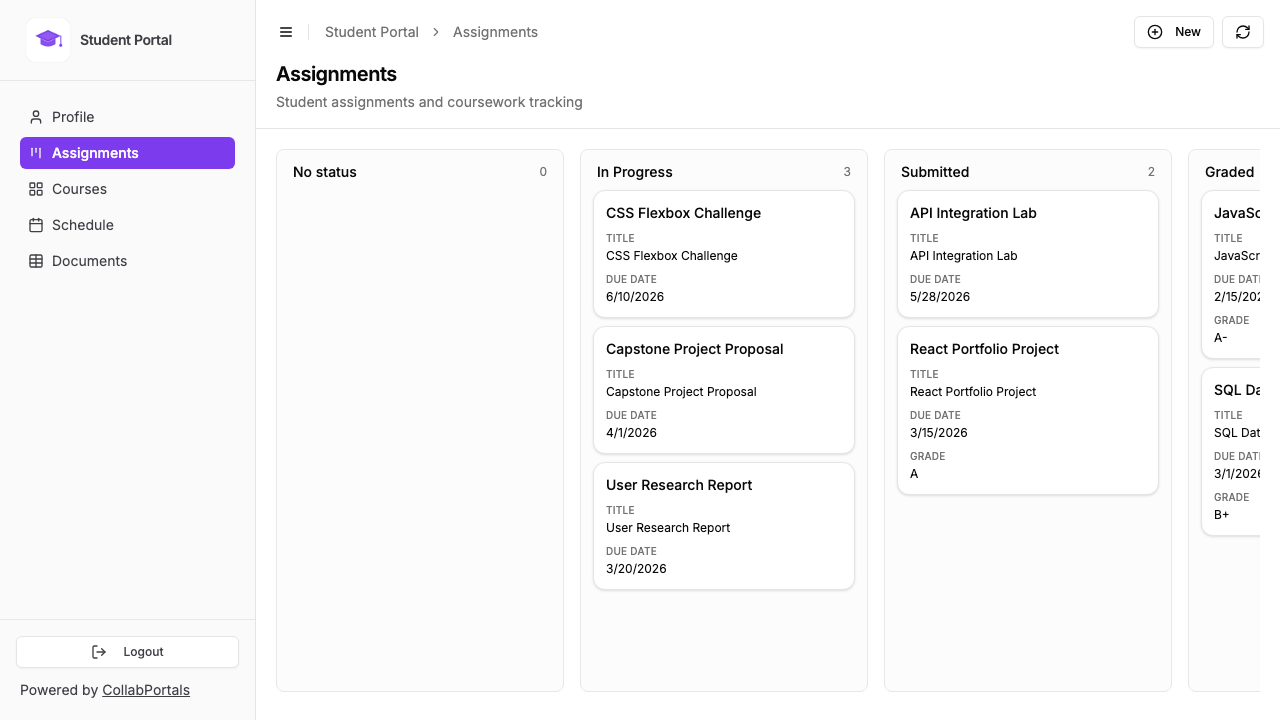
Students track their own assignments on a board, with due date and grade on every card. - 6
They log in with their email
Share the link with your students. Each one signs in with their email and a one-time code, so there are no passwords to manage and no Airtable seats to buy.
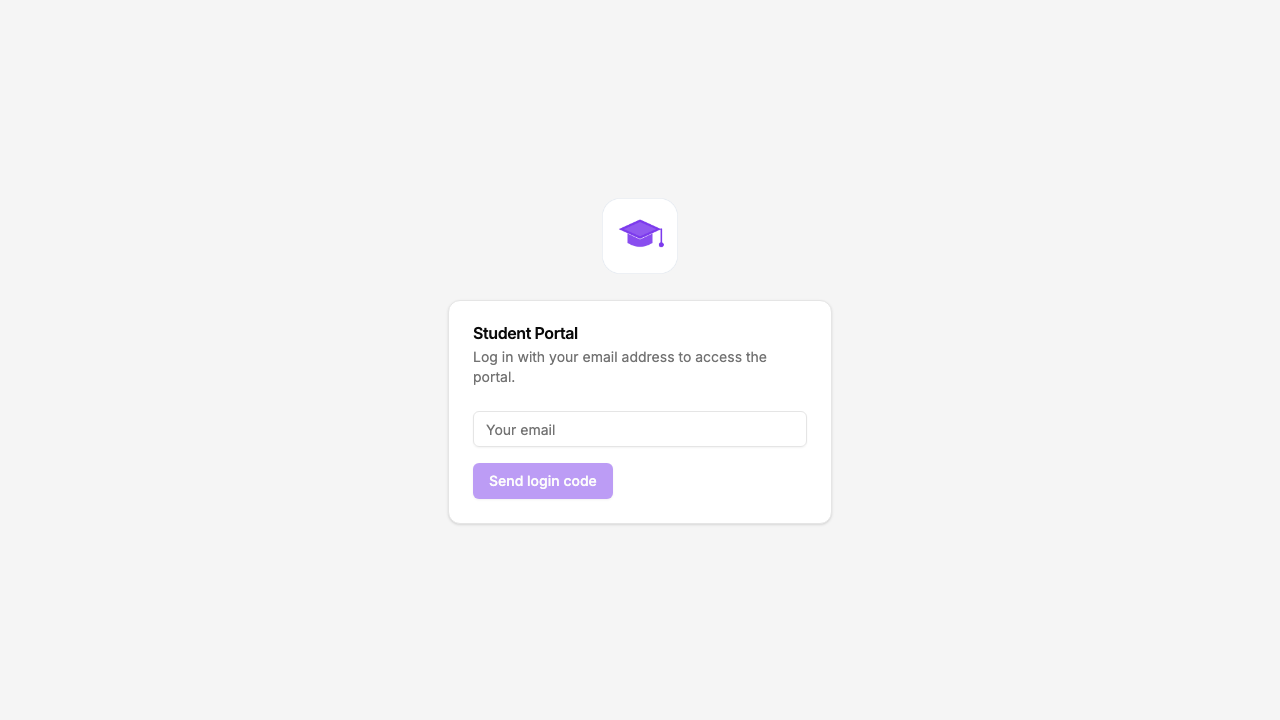
Email and one-time code login, branded with your institution's logo and colour.
Want to start from this exact setup? Open the live demo or copy the Airtable template and connect it to your own base in minutes.
Take It Further
The walkthrough above is the whole build. A few options are worth knowing once you are up and running:
- One record per student. Each student is matched to their Students record by email, so the same portal serves a whole cohort, each seeing only their own assignments and grades, which keeps you on the right side of FERPA.
- Courses gallery. Show enrolled courses as a gallery with cover images, so students see their term at a glance.
- Document downloads. Keep transcripts, certificates and letters in a Documents table students can download, with create access if you want them to upload their own.
- Nest assignments under each course. Turn on related tabs so a course's assignments and schedule show as tabs on the course record, scoped to it, so a student works through one course's coursework and grades on its own page.
After set-up, every submission and update lands in your Airtable base, where your programme staff already work.
For the generic version that applies to any base, see the setup guide.
Frequently Asked Questions
Is this FERPA compliant?
CollabPortals isolates each student's view to only their own records by matching their email to their record in your Airtable Users table. Other students' data is never visible. Your data stays in Airtable, CollabPortals does not store student records. However, you should review your institution's specific FERPA policies with your compliance team.
Can students update their own information?
Yes. You can give students full create, edit, and delete access on specific tables (like their profile) while keeping other tables read-only. Field-level permissions let you control which specific fields they can modify.
How do students log in?
Students enter their email address and receive a verification code. No passwords, no Airtable accounts. Their email must match a record in your portal's Users table.
Can I use this for multiple programs or cohorts?
Yes. You can create separate portals for different programs, each connected to the same or different Airtable bases. Each portal has its own permissions configuration and URL.
What happens when a student graduates or leaves the program?
Remove or archive their record in your Airtable Users table. They will no longer be able to authenticate and access the portal.
How many students can use the portal?
CollabPortals has no user limits. Whether you have 10 students or 500, the cost is $10/month.

About the author
Matt Shepherd
Founder, CollabPortals
Matt is the founder of CollabPortals. A software engineer and Airtable power user who kept running into the same frustration: no easy way to give external users a simple and secure view to edit their data. He built CollabPortals as the lightweight solution to that problem, allowing you to set up a secure, permissioned portal in a few clicks.
Related use cases and guides
Membership Management
Give your members secure, self-service access to their profile, roster, and account data in Airtable. No extra seats, no member login headaches.
Use caseNonprofits
Give donors, volunteers, beneficiaries, and board members secure access to the data they need, without Airtable seats or custom development.
ComparisonCollabPortals vs Airtable Portals: Third-Party Tool or Native Feature?
Compare CollabPortals ($10/month, unlimited users) with Airtable's native Portals, where read-only guests are free and editing guests are sold in packs from $120/month. See which fits how your users actually work.
ComparisonCollabPortals vs Stacker: Simple Portal or Full App Builder?
Compare CollabPortals ($10/month) with Stacker Classic ($9+/month) for Airtable portals. Find out which tool fits your budget and use case.