Build an Airtable Event Crew and Staffing Portal
Give event crew, temporary staff, and contractors a self-service portal to view schedules, assignments, and logistics, powered by your Airtable event database.

See it working, then start from a ready-made Airtable base.
See a live demoCopy the Airtable templateThe Problem: Coordinating Event Crews
Event production, exhibition, and staffing companies manage complex logistics in Airtable, events, venues, crew assignments, schedules, equipment, travel, and contact sheets. The data model is often 15 to 30+ tables.
But the people who need this information most, the crew, cannot access it:
- Schedules are distributed via email or group chat, crew members miss updates, ask repeated questions, and work from outdated information
- Contact sheets are shared as PDFs, stale the moment someone's number changes
- Adding crew to Airtable is impractical, event crews are temporary. Paying $20/month per person for a weekend event makes no sense. A roster of 50 crew members would cost $1,000/month.
- Crew cannot confirm availability or update their details, someone has to collect this information manually via messages or calls
What you need is a portal where crew members log in before an event, see their assignments and schedules, access contact information for their team, and update their own availability and details, without seeing your client contracts, budgets, or other events.
How CollabPortals Works for Event Staffing
CollabPortals connects to your Airtable event database and gives crew members a branded portal. They log in with their email, get matched to their crew record, and see only the data linked to them.
Example: Exhibition Company Crew Portal
An exhibition and event production company with a complex Airtable base (27 tables) configured their portal like this:
| Tables | Crew Access | Purpose |
|---|---|---|
| Events, Venues, Schedule | View only | Crew see where they need to be and when |
| Crew Assignments | View only | Who is assigned to what role at which event |
| Contact Sheet | View only | Phone numbers and emails for the event team |
| Equipment / Kit Lists | View only | What to bring, what is provided |
| Crew Profile | View, edit | Crew update their contact info, skills, certifications, and availability |
| Timesheets / Hours | View, create, edit, delete | Crew log their hours after each event |
| Travel / Logistics | View only | Transport details, accommodation, parking |
| Client Details | Hidden | Client contracts and contacts stay internal |
| Budget / Costs | Hidden | Event budgets, crew rates, and margins stay internal |
| Internal Planning | Hidden | Production notes, risk assessments, and vendor negotiations |
Most tables are read-only, crew need to know what, where, and when, but should not be editing event details. The editable tables are limited to their own profile and timesheets.
Build an Event Crew Portal Step by Step
Here is how the live demo above is put together. It takes about an hour the first time, with no code involved.
- 1
Set up your Airtable base
Start with your event database: an Events calendar with venues and dates, a Crew Assignments table for who works what, a Team directory, a Documents library, and a Contacts table for the crew who log in. Contacts is the hub. It holds each crew member's email, and the assignment tables link back to it, so each person only ever sees the events and roles they are on.
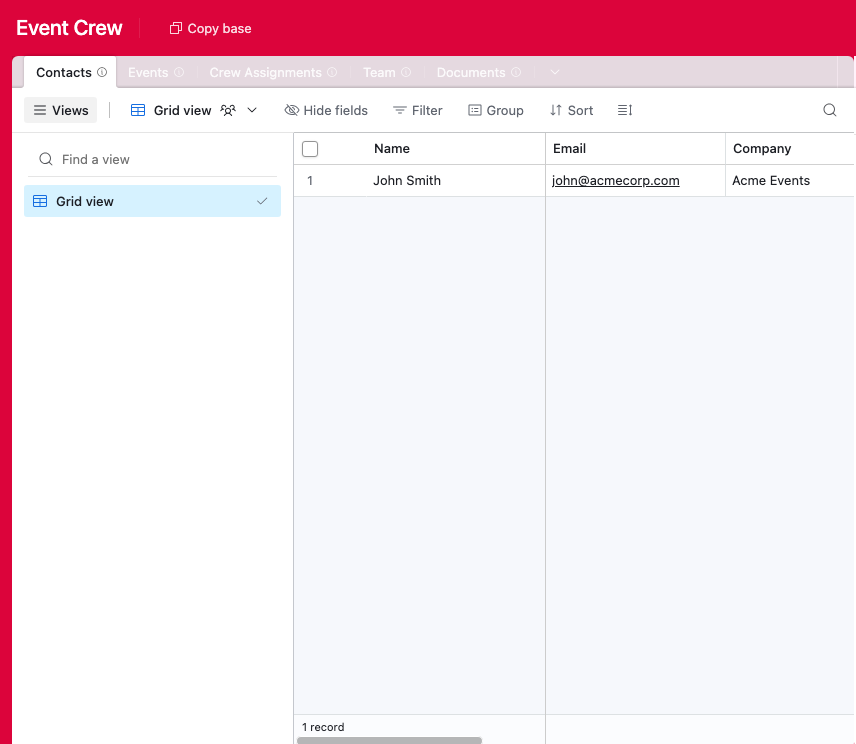
A table for each part of the operation, with a Contacts table every assignment links back to. - 2
Connect the base and pick the user table
Point CollabPortals at that base, then choose Contacts as your user table and Email as the login field. Each crew member signs in with their email and is matched to their own record.
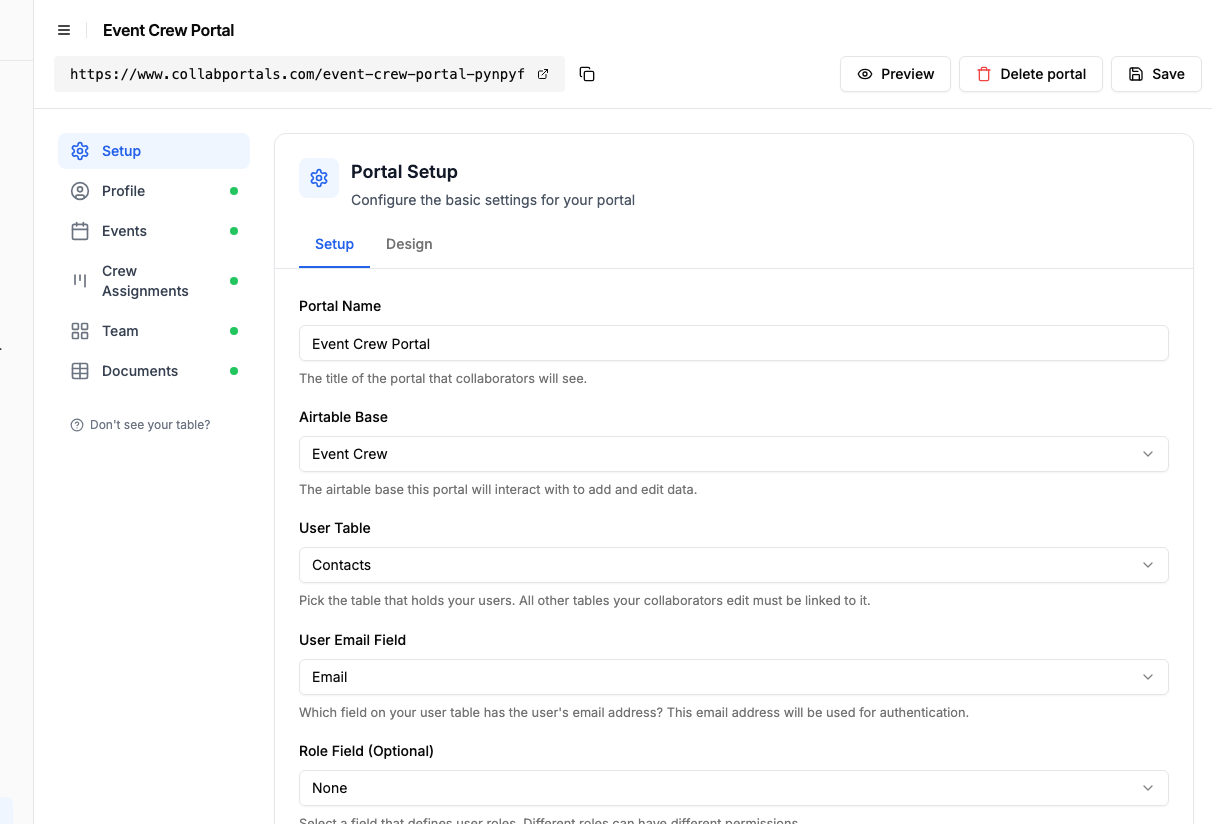
Connect the base, then point CollabPortals at the Contacts table and its email field. - 3
Show crew their events, hide client and budget
Decide field by field what crew see. On Events, show the date, venue, call time and the role they are booked for, and hide the internal side, your client contracts, budgets and crew rates. Crew get exactly what they need to turn up to the right place at the right time.
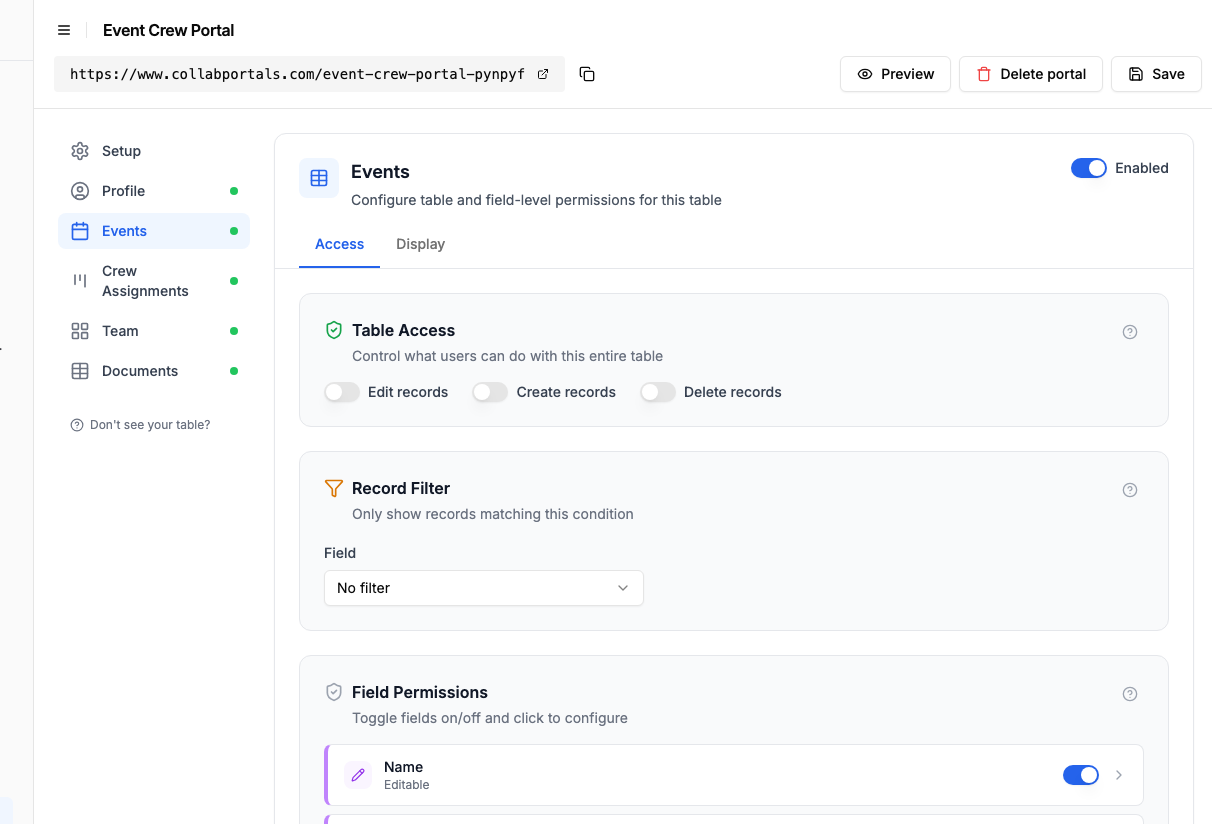
Show the event details crew need, keep client contracts and budgets hidden. - 4
Give each table the view that fits
Pick how each table appears. Events on a calendar so crew see their schedule at a glance, Crew Assignments as a board, the Team as a directory, Documents as a table. Same Airtable data, shaped for the crew.
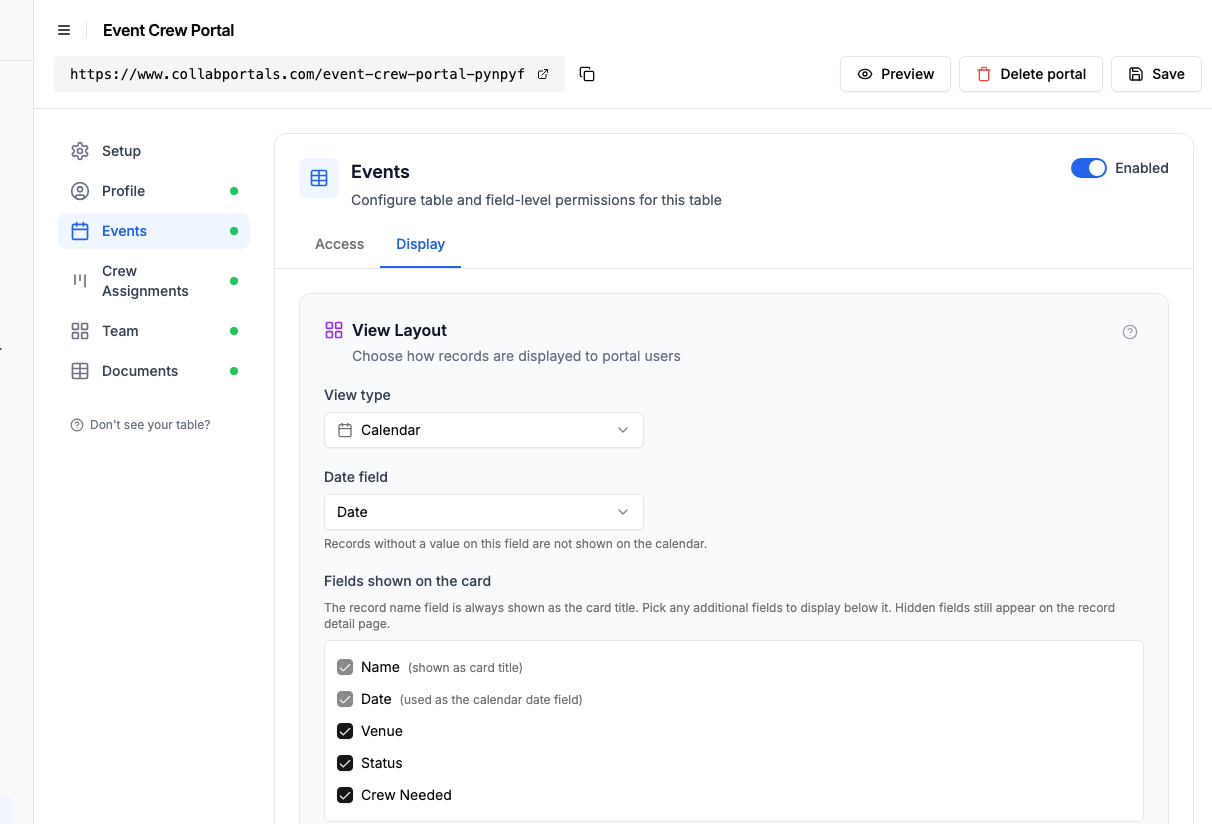
The Display tab lays the Events table out as a calendar of the schedule. - 5
Crew get their schedule in one place
The result is a clean, branded portal. Each crew member signs in before an event and sees only their own schedule, assignments and team, always current because it reads straight from your Airtable base.
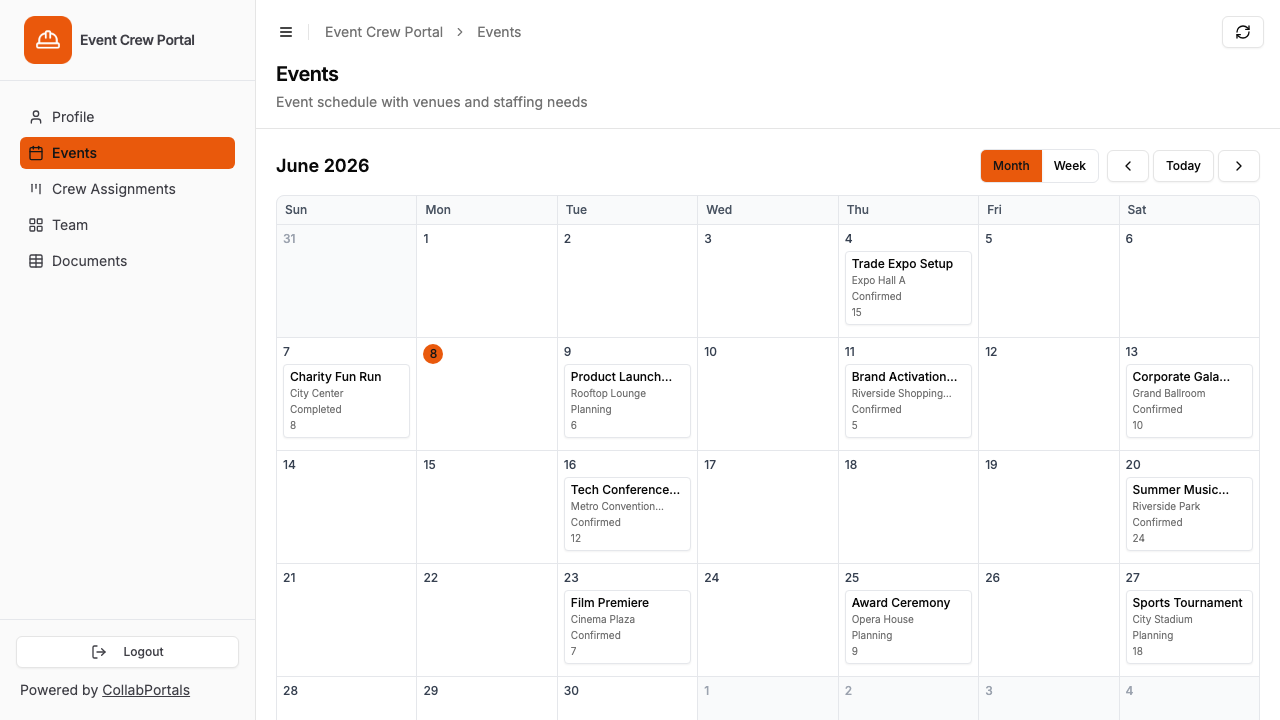
Each crew member sees their own schedule as a calendar, with venue and call time on every event. - 6
They log in with their email
Share the link with your crew before each event. Each one signs in with their email and a one-time code, so there are no passwords to manage and no Airtable seats to buy, which matters when crews are temporary.
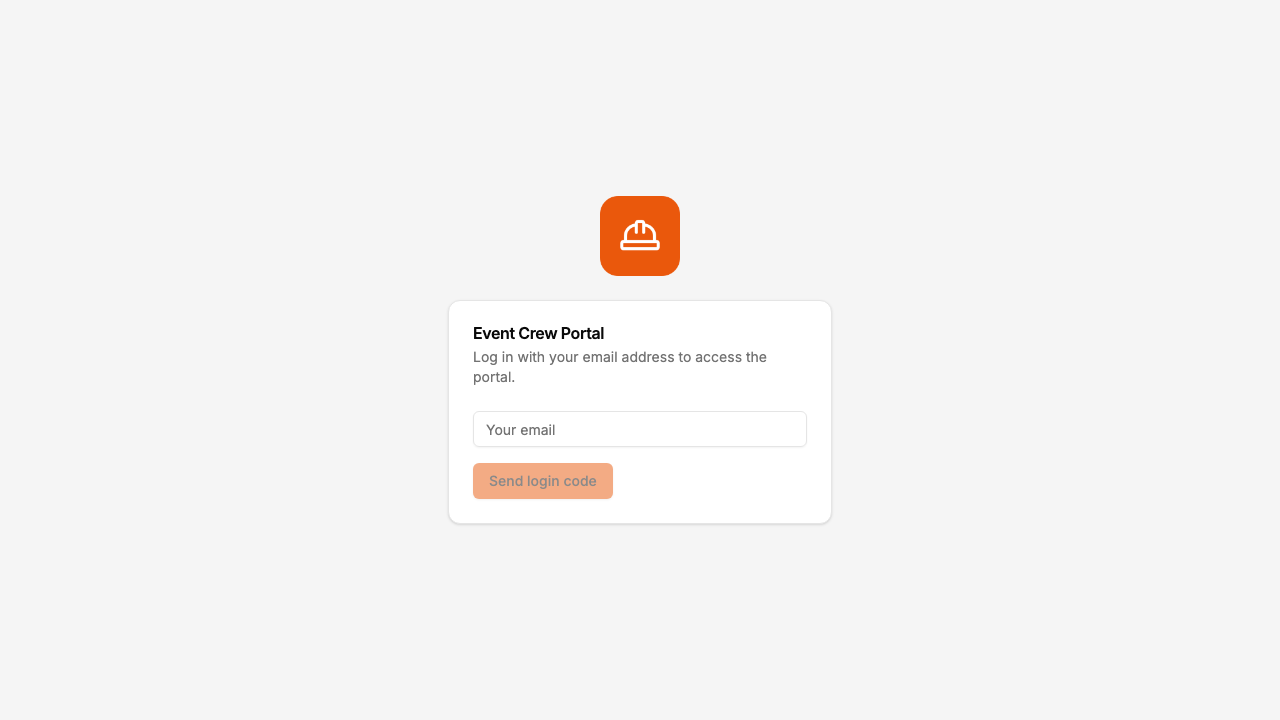
Email and one-time code login, branded with your logo and colour.
Want to start from this exact setup? Open the live demo or copy the Airtable template and connect it to your own base in minutes.
Common Event Portal Configurations
Pre-Event Information Portal
Give crew everything they need to show up prepared.
- Event details (read-only), date, time, venue, description, dress code
- Schedule / Run sheet (read-only), shift times, call times, break schedule
- Crew assignments (read-only), role, team, reporting to
- Venue details (read-only), address, parking, load-in instructions
- Contact sheet (read-only), key contacts for the event
- Crew profile (editable), availability confirmation, dietary requirements, emergency contact
Ongoing Staffing Portal
For staffing agencies or companies with regular crews working recurring events.
- Upcoming assignments (read-only), crew see their scheduled events
- Profile and skills (editable), crew maintain their certifications, skills, and availability calendar
- Timesheets (create, edit), crew log hours per event
- Past events (read-only), history of completed assignments
- Equipment certifications (read-only), what they are qualified to operate
Post-Event Portal
For timesheet collection and wrap-up after events.
- Timesheets (create, edit, delete), crew submit and correct their hours
- Event summary (read-only), key details for reference when logging time
- Expenses (create, edit), crew submit expense claims with details
Why This Works Better Than Group Chats and Emails
| Method | Crew Can Self-Update | Per-Person Data | Real-Time Updates | Cost for 50 Crew |
|---|---|---|---|---|
| CollabPortals | Yes | Yes (isolated view) | Yes | $10/month |
| WhatsApp / Slack group | No | No (everyone sees everything) | Yes | Free |
| Email distribution | No | Possible (tedious) | No (point-in-time) | Free |
| Shared Google Sheet | Yes (but anyone edits anything) | No | Yes | Free |
| Airtable seats | Yes | Yes | Yes | $1,000/month |
| Custom crew app | Yes | Yes | Yes | $10,000+ to build |
For detailed alternative comparisons, see CollabPortals vs Softr and CollabPortals vs Glide, or the roundup of the best Airtable portal builders.
The key advantage over group chats: crew see only their own assignments, their own schedule, and their own contact sheet, not every other crew member's data. And unlike email, the information is always current.
Field-Level Permissions for Events
Event databases often have fields that are critical internally but should never be visible to crew:
- Show: Event name, date, venue, shift times, role
- Hide: Event budget, client fee, profit margin
- Show: Crew member's rate (optional)
- Hide: Other crew members' rates
- Show: Equipment list
- Hide: Equipment cost, rental source, vendor contacts
- Show: Venue address, parking instructions
- Hide: Venue contract terms, deposit amounts
CollabPortals lets you toggle visibility on every field in every table, so you share exactly the right level of detail.
For the generic version that applies to any base, see the setup guide.
Take It Further
The walkthrough above is the whole build. A few options are worth knowing once you are up and running:
- Nest the roster under each event. Turn on related tabs so an event's crew assignments, schedule, equipment and travel show as tabs on the event record, scoped to it, instead of separate tables crew have to cross-reference.
Frequently Asked Questions
Can crew members only see the events they are assigned to?
Yes. Each crew member is matched to their record in your Airtable Users table via email. They only see records linked to them, their assignments, their schedule, their timesheets. They cannot see other crew members' data.
How do I onboard crew for a specific event?
Add their email to your Airtable Users table and share the portal link. They verify their email and immediately see their assignments. After the event, you can remove or archive their record to revoke access.
Can crew confirm their availability through the portal?
Yes. If you include an availability or confirmation field on an editable table (like the crew profile), crew members can update it themselves. This saves you from chasing confirmations via phone or message.
What about crew who work multiple events?
As long as each event assignment is linked to the crew member's record in Airtable, they will see all their assignments across events when they log in. CollabPortals shows all records linked to the authenticated user.
Can I use this for volunteer coordination?
Yes. The same pattern works for volunteers, they log in, see their assigned shifts or roles, update their contact details, and confirm availability. Volunteers do not need Airtable accounts.
Is there a limit on how many crew members can access the portal?
No. CollabPortals includes unlimited users for $10/month. Whether you have 5 crew or 500, the price is the same.

About the author
Matt Shepherd
Founder, CollabPortals
Matt is the founder of CollabPortals. A software engineer and Airtable power user who kept running into the same frustration: no easy way to give external users a simple and secure view to edit their data. He built CollabPortals as the lightweight solution to that problem, allowing you to set up a secure, permissioned portal in a few clicks.
Related use cases and guides
Event Scheduling
Give speakers, authors, tutors, and performers a self-service portal to view their upcoming events, confirm availability, and access venue details from your Airtable schedule.
Use caseVolunteers
Give volunteers self-service access to their assignments, schedules, and tasks. No extra Airtable seats, no code, no passwords to manage.
ComparisonCollabPortals vs Airtable Portals: Third-Party Tool or Native Feature?
Compare CollabPortals ($10/month, unlimited users) with Airtable's native Portals, where read-only guests are free and editing guests are sold in packs from $120/month. See which fits how your users actually work.
ComparisonCollabPortals vs Glide: Lightweight Portal or Full App Platform?
Compare CollabPortals ($10/month) with Glide ($239+/month for Airtable) for building portals. Find out which tool fits your needs and budget.