Build an Airtable Volunteer Portal for Your Organization
Give volunteers self-service access to their assignments, schedules, and tasks. No extra Airtable seats, no code, no passwords to manage.

See it working, then start from a ready-made Airtable base.
See a live demoCopy the Airtable templateThe Problem: Coordinating Volunteers at Scale
You use Airtable to manage your volunteer program: tracking who is available, assigning tasks, scheduling shifts, and recording updates. But your volunteers cannot see any of it without an Airtable seat.
Your current options are not great:
- Add volunteers as Airtable collaborators, each seat costs $20/month on Team plans. For 50 volunteers, that is $1,000/month just so they can check their schedule.
- Send email updates, stale the moment you hit send. Volunteers reply asking for information you have already updated in Airtable.
- Use a shared spreadsheet, no privacy between volunteers. Everyone sees everyone's data, and version control is a constant headache.
- Build a custom app, months of development for something that should be simple.
What you need is a way for volunteers to log in and see just their own assignments, submit updates, and manage their availability, all flowing directly back to your Airtable base.
How CollabPortals Solves This
CollabPortals connects to your existing Airtable base and creates a branded portal your volunteers access via a simple link. Upload your organisation's logo and the portal header carries your brand. Each volunteer logs in with their email, and CollabPortals matches them to their record in your Airtable Volunteers table. They only see data linked to them.
Table-Level Permissions
Choose exactly which tables your volunteers can access. Keep internal planning tables, financials, and staff discussions hidden while exposing the tables volunteers need.
| Table | Volunteer Access | Why |
|---|---|---|
| Assignments | View, edit | Volunteers see their tasks and update progress |
| Schedule | View only | Volunteers check upcoming shifts without modifying them |
| Availability Survey | Create, edit | Volunteers submit when they are available |
| Equipment Checkout | Create, edit | Volunteers reserve and return shared equipment |
| Staff Notes | Hidden | Internal coordination stays private |
| Budget | Hidden | Financial data stays internal |
Field-Level Permissions
Within each visible table, you control which fields volunteers see and which they can edit. Show the "Task Name" and "Due Date" fields, but hide "Internal Priority" and "Staff Notes". Let volunteers edit their "Status" field to mark tasks complete, but keep "Assigned By" read-only.
No Passwords, No Accounts
Volunteers log in with their email address and a verification code. No passwords to manage, no accounts to provision, no access to revoke manually. If a volunteer leaves, just remove their record from your Airtable table.
Build a Volunteer Portal Step by Step
Here is how the live demo above is put together. It takes about an hour the first time, with no code involved.
- 1
Set up your Airtable base
Start in Airtable with a table for each part of the programme: an Assignments table for the tasks volunteers take on, a Schedule of shifts, an Availability table, a Team directory, a Documents library, and a Volunteers table for the people who log in. Volunteers is the hub. It holds each person's email, and the assignment and shift tables link back to it, so each volunteer only ever sees their own tasks and shifts.
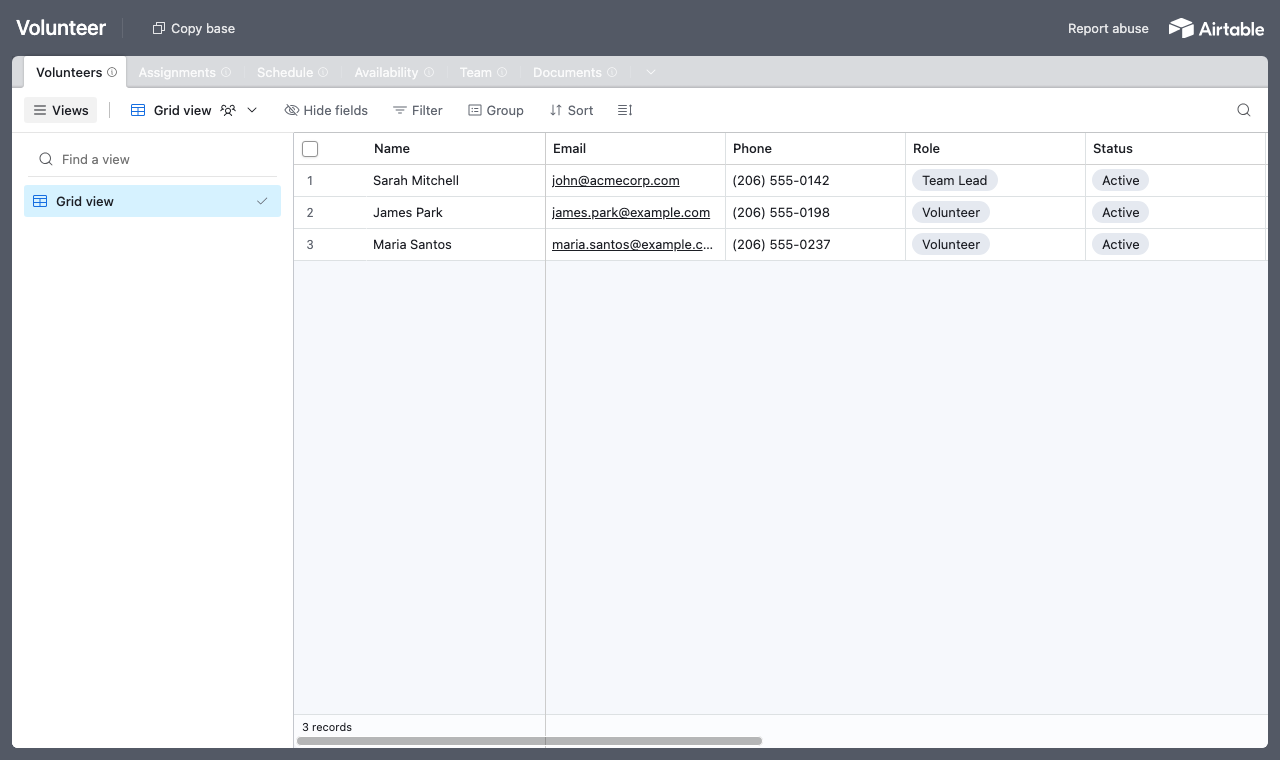
A table for each part of the programme, with a Volunteers table every assignment links back to. - 2
Connect the base and pick the user table
Point CollabPortals at that base, then choose Volunteers as your user table and Email as the login field. Each volunteer signs in with their email and is matched to their own record.
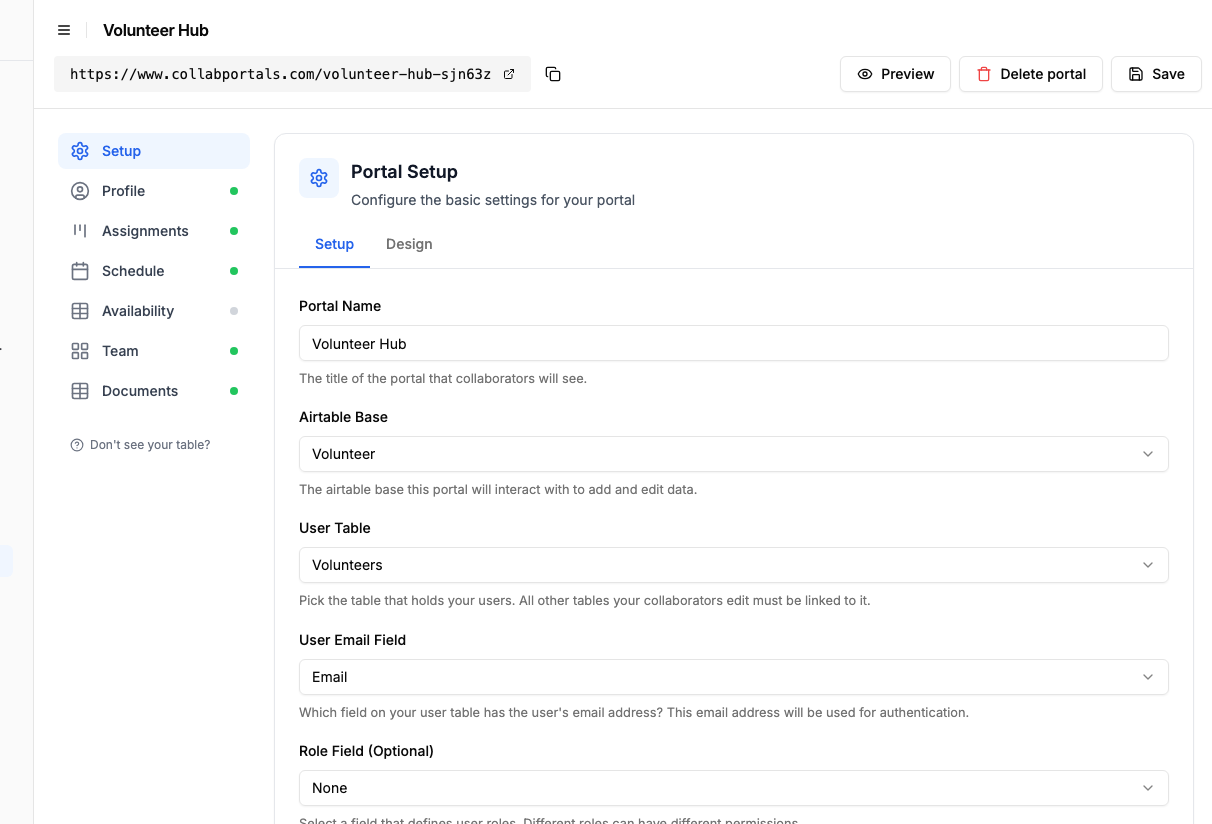
Connect the base, then point CollabPortals at the Volunteers table and its email field. - 3
Let volunteers update their tasks, hide staff notes
On the Assignments table, turn on edit so volunteers can move a task forward and mark it complete, while leaving create and delete to your coordinators. Show the fields they need, like task name and due date, and hide internal ones such as priority and staff notes.
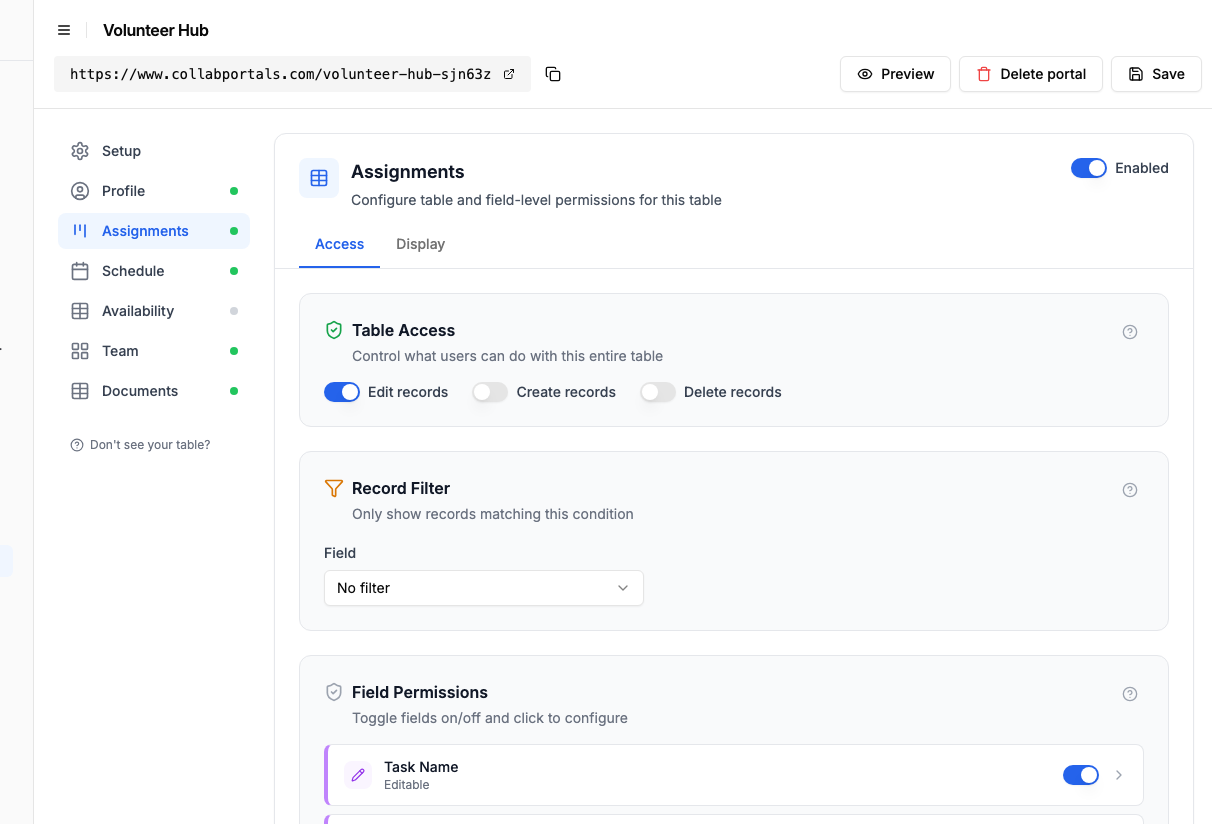
Let volunteers update their own tasks, while priority and staff notes stay hidden. - 4
Give each table the view that fits
Pick how each table appears. Assignments as a board volunteers move their tasks across, the Schedule on a calendar, the Team as a directory, Documents as a table. Same Airtable data, shaped for self-service.
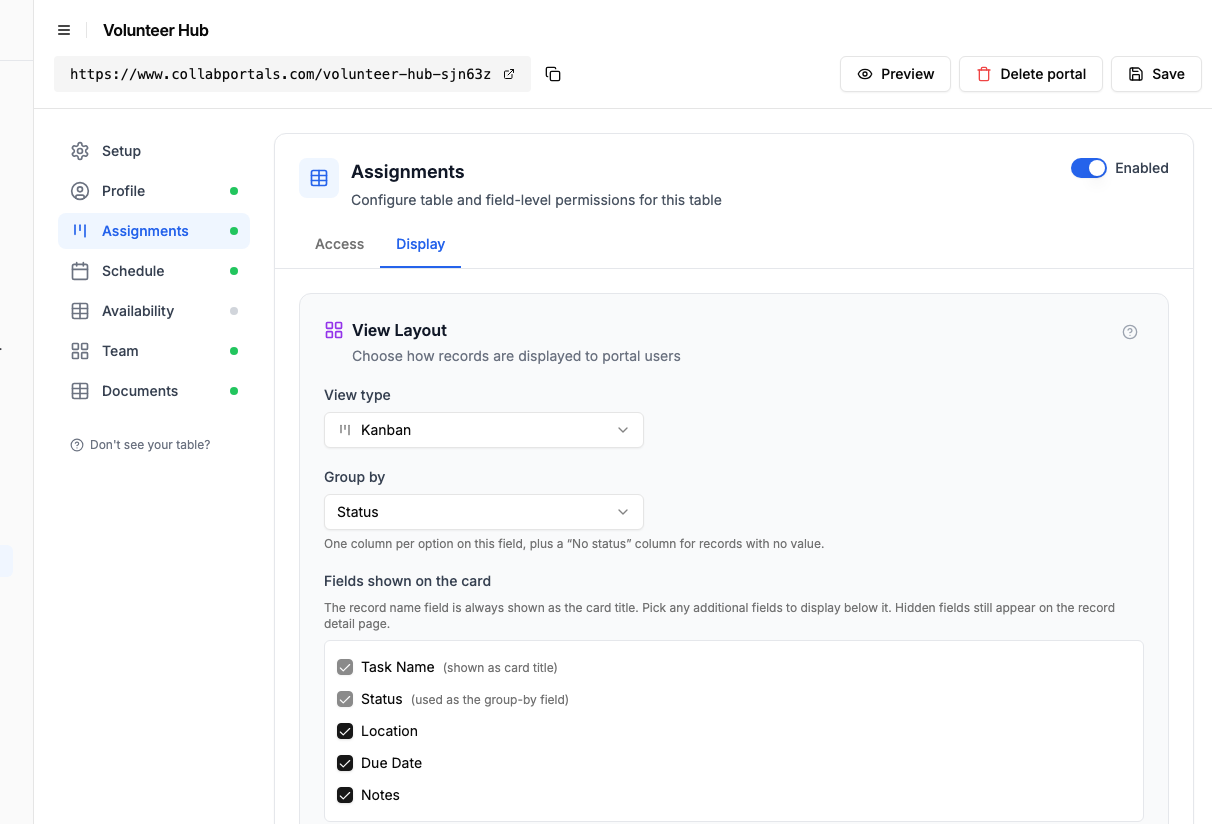
The Display tab lays the Assignments table out as a board grouped by status. - 5
Volunteers get their own to-do board
The result is a clean, branded portal. Each volunteer signs in and sees only their own assignments and shifts, updates progress as they go, and never sees another volunteer's data, all flowing straight back to your Airtable base.
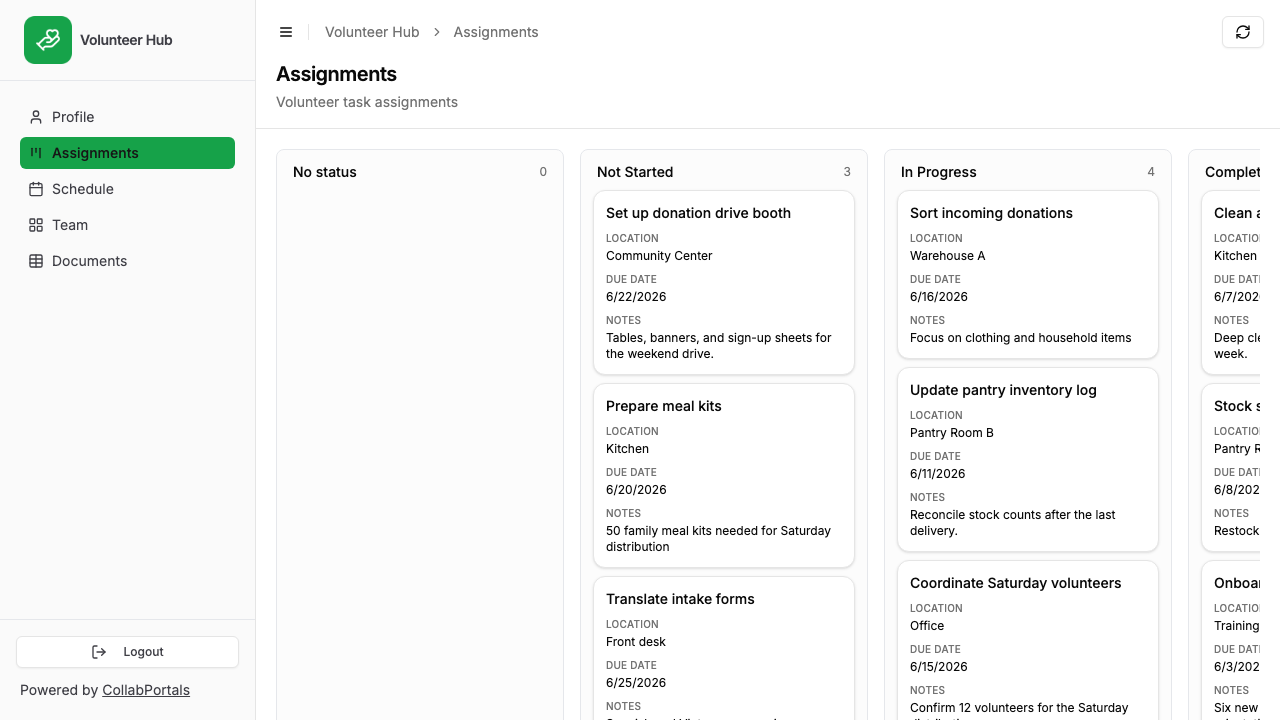
Each volunteer sees and updates only their own tasks, on a board grouped by status. - 6
They log in with their email
Share the link with your volunteers. Each one signs in with their email and a one-time code, so there are no passwords to manage and no Airtable seats to buy.
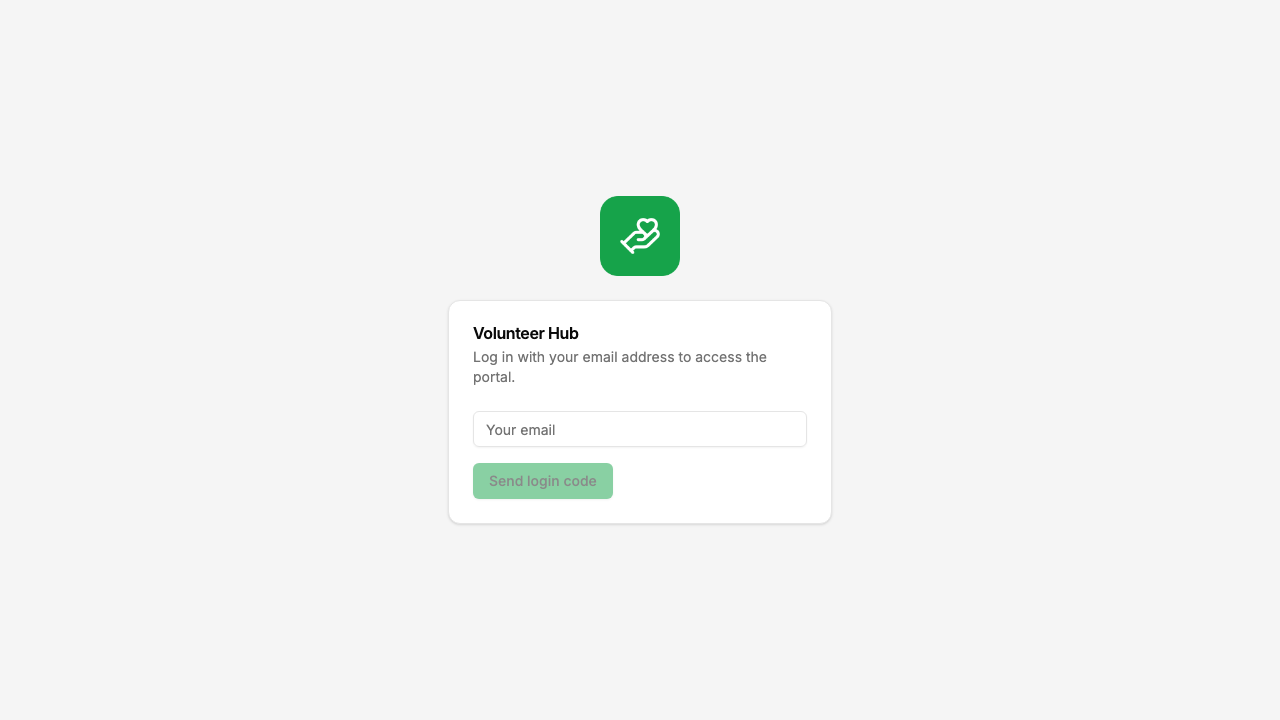
Email and one-time code login, branded with your organisation's logo and colour.
Want to start from this exact setup? Open the live demo or copy the Airtable template and connect it to your own base in minutes.
Real-World Volunteer Portal Patterns
The Shift and Schedule Portal
Volunteers log in to check their upcoming shifts, view assigned locations, and confirm attendance. A simple "Availability" table lets them submit when they can work next.
Common in: food banks, community kitchens, homeless shelters, event organizations
- 2 to 4 visible tables (Shifts, Assignments, Availability, Location details)
- Shift/schedule tables are read-only
- Availability table allows create and edit
- Sensitive fields hidden (emergency contacts, internal notes)
The Task and Assignment Portal
Volunteers view their assigned tasks, update progress, and submit completion reports. Coordinators manage everything in Airtable; volunteers interact through the portal.
Common in: habitat restoration, animal shelters, community cleanup programs, tutoring programs
- 3 to 6 visible tables (Tasks, Assignments, Reports, Resources)
- Task tables allow status updates (edit)
- Report/update tables allow create and edit
- Reference tables (procedures, guidelines) are read-only
The Equipment and Resource Portal
Organizations that lend equipment or supplies to volunteers use the portal for self-service checkout and returns. Volunteers see what is available, reserve items, and log returns.
Common in: tool libraries, animal foster programs, community gardens, maker spaces
- 2 to 4 visible tables (Inventory, Reservations, Returns)
- Inventory is read-only (volunteers see availability)
- Reservations allow create and edit
- Internal tracking fields hidden
What Makes This Different from Google Sheets or Forms
Many volunteer organizations default to shared spreadsheets or Google Forms, but both have significant drawbacks:
| Capability | CollabPortals | Google Sheets / Forms |
|---|---|---|
| Per-volunteer data privacy | Yes, each volunteer sees only their data | No, sheets are shared or all-or-nothing |
| Real-time Airtable sync | Yes, reads and writes directly to Airtable | No, requires manual export/import |
| Field-level permissions | Yes, per-table granular control | No, entire sheet or nothing |
| No passwords | Yes, email verification codes | Requires Google account or link sharing |
| Unlimited volunteers | Yes, flat $10/month | Free, but no privacy or permissions |
Take It Further
The walkthrough above is the whole build. A few options are worth knowing once you are up and running:
- Availability. Give the Availability table create access so volunteers submit when they are free, and you stop chasing confirmations by phone.
- Roles. If your Volunteers table has a role field, give team leads their own permissions, for example editing the schedule, while everyone else just reads it.
- Required fields. Make the fields that matter required, so an availability or status update always comes in complete.
After the first day of set-up, every update a volunteer makes lands straight in your Airtable base, where your coordinators already work.
For the generic version that applies to any base, see the setup guide.
Frequently Asked Questions
How do volunteers log in?
Volunteers enter their email address and receive a verification code. CollabPortals matches their email to a record in your Airtable Volunteers table, so they only see data linked to them. No passwords to set up or manage.
Can different volunteers see different things?
Yes. Each volunteer only sees records linked to their own record in your Volunteers table. You also control which tables and fields are visible at the portal level, so you can hide internal-only data entirely.
What if I have different types of volunteers (team leads vs regular volunteers)?
CollabPortals supports roles. Add a "Role" field to your Volunteers table, and you can configure different table and field permissions for each role. Team leads might see more tables or have edit access where regular volunteers only have view access.
How much does it cost?
CollabPortals costs $10/month for unlimited users and unlimited portals. There is no per-volunteer charge. Compare that to $20/month per user for Airtable seats.
Does my data leave Airtable?
No. CollabPortals reads and writes directly to your Airtable base using the Airtable API. Your data stays in Airtable.
Can volunteers submit data back to Airtable?
Yes. If you enable create or edit permissions on a table, volunteers can submit new records (like availability surveys or progress reports) and update existing ones. Everything flows directly back to your Airtable base in real time.
What happens when a volunteer leaves the organization?
Remove or deactivate their record in your Airtable Volunteers table. Since authentication is based on email matching, they will no longer be able to log in.

About the author
Matt Shepherd
Founder, CollabPortals
Matt is the founder of CollabPortals. A software engineer and Airtable power user who kept running into the same frustration: no easy way to give external users a simple and secure view to edit their data. He built CollabPortals as the lightweight solution to that problem, allowing you to set up a secure, permissioned portal in a few clicks.
Related use cases and guides
Nonprofits
Give donors, volunteers, beneficiaries, and board members secure access to the data they need, without Airtable seats or custom development.
Use caseEvent Crew
Give event crew, temporary staff, and contractors a self-service portal to view schedules, assignments, and logistics, powered by your Airtable event database.
ComparisonCollabPortals vs Airtable Portals: Third-Party Tool or Native Feature?
Compare CollabPortals ($10/month, unlimited users) with Airtable's native Portals, where read-only guests are free and editing guests are sold in packs from $120/month. See which fits how your users actually work.
ComparisonCollabPortals vs Fillout: Portal or Form Builder?
Compare CollabPortals ($10/month portal builder) with Fillout (form builder from $0/month). Understand when you need a portal vs a form for Airtable data collection.