Build an Airtable Portal for Nonprofits
Give donors, volunteers, beneficiaries, and board members secure access to the data they need, without Airtable seats or custom development.

See it working, then start from a ready-made Airtable base.
See a live demoCopy the Airtable templateThe Problem: Nonprofit Data Has Many Audiences
Nonprofits track a lot of data in Airtable: donor records, volunteer hours, program participants, grant deliverables, event logistics, and board meeting materials. The challenge is that different stakeholders need access to different slices of this data:
- Donors want to see their giving history and how funds are being used
- Volunteers need to check assignments, submit hours, and view schedules
- Program participants want to see their enrollment status and upcoming activities
- Board members need access to financial summaries and program metrics
- Grant administrators need to review deliverables and milestone progress
Giving all of these groups access to your Airtable base is not practical:
- Airtable seats cost $20/month each, a nonprofit with 50 volunteers, 200 donors, and 30 program participants cannot afford $5,600/month in Airtable seats.
- Shared views expose too much, Airtable shared views do not filter by user. If you share a view, everyone sees the same data.
- Custom portals cost too much, most nonprofits do not have the budget or technical staff to build and maintain custom software.
What you need is a way to give each stakeholder group a portal where they log in and see only their own data, with exactly the permissions you choose.
How CollabPortals Solves This
CollabPortals connects to your existing Airtable base and lets you create multiple portals for different audiences. Each portal has its own permissions, visible tables, user authentication, and logo, so every audience sees your brand on the pages meant for them.
One Base, Multiple Portals
A single Airtable base can power several portals, each tailored to a different audience:
| Portal | Audience | Tables Exposed | Key Permissions |
|---|---|---|---|
| Volunteer Hub | Volunteers | Assignments, Hours, Schedule | Submit hours, view schedule |
| Donor Dashboard | Donors | Donations, Impact Reports | View giving history (read-only) |
| Participant Portal | Beneficiaries | Enrollment, Activities, Resources | View enrollment, sign up for activities |
| Board Portal | Board members | Financials, Programs, Minutes | View reports (read-only) |
Each portal has its own URL, its own user table (matching by email), and its own set of table and field permissions.
Per-User Data Privacy
When a donor logs into the Donor Dashboard, they only see their own donation records, not other donors' data. When a volunteer logs into the Volunteer Hub, they only see their own assignments. CollabPortals matches each user to their record in your Airtable Users table via email verification.
No Per-User Costs
Most nonprofit SaaS tools charge per user, which quickly becomes unaffordable. CollabPortals costs $10/month for unlimited users and unlimited portals. Whether you have 10 volunteers or 500 donors, the price stays the same.
Build a Donor Dashboard Step by Step
Here is how the live demo above, a donor dashboard, is put together. It takes about an hour the first time, with no code involved.
- 1
Set up your Airtable base
Start with a table for each part of your fundraising: a Donations table for gifts, a Programs table for the work you fund, an Impact Reports library, an Events calendar, and a Donors table for the people who log in. Donors is the hub. It holds each donor's email, and their donations link back to it, so each donor only ever sees their own giving.
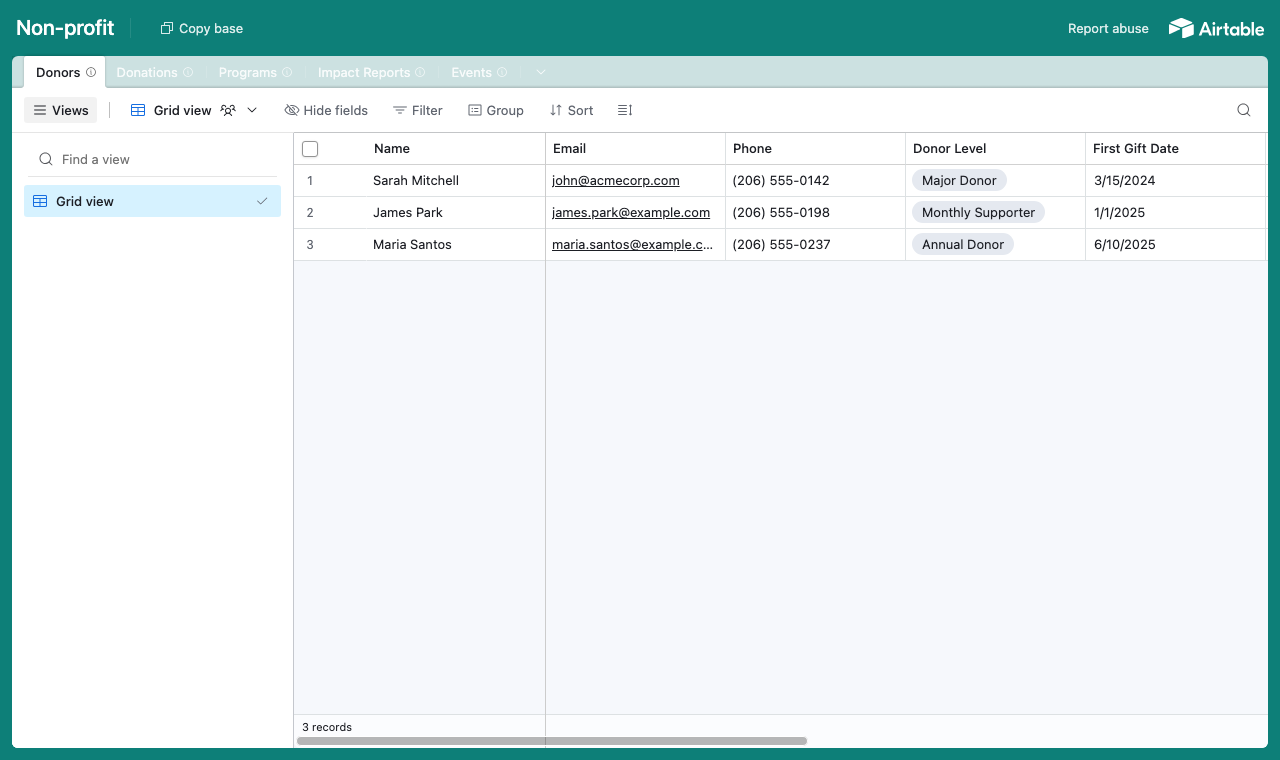
A table for each part of your fundraising, with a Donors table every gift links back to. - 2
Connect the base and pick the user table
Point CollabPortals at that base, then choose Donors as your user table and Email as the login field. Each donor signs in with their email and is matched to their own record.
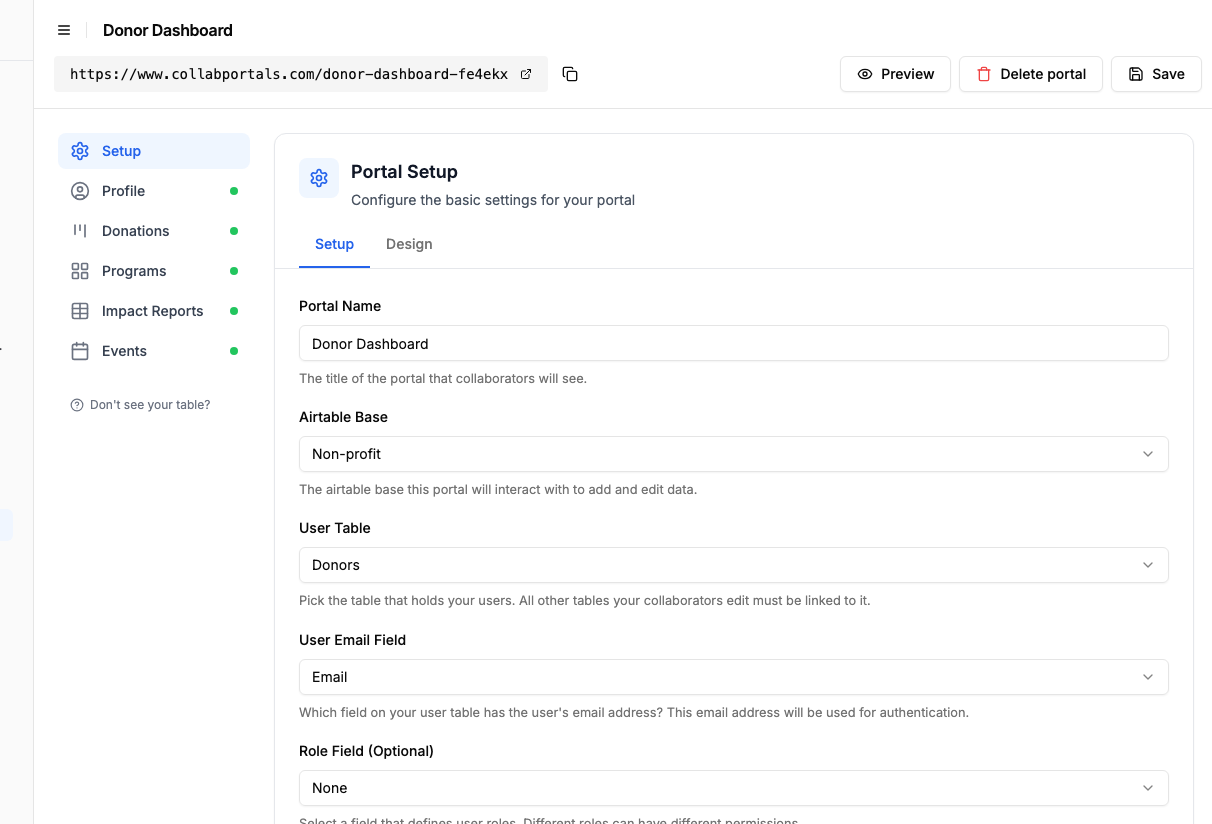
Connect the base, then point CollabPortals at the Donors table and its email field. - 3
Show donors their giving, hide your back office
Decide field by field what donors see. On Donations, show the amount, date and the programme each gift supported, and hide the internal side, donor scoring, solicitation notes and ask amounts. Donors get a clear record of their giving without seeing how you run fundraising.
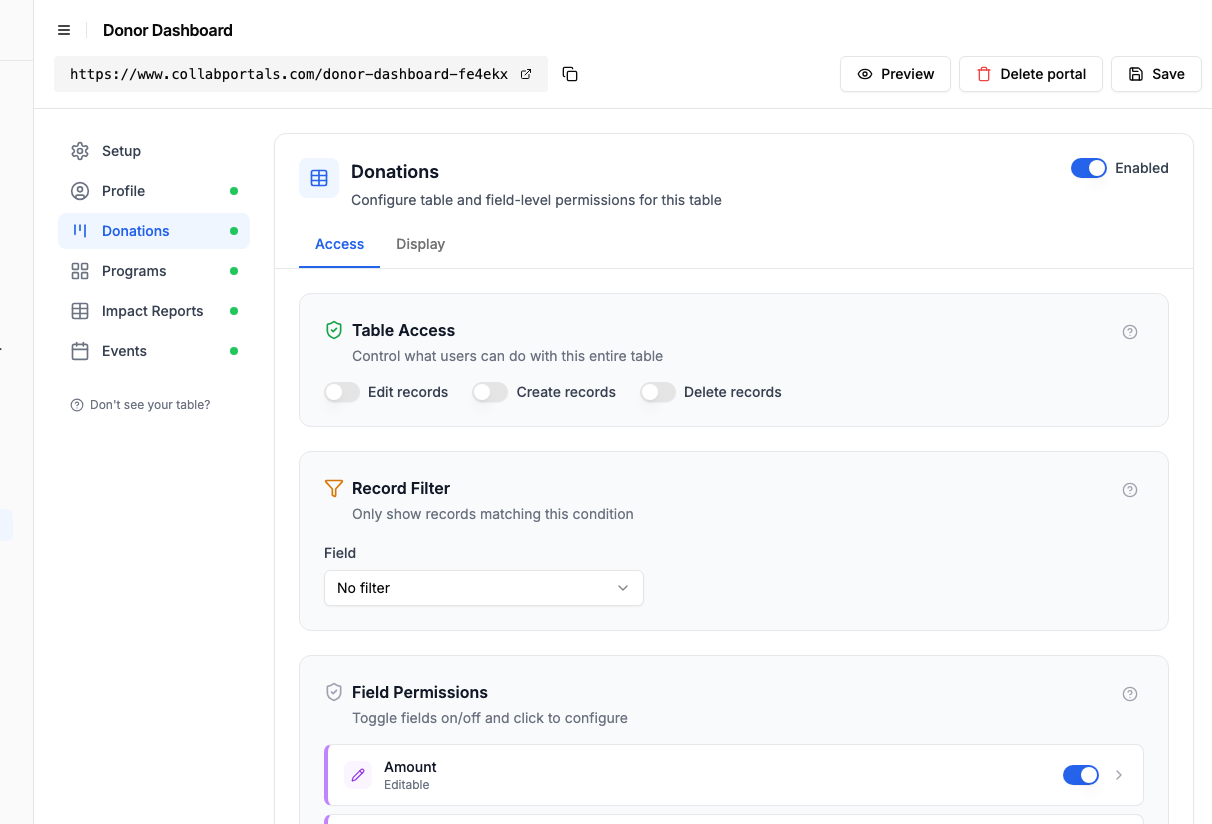
Show donors their own gifts, keep donor scoring and solicitation notes hidden. - 4
Give each table the view that fits
Pick how each table appears. Programs as a gallery so donors see the work they fund, Donations as a table of their giving history, Events on a calendar, Impact Reports as a library. Same Airtable data, shaped for the donor.
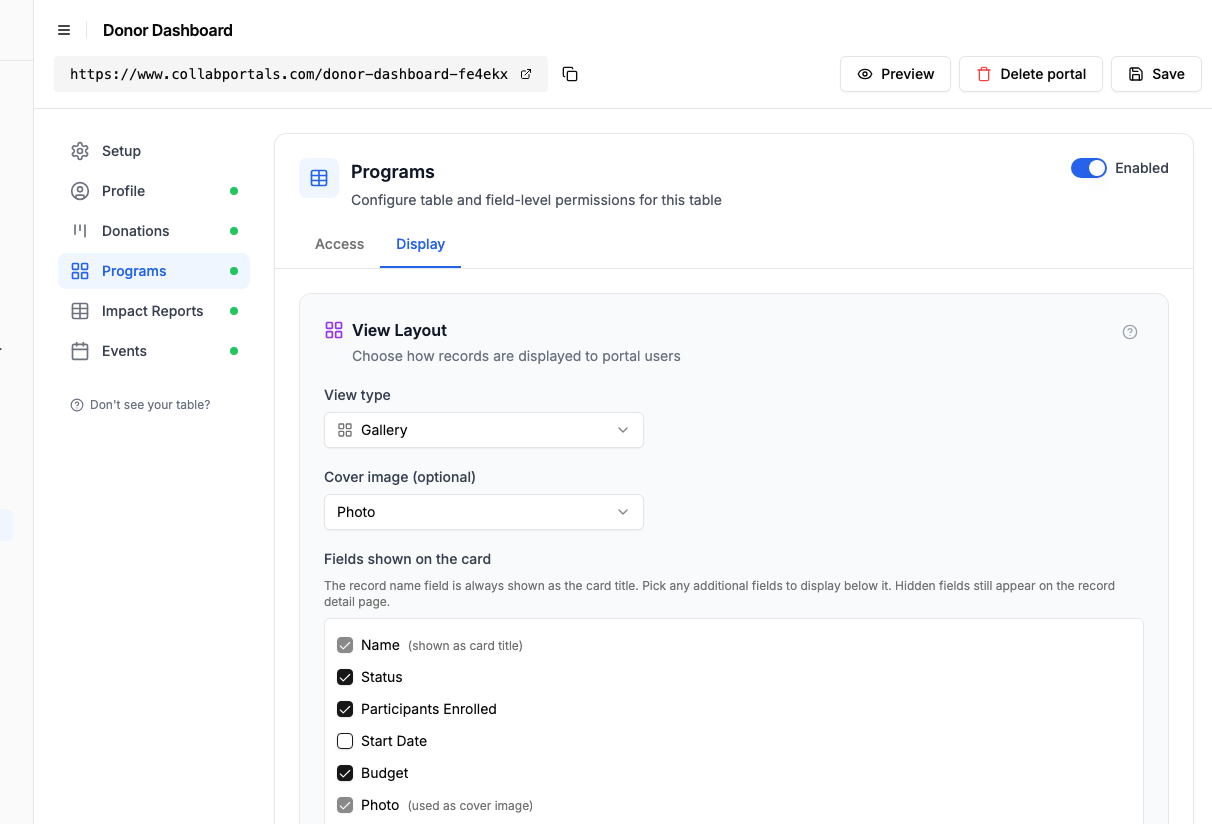
The Display tab lays Programs out as a gallery of the work donors fund. - 5
Donors see their impact
The result is a clean, branded portal. Each donor signs in and sees only their own giving history, the programmes their gifts support, and upcoming events, always current because it reads straight from your Airtable base.
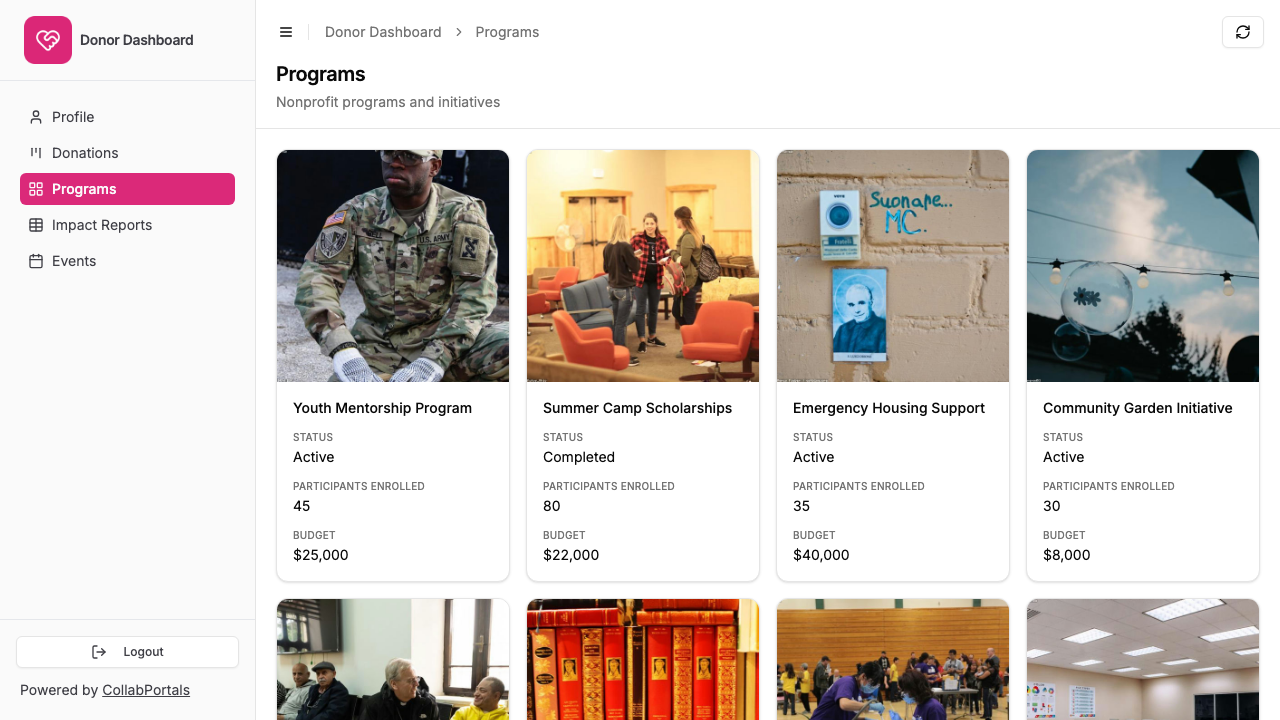
Donors see the programmes their gifts support, as a gallery of real work. - 6
They log in with their email
Share the link with your donors. Each one signs in with their email and a one-time code, so there are no passwords to manage and no Airtable seats to buy.
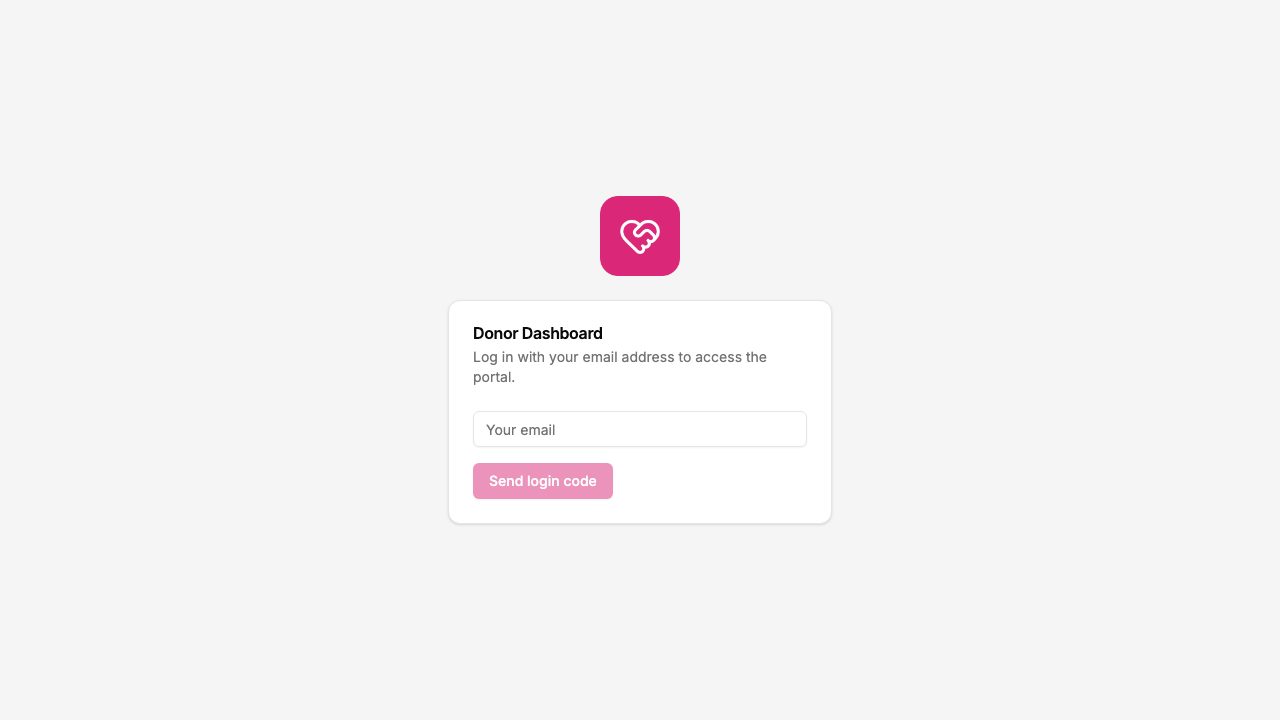
Email and one-time code login, branded with your organisation's logo and colour.
Want to start from this exact setup? Open the live demo or copy the Airtable template and connect it to your own base in minutes.
Real-World Nonprofit Portal Patterns
The Volunteer Management Portal
The most common nonprofit portal. Volunteers log in to view assignments, submit hours, check schedules, and update their contact information.
Tables exposed:
- Assignments (view, edit status)
- Hours Log (create, edit)
- Schedule (view only)
- Volunteer Profile (view, edit contact info)
Fields hidden: internal ratings, staff notes, background check status
The Donor Engagement Portal
Donors log in to view their giving history, see how funds are allocated, and access tax receipts. Some organizations also let donors update their contact preferences.
Tables exposed:
- Donations (view only)
- Impact Updates (view only)
- Donor Profile (view, edit contact info)
Fields hidden: donor rating tier, solicitation notes, prospect status
The Program Participant Portal
Beneficiaries or program participants log in to check enrollment status, view upcoming activities, access resources, and submit feedback.
Tables exposed:
- Enrollment (view only)
- Activities/Events (view, sign up)
- Resources/Documents (view only)
- Feedback/Surveys (create, edit)
Fields hidden: internal case notes, eligibility scores, staff assignments
The Board and Governance Portal
Board members access meeting materials, financial summaries, and program reports. Everything is read-only with sensitive operational data hidden.
Tables exposed:
- Meeting Agendas and Minutes (view only)
- Financial Summaries (view only)
- Program Reports (view only)
Fields hidden: line-item expenses, staff salaries, HR data
Comparison: CollabPortals vs Common Nonprofit Tools
| Capability | CollabPortals | Airtable Interfaces | Custom Portal | Spreadsheet/Email |
|---|---|---|---|---|
| External user access | Yes, email verification | No, requires Airtable seat | Yes, with development | No secure login |
| Per-user cost | None ($10/month flat) | $20/month per user | Variable (hosting + dev) | Free |
| Multiple portals from one base | Yes | One interface per view | Separate builds | N/A |
| Per-user data filtering | Automatic by email match | Manual view filters | Custom code required | Not possible |
| Setup time | Minutes | Minutes (internal only) | Weeks to months | N/A |
| Ongoing maintenance | None | None | Developer required | Manual updates |
Take It Further
The walkthrough above builds the donor dashboard. The same base can power more:
- One base, many portals. Point a second portal at the same base with a Volunteers user table and different permissions, and you have a volunteer hub alongside the donor dashboard, with no duplicated data.
- Editable profiles. Give the Donors table edit access so donors keep their own contact details and communication preferences current.
- Event sign-ups. Turn on create on an RSVP table so donors register for events themselves.
- Nest impact under each program. Turn on related tabs so a program's impact reports and events show as tabs on the program record, scoped to it, so a donor sees the work behind the cause they fund on a single page.
After set-up, every gift and update lives in your Airtable base, where your fundraising team already works.
For the generic version that applies to any base, see the setup guide.
Frequently Asked Questions
Can I create multiple portals from one Airtable base?
Yes. You can create as many portals as you need from a single base. Each portal has its own URL, user authentication, and permission settings. A Volunteer Hub and a Donor Dashboard can both point to the same base with completely different permissions.
How do users log in?
Users enter their email address and receive a verification code. CollabPortals matches their email to a record in the portal's Users table. No passwords to manage, no accounts to provision.
Is this secure enough for donor data?
Yes. Each user only sees data linked to their own record. CollabPortals uses email verification for authentication and communicates with Airtable over encrypted connections. Your data stays in Airtable and is never stored on CollabPortals servers.
We have 200+ volunteers. How much would this cost?
$10/month. CollabPortals charges a flat monthly fee with no per-user charges. Whether you have 5 users or 500, the cost is the same.
Can we use roles for different volunteer levels?
Yes. CollabPortals supports roles. If your Volunteers table has a "Level" or "Role" field, you can configure different permissions per role. Team leads might see more tables or have edit access where regular volunteers only have view access.
Does my data leave Airtable?
No. CollabPortals reads and writes directly to your Airtable base using the Airtable API. Your data stays in Airtable.
We already use Airtable Forms for intake. Can we replace those?
You can use CollabPortals alongside Airtable Forms, or replace them. CollabPortals lets users both submit new records and view/edit existing ones, which Airtable Forms cannot do. Many organizations start with Forms for initial intake and then use CollabPortals for ongoing access.

About the author
Matt Shepherd
Founder, CollabPortals
Matt is the founder of CollabPortals. A software engineer and Airtable power user who kept running into the same frustration: no easy way to give external users a simple and secure view to edit their data. He built CollabPortals as the lightweight solution to that problem, allowing you to set up a secure, permissioned portal in a few clicks.
Related use cases and guides
Volunteers
Give volunteers self-service access to their assignments, schedules, and tasks. No extra Airtable seats, no code, no passwords to manage.
Use caseMembership Management
Give your members secure, self-service access to their profile, roster, and account data in Airtable. No extra seats, no member login headaches.
ComparisonCollabPortals vs Airtable Portals: Third-Party Tool or Native Feature?
Compare CollabPortals ($10/month, unlimited users) with Airtable's native Portals, where read-only guests are free and editing guests are sold in packs from $120/month. See which fits how your users actually work.
ComparisonCollabPortals vs Softr: Lightweight Portal or Full App Builder?
Compare CollabPortals and Softr for Airtable portals. See how a $10/month focused portal tool stacks up against a full no-code app builder starting at $49/month.