Build an Airtable CRM Client Portal
Give your clients a branded portal to view their account data, deals, contacts, sites, activity, directly from your Airtable CRM. No extra seats, no code.

See it working, then start from a ready-made Airtable base.
See a live demoCopy the Airtable templateThe Problem: Clients Cannot See Their Own Account Data
You run your business on an Airtable CRM, tracking companies, contacts, deals, sites, activity logs, and more. But your clients have no visibility into their own data:
- Add them as Airtable collaborators, they see every company's data, your pipeline, internal notes, and margin figures. Each seat also costs $20/month on Team plans.
- Send periodic email updates, stale the moment you send them. Clients reply asking about information that has already changed.
- Export to PDF or spreadsheet, manual effort every time, and clients have no way to update their own details.
- Build a custom portal, weeks of development to create a basic CRUD interface for your CRM data, plus ongoing maintenance.
- Use a heavy CRM platform (Salesforce, HubSpot), your team is already in Airtable, and migrating is not worth the cost or disruption.
What you need is a way to let clients log in and see their account data, their deals, their contacts, their activity, without seeing other clients' data or your internal fields.
How CollabPortals Works for CRM Portals
CollabPortals connects to your Airtable CRM base and creates a branded portal that clients access via a shared link. They log in with their email, see only their own data, and can update fields you choose. Your sales and account management team continues working in Airtable.
Example: Account Management Portal
A B2B services company gives clients a portal to view their account data and update their details.
| Table | Client Access | Purpose |
|---|---|---|
| Company | View, edit | Clients view and update their company details |
| Contacts | View only | Clients see who is listed as their contacts |
| Deals | View only | Clients see their active and past deals |
| Sites / Locations | View only | Clients see their registered locations |
| Activity Log | View only | Clients see a history of interactions |
| Pipeline Stage | Hidden | Internal sales process tracking |
| Revenue Targets | Hidden | Internal financial goals |
| Internal Notes | Hidden | Account manager observations and strategy |
Clients see: their company profile, deal history, registered sites, and activity log. Your team sees: the full CRM with pipeline stages, revenue targets, and internal notes.
Build a CRM Client Portal Step by Step
Here is how the live demo above is put together. It takes about an hour the first time, with no code involved.
- 1
Set up your Airtable base
Start with the CRM base you already run: Companies, Deals, Sites, an Activity Log, Documents, and a Contacts table for the people who log in. Contacts is the hub. It holds each client contact's email, and the other tables link back to it, so each client only ever sees their own company, deals and activity.
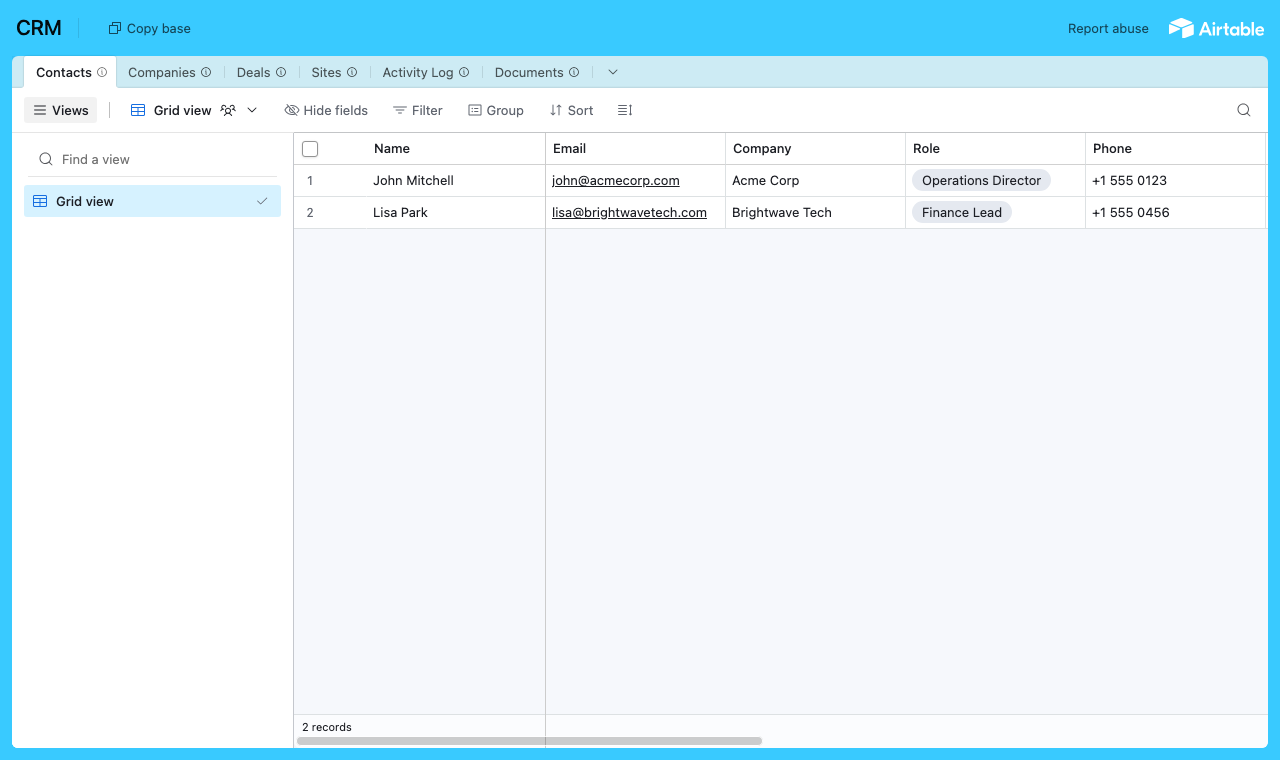
Your existing CRM base, with a Contacts table every company, deal and activity links back to. - 2
Connect the base and pick the user table
Point CollabPortals at that base, then choose Contacts as your user table and Email as the login field. Each client signs in with their email and is matched to their own record.
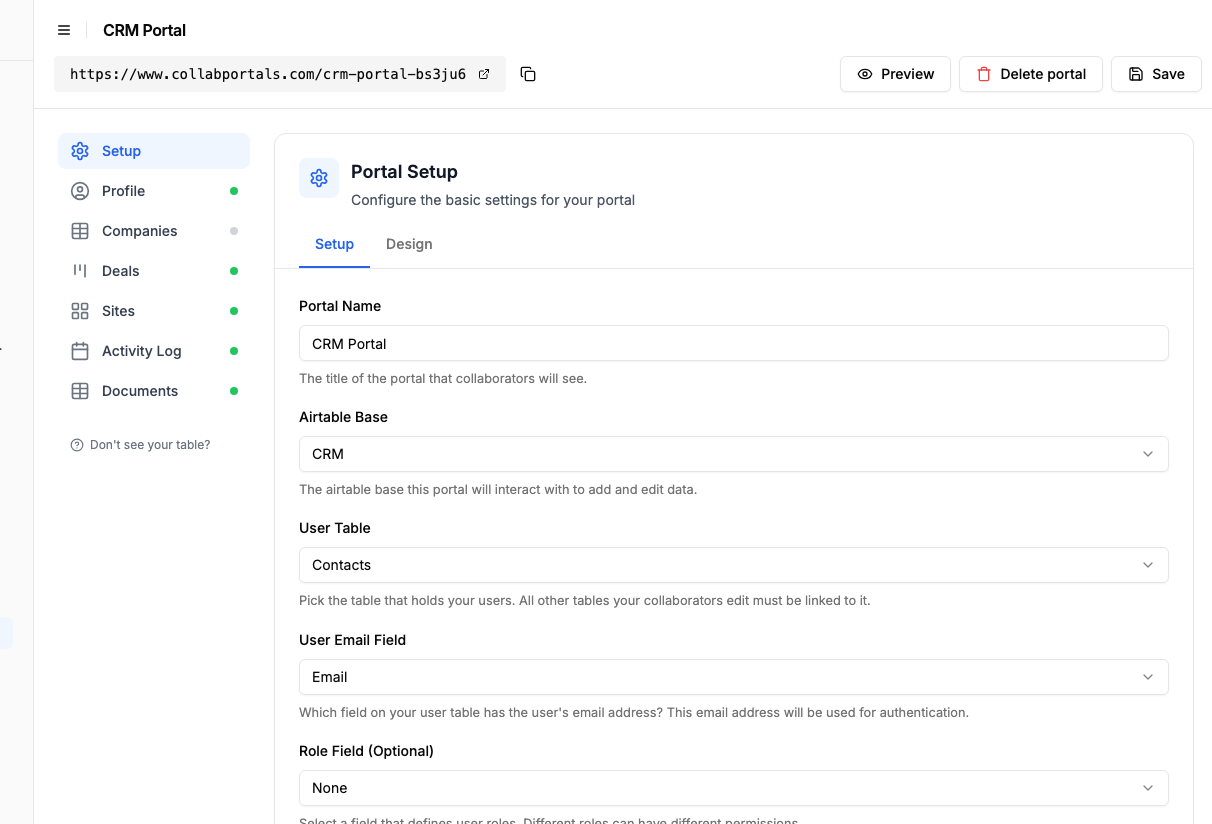
Connect the base, then point CollabPortals at the Contacts table and its email field. - 3
Show clients their account, hide your pipeline
Decide field by field what clients see. On Deals, show the deal name, value and stage, and hide the internal side, your revenue targets and account-manager notes. Clients get a clear window into their account without seeing how you run your pipeline.
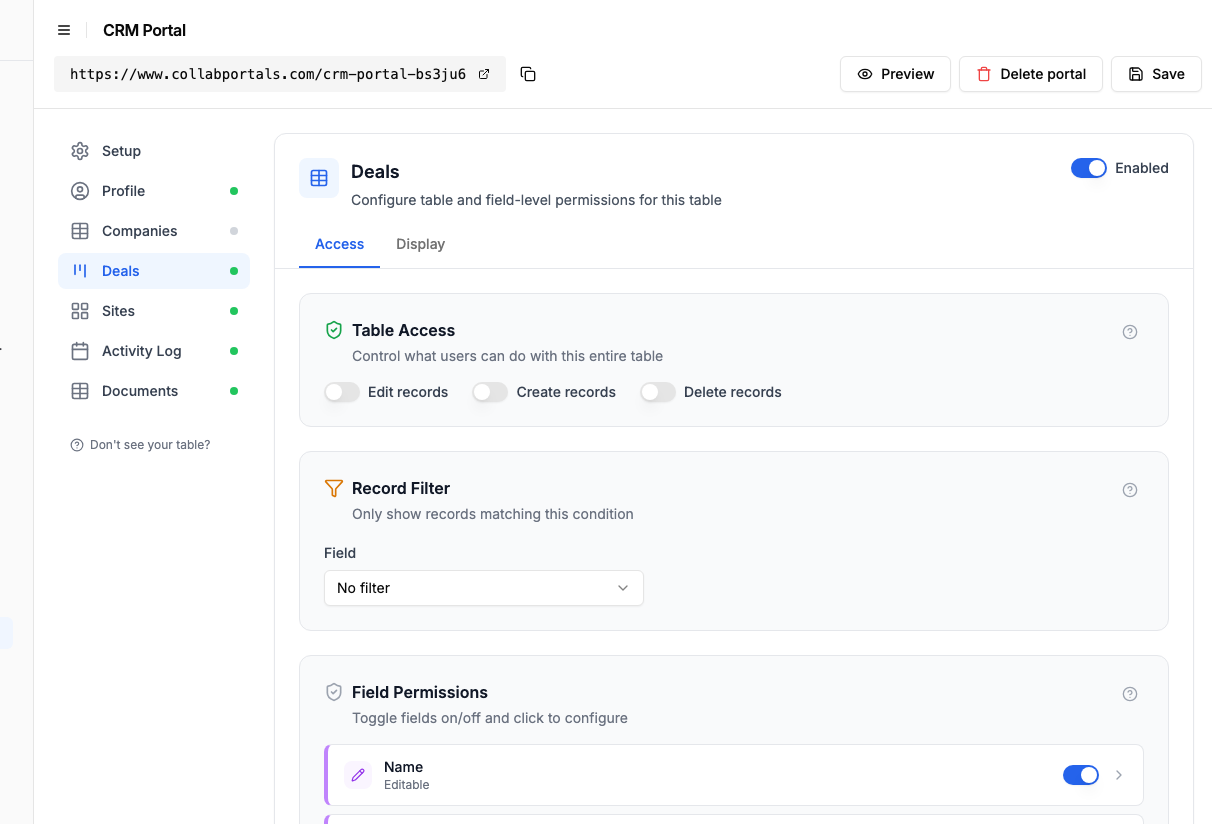
Show the deals clients should see, keep your revenue targets and internal notes hidden. - 4
Give each table the view that fits
Pick how each table appears. Deals as a board so a client watches a deal move from Prospect to Proposal to Negotiation, or as a table grouped by stage with a count on each, the Activity Log on a calendar, Sites and Documents as tables. Same CRM data, laid out for the client.
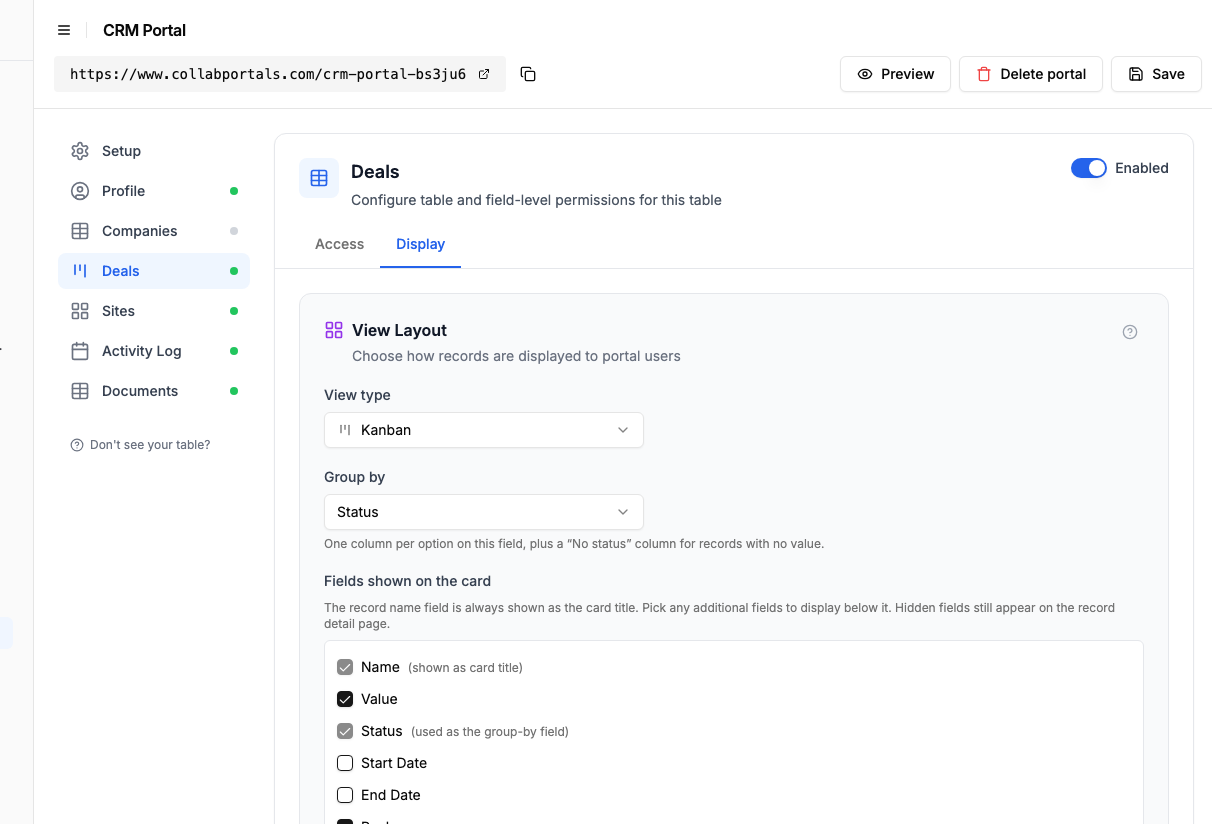
The Display tab lays the Deals table out as a board grouped by stage. - 5
Clients get a window into their account
The result is a clean, branded portal. Each client signs in and sees only their own company, deals, sites and activity, always current because it reads straight from your Airtable CRM.
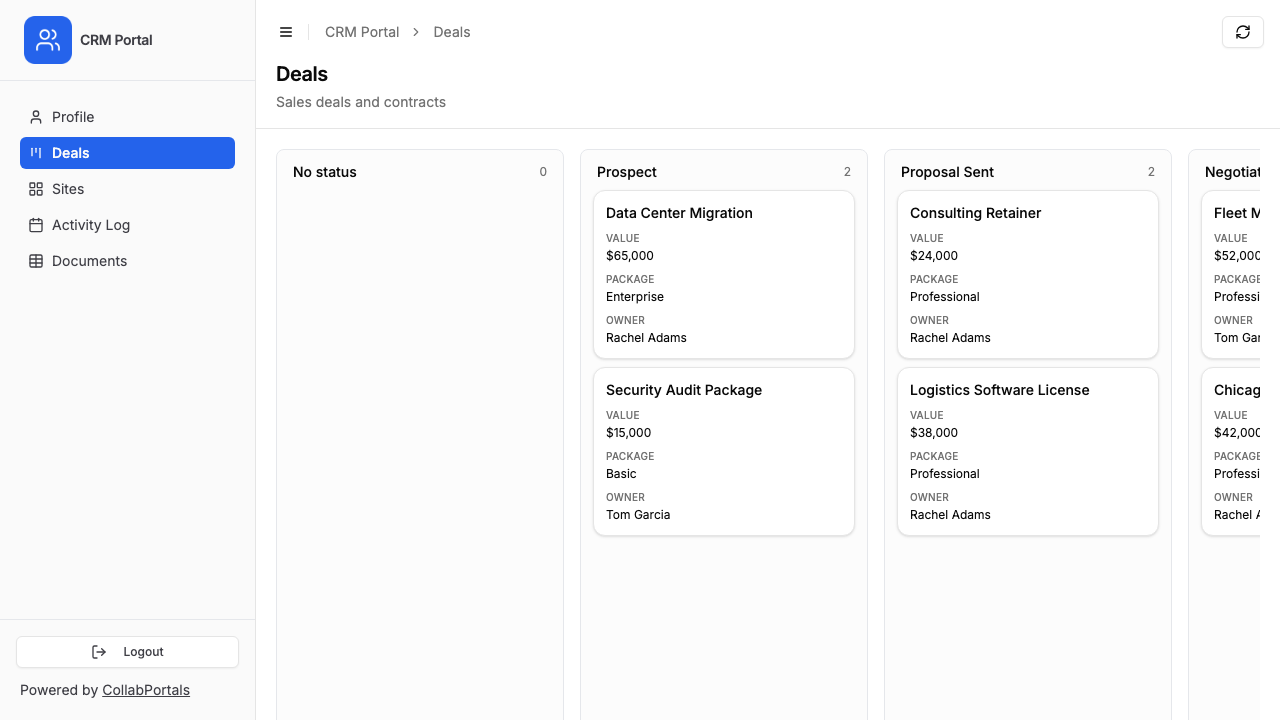
Each client sees only their own deals, on a board that mirrors your pipeline stages. - 6
They log in with their email
Share the link with your clients. Each one signs in with their email and a one-time code, so there are no passwords to manage and no Airtable seats to buy.
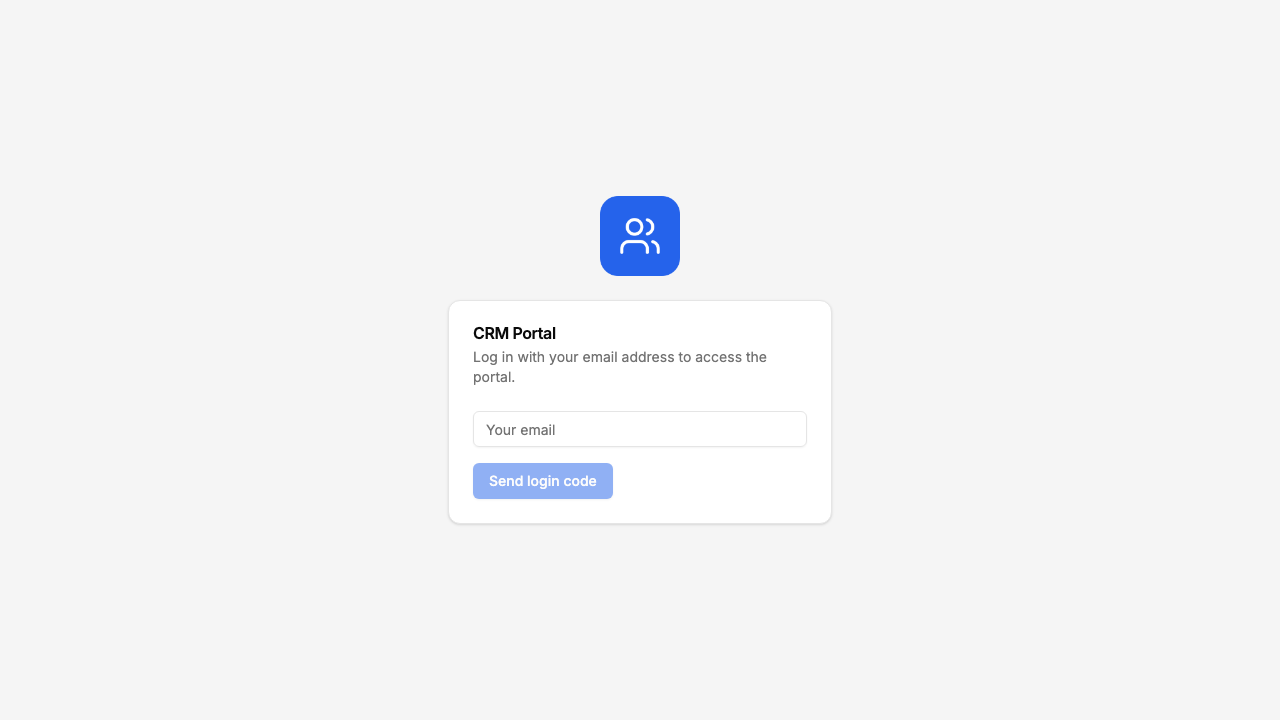
Email and one-time code login, branded with your logo and colour.
Want to start from this exact setup? Open the live demo or copy the Airtable template and connect it to your own base in minutes.
Use Cases for CRM Client Portals
B2B Account Portals
Service companies give clients a window into their account data, contracts, sites, contacts, activity history.
- Company (view, edit), name, address, phone, email, website
- Deals / Contracts (read-only), deal value, status, start/end dates, package
- Sites / Locations (read-only), registered sites linked to the account
- Activity Log (read-only), calls, meetings, emails, notes
- Hidden: credit score, financial data, internal priority, account tier, revenue targets
Agency Client Portals
Agencies give clients visibility into their campaigns, deliverables, and billing.
- Campaigns (view, edit), campaign name, status, client feedback field
- Deliverables (read-only), asset name, type, status, delivery date
- Invoices (read-only), amount, date, payment status
- Contacts (view, edit), client team members and their roles
- Hidden: internal costs, team hours, profit margin, vendor fees
Vendor and Partner Portals
Companies give vendors or partners access to their shared data, orders, inventory, performance metrics.
- Orders (view, create), order details, quantities, delivery dates
- Products / Inventory (read-only), stock levels, pricing, product specs
- Performance (read-only), delivery metrics, quality scores
- Hidden: internal cost data, alternative vendor comparisons, sourcing strategy
What Makes This Better Than Airtable Interfaces
| Capability | CollabPortals | Airtable Interfaces | Custom Portal |
|---|---|---|---|
| External client access | Yes, email verification, no Airtable account | No, requires Airtable seat ($20/month) | Yes (custom dev) |
| Per-user cost | None, unlimited users for $10/month | $20/month per client on Team plan | Varies |
| Per-client data isolation | Automatic (email-based matching) | Manual (complex filter setup) | Custom logic |
| Field-level permissions | Per-portal granular control | Tied to Airtable's permission system | Custom logic |
| Setup time | Minutes | Minutes (but internal only) | Weeks to months |
| Maintenance | None, changes in Airtable reflected instantly | Minimal | Ongoing |
| Custom branding | Logo, theme colours, favicon, portal name, and your own custom domain | Limited to Airtable UI | Full control |
The key difference: Airtable Interfaces is for your team. CollabPortals is for your clients. For a deeper look, see our full comparisons of CollabPortals vs Airtable Interfaces and CollabPortals vs Airtable Portals.
Field-Level Permissions for CRM Data
CRM tables contain sensitive fields that clients should never see:
- Show to clients: Company name, address, phone, deal status, deal value, contract dates, activity log entries, site addresses
- Hide from clients: Credit score, financial data (EBITDA, turnover, liabilities), internal priority, account tier, revenue targets, profit margins, internal notes
- Editable by clients: Company details (address, phone, email, website), contact info
- Read-only for clients: Deal status, deal value, activity history, site details
This lets clients keep their own details current while your team retains control over commercial and operational data. Each field carries four independent permissions, so a contact can edit their phone number on the edit form while Account Tier stays visible but read-only.
Take It Further
The walkthrough above is the whole build. A few options are worth knowing once you are up and running:
- Let clients edit their own details. Turn on edit for the Companies table so clients keep their address and contacts current, and you stop fielding "can you update our details" emails.
- Scope with record filters. Each client only ever sees their own company's deals and activity, matched automatically by the email they log in with.
- One CRM, many portals. The same base can power a client-facing portal and an internal-only portal, each with its own permissions.
- Let clients filter their own records. Turn on filter, search and sort controls so a client can filter Deals by stage or owner and search their activity log instead of scrolling it.
- Account-360 on one page. Turn on related records so a company's deals, contacts and activity show on its record, the whole account in one place instead of separate sidebar tables. Each set can sit in a tab of its own or underneath the company's fields, so the one people open the record for is on screen with it.
After set-up, every change you make in your Airtable CRM shows up in the client's portal instantly, with nothing to sync.
For the generic version that applies to any base, see the setup guide.
Frequently Asked Questions
Can clients only see their own company data?
Yes. Each client is matched to their record in your Airtable Users table via email. They see only deals, contacts, sites, and activity linked to their company. One client cannot see another client's data.
Can clients update their own company details?
Yes, if you enable edit permissions on the Company table and make specific fields editable. Clients can update their address, phone number, or other details directly, and the changes appear in your Airtable CRM immediately.
Will clients see our financial data or internal notes?
No. You choose exactly which fields are visible at the portal level. Fields like credit score, profit margin, internal priority, and account manager notes can be hidden while the same table shows client-facing fields like company name and address.
How much does this cost compared to adding Airtable seats?
CollabPortals costs $10/month for unlimited users and portals. Adding clients as Airtable collaborators costs $20/month per user on Team plans. For 20 clients, that is $10/month vs $400/month.
Does data stay in Airtable?
Yes. CollabPortals reads and writes directly to your Airtable base using the Airtable API. Your CRM data stays in Airtable, CollabPortals is just a controlled window into it.
Can I show different data to different client types?
Two ways. First, use roles within a single portal: define client-type roles on your Users table, and each role carries its own table and field permissions plus an optional record filter that narrows which rows the role sees. Second, if the underlying data sits in different Airtable bases, spin up multiple portals, one per base. Most teams start with roles because they avoid duplicating configuration.

About the author
Matt Shepherd
Founder, CollabPortals
Matt is the founder of CollabPortals. A software engineer and Airtable power user who kept running into the same frustration: no easy way to give external users a simple and secure view to edit their data. He built CollabPortals as the lightweight solution to that problem, allowing you to set up a secure, permissioned portal in a few clicks.
Related use cases and guides
Clients
Give your clients secure, branded access to their project data in Airtable. No extra seats, no code, no complex setup, just share a link.
Use caseProject Management
Give clients and external collaborators a branded view into their projects in Airtable, with controlled access to tasks, timelines, and deliverables.
ComparisonCollabPortals vs Airtable Interface Designer: Can You Use Interfaces as a Portal?
Airtable Interface Designer is free, but can it replace a dedicated portal? Compare it to CollabPortals for sharing data with external users.
ComparisonCollabPortals vs Airtable Portals: Third-Party Tool or Native Feature?
Compare CollabPortals ($10/month, unlimited users) with Airtable's native Portals, where read-only guests are free and editing guests are sold in packs from $120/month. See which fits how your users actually work.