Custom Domains: Put Your Airtable Portal on Your Own Domain
Serve your CollabPortals Airtable portal on your own domain like portal.acme.com, with an automatic HTTPS certificate. Available on any paid plan. Here is how to set it up.

You can now serve a portal on your own domain. Instead of collabportals.com/your-portal, your end users see an address you own, like portal.acme.com, with an HTTPS certificate provisioned automatically.
The portal itself is unchanged. Same login, same tables, same permissions. Only the address in the browser bar is yours.
How To Set It Up
Open a portal's settings and go to the new Domain tab.
- Enter the domain you want to use, for example
portal.acme.com, and save. - The tab shows you one DNS record to add. For a subdomain it is a single
CNAME. Add it at whatever provider hosts your domain. - Once the record is live, CollabPortals verifies the domain and issues a TLS certificate for it, usually within a few minutes. The status moves to "Live" and the portal starts serving on your domain.
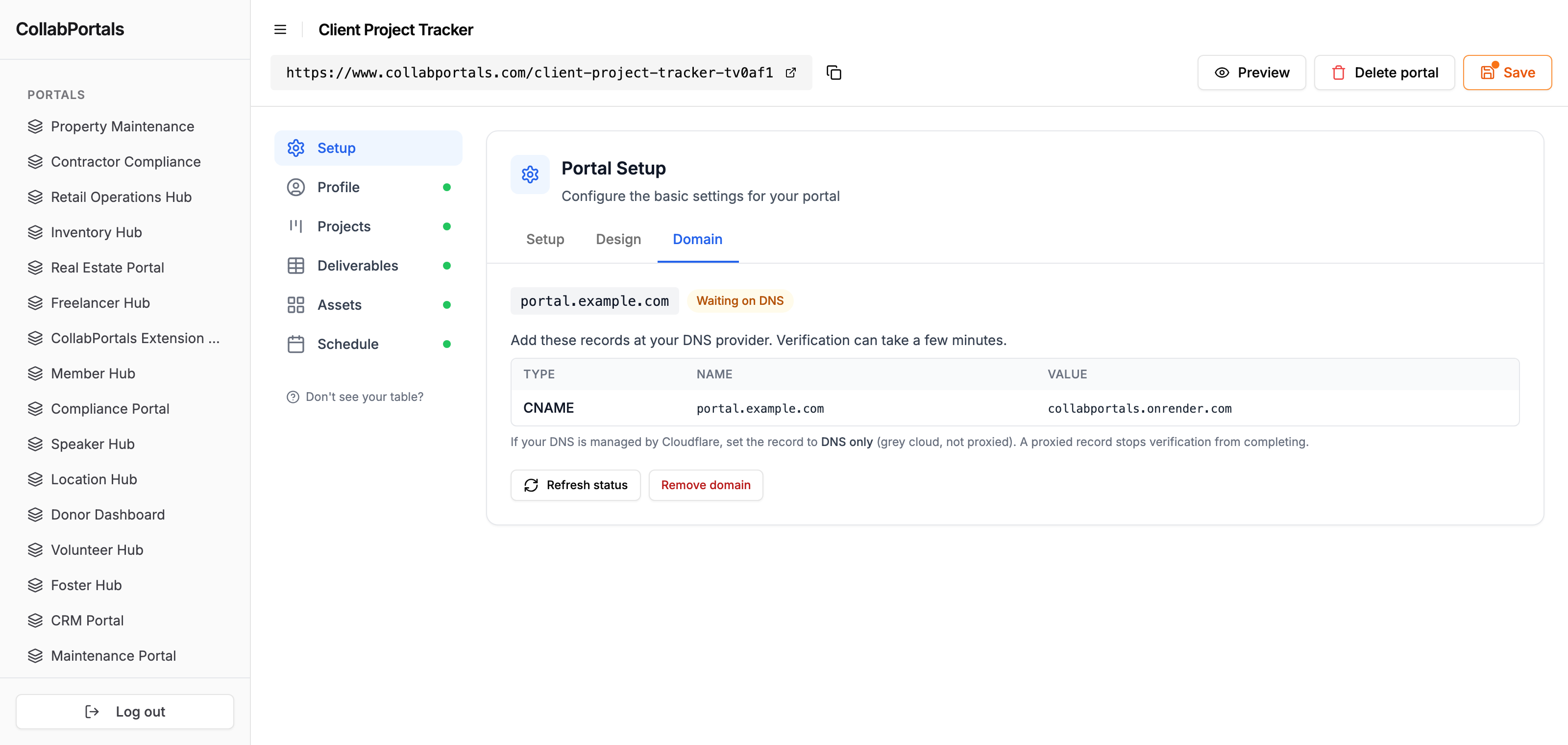
That is the whole setup: one record, then it is live over HTTPS. The certificate renews itself, so there is nothing to maintain.
One note if your DNS is on Cloudflare: set the record to "DNS only" (the grey cloud, not "Proxied"), or the domain will not verify. The full reference, including root domains, is in Custom Domains.
Subdomains and Root Domains
A subdomain like portal.acme.com is the common case and the simplest: one CNAME and you are done. Most teams use a subdomain so their main website keeps the root domain.
Root domains (an apex like acme.com) work too, as long as your DNS provider supports ALIAS or ANAME records. The Domain tab shows the right record for whatever you enter.
Who This Helps Most
A custom domain matters when end users outside your team see the portal and the address is part of how your business looks.
- Client portals and CRM portals, where clients log in to something on your domain rather than a tool they have never heard of.
- Freelancer portals and agencies delivering a portal as part of a client engagement, where the address is part of the deliverable.
- Membership portals, where members reach a portal that reads as an extension of the main site.
If the portal is internal-only, the CollabPortals URL is perfectly fine, and the custom domain is there the day you want to put it in front of customers.
How It Compares
Airtable's own Interface Designer does not do this for portals. Interfaces are served from airtable.com, and the only native custom-domain option Airtable offers is an Enterprise-tier beta that brands bases, not the Interfaces you would share with end users.
The dedicated portal and app builders, Softr, Noloco, and Stacker, do offer custom domains, but typically on their higher-priced plans. CollabPortals includes custom domains on any paid plan, at $10 per month flat, alongside your own logo, colors, and favicon. The portal is on your domain and carries your brand without moving up a pricing tier.
Try It
It is live now on any paid plan. Open a portal, go to the Domain tab, and add your domain. If there is something more you want from it, the public roadmap is the place to ask.

About the author
Matt Shepherd
Founder, CollabPortals
Matt is the founder of CollabPortals. A software engineer and Airtable power user who kept running into the same frustration: no easy way to give external users a simple and secure view to edit their data. He built CollabPortals as the lightweight solution to that problem, allowing you to set up a secure, permissioned portal in a few clicks.
Related reading
Clients
Give your clients secure, branded access to their project data in Airtable. No extra seats, no code, no complex setup, just share a link.
Use caseCRM
Give your clients a branded portal to view their account data, deals, contacts, sites, activity, directly from your Airtable CRM. No extra seats, no code.
Use caseFreelancers
Give freelancers and contractors a self-service portal to manage their profiles, track projects, and log timesheets, all powered by your Airtable base.
Use caseMembership Management
Give your members secure, self-service access to their profile, roster, and account data in Airtable. No extra seats, no member login headaches.