Build an Airtable Regulatory & Compliance Portal
Give clients, members, and auditors secure access to compliance data, certifications, and regulatory filings in your Airtable base. No extra seats, no spreadsheets, no custom software.

See it working, then start from a ready-made Airtable base.
See a live demoCopy the Airtable templateThe Problem: Compliance Data Lives in Silos
You manage regulatory obligations for clients or member organizations: drug testing, license renewals, safety certifications, environmental filings, or workplace training records. Your team tracks all of it in Airtable because the data is structured but complex, with linked records across companies, individuals, deadlines, and document checklists.
But sharing that data with the people who need it is painful:
- Email updates and PDF reports - stale the moment you send them. Clients call to ask about data you already updated.
- Shared spreadsheets - no access control. One client sees another's compliance status, or worse, their sensitive personnel data.
- Adding clients to Airtable - $20/month per seat. For a compliance firm managing 30+ organizations, that's $600+/month just for read access.
- Dedicated compliance platforms - expensive, rigid, and require migrating away from the Airtable workflow that already works.
What you need is a way to let each client log in and see their own compliance data, update their records when things change, and track upcoming deadlines, all without exposing your internal processes or other clients' information.
How CollabPortals Works for Compliance
CollabPortals connects to your existing Airtable compliance base and creates a branded portal where clients log in with their email, get matched to their records, and interact with only the tables and fields you allow.
Example: DOT Safety & Drug Testing Consortium
A safety consulting firm manages FMCSA compliance for trucking companies. Their Airtable base tracks member companies, drivers, Clearinghouse queries, MVR pulls, and renewal deadlines.
What consortium members see:
| Table | Member Access | Purpose |
|---|---|---|
| My Company | View, edit | Members update their DOT number, address, and service selections |
| Drivers | View, create, edit | Members manage their driver roster with license details and enrollment dates |
| Contacts | View only | Members see their assigned contacts at the compliance firm |
| Annual Work | Hidden | Internal tracking of query schedules and completion status |
| Renewals | Hidden | Internal renewal pipeline with invoicing and due dates |
| Onboarding | Hidden | Internal checklist for new member setup |
What members can edit vs. what stays internal:
- Editable by members: Company details, DOT info, service selections, driver names, license numbers, active/inactive status
- Read-only for members: Onboarding progress, query due dates, contact information
- Hidden from members: Account notes, Clearinghouse login credentials, internal IDs, invoicing details, onboarding checklists
Build a Compliance Portal Step by Step
Here is how the live demo above is put together. It takes about an hour the first time, with no code involved.
- 1
Set up your Airtable base
Start with your compliance base: a Certifications table for every test, licence and check, a Drivers roster, a Companies table, a Scheduled Events calendar, a Documents library, and a Contacts table for the people who log in. Contacts is the hub. It holds each client's email, and the drivers and certifications link back to it, so each client only ever sees their own people and records.
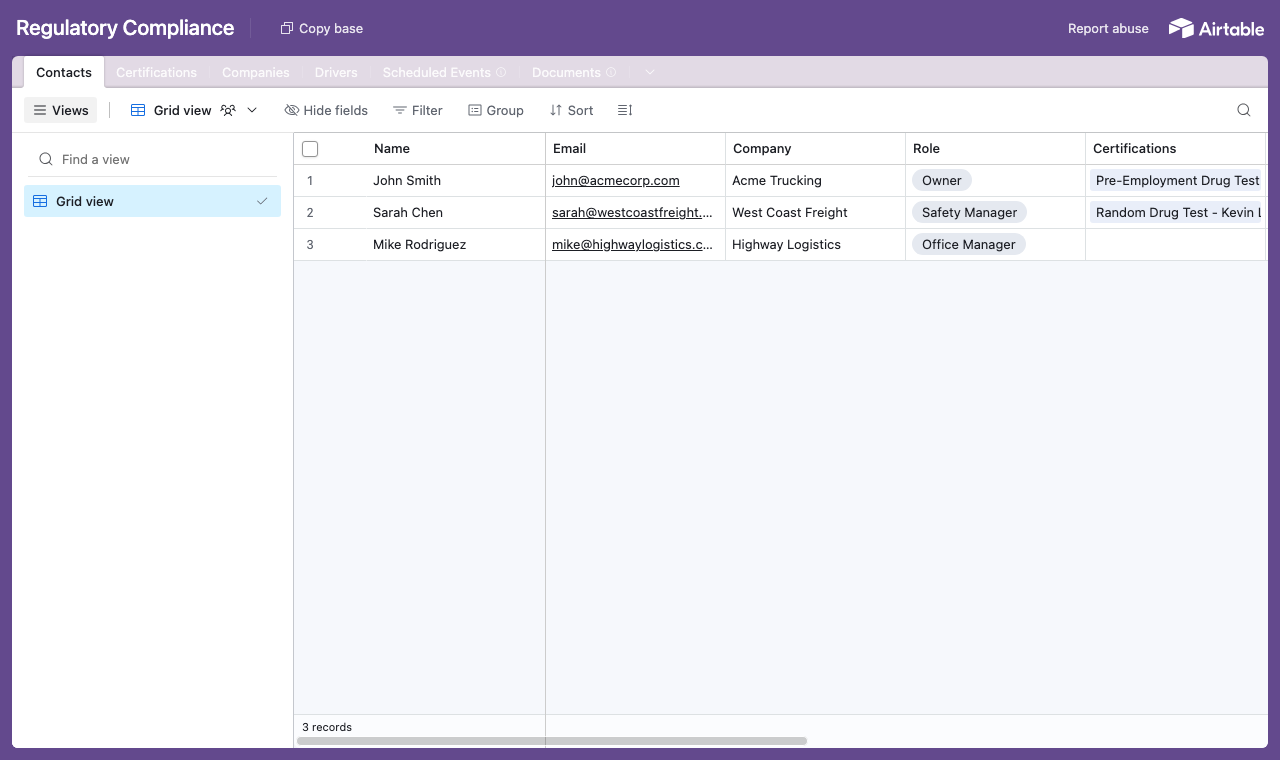
A table for each part of the programme, with a Contacts table every driver and certification links back to. - 2
Connect the base and pick the user table
Point CollabPortals at that base, then choose Contacts as your user table and Email as the login field. Each client signs in with their email and is matched to their own record.
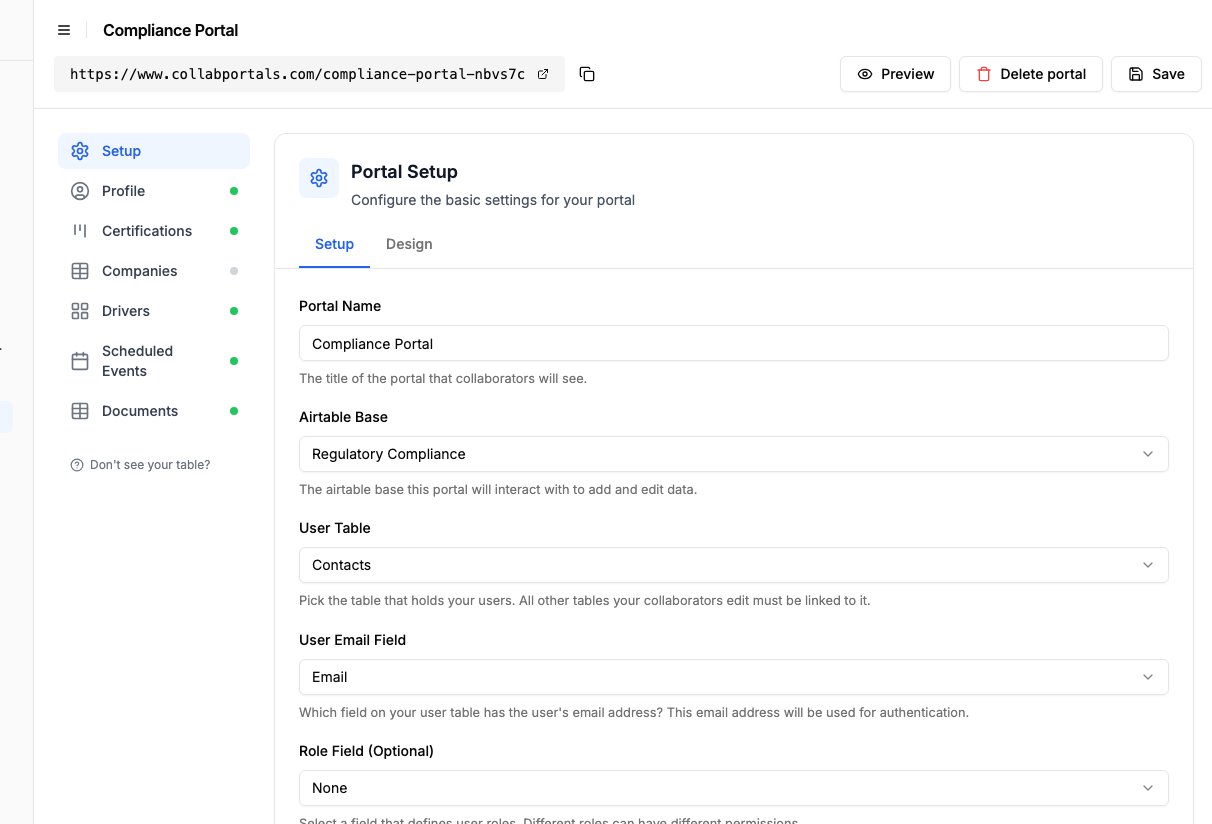
Connect the base, then point CollabPortals at the Contacts table and its email field. - 3
Let clients manage their roster, hide your pipeline
On the Drivers table, turn on create and edit so each client keeps their own roster current, adding a new driver or updating a licence, and leave delete to your team. Show the fields they manage, and hide internal ones like query schedules, invoicing and onboarding checklists.
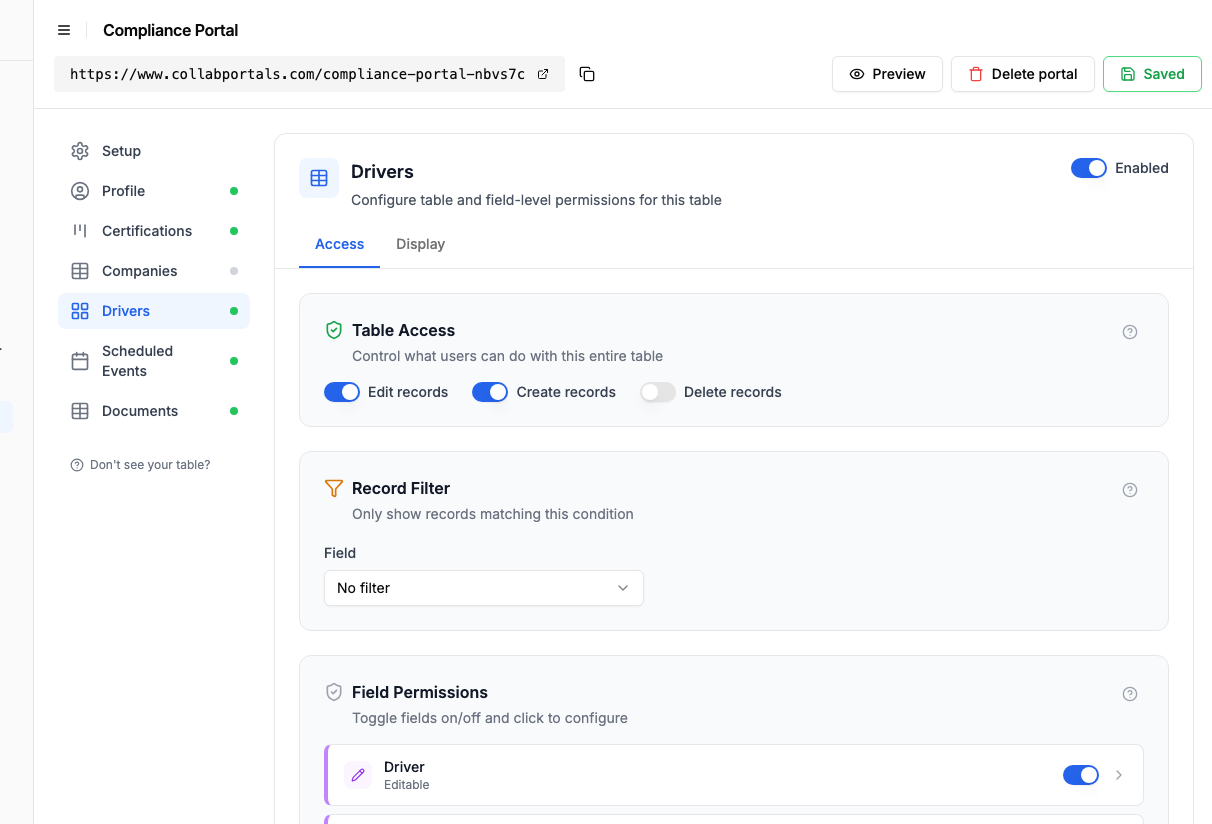
Let clients manage their own driver roster, while your internal pipeline stays hidden. - 4
Give each table the view that fits
Pick how each table appears. Certifications as a board grouped by status, so a client sees at a glance what is Current, Expiring Soon, or Expired, Drivers as a roster, Scheduled Events on a calendar, Documents as a table.
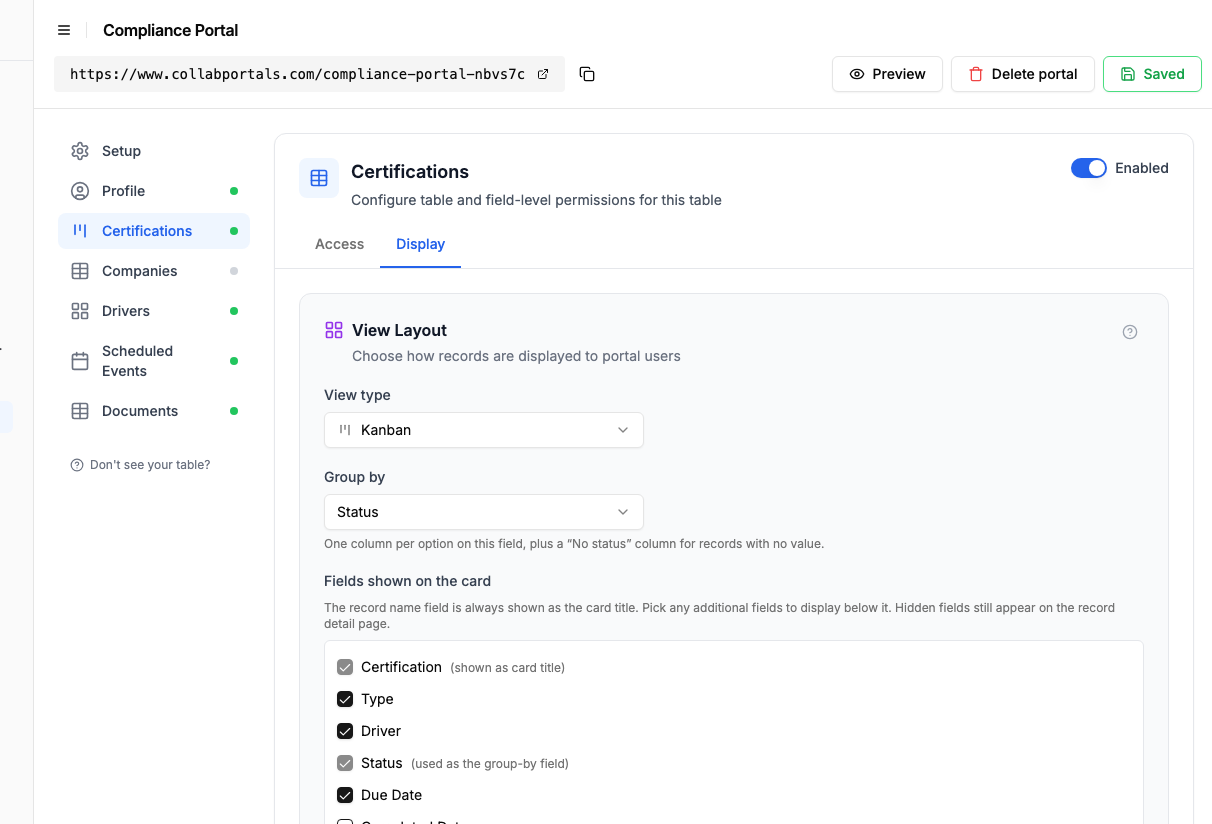
The Display tab lays Certifications out as a board grouped by status: Current, Expiring Soon, Expired. - 5
Clients see their compliance at a glance
The result is a clean, branded portal. Each client signs in, manages their driver roster, and watches every certification move from Current to Expiring Soon to Expired, so nothing lapses, all reading straight from your Airtable base.
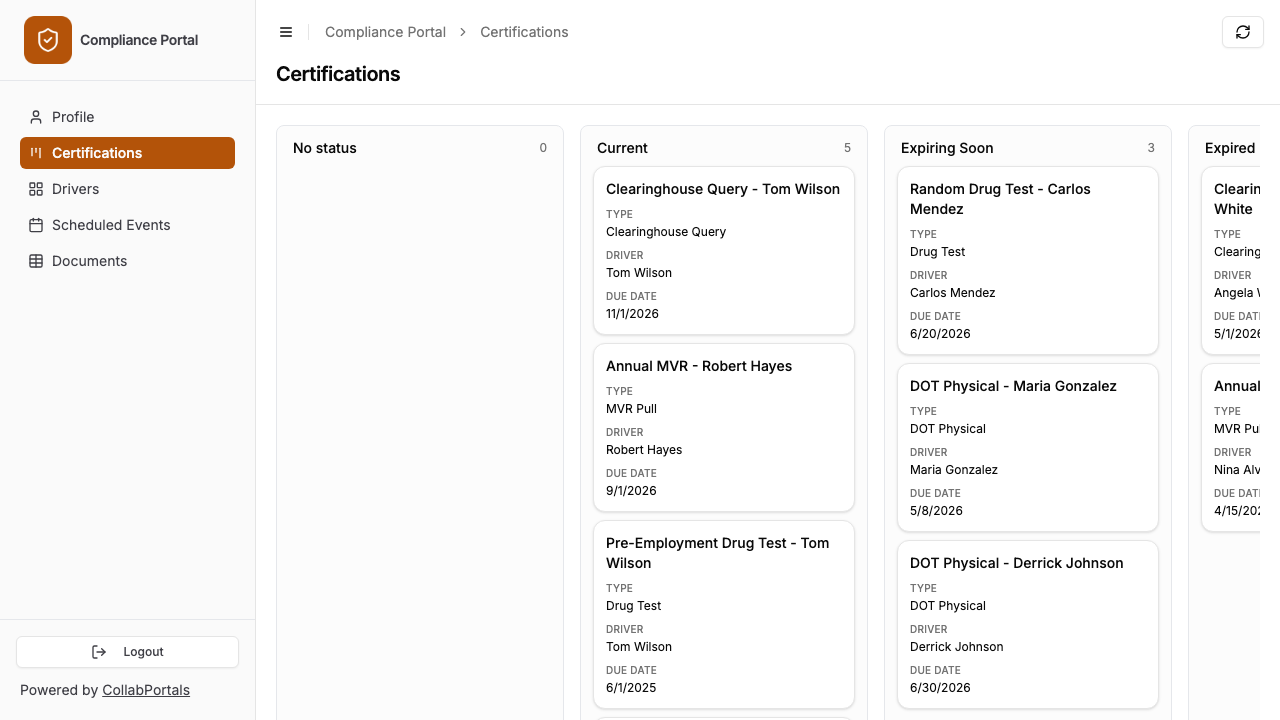
Each client sees their certifications on a board, grouped so nothing lapses unnoticed. - 6
They log in with their email
Share the link with your clients. Each one signs in with their email and a one-time code, so there are no passwords to manage and no Airtable seats to buy.
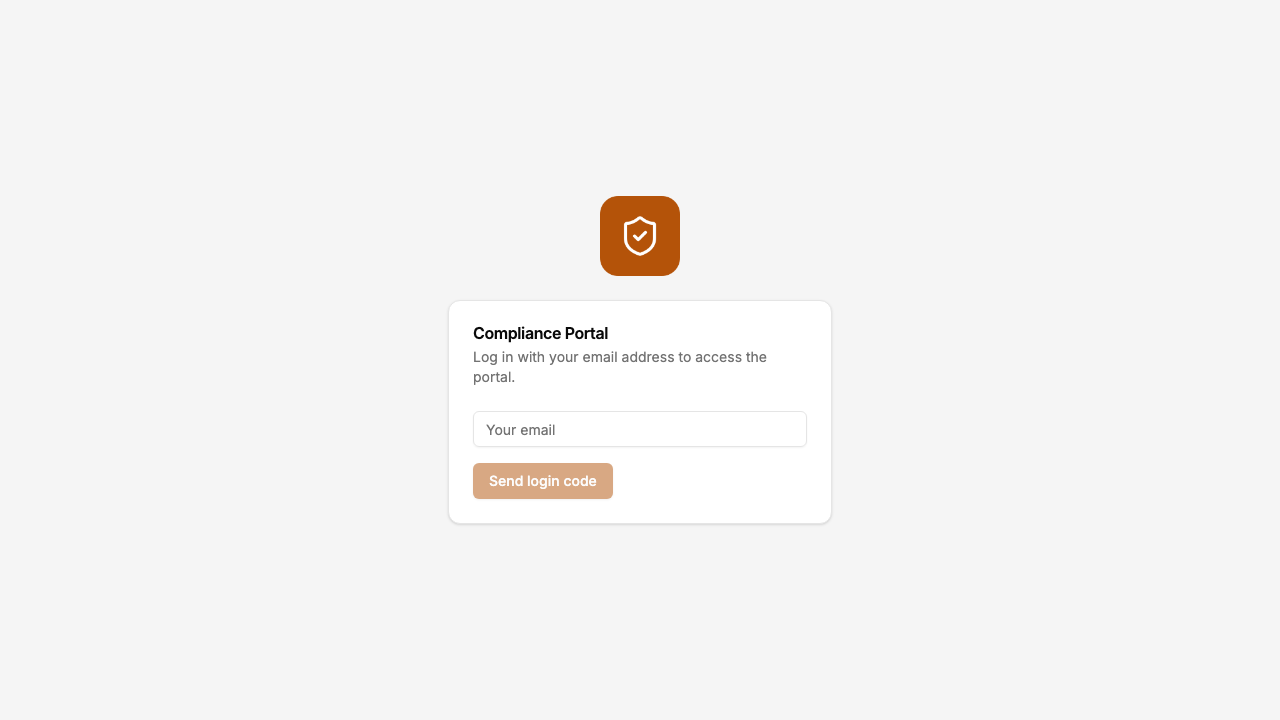
Email and one-time code login, branded with your firm's logo and colour.
Want to start from this exact setup? Open the live demo or copy the Airtable template and connect it to your own base in minutes.
Common Compliance Portal Patterns
Service Provider Portal
A compliance consulting firm gives each client organization a window into their compliance status.
- Company profile (view, edit) - organization details, license numbers, service agreements
- Personnel / drivers / employees (view, create, edit) - client manages their own roster
- Certifications & testing (view only) - results of drug tests, background checks, or inspections
- Upcoming deadlines (view only) - renewal dates, filing deadlines, audit schedules
- Hidden: internal notes, cost tracking, billing, workflow automation fields
Certification Tracking Portal
An industry body or training organization gives certified professionals access to their records.
- My certifications (view only) - certification type, issue date, expiry, status
- Training records (view only) - completed courses, hours logged, scores
- Renewal applications (create, edit) - professionals submit renewal documentation
- CE credits (view, create) - log continuing education activities
- Hidden: review notes, approval workflows, fee tracking, internal scoring
Environmental / Safety Reporting Portal
An environmental or safety consultancy gives clients access to their inspection and reporting data.
- Site inspections (view only) - inspection date, findings, compliance rating
- Corrective actions (view, edit) - client updates progress on required fixes
- Document submissions (create, edit) - client uploads required filings and evidence
- Compliance status (view only) - overall compliance score or rating per site
- Hidden: auditor notes, penalty risk assessments, regulatory correspondence
Why Airtable + CollabPortals for Compliance
Compliance data is structured, relational, and requires careful access control. Airtable handles the data model, and CollabPortals adds the controlled external access layer.
| Approach | Cost for 25 Clients | Record Updates | Deadline Tracking | Data in Airtable |
|---|---|---|---|---|
| CollabPortals | $10/month | Self-service | Yes | Yes (native) |
| Airtable seats | $500/month | Self-service | Yes | Yes |
| Email / PDF reports | Free | Manual re-entry | No | After manual entry |
| Google Forms + Zapier | $20+/month | One-way only | No | Via automation |
| Dedicated compliance software | $50-200/user/month | Yes | Yes | No (separate system) |
For organizations already running compliance workflows in Airtable, CollabPortals is the fastest way to give clients structured, secure access without changing systems.
Field-Level Permissions for Compliance Data
Compliance data often contains sensitive information that different audiences should not see:
- Show to clients: Company name, license numbers, compliance status, upcoming deadlines, personnel roster
- Hide from clients: Internal notes, cost breakdowns, billing status, workflow automation fields, other clients' data
- Editable by clients: Their own company details, personnel roster, document submissions
- Read-only for clients: Test results, inspection findings, compliance scores, deadline dates
CollabPortals gives you field-level control on every table, so each portal exposes exactly the right data for its audience. For clients with a large roster or many certifications, turn on filter, search and sort controls so they can filter by status and search for a driver or document by name.
For the generic version that applies to any base, see the setup guide.
Take It Further
The walkthrough above is the whole build. A few options are worth knowing once you are up and running:
- Nest certifications under each driver. Turn on related tabs so a driver's certifications, scheduled events and documents show as tabs on the driver record, scoped to it, so a client checks one person's tests and renewals on their own page.
Frequently Asked Questions
Can each client only see their own compliance data?
Yes. Each client is matched to their record in your Airtable Users table via email. They only see companies, drivers, or records linked to them. Client A cannot see Client B's data.
Can clients update their own personnel records?
Yes. If you enable create and edit permissions on a personnel or drivers table, clients can add new employees, update license information, and mark people as inactive. You control which fields are editable.
Is this secure enough for regulated data?
CollabPortals uses email verification for authentication and reads/writes directly to your Airtable base via the Airtable API with OAuth 2.0. Your data stays in Airtable. CollabPortals does not store compliance records. For specific regulatory requirements, review with your compliance team.
Can clients upload documents through the portal?
Yes, if your Airtable table includes attachment fields and you make them editable in the portal. Clients can upload PDFs, certificates, and other compliance documentation directly.
How do clients get notified about upcoming deadlines?
CollabPortals itself does not send notifications, but you can use Airtable automations to email clients when deadlines approach or when compliance statuses change. Many teams already have these automations in place.
Can I use different portals for different compliance programs?
Yes. You can create multiple portals connected to the same Airtable base with different permission configurations. For example, one portal for drug testing consortium members and another for safety training participants, each seeing only the tables and fields relevant to them.

About the author
Matt Shepherd
Founder, CollabPortals
Matt is the founder of CollabPortals. A software engineer and Airtable power user who kept running into the same frustration: no easy way to give external users a simple and secure view to edit their data. He built CollabPortals as the lightweight solution to that problem, allowing you to set up a secure, permissioned portal in a few clicks.
Related use cases and guides
Insurance
Give agents, brokers, and clients a secure portal to submit applications, track policy status, and manage underwriting data, powered by your Airtable base.
Use caseInternal Requests
Let employees submit hardware requests, IT tickets, supply orders, and internal service requests through a portal connected to your Airtable operations base.
ComparisonCollabPortals vs Airtable Portals: Third-Party Tool or Native Feature?
Compare CollabPortals ($10/month, unlimited users) with Airtable's native Portals, where read-only guests are free and editing guests are sold in packs from $120/month. See which fits how your users actually work.
ComparisonCollabPortals vs Miniextensions: Which Airtable Portal Tool Is Right for You?
A detailed comparison of CollabPortals and Miniextensions for building Airtable portals. Compare pricing, features, and limitations to find the best fit.