Build an Airtable Maintenance and Fault Reporting Portal
Let tenants, clients, or building occupants submit fault reports with photos and track repair status through a portal connected to your Airtable maintenance database.

See it working, then start from a ready-made Airtable base.
See a live demoCopy the Airtable templateThe Problem: Collecting Fault Reports from Clients
You run a repair, maintenance, or facilities management business. You track faults, work orders, and repair status in Airtable. But the people reporting faults, tenants, building managers, clients, cannot access your system:
- Phone and email reports require manual data entry. Details get lost in translation, photos arrive in separate email threads, and reporters call back repeatedly to check status.
- Google Forms or Typeform collect the initial report but offer no follow-up. Reporters submit into a void, no status updates, no way to add information, no visibility into what happens next.
- WhatsApp groups become chaotic. Photos and descriptions are scattered across chat threads, nothing is structured, and older reports get buried.
- Dedicated CMMS or helpdesk tools (Jira, Freshdesk, UpKeep) cost $15 to $50+ per user per month and force your team to leave Airtable.
What you need is a portal where clients submit structured fault reports directly into your Airtable base, upload photos, and come back to check repair status, without seeing other clients' reports or your internal cost data.
How CollabPortals Works for Maintenance
CollabPortals connects to your Airtable base and creates a branded portal for fault reporting. Clients log in with their email, submit reports using your Airtable table structure, and track repair status. Your maintenance team continues working in Airtable.
Example: Property Maintenance Portal
A facilities management company lets building occupants report faults and track repairs.
| Table | Client Access | Purpose |
|---|---|---|
| Fault Reports | View, create, edit | Clients submit faults with location, description, photos, priority |
| My Company | View only | Clients see their company details and contact info |
| Users | View, edit | Clients manage their own profile |
| Technician Assignments | Hidden | Internal dispatch and scheduling |
| Cost Tracking | Hidden | Parts, labor costs, and vendor invoices |
| Quotes | Hidden (or view-only) | Optionally share repair quotes for client approval |
Clients see: a form to submit faults, their existing reports with status, and any quotes awaiting approval. Your team sees: the full operation with assignments, costs, and scheduling.
Build a Maintenance Portal Step by Step
Here is how the live demo above is put together. It takes about an hour the first time, with no code involved.
- 1
Set up your Airtable base
Start with your maintenance base: a Fault Reports table for what clients submit, a Properties table for the sites you cover, a Scheduled Visits calendar, a Documents library, and a Contacts table for the people who log in. Contacts is the hub. It holds each client's email, and the Fault Reports link back to it, so each client only ever sees their own reports.
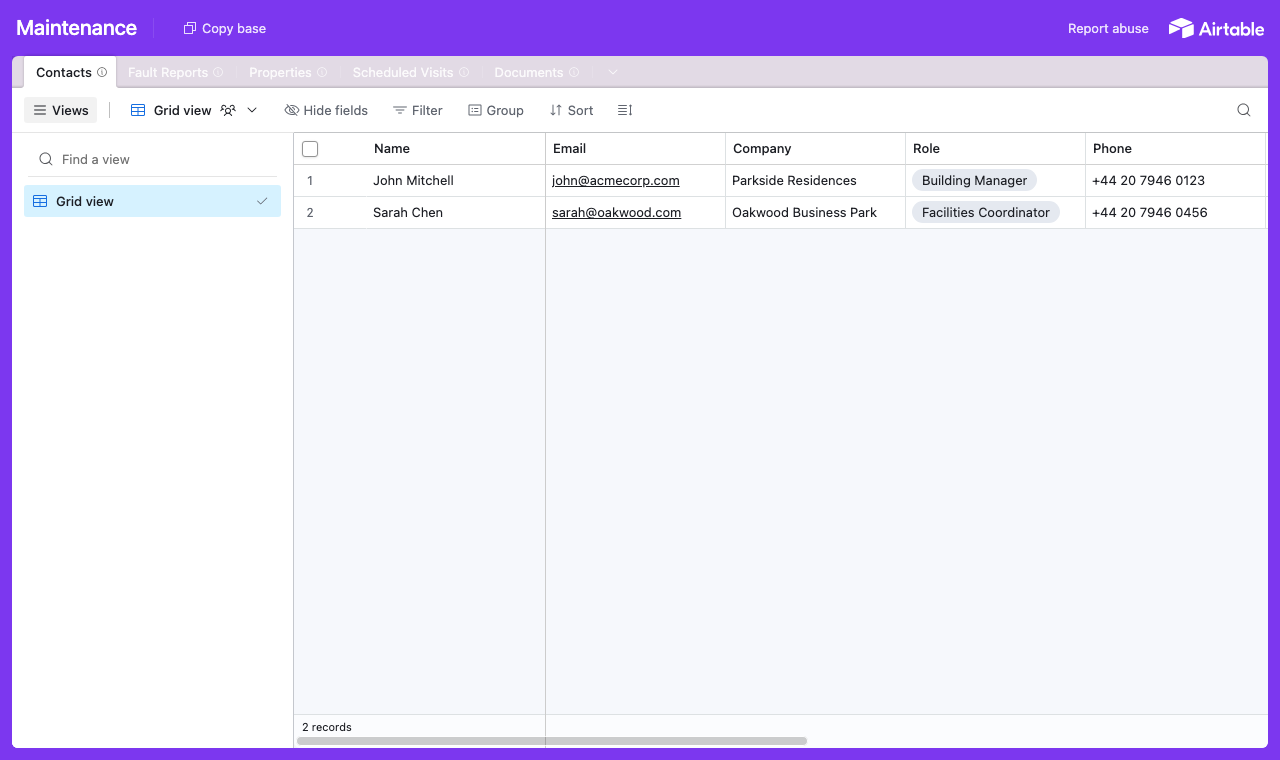
A table for each part of the operation, with a Contacts table every fault report links back to. - 2
Connect the base and pick the user table
Point CollabPortals at that base, then choose Contacts as your user table and Email as the login field. Each client signs in with their email and is matched to their own record.
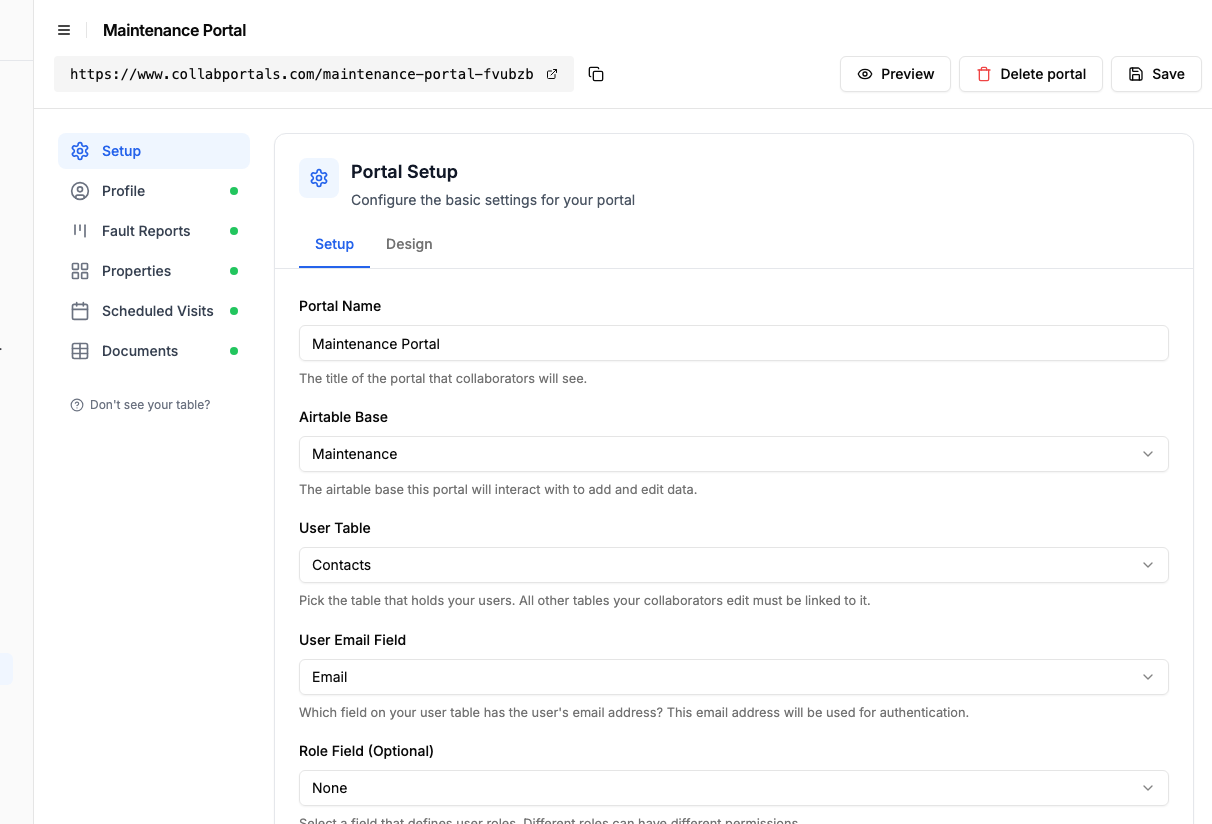
Connect the base, then point CollabPortals at the Contacts table and its email field. - 3
Let clients report faults, hide costs and assignments
On the Fault Reports table, turn on create and edit so clients can raise a fault, attach a photo and update it later, and leave delete off. Show the fields they fill in, like location, description, priority and photo, and hide internal ones such as the assigned technician, parts cost and labour.
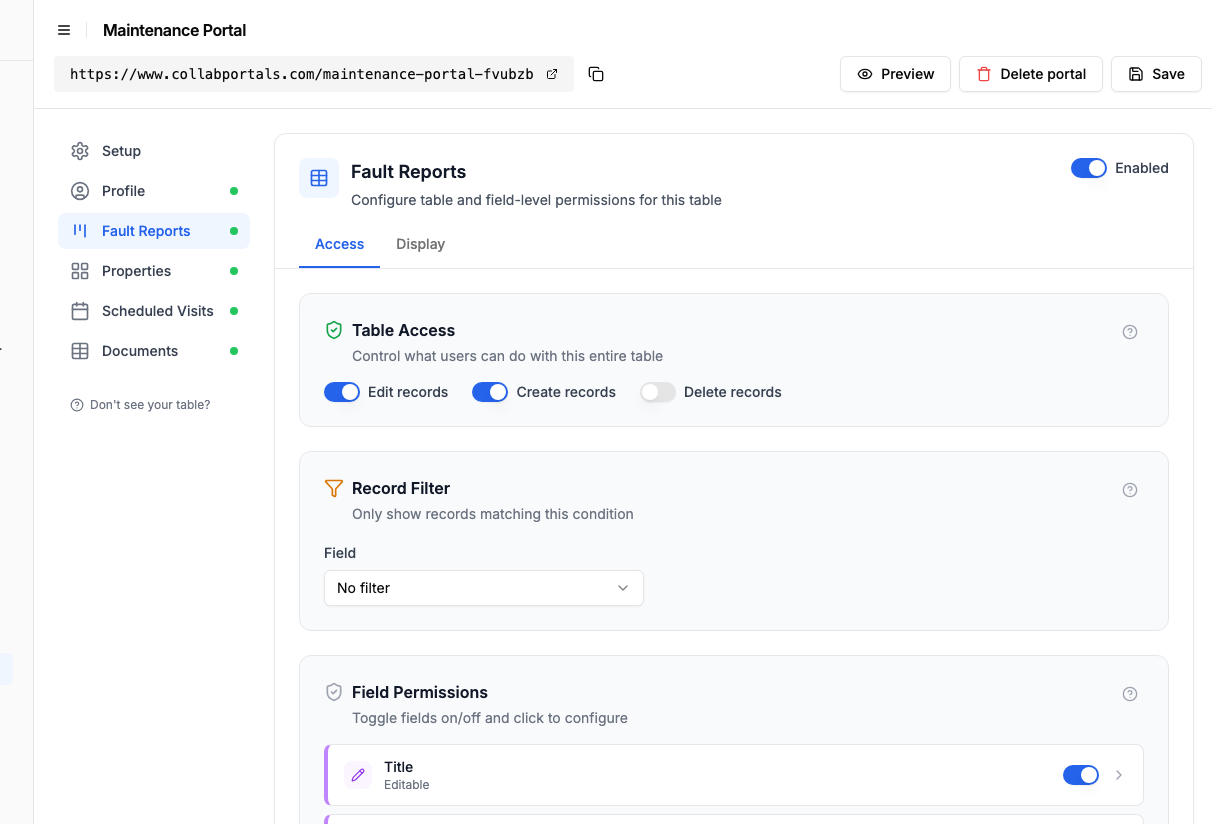
Let clients raise and update faults, while assignments and costs stay hidden. - 4
Give each table the view that fits
Pick how each table appears. Fault Reports as a board so a client watches a report move from Reported to In Progress to Resolved, Scheduled Visits on a calendar, Properties and Documents as tables. If your team wants fault reports on a calendar as well as a board, add a second page on the same table rather than choosing.
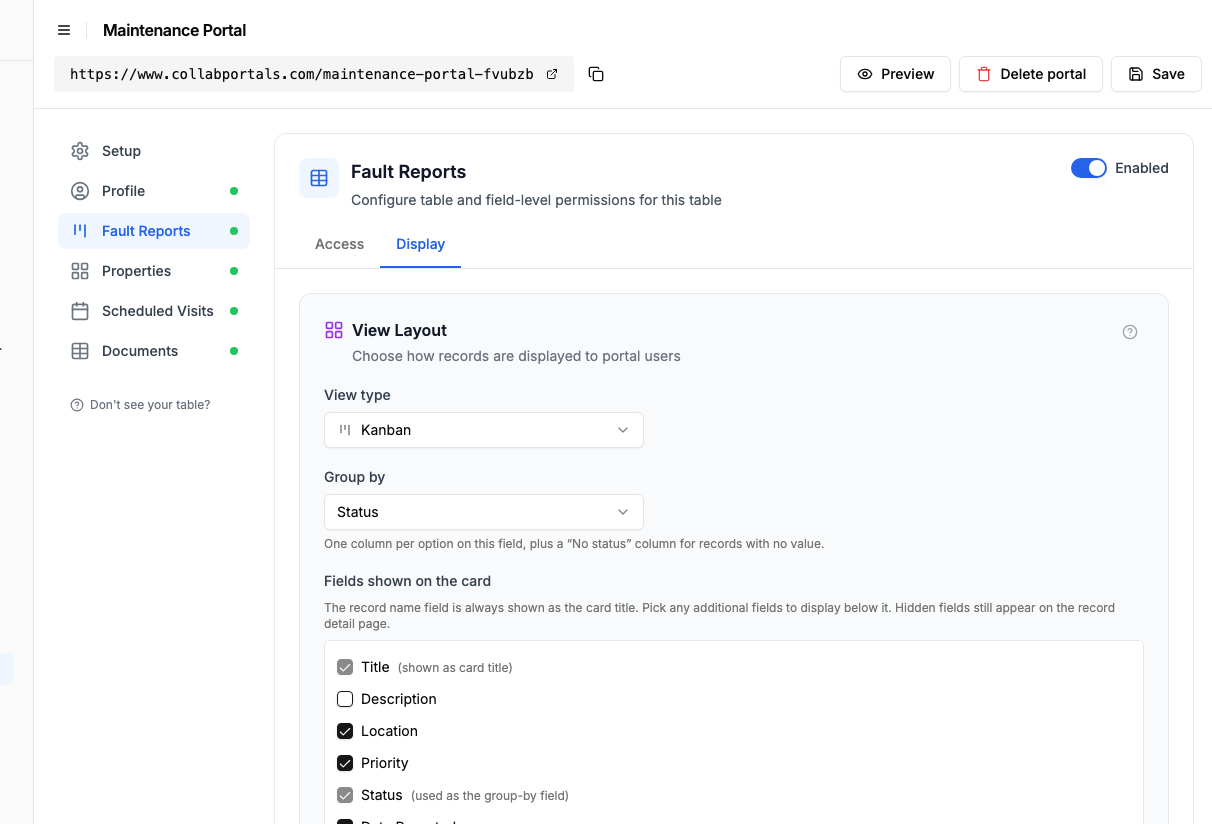
The Display tab lays the Fault Reports table out as a board grouped by status. - 5
Clients report and track in one place
The result is a clean, branded portal. Each client signs in, submits a fault with a photo, and watches it move across the board as your team works it, all writing straight into your Airtable base.
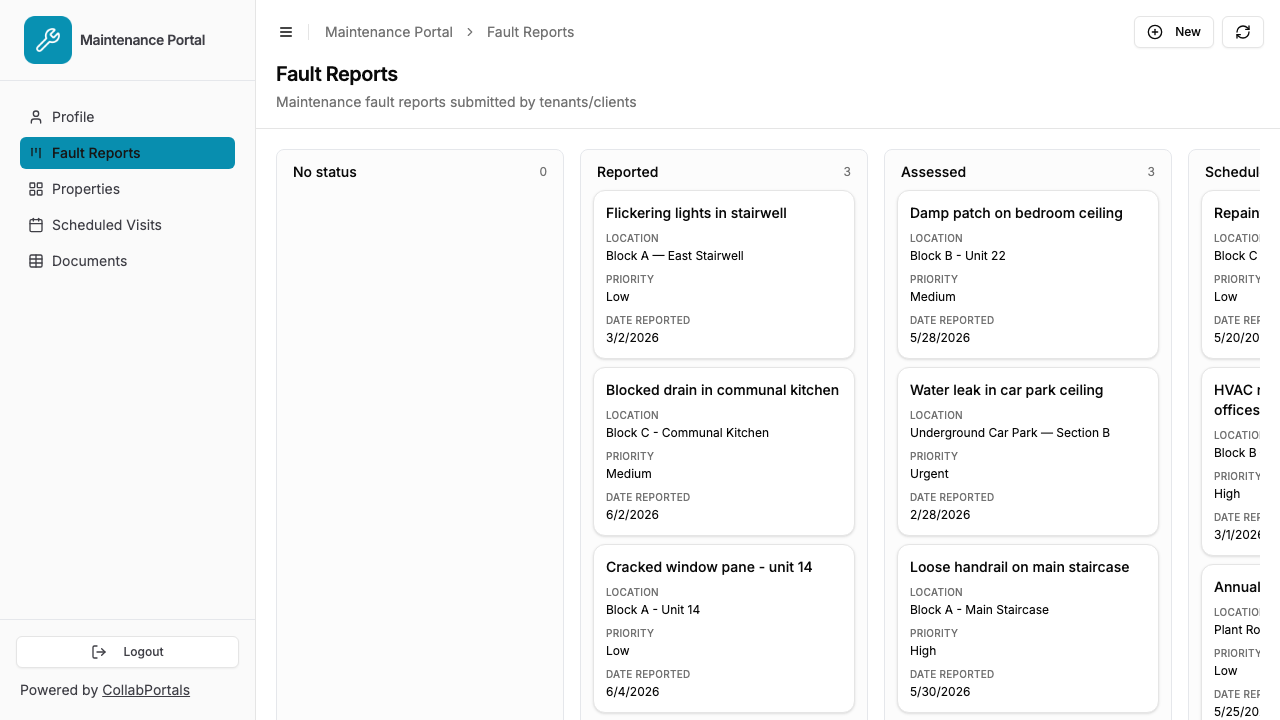
Clients submit a fault and track it from Reported to Resolved on the board. - 6
They log in with their email
Share the link with your clients. Each one signs in with their email and a one-time code, so there are no passwords to manage and no Airtable seats to buy.
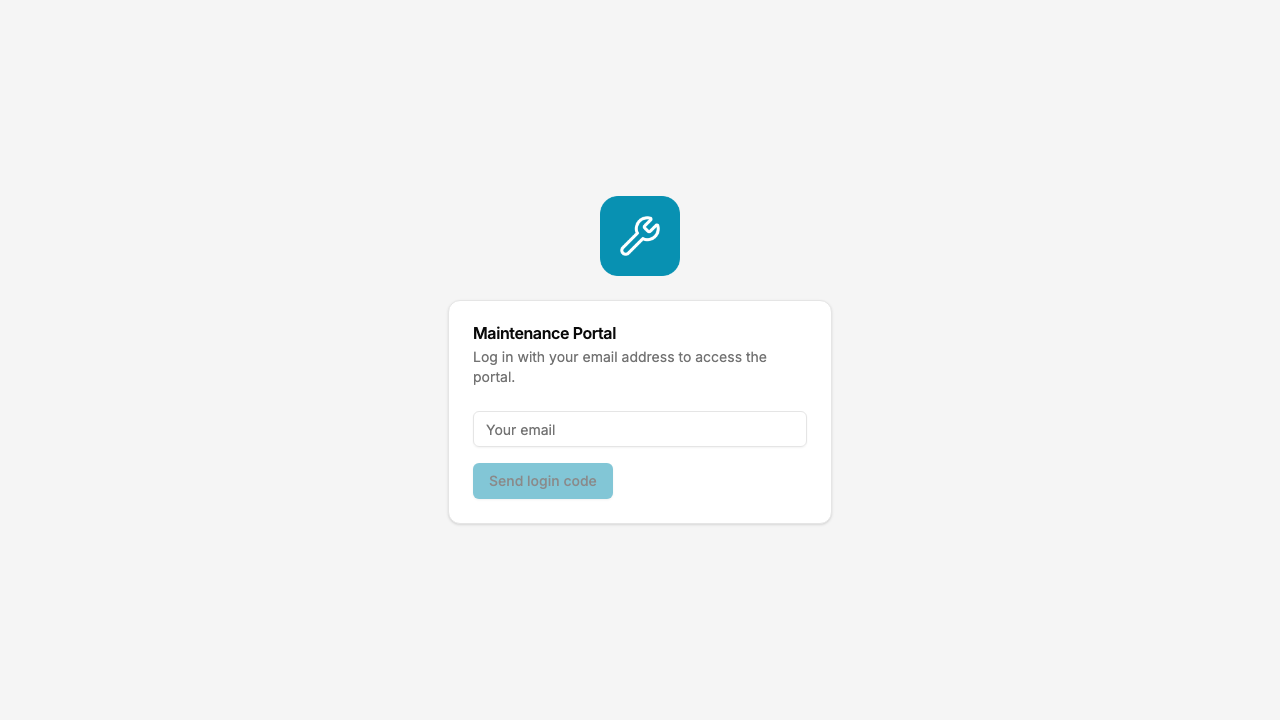
Email and one-time code login, branded with your logo and colour.
Want to start from this exact setup? Open the live demo or copy the Airtable template and connect it to your own base in minutes.
Use Cases for Maintenance Portals
Property and Facilities Management
Tenants or building occupants report issues (broken fixtures, HVAC faults, plumbing leaks, electrical problems) and track resolution.
- Fault Reports (create, edit), location, description, photos, priority, date
- Status view (read-only), reported, assessed, scheduled, in progress, resolved
- Quote acceptance (edit), approve or reject repair quotes
- Hidden: assigned contractor, cost breakdown, parts ordered, internal priority
Equipment and Machinery Maintenance
Clients or operators report equipment faults for a service company to investigate and repair.
- Fault Reports (create, edit), equipment type, serial number, fault description, photos, urgency
- Service History (read-only), previous repairs, maintenance schedule
- Hidden: parts inventory, supplier costs, technician availability, warranty status
Commercial Cleaning and Building Services
Property managers report issues to their cleaning or building services provider.
- Service Requests (create, edit), building, floor, area, issue type, description, photos
- Request Status (read-only), received, scheduled, completed, follow-up needed
- Hidden: staff assignments, hourly rates, contract terms, internal SLA tracking
What Makes This Better Than Forms or Chat
| Capability | Form (Google/Typeform) | WhatsApp/Email | CMMS (UpKeep/Jira) | CollabPortals |
|---|---|---|---|---|
| Structured fault submission | Yes | No | Yes | Yes |
| Photo uploads | Limited | Yes (unstructured) | Yes | Yes |
| Reporter sees status updates | No | Ad hoc | Yes | Yes |
| Reporter can add info to existing report | No | Via chat (messy) | Yes | Yes (edit access) |
| Data lives in Airtable | Via integration | No | No (separate system) | Yes (native) |
| Per-client data isolation | N/A | No | Yes | Yes |
| Cost | Free + integration ($20+/month) | Free | $20 to 50/user/month | $10/month flat |
| Your team works in Airtable | Partially | No | No | Yes |
The portal closes the feedback loop: clients submit structured reports, upload photos, check repair status, and approve quotes, all through your Airtable data. No separate system for your team to monitor. For more on the portal-vs-form question, see CollabPortals vs Fillout and CollabPortals vs Miniextensions.
Field-Level Permissions for Fault Reporting
Maintenance tables often have fields that serve different audiences:
- Show to clients: Fault description, location, photos, priority, status, date submitted, quote document
- Hide from clients: Assigned technician, labor cost, parts cost, internal priority score, SLA deadline, contractor notes
- Editable by clients: Description (to add details), photos (to add evidence), quote acceptance
- Read-only for clients: Status, resolution date, days open
This means clients see a clean, relevant view while your team has full operational data in the same Airtable table.
Take It Further
The walkthrough above is the whole build. A few options are worth knowing once you are up and running:
- Quote approvals. Add a Quotes table, view-only or with an approve field, so clients sign off on repair quotes without an email thread.
- Status emails. Pair the portal with an Airtable automation that emails a client when their fault moves to In Progress or Resolved.
- Per-property scope. With a record filter, a building manager sees only the faults at their own sites, never another client's.
- Nest faults and visits under each property. Turn on related tabs so a property's fault reports and scheduled visits show as tabs on the property record, scoped to it, so a building manager sees one site's open work in one place.
- Call them jobs, not records. On the Labels tab you set what one row is called, per table, and the portal follows it: the button becomes "Log a job", the delete prompt asks "Delete job?", and an empty table reads "No jobs to display." See renaming your portal's wording.
After set-up, every fault a client reports lands straight in your Airtable base, where your team schedules, costs and closes it.
For the generic version that applies to any base, see the setup guide.
Frequently Asked Questions
Can clients only see their own fault reports?
Yes. Each client is matched to their record in your Airtable Users table via email. They see only faults they submitted or that are linked to their company. One tenant cannot see another tenant's reports.
Can clients upload photos of the fault?
Yes, if your Airtable table includes an attachment field and you make it visible and editable in the portal. Clients can upload photos directly when submitting or updating a fault report.
Can clients approve or reject repair quotes?
Yes. If you add a quote acceptance field (e.g., a single select with "Approved" / "Rejected") and make it editable, clients can respond to quotes directly in the portal.
Can I send notifications when a fault status changes?
CollabPortals itself does not send notifications, but you can set up Airtable automations to email clients when a status field changes. The portal then reflects the updated status when they log in.
How is this different from a dedicated CMMS tool?
If your team already tracks maintenance in Airtable, CollabPortals adds a client-facing portal without migrating to a new system. CMMS tools like UpKeep or Fiix cost $20 to $50+ per user per month and require your team to work in a separate system.
Can I use this for both internal and external fault reporting?
Yes. You can create separate portals with different permissions, one for external clients and one for internal staff. Both connect to the same Airtable base.

About the author
Matt Shepherd
Founder, CollabPortals
Matt is the founder of CollabPortals. A software engineer and Airtable power user who kept running into the same frustration: no easy way to give external users a simple and secure view to edit their data. He built CollabPortals as the lightweight solution to that problem, allowing you to set up a secure, permissioned portal in a few clicks.
Related use cases and guides
Issue Tracking
Let tenants, customers, or end users report issues and track resolution status through a portal connected to your Airtable maintenance database.
Use caseLocation Management
Give field teams, franchisees, and regional partners secure access to their location data in Airtable. Track sites, jobs, inventory, and tickets without sharing your entire base.
ComparisonCollabPortals vs Fillout: Portal or Form Builder?
Compare CollabPortals ($10/month portal builder) with Fillout (form builder from $0/month). Understand when you need a portal vs a form for Airtable data collection.
ComparisonCollabPortals vs Miniextensions: Which Airtable Portal Tool Is Right for You?
A detailed comparison of CollabPortals and Miniextensions for building Airtable portals. Compare pricing, features, and limitations to find the best fit.