Embed a Map, Form or Booking Page on Each Airtable Record in Your Portal
Record embeds show a page from another site on each record's page in your CollabPortals portal, using a link stored on the record. A map per property, a form per applicant, shown only when your conditions match.

Some steps happen on another site
A lot of Airtable workflows hand off to another tool for one step. An applicant does an ID check with a verification provider. A client signs a contract with an e-signature tool. A customer picks a slot on a booking page. Each of those has its own link, usually a different one for every record.
Until now the person got that link by email, separately from the portal where everything else lived. A record embed puts it on the record's page instead.
What a record embed does
You pick a field that holds a link, and each record's page in the portal shows the page that link points to. Because the link comes from the record, every record shows its own.
The simplest case is a map. Add a formula field that builds each property's Google Maps embed address, such as "https://www.google.com/maps?q=" & ENCODE_URL_COMPONENT({Address}) & "&output=embed", add one embed that allows www.google.com, and every property's page shows where it is. The output=embed part matters: an ordinary Google Maps link, or the short link from the Share button, won't show inside the portal.
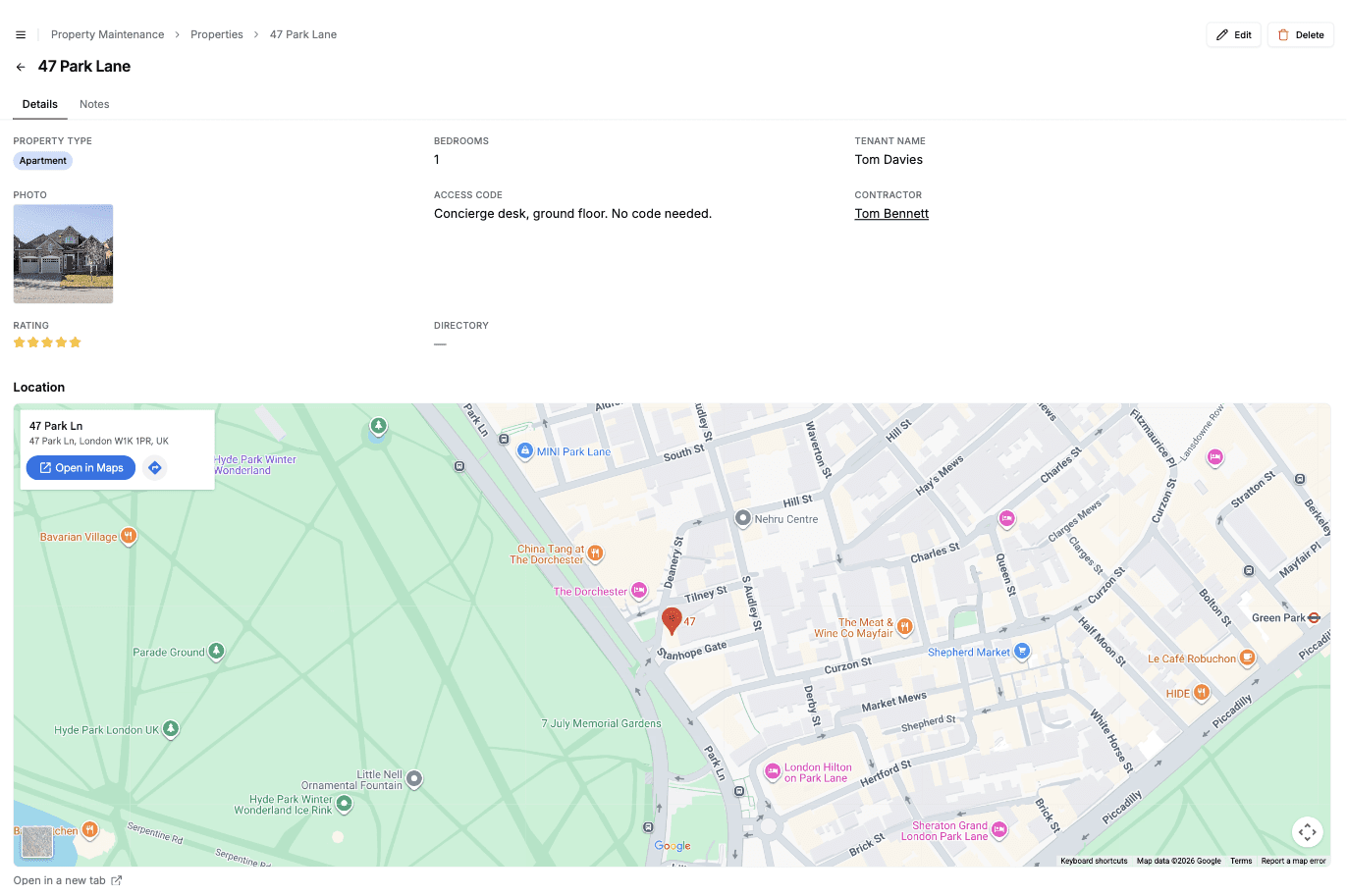
You can see one working on our Property Maintenance demo.
The more useful case is a step that comes and goes. An Airtable automation creates an intake form or a signature request with the provider and writes its link into a field. The record page shows the form while a status field says it is outstanding, and hides it once the status says it is done.
Setting one up
Open the page in the portal editor, switch to the Display tab, and find Record Embed at the bottom.
- Add an embed and pick the field that holds the link. URL fields, single line text, formulas that build a link, and lookups of either all work. The field can be one your users can't see.
- List the sites you allow, such as
www.google.com, or*.example.comfor every subdomain. Nothing shows until at least one site is listed. - Add conditions if the embed should only show on some records, for example "where KYC Status does not equal Verified".
You can also set a heading, a height, and whether the embedded page may use the camera and microphone, which ID and selfie checks need.
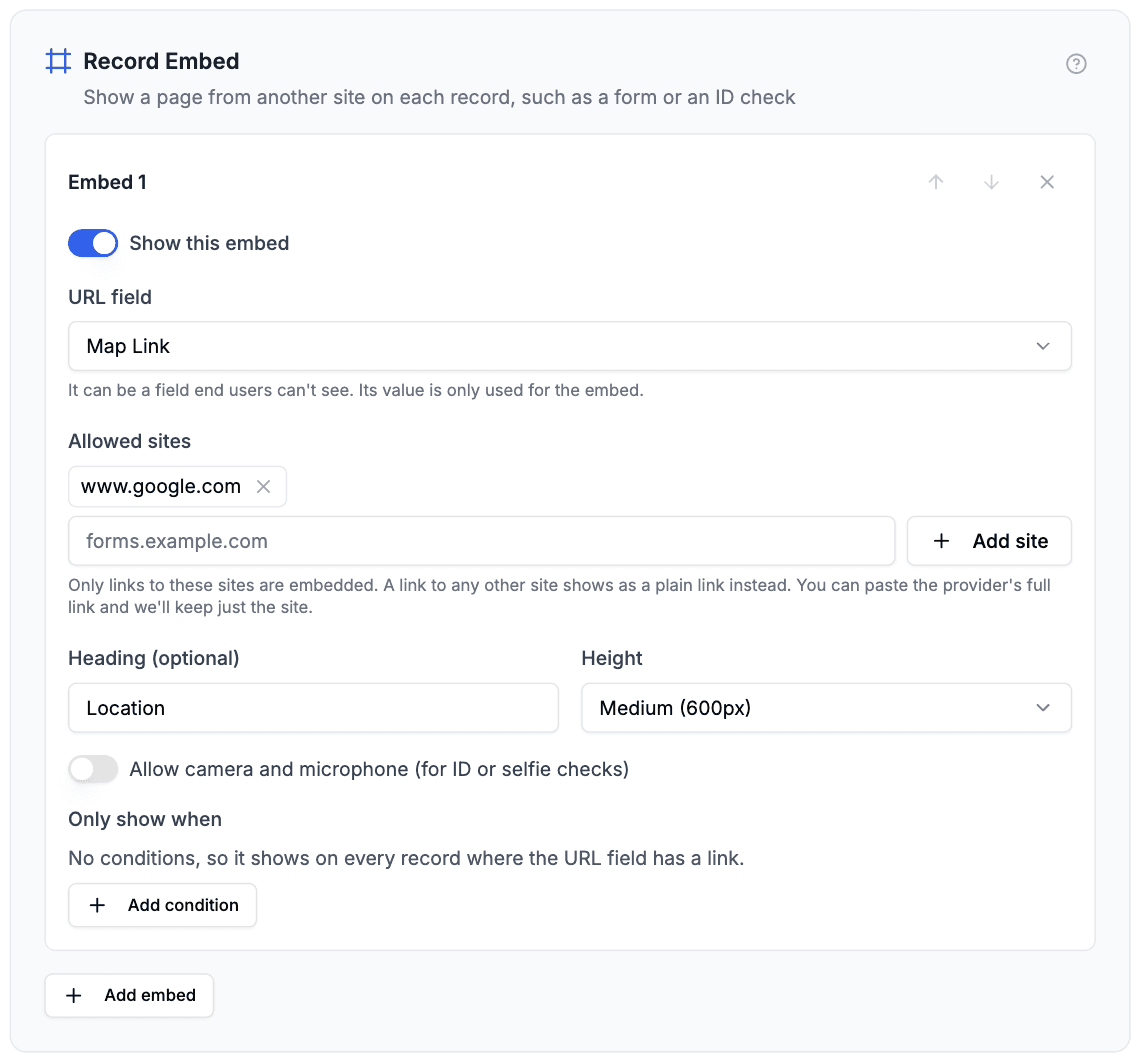
A page can have up to five embeds, each with its own field, sites and conditions, so an ID check and a contract can come from different providers. Every embed whose conditions match is shown, in order. To show one step at a time, give them conditions that can't both be true.
What stays safe
Only the sites you list are embedded. A link to anything else shows as a plain link naming the site, so a link to a site you have not listed is never shown inside the portal. The embedded page can't navigate your portal away, and the camera stays off unless you turn it on for that embed.
Your users never receive the settings themselves. The list of sites, which field holds the link and your conditions are all worked out before the page is sent.
One thing to know before you start: some providers refuse to be shown inside another site, and a browser gives the portal no way to tell. That is why every embed has an "Open in a new tab" link under it. If the area stays blank, check the provider's settings for an embedding or "allowed domain" option and add your portal's address. The record embeds guide covers this in more detail.
Who this helps
Any portal where part of the job happens in another tool.
- Application portals, with an ID check or a signature request on each applicant's record
- Real estate portals and location management portals, with a map on every property or site
- Service business portals, with each client's booking page on their record
- Contractor compliance portals, with a provider's signature step that disappears once it is complete
How it compares
Softr can show embed code stored in an Airtable field through its embed field type, so each record can carry its own iframe. Noloco has an iframe component whose URL can come from your data.
In CollabPortals the embed reads a plain link rather than embed code, so the field your automation fills is just a URL. The allowed sites, the conditions and the field itself stay on the server, and a link to a site you have not listed is never framed.
Getting started
Open a page's Display tab and add an embed under Record Embed. The record embeds feature page has the overview, and the guide has every setting.
Let me know what you embed.

About the author
Matt Shepherd
Founder, CollabPortals
Matt is the founder of CollabPortals. A software engineer and Airtable power user who kept running into the same frustration: no easy way to give external users a simple and secure view to edit their data. He built CollabPortals as the lightweight solution to that problem, allowing you to set up a secure, permissioned portal in a few clicks.
Related reading
Embed a Map, Form or Booking Page on Each Airtable Record
Show a page from another site inside each record's page in your portal, using a link stored on the record. A per-record map, intake form, ID check or signature request, shown only when your conditions match.
Use caseReal Estate
Give clients and agents a branded portal to track property listings, transactions, and documents, all powered by your existing Airtable base.
Use caseApplications and Reviews
Run grant, scholarship and program applications in Airtable. Applicants track status and upload what is missing; reviewers score only their assignments.
ComparisonCollabPortals vs Softr: Lightweight Portal or Full App Builder?
Compare CollabPortals and Softr for Airtable portals. See how a $10/month focused portal tool stacks up against a full no-code app builder starting at $19/month billed annually.