Build an Airtable Contractor Compliance Portal
Give contractors and vendors a self-service portal to upload and renew their insurance, license, and tax documents, with expiry tracking, all powered by your Airtable base.

See it working, then start from a ready-made Airtable base.
See a live demoCopy the Airtable templateThe Problem: Chasing Contractor Documents
You work with contractors and vendors, and every one of them has to stay compliant. Certificates of insurance, W9s, business licenses, and bonds all live in Airtable because it is the most flexible way to track who is covered and who is not.
But collecting and renewing those documents is a manual grind:
- You chase paperwork by email, asking contractors to send their latest insurance certificate, then saving the attachment into Airtable yourself
- Nothing warns you when a document expires, a certificate of insurance lapses and you only find out when you go looking
- Contractors cannot see what they owe you, so they send the wrong file, an out-of-date one, or nothing at all
- Adding them to Airtable is expensive, $20/month per contractor on Team plans just so they can upload a file
What you need is a portal where each contractor logs in, sees exactly which documents are valid, expiring, or expired, and uploads renewals themselves, all writing straight back to your Airtable base.
How CollabPortals Works for Contractor Compliance
CollabPortals creates a branded portal connected to your Airtable base. Each contractor logs in with their email, gets matched to their record, and sees only the documents linked to them.
Example Portal Configuration
| Table | Contractor Access | Purpose |
|---|---|---|
| Contractors (Profile) | View, edit | Contractors keep their own company name, trade, and contact details current |
| Documents | View, create, edit | Contractors upload and renew COIs, W9s, licenses, and bonds, with required type, file, and expiry date |
| Status (per document) | View only | A live Valid / Expiring soon / Expired status, read-only so it stays accurate |
| Vetting status, internal notes | Hidden | Your internal review status and notes stay private |
What This Replaces
| Before | After |
|---|---|
| You email contractors asking for their latest insurance certificate | Contractors upload renewals themselves in the portal |
| You save attachments into Airtable by hand | Files write straight into your Airtable base |
| A lapsed certificate goes unnoticed | Every document shows a live expiry status |
| Contractors guess what you need | They see exactly which documents are valid, expiring, or expired |
| $20/month per contractor for Airtable access | One flat CollabPortals subscription |
Portal Patterns for Contractor Compliance
Document Collection and Renewal
Contractors submit and renew their own paperwork, and it flows directly into Airtable.
- Documents table with create and edit access, document type, file attachment, issue date, and expiry date
- Required fields ensure every upload has a type, a file, and an expiry date
- Each new document links automatically to the contractor who uploaded it
Expiry Tracking
A simple formula field turns expiry dates into a status everyone can read at a glance.
- A Status field marks each document Valid, Expiring soon, or Expired based on its expiry date
- The Documents view is sorted by expiry date, so anything lapsing surfaces first
- Status is read-only in the portal, so it always reflects the real date
Self-Service Profiles
Contractors keep their own details current so you are not the bottleneck for data entry.
- Contractors table with edit access to company name, trade, and phone
- Email is read-only, since it is their login identity
- Internal fields like vetting status and private notes stay hidden
Cost Comparison
| Approach | Cost for 30 Contractors | Contractor Self-Service | Expiry Tracking |
|---|---|---|---|
| CollabPortals | $10/month | Yes, upload and renew | Yes, live status field |
| Airtable seats | $600/month | Yes | Manual |
| Google Forms to Airtable | Free + automation cost | Limited (form submissions only) | Via Zapier/Make ($20+/month) |
| Dedicated compliance software | $100 to 500+/month | Yes | Yes (but a separate system) |
| Email + manual entry | Free | No, you do it | No |
For detailed pricing breakdowns, see CollabPortals vs Miniextensions and CollabPortals vs Stacker, or the roundup of the best Airtable portal builders.
Build a Contractor Compliance Portal Step by Step
Here is how the live demo above is put together. It takes about an hour the first time, with no code involved.
- 1
Set up your Airtable base
Start with two tables: a Contractors table for the people who log in, with their email, company and trade, and a Documents table for their paperwork, with a type, a file attachment, an issue date and an expiry date. Every document links back to its contractor, so each one only ever sees their own files. Add a formula Status field that reads each expiry date and marks the document Valid, Expiring soon, or Expired.
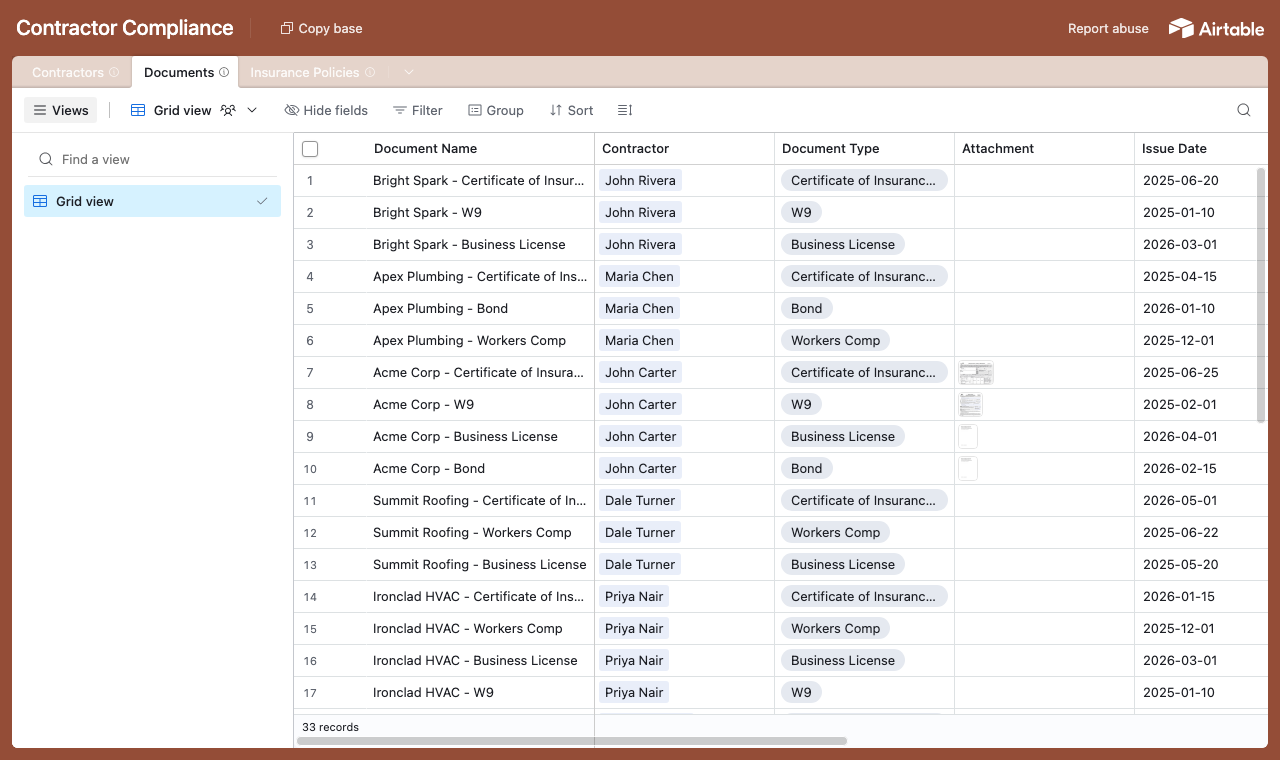
A Documents table, each row linked to the contractor who owns it, with type, file and expiry date. - 2
Connect the base and pick the user table
Point CollabPortals at that base, then choose Contractors as your user table and Email as the login field. Each contractor signs in with their email and is matched to their own record.
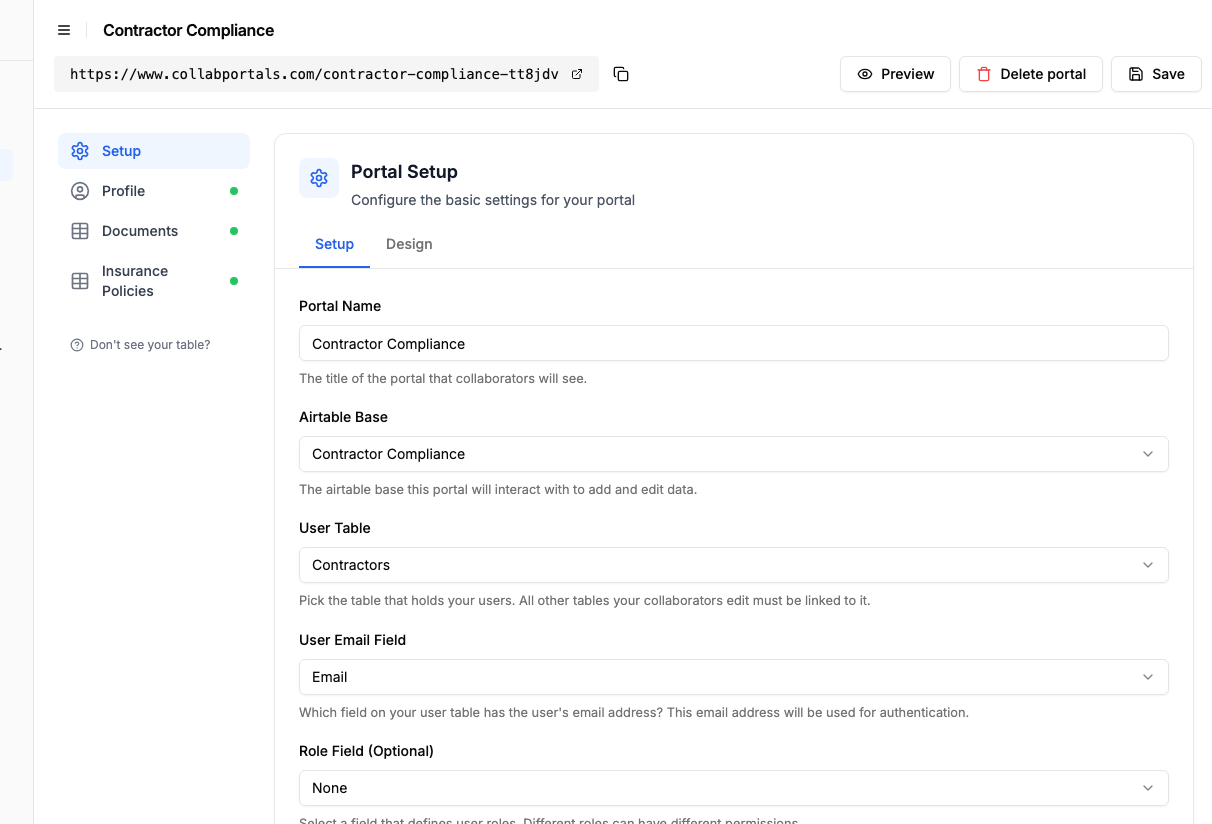
Connect the base, then point CollabPortals at the Contractors table and its email field. - 3
Let contractors upload and renew, hide your vetting
On the Documents table, turn on create and edit so contractors can upload a certificate and renew it later, and leave delete off. Make document type, file and expiry date required so nothing comes in half-finished, and keep the Status field read-only so it always reflects the real expiry date. Your vetting status and internal notes stay hidden.
Because each field's four permissions are independent, you can ask for something once and never again: turn Create and Required on for a reference number or a first insurance certificate, leave Edit off, and it is mandatory at intake and locked afterwards.
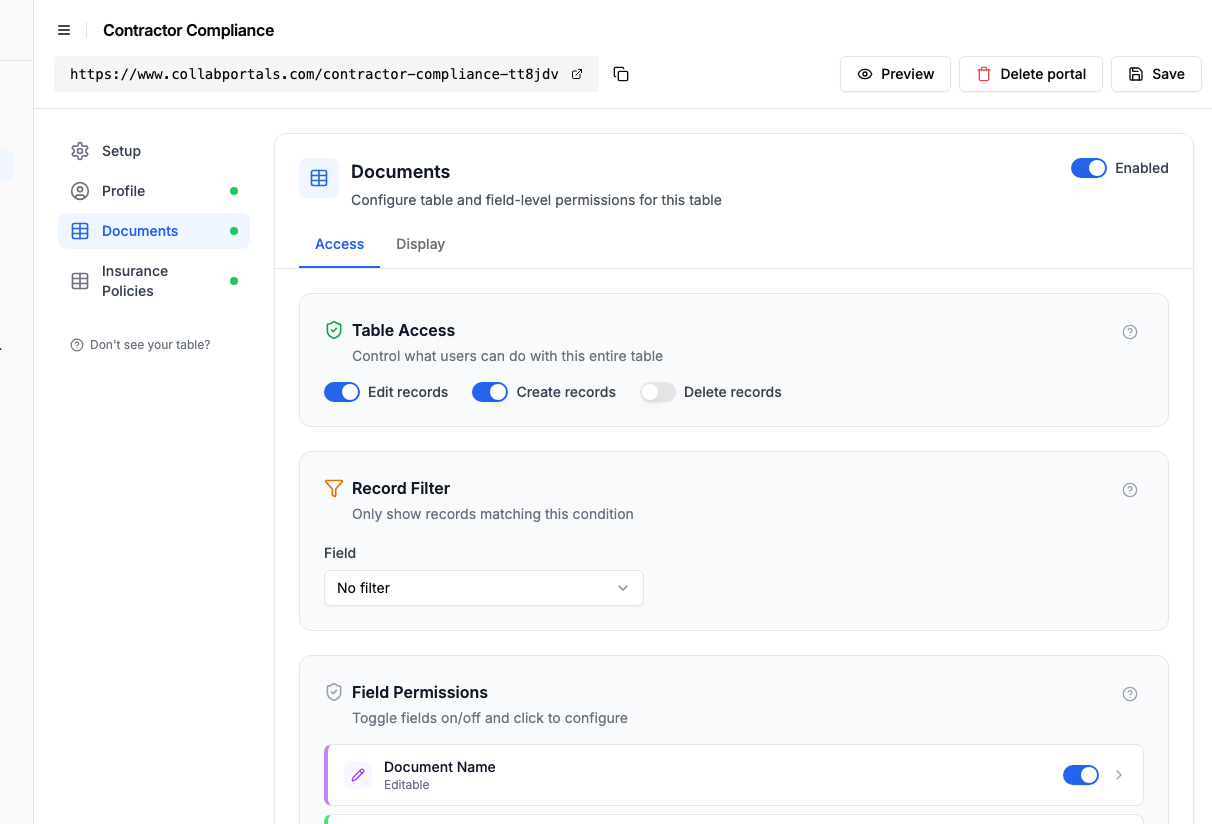
Let contractors upload and renew their own documents, while your vetting notes stay hidden. - 4
Give each table the view that fits
Pick how each table appears. Documents as a table sorted by expiry date, so anything lapsing surfaces first, with the Status column showing Valid, Expiring soon or Expired at a glance. The Contractors profile holds each person's own company and contact details.
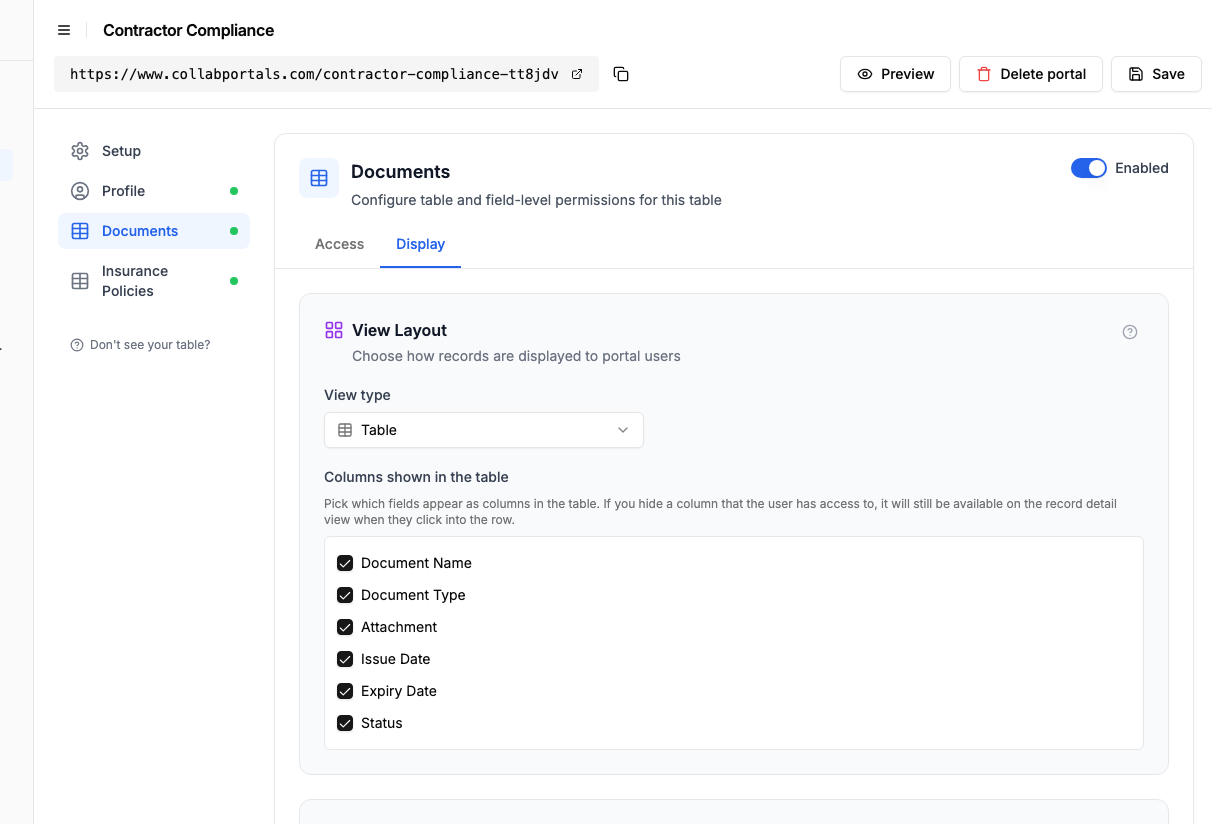
The Display tab lays the Documents table out as a table grouped by document type. - 5
Contractors manage their own compliance
The result is a clean, branded portal. Each contractor signs in, sees exactly which of their documents are valid, expiring or expired, and uploads renewals straight into your Airtable base.
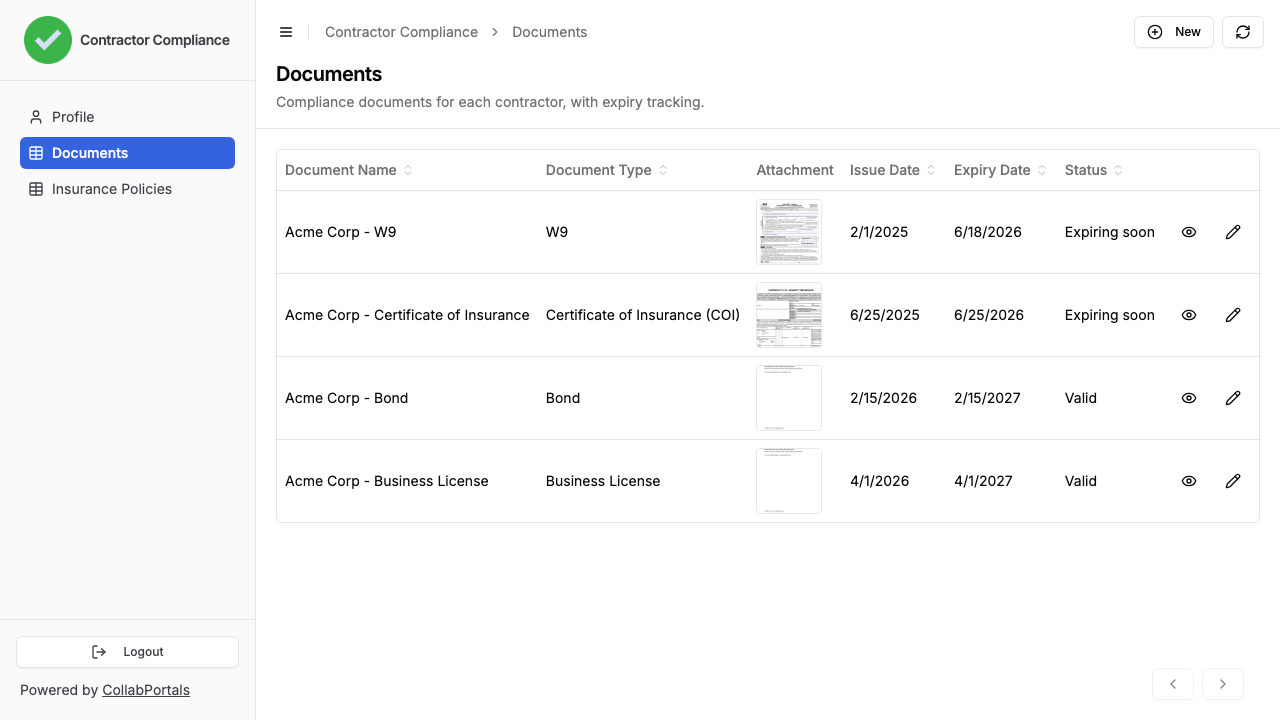
Contractors see their own documents with a live expiry status, and upload renewals in place. - 6
They log in with their email
Share the link with your contractor roster. Each one signs in with their email and a one-time code, so there are no passwords to manage and no Airtable seats to buy.
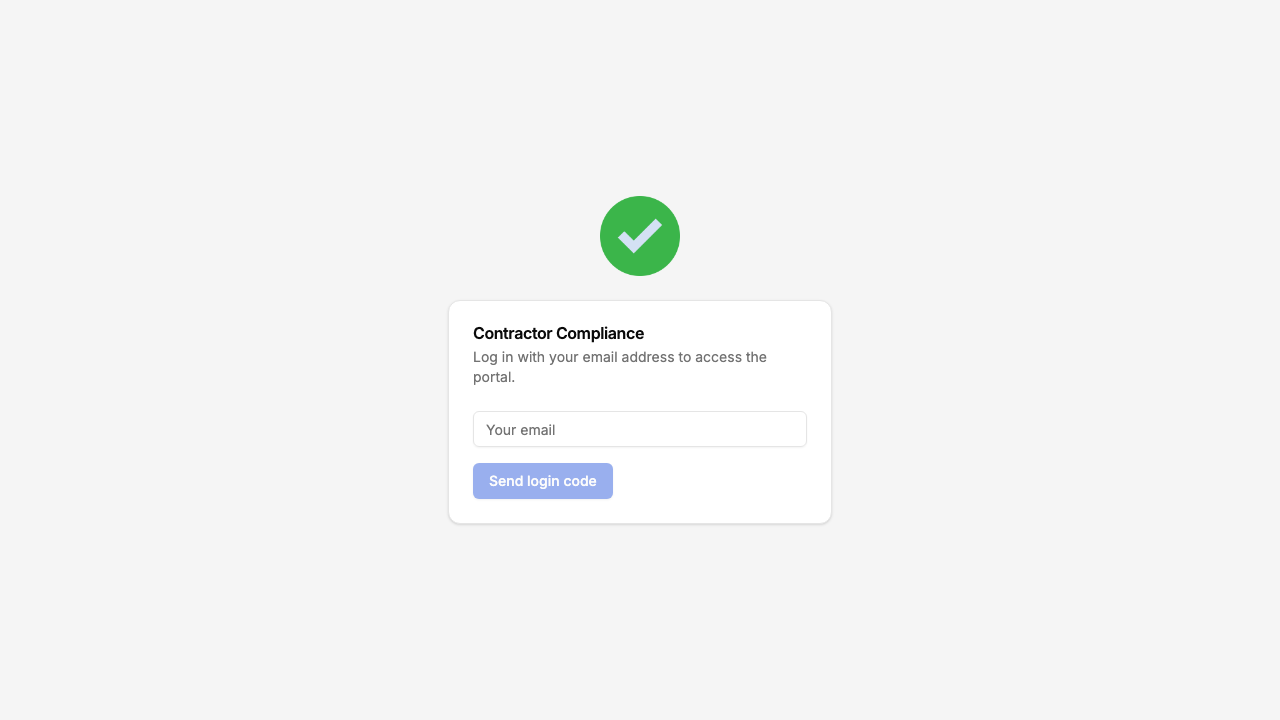
Email and one-time code login, branded with your logo and colour.
Want to start from this exact setup? Open the live demo or copy the Airtable template and connect it to your own base in minutes.
Take It Further
The walkthrough above is the whole build. A few options are worth knowing once you are up and running:
- Expiry reminders. Add an Airtable automation that emails a contractor when their document moves to Expiring soon, so renewals happen before anything lapses.
- Insurance policies. Track policies separately from uploaded files with their own table, carrier, coverage limit and expiry, and expose it alongside Documents for a fuller compliance picture.
- Required fields. Make document type, file and expiry date required so every upload comes in complete, with nothing for you to chase.
- Let your team search the roster. Turn on filter, search and sort controls so a reviewer can find a contractor in a long directory by name or trade and filter documents by status.
- Nest documents under each contractor. Turn on related tabs so a contractor's documents and insurance policies show as tabs on their record, scoped to them, so a reviewer reads one company's whole compliance picture on a single page.
After set-up, every upload and renewal lands in your Airtable base, where your team already works.
For the generic version that applies to any base, see the setup guide.
Frequently Asked Questions
Can each contractor only see their own documents?
Yes. Each contractor is matched to their record in your Airtable Contractors table via their email address. They only see documents linked to them, never another contractor's paperwork.
How does the portal know when a document is expiring?
A formula field in Airtable compares each document's expiry date to today and labels it Valid, Expiring soon, or Expired. The portal shows that status as a read-only field, so contractors and your team always see the real state.
Can contractors upload files through the portal?
Yes. The Documents table includes a file attachment field, and contractors upload certificates, licenses, and tax forms directly from the portal. The files write straight into your Airtable base.
Can I require certain fields on each upload?
Yes. You can mark fields as required, so a contractor cannot submit a document without selecting its type, attaching the file, and setting an expiry date.
How do I onboard a new contractor?
Add their email to your Airtable Contractors table and share the portal link. They verify their email and can immediately start uploading documents. No account creation or invitation workflow needed.

About the author
Matt Shepherd
Founder, CollabPortals
Matt is the founder of CollabPortals. A software engineer and Airtable power user who kept running into the same frustration: no easy way to give external users a simple and secure view to edit their data. He built CollabPortals as the lightweight solution to that problem, allowing you to set up a secure, permissioned portal in a few clicks.
Related use cases and guides
Freelancers
Give freelancers and contractors a self-service portal to manage their profiles, track projects, and log timesheets, all powered by your Airtable base.
Use caseRegulatory Compliance
Give clients, members, and auditors secure access to compliance data, certifications, and regulatory filings in your Airtable base. No extra seats, no spreadsheets, no custom software.
Use caseInsurance
Give agents, brokers, and clients a secure portal to submit applications, track policy status, and manage underwriting data, powered by your Airtable base.
ComparisonCollabPortals vs Miniextensions: Which Airtable Portal Tool Is Right for You?
A detailed comparison of CollabPortals and Miniextensions for building Airtable portals. Compare pricing, features, and limitations to find the best fit.