Build an Airtable Inspection Portal
Give field inspectors a portal on your Airtable base: assigned sites, a visit calendar, findings with photos and sign-offs, with fees and billing kept internal.

See it working, then start from a ready-made Airtable base.
See a live demoCopy the Airtable templateThe Problem: Your Inspection Records Live in Airtable, Your Inspectors Live on Site
Inspection firms run a lot of their business in Airtable. Sites and the clients who own them. The visit schedule. Every finding from every visit, the work booked to fix it, the equipment at each building and the certificates that go out afterwards. The base is the system of record.
The people doing the inspecting are rarely at a desk. They need today's visits, the access notes for the next building, a quick way to log a failed smoke detector with a photo, and a list of fixes waiting for them to check. They should not see what each client pays, what the service team quoted, or another inspector's sites.
So you end up doing one of these:
- Paper checklists or a shared spreadsheet that someone in the office retypes into Airtable at the end of the week. Findings arrive days late and photos arrive by text message.
- Airtable seats for every inspector, which puts fees, quotes and every other inspector's work one click away.
- Airtable Interfaces, which still need a paid seat per inspector and give no real per-inspector scope.
- A dedicated inspection app with its own per-user license, then a sync job to get findings back into the Airtable base the office actually runs on.
How CollabPortals Works for Inspection Teams
CollabPortals connects to your Airtable base and gives each inspector a branded portal. They sign in with their email, see only the sites assigned to them, and log findings and sign-offs that write straight back to your base. Fees, quotes and client billing stay in Airtable.
Example: Fire and Life-Safety Inspection Firm
A fire and life-safety firm inspects apartment buildings, offices, warehouses and hotels for landlords and property managers. Each building has one or two contracted systems: a fire alarm, sprinklers, extinguishers, emergency lighting or a kitchen suppression system. Inspectors visit on an annual, semi-annual or quarterly cycle, raise findings, and check the fixes before the office closes them out.
| Table | Inspector Access | Purpose |
|---|---|---|
| Sites | View, edit | Assigned buildings with address, site contact and access notes, flagged when a serious finding is still open |
| Inspections | View, edit | A calendar of booked and completed visits; inspectors record the outcome and report notes |
| Findings | View, create, edit | Deficiencies logged on site with severity, location, code reference and photos, on a board by status |
| Remediation Actions | View, edit | Work the office books against each finding; inspectors tick Signed Off once they have checked it |
| Equipment | View, edit | Each contracted system with its service date, replacement date and condition |
| Certificates | View only | The PDF certificate issued for each system after a completed visit |
| Inspectors | View, edit | Each inspector's own profile, photo and phone number |
| FAQ | View only | Shown as the Help page: how visits, findings and sign-offs work |
| Clients | Hidden | Landlord and property manager contracts, billing contacts and payment terms |
The office runs scheduling, quoting and billing in Airtable. Inspectors get a simple app for the work in front of them.
Build an Inspection Portal Step by Step
Here is how the live demo above is put together. The whole thing takes about an hour the first time, and there is no code involved.
- 1
Set up your Airtable base
Start with one table per thing you track: Sites, Inspections, Findings, Remediation Actions, Equipment and Certificates, plus an Inspectors table for your field staff and a Clients table the office keeps to itself. The tables form a chain: a site has inspections, an inspection has findings, and a finding has remediation actions. Sites, Inspections and Findings link to the inspector directly. Equipment, Remediation Actions and Certificates reach the inspector through a lookup, such as the equipment's site and that site's assigned inspector, so nobody has to keep a second inspector link up to date.
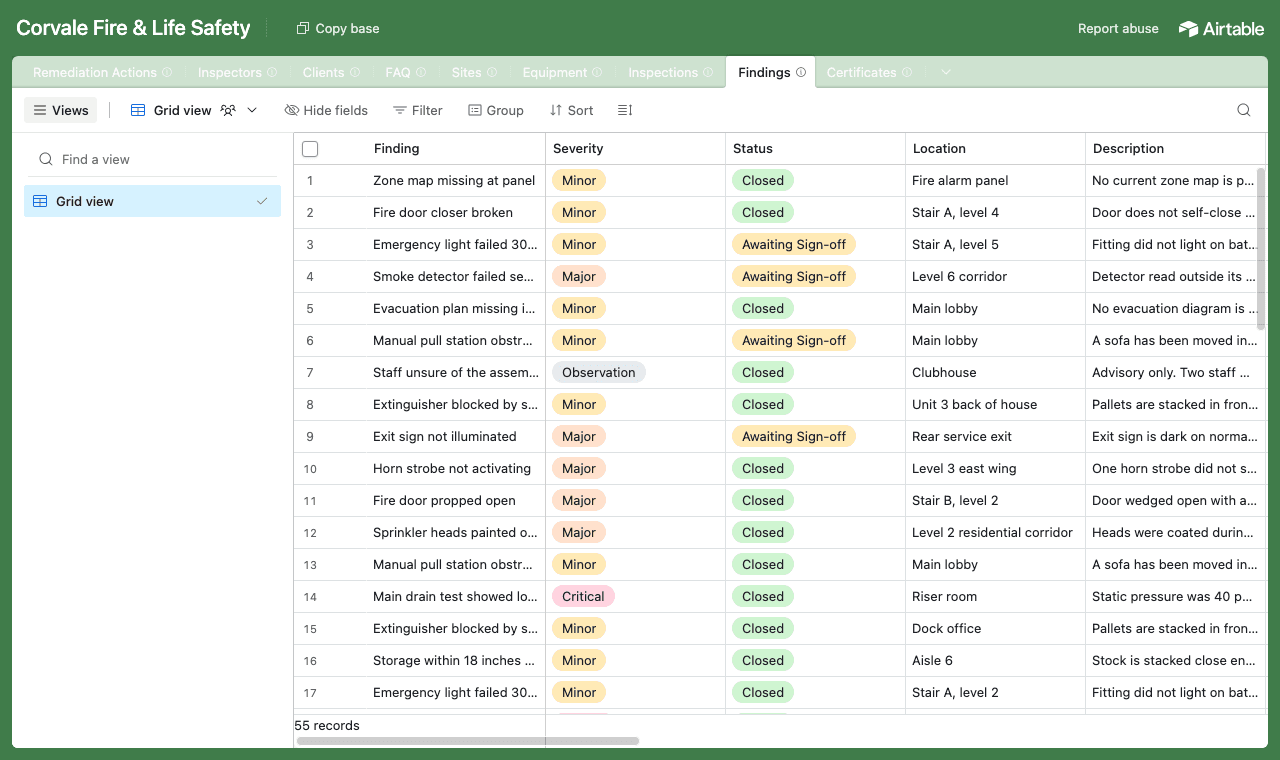
Findings link back to the inspection they were raised on, the equipment they concern, and the remediation booked to fix them. - 2
Connect the base and pick the inspectors table
Point CollabPortals at the base, then choose Inspectors as the user table and Email as the login field. Each inspector signs in with the email on their record, and CollabPortals matches them to their row.
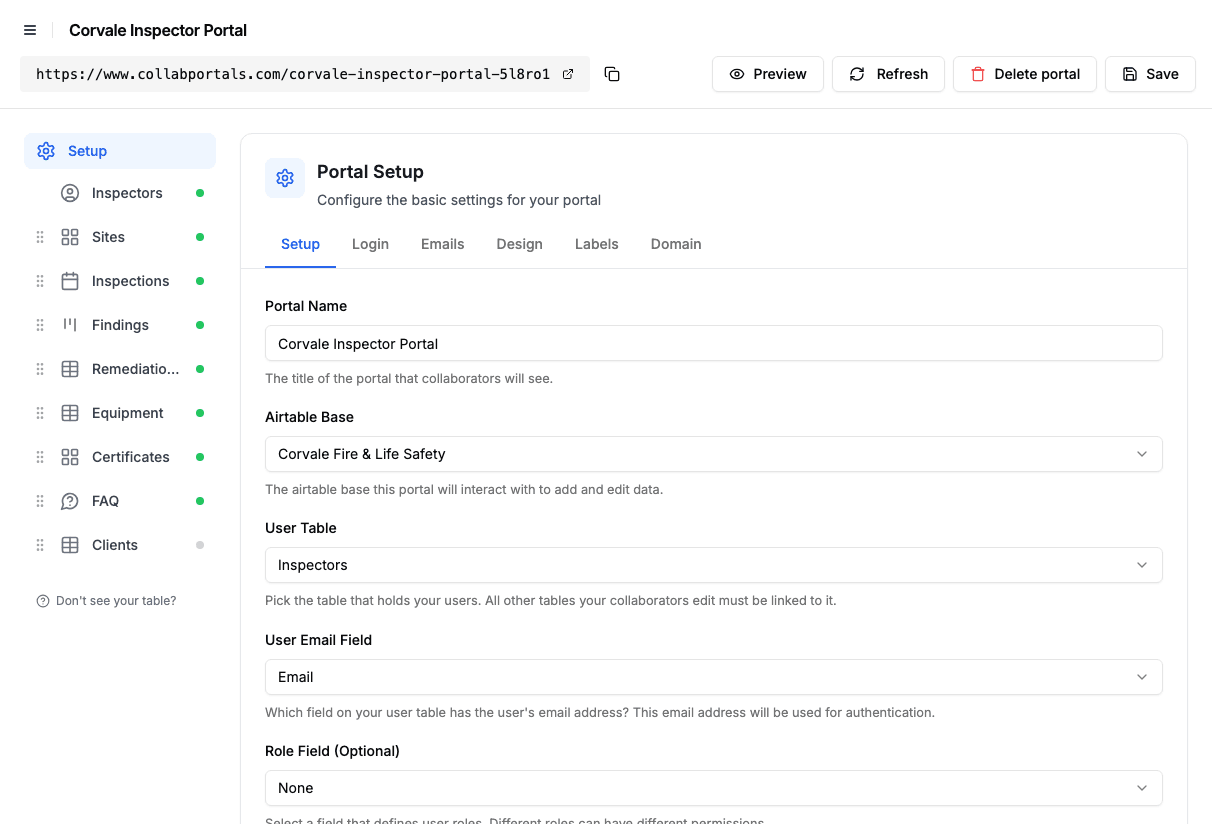
Connect the base, then point CollabPortals at the Inspectors table and its email field. - 3
Hide fees and office notes, keep the site details
On each table you toggle fields on or off. On Sites, inspectors see the address, property type, site contact and access notes, and can update the contact and access notes when they change. Inspection Fee, Office Notes and the Client link stay hidden. On Remediation Actions the Quote Amount is hidden the same way, and inspectors can edit only the sign-off fields.
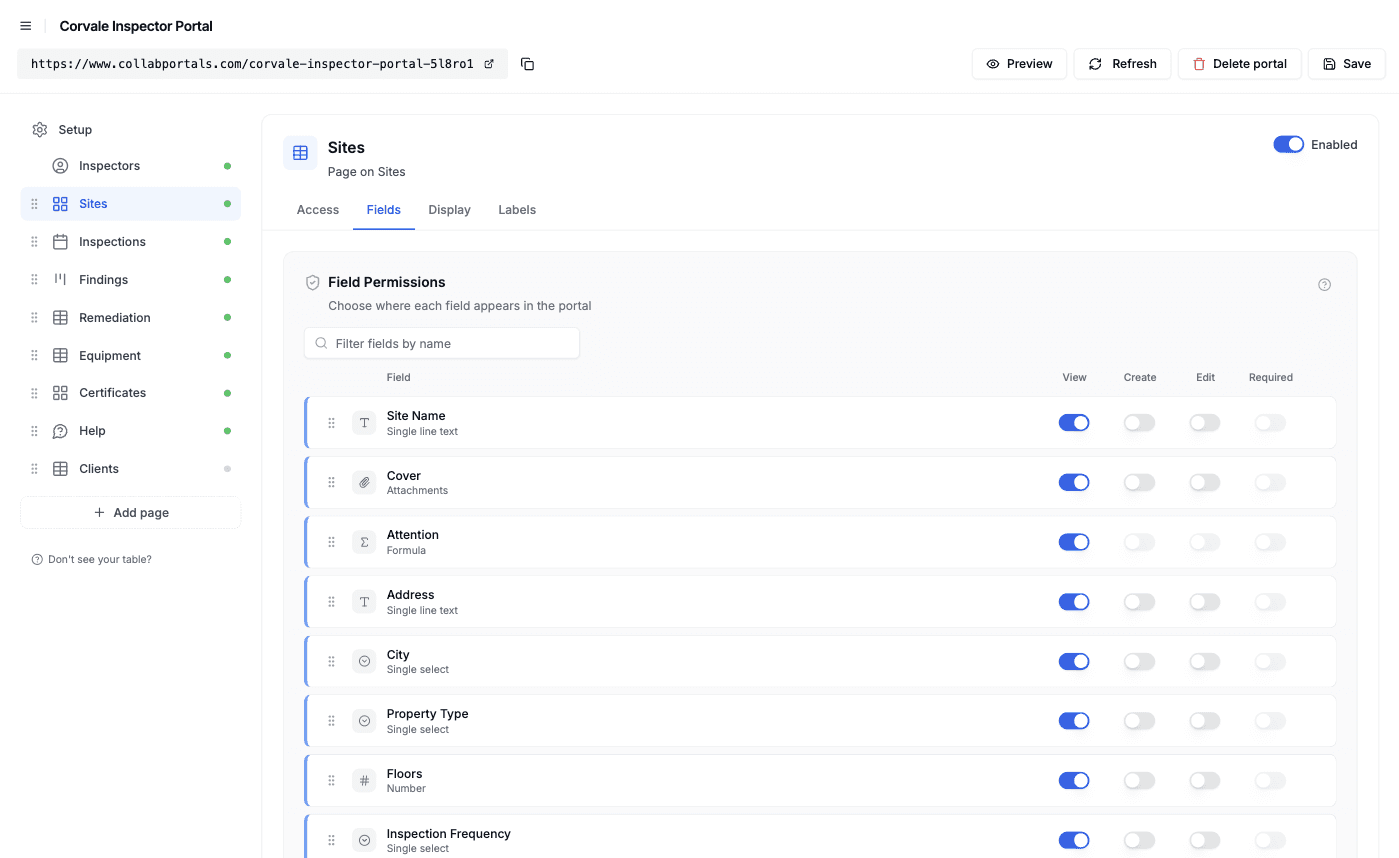
Field-level permissions: show what the inspector needs on site, hide fees and account notes. - 4
Give each table the view that fits
Pick how every table is shown. Sites as a gallery, Inspections as a calendar on the visit date, Findings as a kanban board by status, Equipment and Remediation Actions as tables, and Certificates as a gallery of PDFs. Open a site and its equipment sits under the details with its inspections in a tab; open a finding and its remediation actions are listed on the same page.
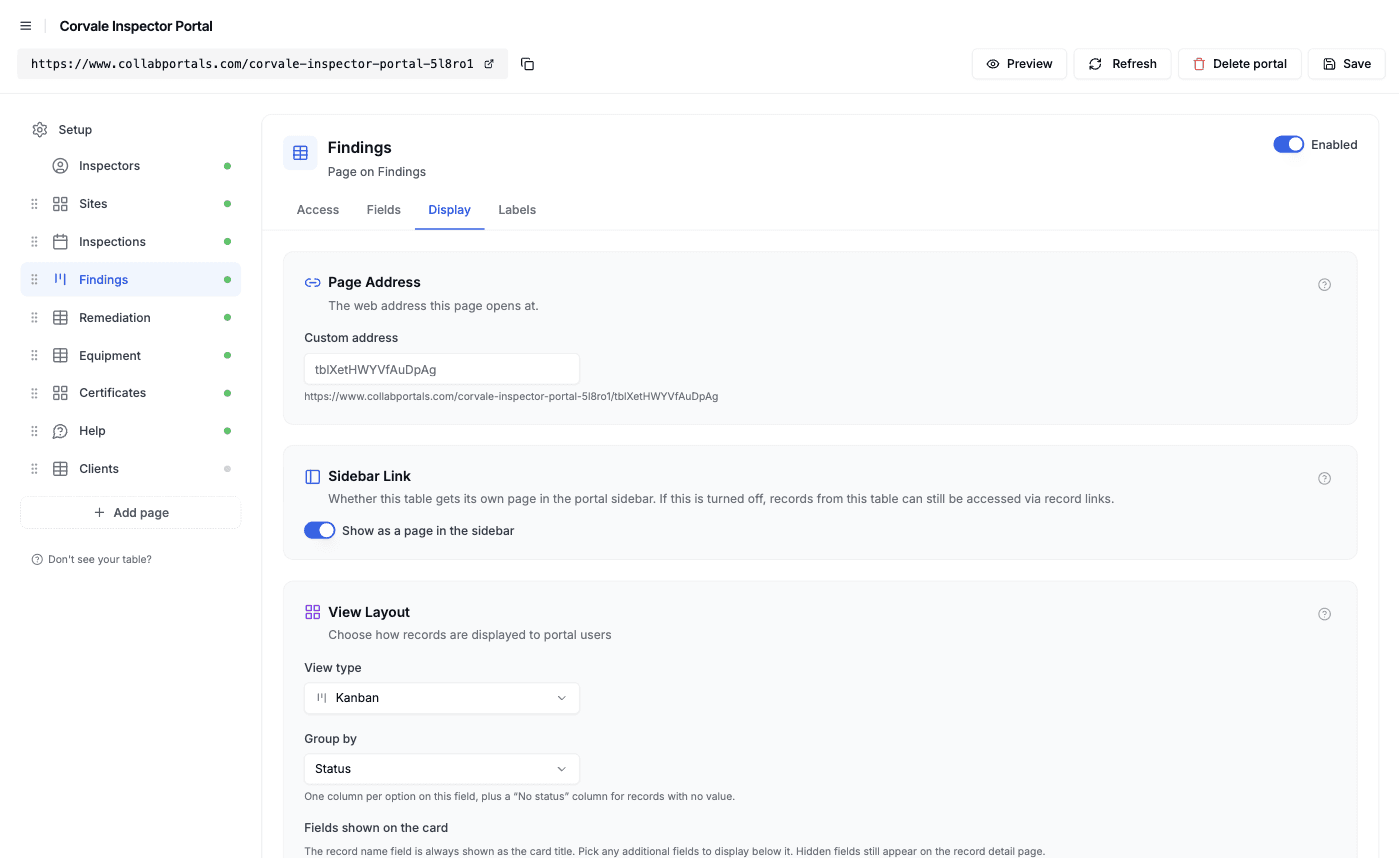
The Display tab turns Findings into a board grouped by status, with site, severity and location on each card. - 5
Inspectors get a clean, branded app
The result is a portal in your colors. Inspectors check the week's visits, log a finding with a photo from the stairwell, see which remediation work is waiting for their sign-off, and open the certificate PDFs from past visits. Failed visits are highlighted red on the calendar and re-inspections purple.
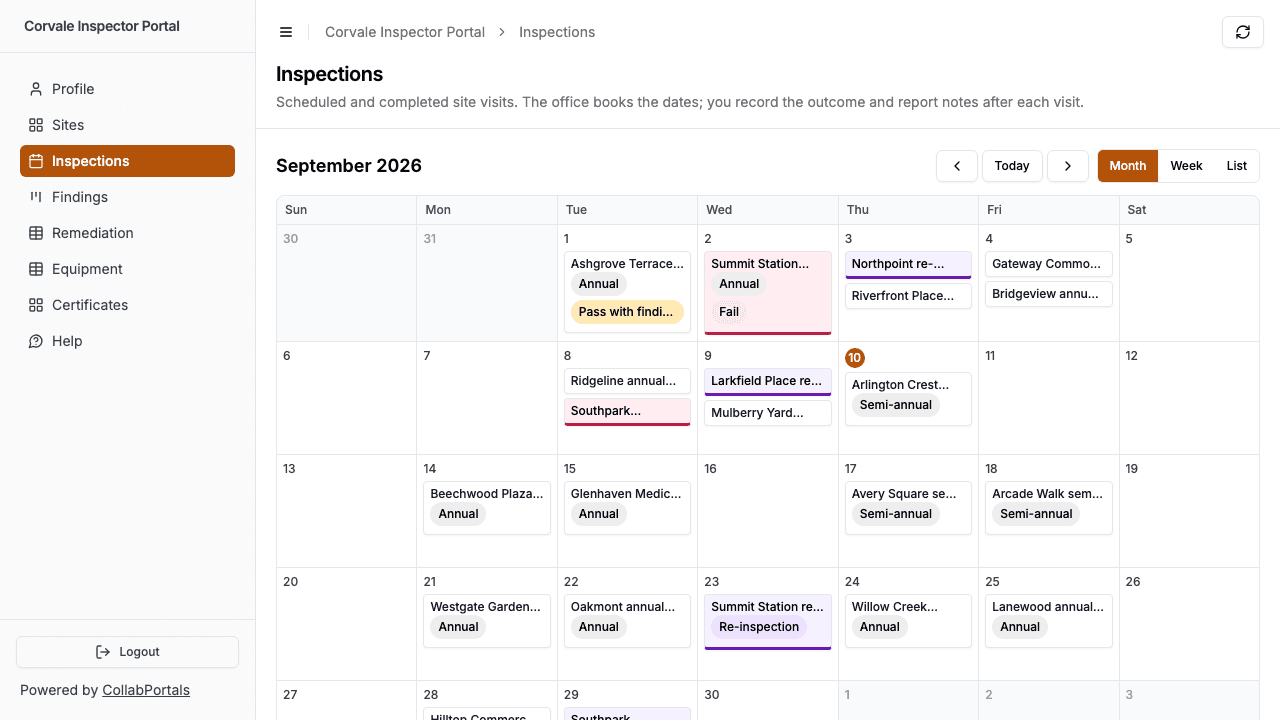
The inspector's visit calendar: failed visits in red, re-inspections in purple. - 6
They log in with just their email
Share the link. Each inspector signs in with the email on their record and a one-time code, so there are no passwords to manage and no Airtable seats to buy. For a public example you can turn on a one-click demo user instead.
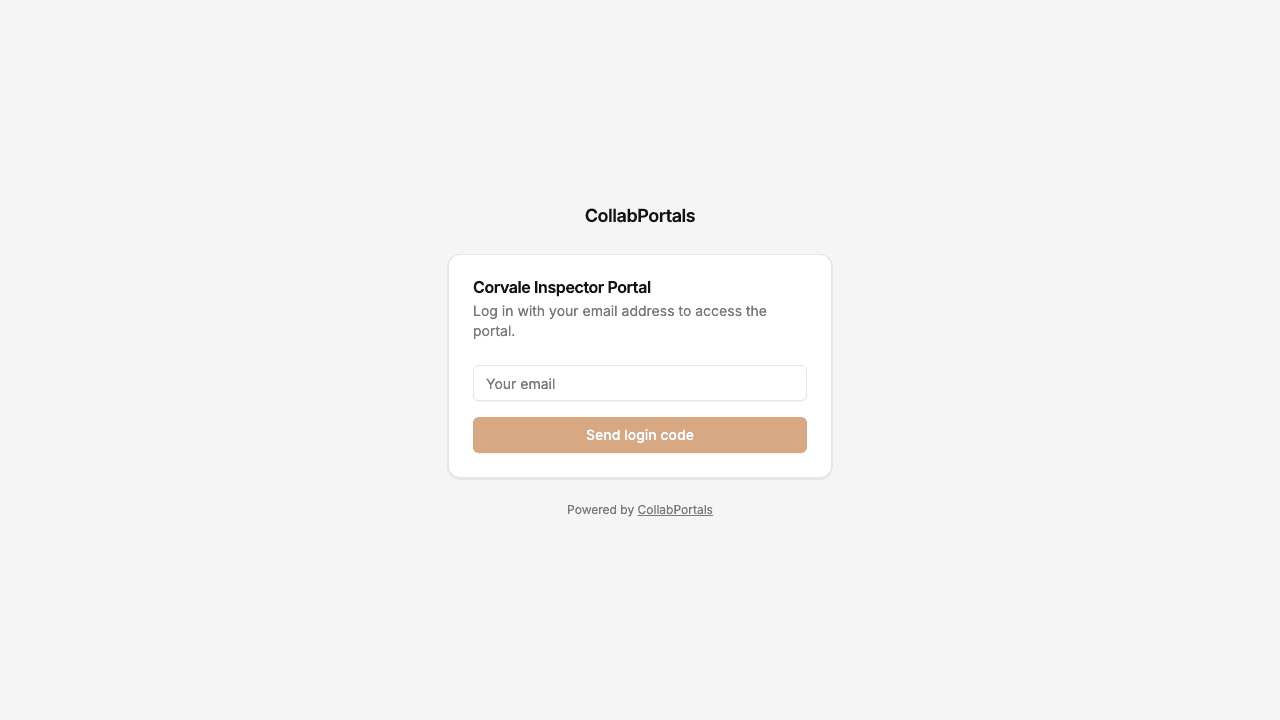
Email and one-time code login, branded with the firm's name and color.
Want to start from this exact setup? Open the live demo or copy the Airtable template and connect it to your own base in minutes.
Use Cases for Inspection Portals
Fire and Life-Safety Inspection Firms
Inspect alarms, sprinklers, extinguishers and emergency lighting for landlords and property managers. Inspectors log deficiencies against each system and sign off the fixes.
- Sites (view, edit), address, access notes, site contact
- Findings (create, edit), severity, location, code reference, photos
- Equipment (view, edit), condition, last serviced, replacement due
- Certificates (view), PDF per system per visit
- Hidden: visit fees, remediation quotes, client billing
Property Condition and Turnover Inspections
Property managers send field staff to check units at move-in, move-out and on a regular cycle. Staff record the condition of each unit and flag repairs for the maintenance team.
- Properties (view), address, unit list, access instructions
- Inspections (view, edit), date, type, overall condition
- Issues (create, edit), room, description, photos, urgency
- Repair Requests (view), what maintenance has scheduled
- Hidden: rent, owner details, vendor rates
Construction Site Safety Audits
Safety officers walk active sites on a schedule and log hazards for the site manager to correct before the next walk.
- Projects (view), site address, phase, site manager
- Audits (view, edit), audit date, score, notes
- Hazards (create, edit), category, location, photo, severity
- Corrective Actions (view, edit), owner, due date, closed out
- Hidden: contract values, subcontractor rates
Elevator, Boiler and Pressure Equipment Inspections
Inspectors certify regulated equipment across many buildings. Each unit has an inspection interval and a certificate that expires.
- Buildings (view), address, contact, access
- Units (view, edit), type, serial number, last inspected, next due
- Inspection Reports (create, edit), result, defects, photos
- Certificates (view), PDF, valid until
- Hidden: client pricing, internal notes, other inspectors' routes
What Makes This Better Than the Alternatives
| Capability | Paper and spreadsheets | Airtable seats for inspectors | Dedicated inspection apps | CollabPortals |
|---|---|---|---|---|
| Findings and photos land in your Airtable base as they are logged | No, retyped later | Yes | No, separate system | Yes |
| Fees, quotes and client billing stay hidden | N/A | No | Yes | Yes |
| Each inspector sees only their own sites | N/A | No | Yes | Yes |
| You keep working in Airtable (formulas, automations, views) | Yes | Yes | No, synced or exported | Yes |
| Cost | Free + office rekeying time | $20/seat/month | Per-inspector license | $12/month flat, or $10/month billed annually |
| Time to set up | None, but ongoing rekeying | Quick, but unsafe | Weeks of migration | Around an hour |
For a side-by-side breakdown, see CollabPortals vs Softr and CollabPortals vs Fillout, or the roundup of the best Airtable portal builders.
Field-Level Permissions for Inspection Teams
Inspection bases mix what the inspector needs on site (access notes, equipment, findings) with commercial detail (fees, quotes, client terms). CollabPortals lets you decide per field what inspectors see and change:
- Show to inspectors: address, site contact, access notes, equipment and service dates, findings, remediation status, certificates
- Hide from inspectors: visit fee, quote amount, office notes, client contract and billing details
- Editable by inspectors: finding details and photos, inspection outcome and report notes, equipment condition, remediation sign-off and verification notes
- Read-only for inspectors: visit dates and scope, which the office books, and the certificates the office issues
The same Airtable record, two different views: the office sees the fee and the quote, the inspector sees the work.
Take It Further
The walkthrough above is the whole build. A few options are worth knowing once you are up and running:
- Roles. Add a role field to your Inspectors table and give a lead inspector or office coordinator their own permissions, such as creating remediation actions or seeing every site. See role-based access.
- Conditional formatting. The demo highlights critical findings, work awaiting sign-off and equipment due for replacement before its next service. Base each rule on a status or a formula field rather than on today's date. See conditional formatting.
- Related records on the record page. Open a site and its equipment is listed under the details, with its inspections in a tab. See related tabs.
- Let inspectors search and filter. Turn on filter, search and sort controls so an inspector can filter equipment by condition or find a site by name.
After setup, findings, sign-offs and site updates happen in the portal and land straight in your Airtable base.
For the generic version that applies to any base, see the setup guide.
Frequently Asked Questions
Can inspectors log findings with photos from the site?
Yes. Give the Findings table create access and make its attachment field editable. An inspector opens the inspection, adds a finding with its severity, location and description, and attaches photos from their phone. The record writes straight to your Airtable base.
Can I hide fees and quotes from inspectors?
Yes. Field-level permissions let you hide the visit fee, quote amounts, office notes and any other commercial field while leaving them in Airtable. Inspectors see the same site and remediation records without those fields.
Does each inspector only see their own sites?
Yes. Sites, inspections and findings are scoped to the signed-in inspector through their link to the Inspectors table. Tables that reach the inspector through a lookup, like equipment through its site, are scoped the same way. See record ownership.
Can clients see their certificates too?
Yes, with a second portal on the same base that uses a client contacts table as its user table and shows certificates and findings read-only. That is close to the setup in the regulatory compliance portal guide.
Does CollabPortals send reminders when equipment or certificates expire?
No. The portal highlights records, but it does not send notifications. Use an Airtable automation to email the office or the client when a replacement date or certificate expiry gets close.
Can inspectors book their own visits?
The demo keeps visit dates read-only because the office books them. You can give inspectors create and edit access on the Inspections table instead, but CollabPortals does not check availability or prevent double bookings, so that logic stays in Airtable.

About the author
Matt Shepherd
Founder, CollabPortals
Matt is the founder of CollabPortals. A software engineer and Airtable power user who kept running into the same frustration: no easy way to give external users a simple and secure view to edit their data. He built CollabPortals as the lightweight solution to that problem, allowing you to set up a secure, permissioned portal in a few clicks.
Related use cases and guides
Maintenance
Let tenants, clients, or building occupants submit fault reports with photos and track repair status through a portal connected to your Airtable maintenance database.
Use caseContractor Compliance
Give contractors and vendors a self-service portal to upload and renew their insurance, license, and tax documents, with expiry tracking, all powered by your Airtable base.
ComparisonCollabPortals vs Airtable Interface Designer: Can You Use Interfaces as a Portal?
Airtable Interface Designer is free, but can it replace a dedicated portal? Compare it to CollabPortals for sharing data with external users.
ComparisonCollabPortals vs Softr: Lightweight Portal or Full App Builder?
Compare CollabPortals and Softr for Airtable portals. See how a $10/month focused portal tool stacks up against a full no-code app builder starting at $49/month.