Make Your Airtable Portal Public, So Anyone Can Browse Without Signing In
A CollabPortals portal can now be public. Anyone with the link browses it read-only, search engines can list it, and people who need more can still sign in or sign up.

Some data is meant to be found
Until now, every CollabPortals portal started at a sign-in screen. That is right for a client's invoices or a contractor's documents. It is wrong for a list of open roles, a property listing, or a directory of suppliers, where the whole point is that people you have never met can find it.
A portal can now be public. Anyone with the link browses it without an account, read-only, and the people who need to do more can still sign in.
Turning it on
Open your portal in the editor, go to the Login tab, and switch on Make this portal public.
Before you save, the setting lists which tables will be public and which stay private, and names any field visitors will be sent that pulls data from a private table. That list updates as you change settings, so you can tidy up a field or a table before anything is published.
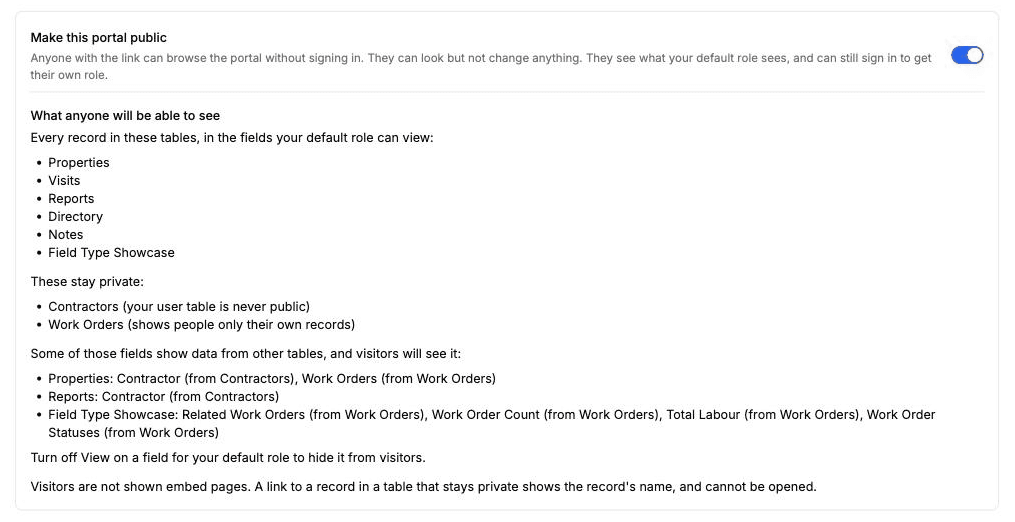
Then open the link in a private window to see what a visitor sees.
What visitors see
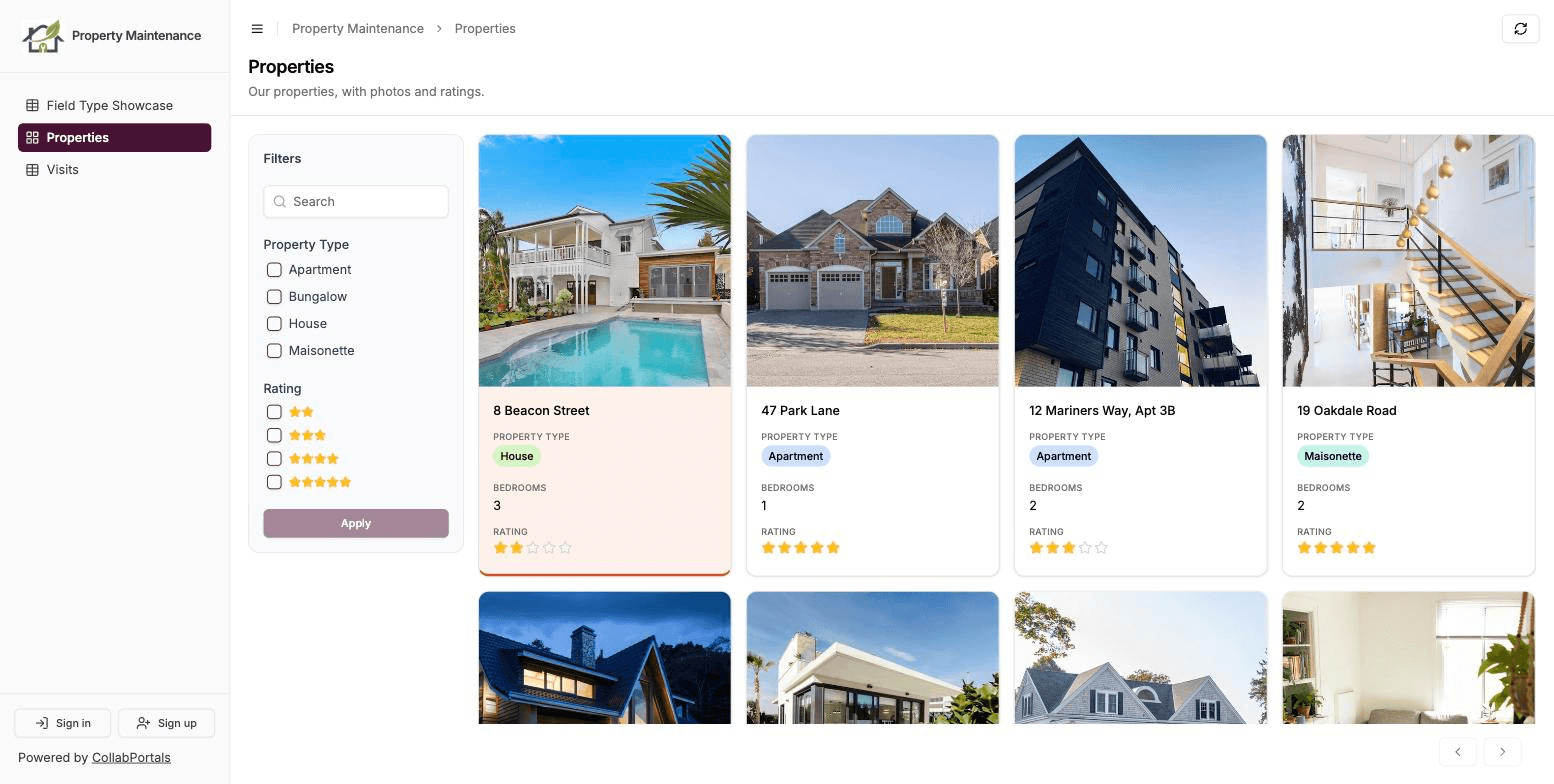
A visitor sees what your default role sees, with three limits:
- Only tables that show everyone all records. A table that shows each person only their own records stays private, because a visitor has no records of their own.
- Never your user table. Even if signed-in users can see each other, visitors cannot open the list of your users.
- No embed pages. A page that frames another website stays for signed-in users.
Everything else works as it does for your default role: the gallery, the kanban board, record pages, related tabs, filters and search. Visitors cannot add, edit or delete anything.
Making a portal public publishes every record in the listed tables, in the fields your default role can view. That includes lookups, rollups and formulas, which are viewable from the day you create a portal. Read both lists before you save.
Signing in and signing up
If your portal has roles, visitors see a Sign in button at the bottom of the sidebar. Signing in gives a person their own role, with whatever it lets them see and edit. If you allow self-registration, a Sign up button sits next to it.
That is what makes a public portal more than a published table. A job board shows every open role to anyone, and an applicant signs up to apply. An events list is open to browse, and attendees sign up to register.
If your portal has no roles, making it public removes the sign-in altogether, and the portal becomes a read-only site. Add a role if you want both.
Search engines and your Airtable limits
A public portal can be listed by Google, records included, and has a sitemap at /your-portal-slug/portal-sitemap.xml ready to submit. That is on by default. Switch off Let search engines list this portal if you only want to share the link yourself.
Most public pages do not read Airtable on every visit. Visitors see a saved copy of your data, refreshed every 5 minutes by default, so a busy public page uses far fewer of your Airtable API requests. You can set the refresh to 1, 5, 15 or 60 minutes, and press Refresh now after an edit you want live straight away. A plain table with more than 100 records is the exception: visitors read it live as they page through. Signed-in users always see live data.
Who this helps
Anyone publishing Airtable records they want people to find.
- Real estate portals, where buyers browse listings in a gallery and agents sign in to update them
- Animal shelter portals, with every animal ready for adoption open to browse
- Application portals, with the openings public and the application behind a sign-up
- Inventory portals used as a public product catalog on a second portal, with stock and cost kept to your staff portal
How it compares
Softr has had public pages for a long time: each page's visibility can be all users, logged-in users or logged-out users, and you build what goes on it from blocks. Noloco lets you make tables, views and pages public, and its guide lists public access on its Build and Enterprise plans.
Airtable's own portals are built for signed-in external users. The no-login option in Airtable is a public shared view or interface link, which shares a single view or page, separately from the portal your signed-in users use.
In CollabPortals it is one switch on the portal you already have, on the one plan, with no extra setup. Your table access, field permissions and record filters decide what visitors see, the same settings that decide what your default role sees, so there is no second set of rules to keep in step.
Getting started
Open your portal, go to Login, and switch on Make this portal public. The public portals guide covers what visitors can reach, signing in, search engines and the refresh settings.
If you are advertising a public portal, the new Tracking tab can count sign-ups and new records as Google Ads conversions.
Let me know what you make public.

About the author
Matt Shepherd
Founder, CollabPortals
Matt is the founder of CollabPortals. A software engineer and Airtable power user who kept running into the same frustration: no easy way to give external users a simple and secure view to edit their data. He built CollabPortals as the lightweight solution to that problem, allowing you to set up a secure, permissioned portal in a few clicks.
Related reading
Real Estate
Give clients and agents a branded portal to track property listings, transactions, and documents, all powered by your existing Airtable base.
Use caseAnimal Shelters
Give foster parents self-service access to their animals, medical records, supplies, and availability surveys, all connected to your Airtable base.
Use caseApplications and Reviews
Run grant, scholarship and program applications in Airtable. Applicants track status and upload what is missing; reviewers score only their assignments.
ComparisonCollabPortals vs Softr: Lightweight Portal or Full App Builder?
Compare CollabPortals and Softr for Airtable portals. See how a $10/month focused portal tool stacks up against a full no-code app builder starting at $49/month.