Build an Airtable Inventory Management Portal
Give warehouse staff, location managers, and external partners controlled access to your Airtable inventory base. Counts, reorders, and vendor pricing without exposing costs or other locations.

See it working, then start from a ready-made Airtable base.
See a live demoCopy the Airtable templateThe Problem: Letting People Touch Stock Data Without Letting Them Touch Everything
You track inventory in Airtable. Products, stock levels, vendor pricing, reorder points, count history. The schema works for you, but the people who need to read or update it (warehouse staff, store managers, field technicians, external 3PLs, suppliers) cannot get into Airtable safely.
- Add them as Airtable collaborators and they see every base, every cost, every margin. At $20/user/month on the Team plan, ten warehouse staff costs $2,400 a year before you have shared anything.
- Export to a spreadsheet and the count is wrong before they open it. People update the spreadsheet instead of the source, and reconciliation becomes its own job.
- Build a custom inventory app and now you maintain a second system that has to stay in sync with Airtable forever.
- Use Airtable Interfaces and you still cannot scope rows by who is logged in. Every interface viewer sees every product and every cost.
What you need is a portal where each person sees the inventory rows that belong to them, can run counts and submit reorders, and never sees vendor margins or other locations. Your buying team and ops team keep working in Airtable as before.
How CollabPortals Works for Inventory
CollabPortals connects to your Airtable base and creates a branded portal for the people who interact with stock data. Each user logs in with their email, sees only the records linked to them, and edits the fields you allow. The base does not move, your formulas do not break, your buying team does not change tools.
Example: Multi-Location Stock Portal
A retailer runs five locations and tracks one product catalog with per-location stock levels. Store managers update counts and submit reorder requests. Head office handles purchasing.
| Table | Store Manager Access | Purpose |
|---|---|---|
| Products | View only | Read-only catalog with description, pack size, retail price |
| Stock Counts | View, create, edit | Managers run counts at their location and submit them |
| Reorder Requests | View, create, edit | Managers flag items that need reordering, with reason |
| Locations | View only | Manager sees their own location record, hidden from others |
| Users | View, edit | Managers manage their own profile |
| Vendors | Hidden | Buying contacts and account numbers are head-office only |
| Vendor Pricing | Hidden | Cost prices, margin, discount tiers stay internal |
| Purchase Orders | Hidden | Internal buying workflow |
Store managers see a clean app: their location, their products, their counts, and a way to flag stockouts. Head office sees the full picture in Airtable.
Use Cases for Inventory Management Portals
Multi-Location Retail and Hospitality
Each store, café, or venue counts and reorders against a shared catalog. The catalog stays consistent, but each location only sees its own counts and only its own staff.
- Stock Counts (create, edit), date, counted-by, location, quantity on hand
- Reorder Requests (create, edit), product, quantity needed, urgency, reason
- Products (view only), description, pack size, supplier (hidden), cost (hidden)
- Hidden: cost prices, gross margin, supplier terms, other locations' counts
Warehouse and 3PL Operations
Warehouse staff or third-party logistics partners count and pick stock for clients. Each client sees their own inventory, your team sees everyone's.
- Inventory by Client (view, edit), SKU, on-hand, reserved, available
- Receipts (create), incoming shipments, dates, condition
- Pick Lists (view), assigned picks for the day
- Hidden: storage fees, client billing rates, internal cost allocation
Equipment and Asset Tracking
Field engineers, depot managers, or rental customers track which units are where, when they were last serviced, and what condition they are in.
- Assets (view, edit), serial number, current location, status, last service date
- Movements (create), date, from, to, transferred-by
- Service Log (view, create), inspections, fixes, parts used
- Hidden: purchase price, depreciation schedule, internal asset value
Manufacturer Raw Materials and BOM
Production staff record material draws against a bill of materials. The portal handles consumption, the office handles purchasing.
- Materials (view), part number, on-hand, reorder point
- Material Draws (create, edit), production run, material, quantity used
- Reorder Triggers (view), items currently below reorder point
- Hidden: vendor cost, lead time agreements, contract pricing
Supplier and Vendor Self-Service
Give suppliers a portal to confirm orders, post shipping updates, or upload pricing changes against their own records, without seeing what other suppliers charge you.
- Their Orders (view, edit), open POs, delivery dates, status
- Their Catalog (view, edit), price list lines for their items
- Hidden: other suppliers, your sell prices, your margins
What Makes This Better Than Spreadsheets or a New App
| Capability | Shared spreadsheet | Airtable seats for everyone | Custom inventory app | CollabPortals |
|---|---|---|---|---|
| Counts feed straight into your live data | No | Yes | Maybe | Yes |
| Each user only sees their location or client | Manual filtering | No, all-or-nothing | Yes | Yes |
| Cost prices and margins stay hidden | No | No | Yes | Yes |
| Counts, reorders, and movements are structured | No | Yes | Yes | Yes |
| Per-user cost | Free + chaos | $20/seat/month | Build cost + dev | $10/month flat |
| Your buying team works in Airtable | Partly | Yes | No | Yes |
For a closer look at how CollabPortals compares to other portal builders, see CollabPortals vs Miniextensions and CollabPortals vs Softr, or the roundup of the best Airtable portal builders.
Build an Inventory Portal Step by Step
Here is how the live demo above is put together. It takes about an hour the first time, with no code involved.
- 1
Set up your Airtable base
Start with a table for each part of the operation: a Products catalogue with on-hand and reorder point, a Stock Counts table, a Reorder Requests table, Locations, Vendors, and a Staff table for the people who log in. Staff is the hub. It holds each person's email, and their counts and reorders link back to it, so each person only ever sees their own work.
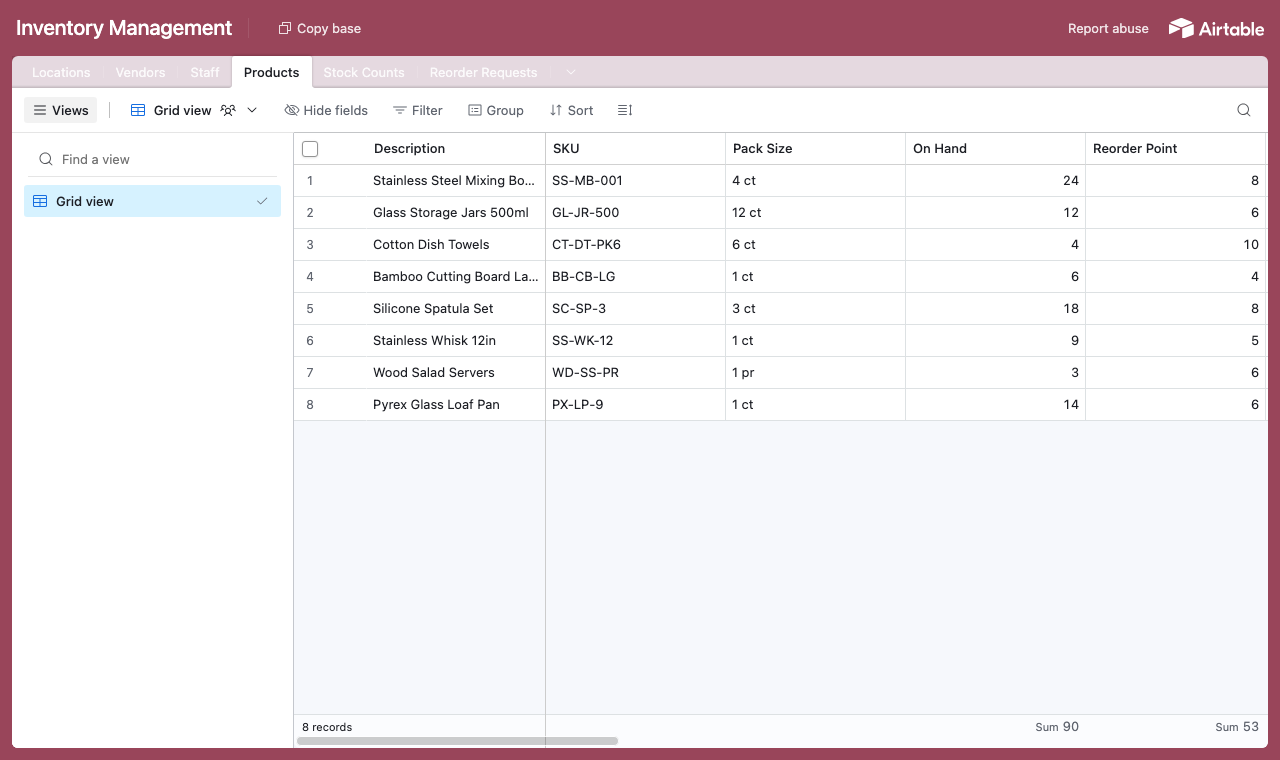
A table for each part of the operation, with a Staff table every count and reorder links back to. - 2
Connect the base and pick the user table
Point CollabPortals at that base, then choose Staff as your user table and Email as the login field. Each person signs in with their email and is matched to their own record.
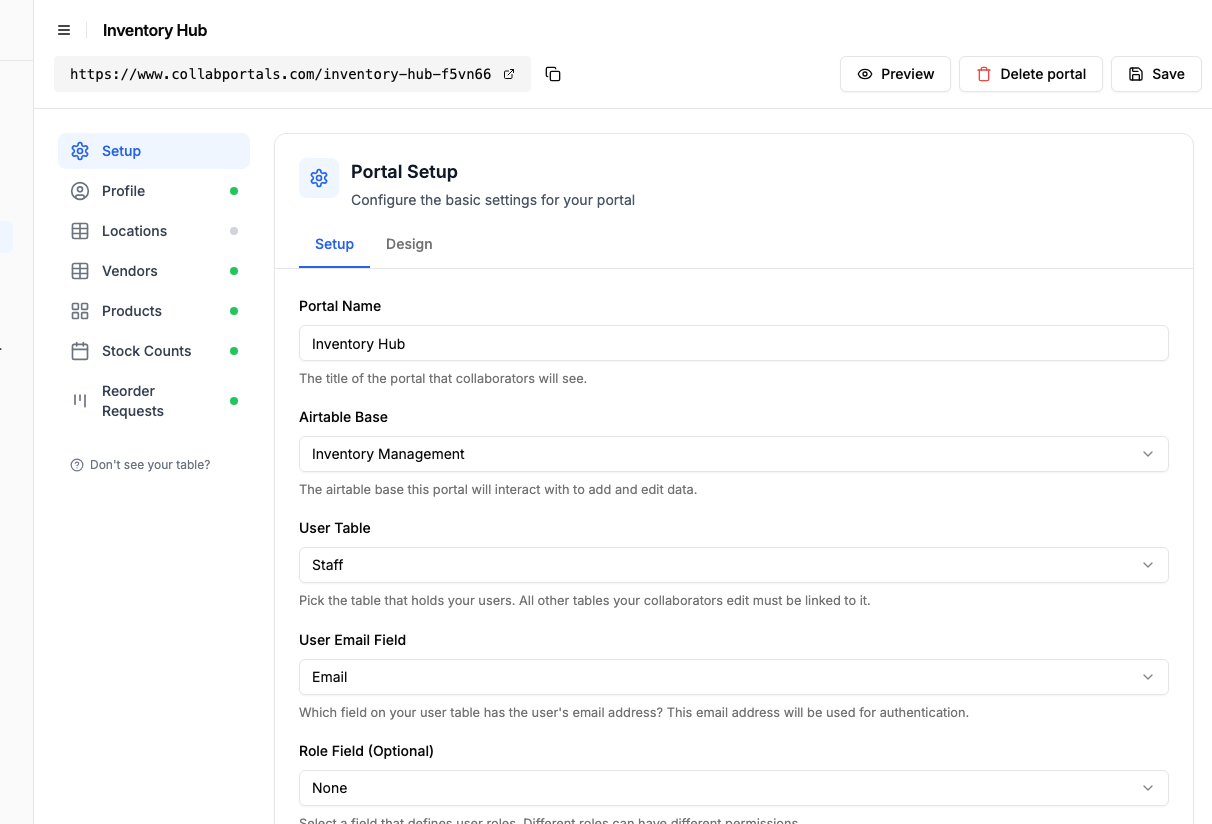
Connect the base, then point CollabPortals at the Staff table and its email field. - 3
Show the catalogue, hide cost and margin
On the Products table, keep description, on-hand, reorder point and sell price visible, and turn off Cost Price and Margin so they never reach staff. Leave edit on so people update counts in place, and create off, since you control the catalogue. Counts and reorders happen on their own tables, where you turn create on so staff submit them.
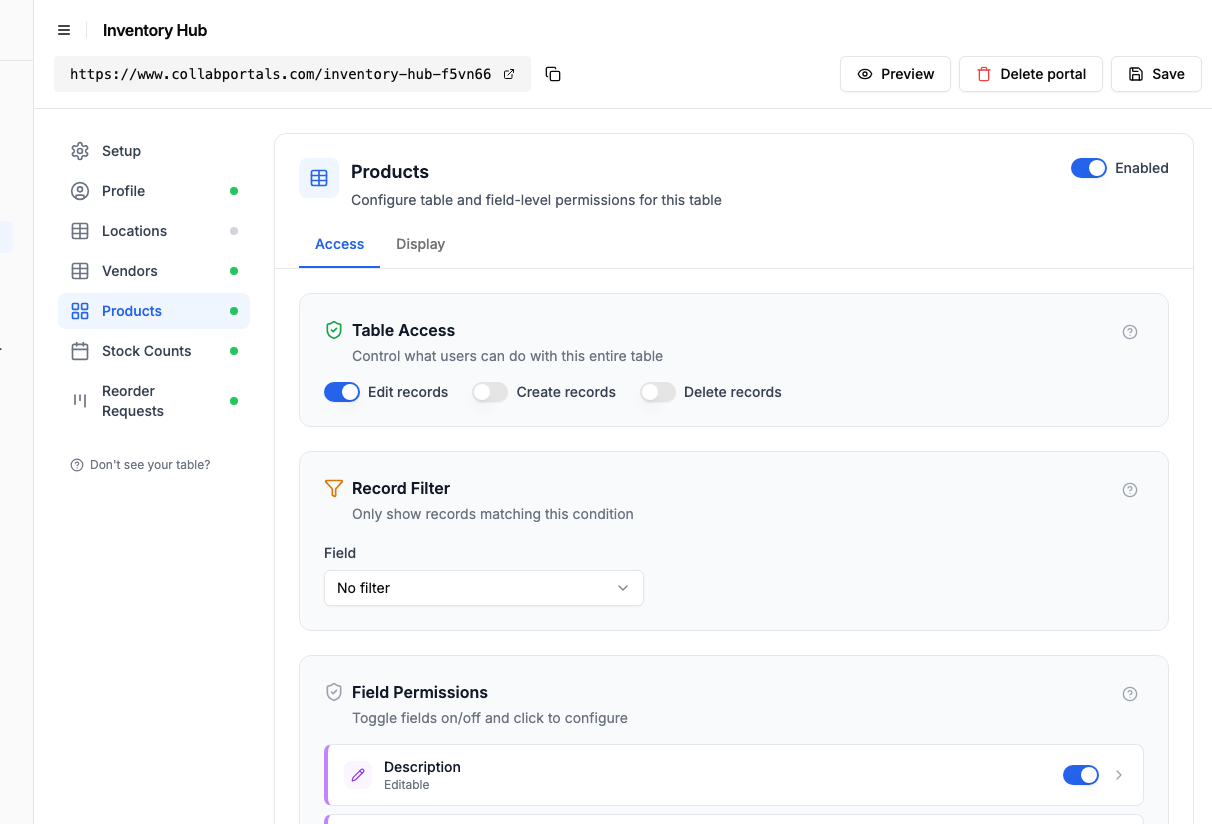
Show the catalogue and on-hand, while cost price and margin stay hidden from staff. - 4
Give each table the view that fits
Pick how each table appears. Products as a gallery so staff browse the catalogue with photos and on-hand, Stock Counts on a calendar by date, Reorder Requests as a board that moves from Pending to Ordered to Received. Same Airtable data, shaped for the floor.
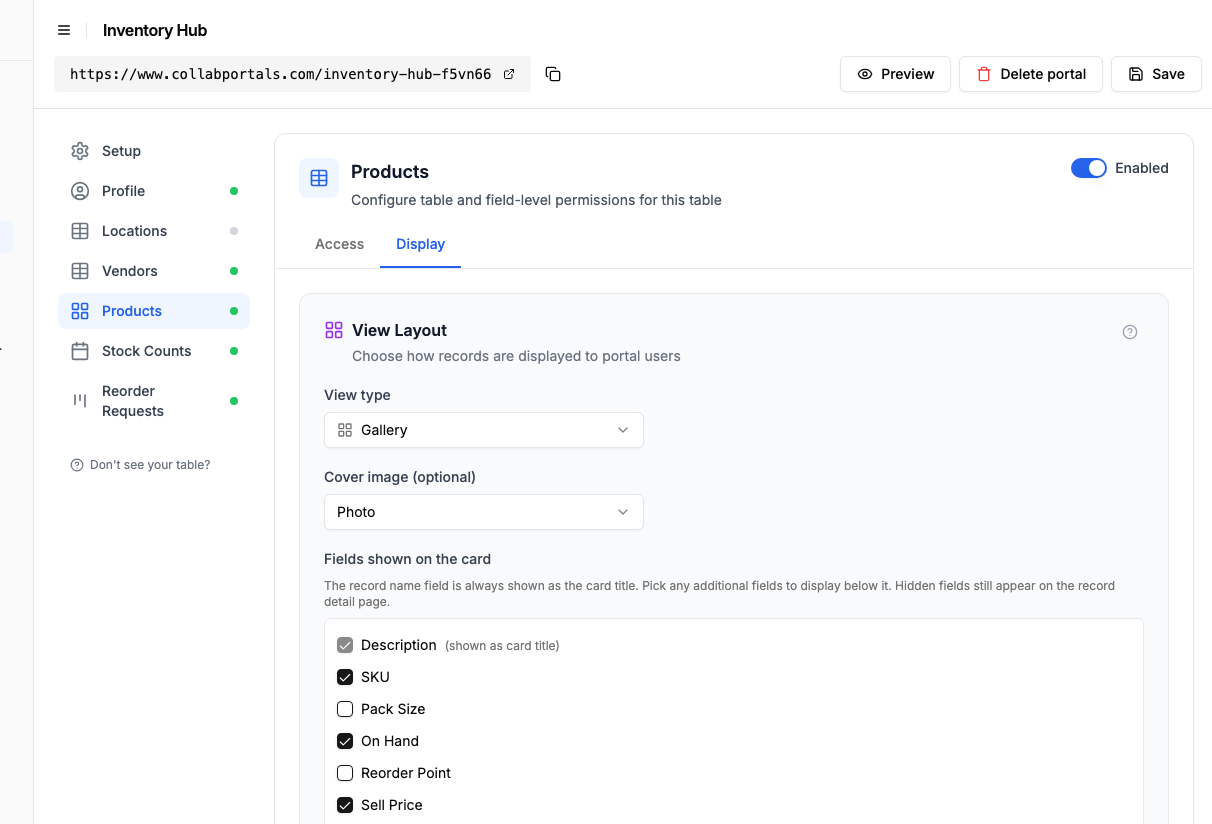
The Display tab lays Products out as a gallery with a photo on every card. - 5
Staff count and reorder in one place
The result is a clean, branded portal. Each person signs in, browses the catalogue with on-hand levels, runs a count, and flags a reorder, all writing straight into your Airtable base while cost and margin stay with you.
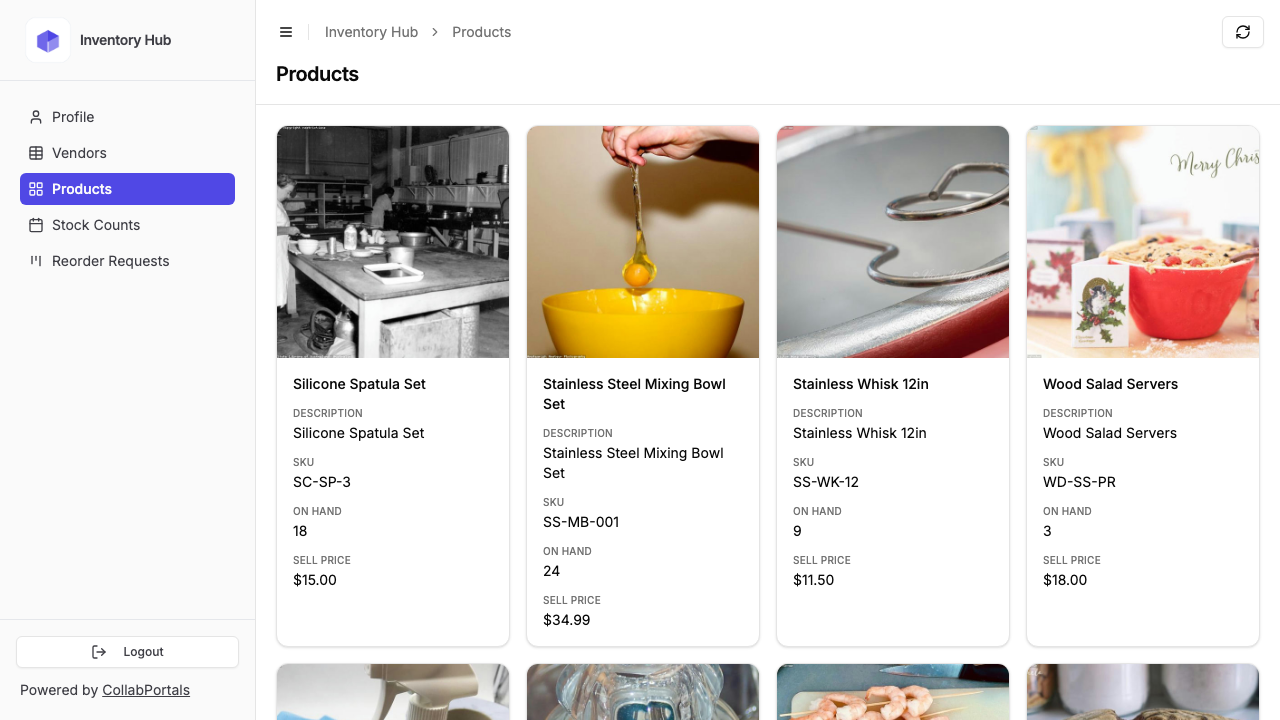
Staff browse the catalogue as a gallery, with on-hand and sell price but no cost or margin. - 6
They log in with their email
Share the link with your staff. Each one signs in with their email and a one-time code, so there are no passwords to manage and no Airtable seats to buy.
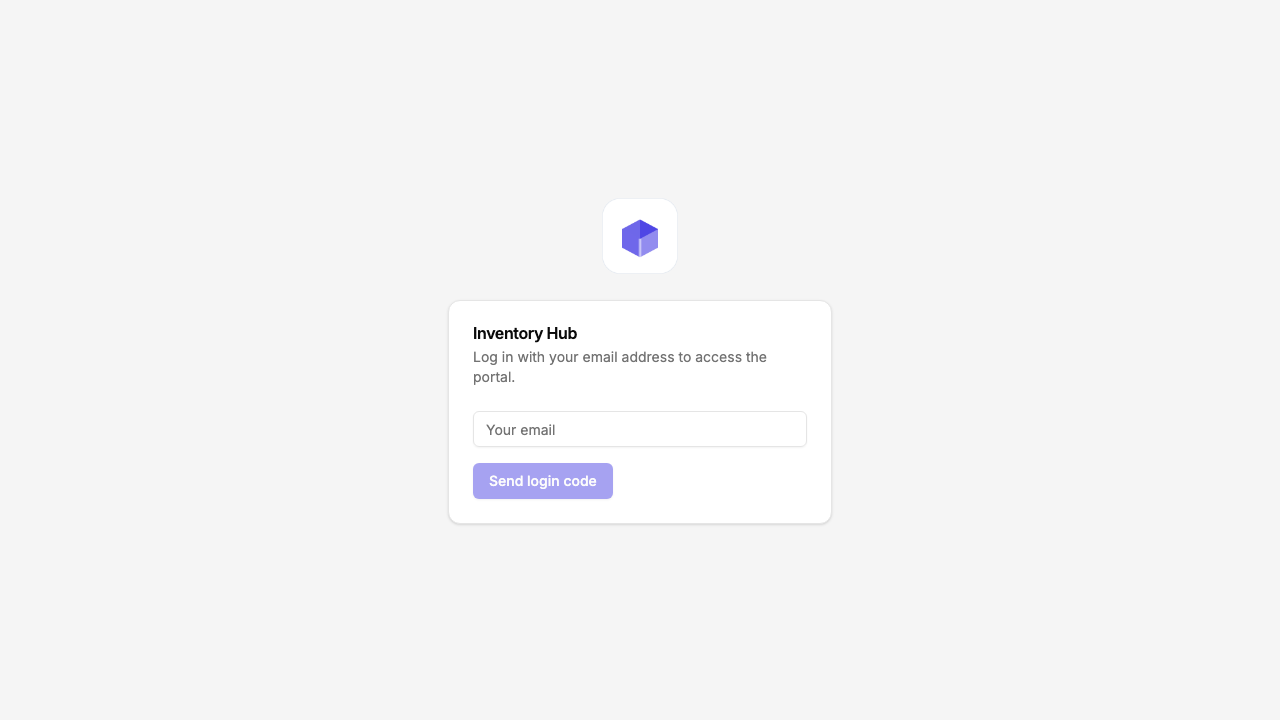
Email and one-time code login, branded with your logo and colour.
Want to start from this exact setup? Open the live demo or copy the Airtable template and connect it to your own base in minutes.
Field-Level Permissions for Inventory
Inventory tables almost always mix data that staff need with data they should never see. CollabPortals lets you split that down to the field:
- Show to staff: product description, pack size, on-hand quantity, reorder point, last counted date, location
- Hide from staff: cost price, margin, supplier name, supplier terms, internal notes
- Editable by staff: count quantity, count date, reorder request, condition note, photo
- Read-only for staff: product description, vendor item code, sell price, status flags
The same Airtable table feeds both audiences. There is no second copy of the data, no manual sync, and no chance of staff seeing the cost field by accident.
Take It Further
The walkthrough above is the whole build. A few options are worth knowing once you are up and running:
- Scope each user to their rows. Set a record filter so a store manager only sees Stock Counts and reorders for their own location, while head office sees every location in Airtable.
- Photos with a count. Make the Photo field editable so staff attach a shot of damaged stock or a dump list alongside a count or reorder.
- Per-role access. Add a role field on Staff so a Manager edits counts and reorders while floor staff only view, both from the same base.
- Nest counts and movements under each product. Turn on related tabs so a product's stock counts, reorder requests and movements show as tabs on the product record, scoped to it, instead of filtering the whole table.
- Let staff search the catalogue. Turn on filter, search and sort controls so staff search a long parts list and filter Products by category instead of scrolling.
After set-up, every count and reorder lands in your Airtable base, where your buying team already works, and cost and margin never leave it.
For the generic version that applies to any base, see the setup guide.
Frequently Asked Questions
Can each location only see its own stock counts?
Yes. CollabPortals matches each user to a record in your Airtable users table. You set a record filter so a user only sees rows linked to their location, their client, or themselves. One store manager cannot see another store's counts.
Can staff submit photos with a count or reorder request?
Yes, if your Airtable table has an attachment field and you make it visible and editable in the portal. Useful for damaged stock, dump lists, or proof-of-receipt on incoming deliveries.
Can I hide cost prices, margins, and vendor names?
Yes. Field-level permissions let you keep cost, margin, and supplier columns hidden while showing on-hand, sell price, and description. The base does not change, only the portal view does.
Does updating a count in the portal update Airtable in real time?
Yes. Edits made in the portal write directly to the underlying Airtable record. There is no separate database. Your buying team sees the new count the next time they refresh Airtable.
Can I integrate with barcode scanners or POS data?
CollabPortals reads and writes Airtable. Anything that already feeds Airtable (POS exports, barcode apps, receiving sheets) shows up in the portal automatically. Outbound integrations work the same way through Airtable automations or scripts.
How is this different from a dedicated inventory or WMS app?
Dedicated inventory and WMS tools (Cin7, Fishbowl, NetSuite Inventory) start around $40 to $200+ per user per month and assume your data lives in their system. If you already track inventory in Airtable, CollabPortals adds the user-facing layer without forcing you to migrate.

About the author
Matt Shepherd
Founder, CollabPortals
Matt is the founder of CollabPortals. A software engineer and Airtable power user who kept running into the same frustration: no easy way to give external users a simple and secure view to edit their data. He built CollabPortals as the lightweight solution to that problem, allowing you to set up a secure, permissioned portal in a few clicks.
Related use cases and guides
Retail Operations
Run a shop, café, or grocery business out of Airtable. Give staff a portal for counts, schedules, dump lists, and daily sales while keeping vendor pricing and margins to head office.
Use caseLocation Management
Give field teams, franchisees, and regional partners secure access to their location data in Airtable. Track sites, jobs, inventory, and tickets without sharing your entire base.
ComparisonCollabPortals vs Miniextensions: Which Airtable Portal Tool Is Right for You?
A detailed comparison of CollabPortals and Miniextensions for building Airtable portals. Compare pricing, features, and limitations to find the best fit.
ComparisonCollabPortals vs Softr: Lightweight Portal or Full App Builder?
Compare CollabPortals and Softr for Airtable portals. See how a $10/month focused portal tool stacks up against a full no-code app builder starting at $49/month.