Build an Airtable Retail Operations Portal
Run a shop, café, or grocery business out of Airtable. Give staff a portal for counts, schedules, dump lists, and daily sales while keeping vendor pricing and margins to head office.

See it working, then start from a ready-made Airtable base.
See a live demoCopy the Airtable templateThe Problem: Airtable Is Your Back Office, but Staff Cannot Live in It
Plenty of independent retailers, cafés, butchers, bakeries, and small grocers run their entire back office in Airtable. Product catalog with vendor pricing. Daily sales. Employee schedules. Markdowns and waste. Reorder alerts. The base is doing real work.
The problem is the people on the shop floor. Cashiers, butchers, supervisors, and shift leads need to enter counts, log markdowns, check the schedule, and update reorder flags. None of them should see your vendor cost prices, margins, or other locations' numbers. Putting them in Airtable as collaborators is a privacy and pricing problem. Printing daily sheets and rekeying them in the office is a labour problem.
You end up doing one of these:
- Leaving Airtable open on the office iPad so anyone can edit anything. Margins and supplier pricing are one tap away.
- Building Airtable Interfaces that still show every row to every user, with no real per-employee scope.
- Using paper count sheets that someone retypes into Airtable later. Every transcription is a chance to lose a digit.
- Buying a retail back-office app (Lightspeed Retail, Cin7, Vend) for $80 to $300+ per location per month, then trying to keep it in sync with the Airtable workflows you already have.
How CollabPortals Works for Retail Operations
CollabPortals connects to your Airtable base and gives staff a branded portal. Each employee logs in with their email, sees the tables and fields you allow, and edits the rows that belong to them. Vendor pricing, margins, and the buying side stay in Airtable, untouched.
Example: Independent Grocery and Butcher Operations Portal
A small grocery business runs a butcher counter, a deli, and a checkout. Their Airtable base tracks every UPC, every vendor price, every employee shift, every day's takings, and every markdown. The portal exposes the operational pieces to staff and hides everything financial.
| Table | Staff Access | Purpose |
|---|---|---|
| Products | View, edit | Staff update on-hand, location, and reorder flag for each product |
| Stock Counts | View, create, edit | Counters enter inventory counts by department and date |
| Markdowns / Dump List | View, create, edit | Staff log waste and markdowns with photo, reason, and value |
| Daily Sales | View, edit | Shift leads enter daily totals by tender type at close of day |
| Schedules | View only | Staff see their own shifts; managers edit the schedule |
| Employees | View, edit | Staff manage their own profile and pin |
| Vendors | Hidden | Sales reps, account numbers, order rules stay with the buyer |
| Vendor Pricing | Hidden | Cost prices and price lists stay internal |
| Margins | Hidden | Anything calculated from cost stays out of the staff view |
The owner sees the full back office in Airtable. Staff see a simple, branded app for the bits that involve them.
Build a Retail Operations Portal Step by Step
Here is how the live demo above is put together. The whole thing takes about an hour the first time, and there is no code involved.
- 1
Set up your Airtable base
Start in Airtable with one table per thing you track: Products, Stock Counts, Markdowns, Daily Sales, Schedules, and an Employees table for your staff. Employees is the hub. It holds each person's email, and every other table has a link field pointing back to it, so each row can be tied to the staff member it belongs to. That link is what later lets the portal show each person only their own records.
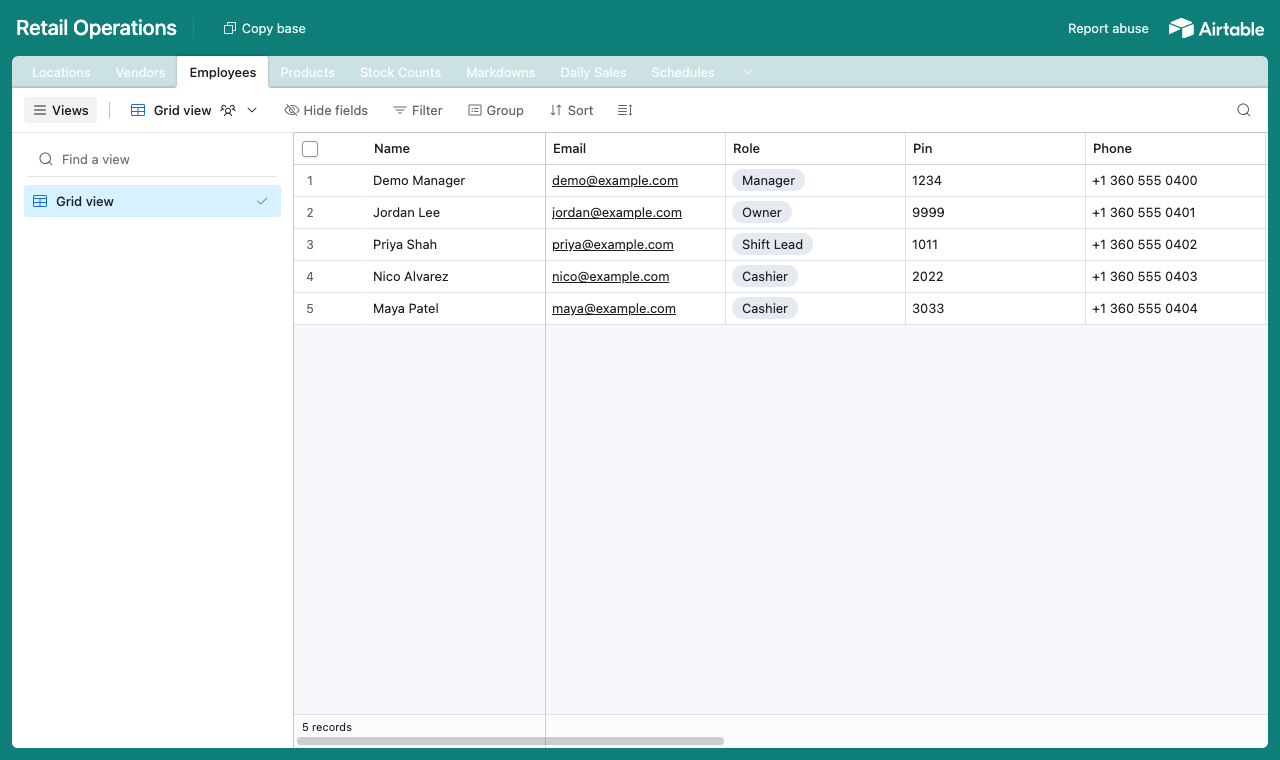
One table per thing, with an Employees table as the hub every other table links back to. - 2
Connect the base and pick the staff table
Point CollabPortals at that base, then choose the Employees table as your user table and Email as the login field. Everyone signs in with the email on their staff record, and CollabPortals matches them to their row.
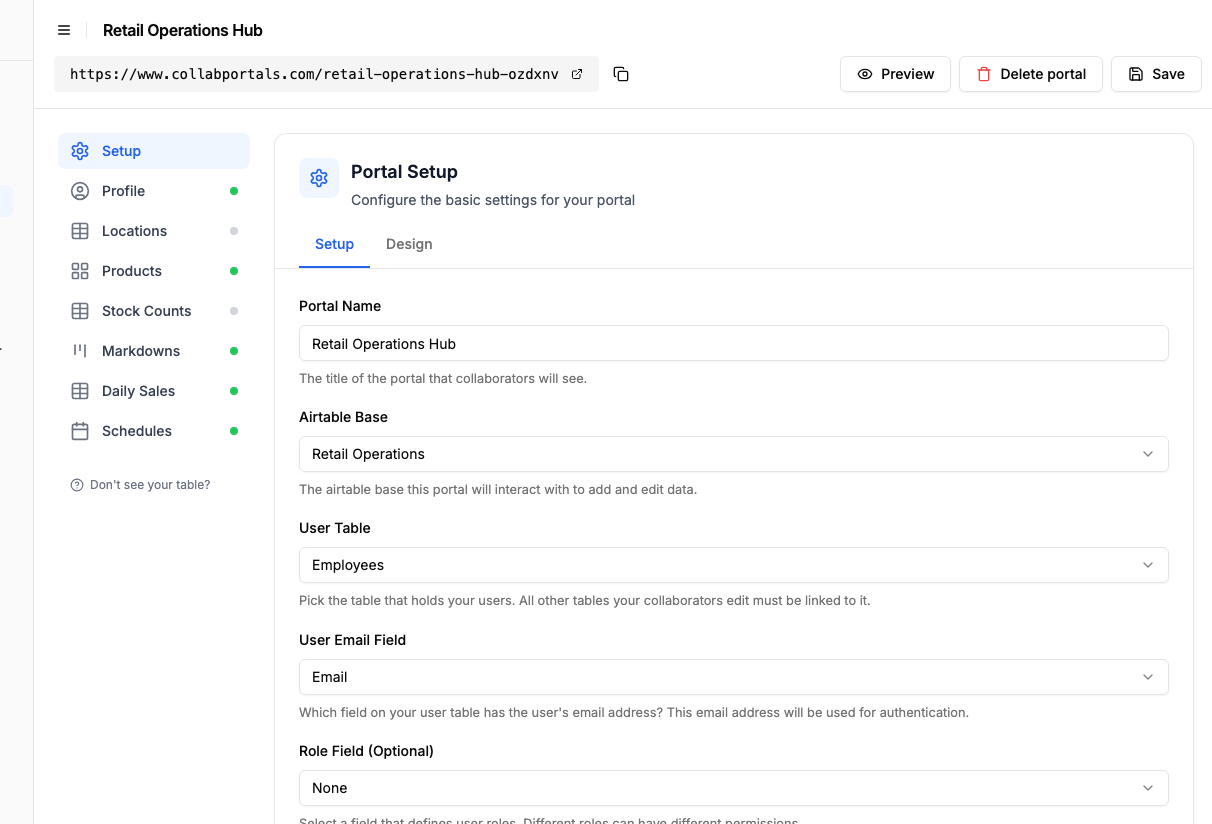
Connect the base, then point CollabPortals at the Employees table and its email field. - 3
Hide cost and margin, keep the shop-floor fields
On each table you toggle fields on or off. On Products, staff see the description, on-hand, sell price and the photo (editable, so they can snap one at the shelf), while Cost Price, Margin and Vendor stay hidden for head office. Table access is set to edit only, with no deleting.
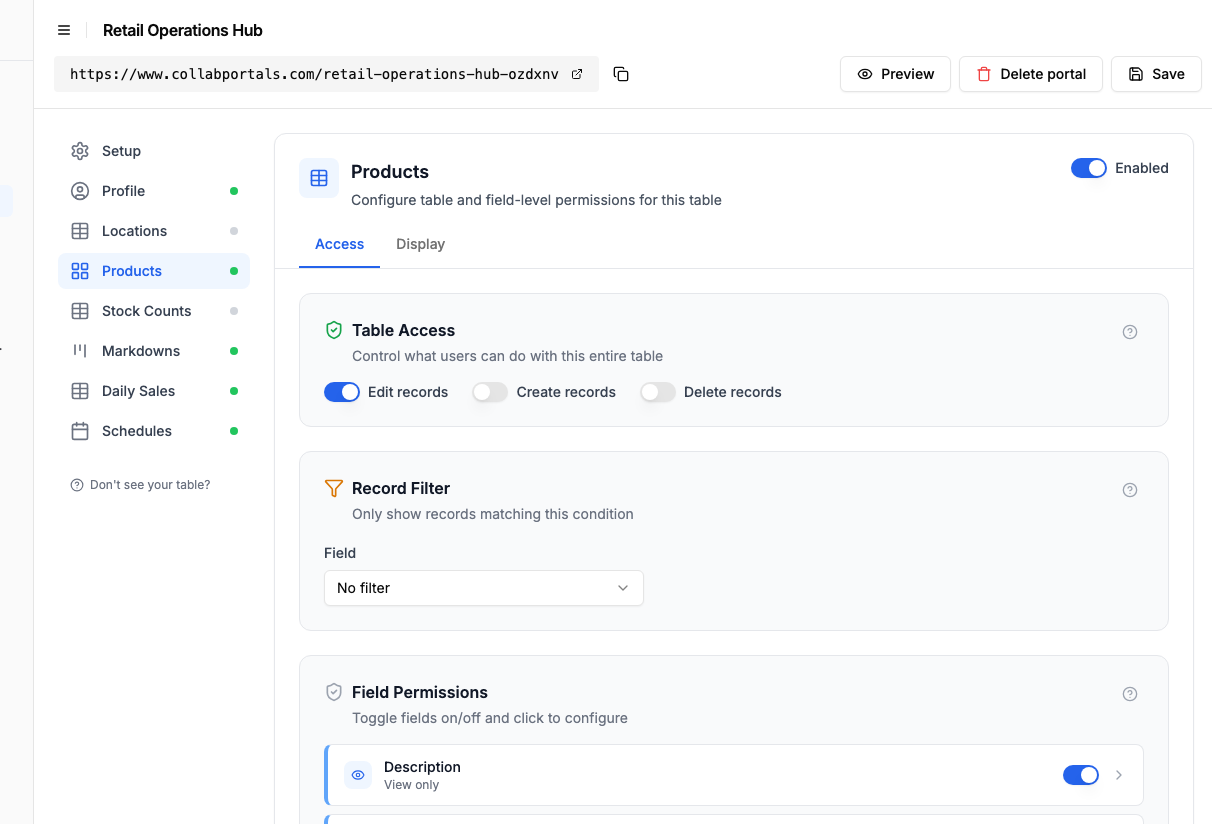
Field-level permissions: show the operational fields, hide anything financial. - 4
Give each table the view that fits
Pick how every table is shown to staff. Products as a gallery of photos, Markdowns as a kanban by reason, Daily Sales as a table, Schedules as a calendar. It is the same Airtable data, laid out for the shop floor.
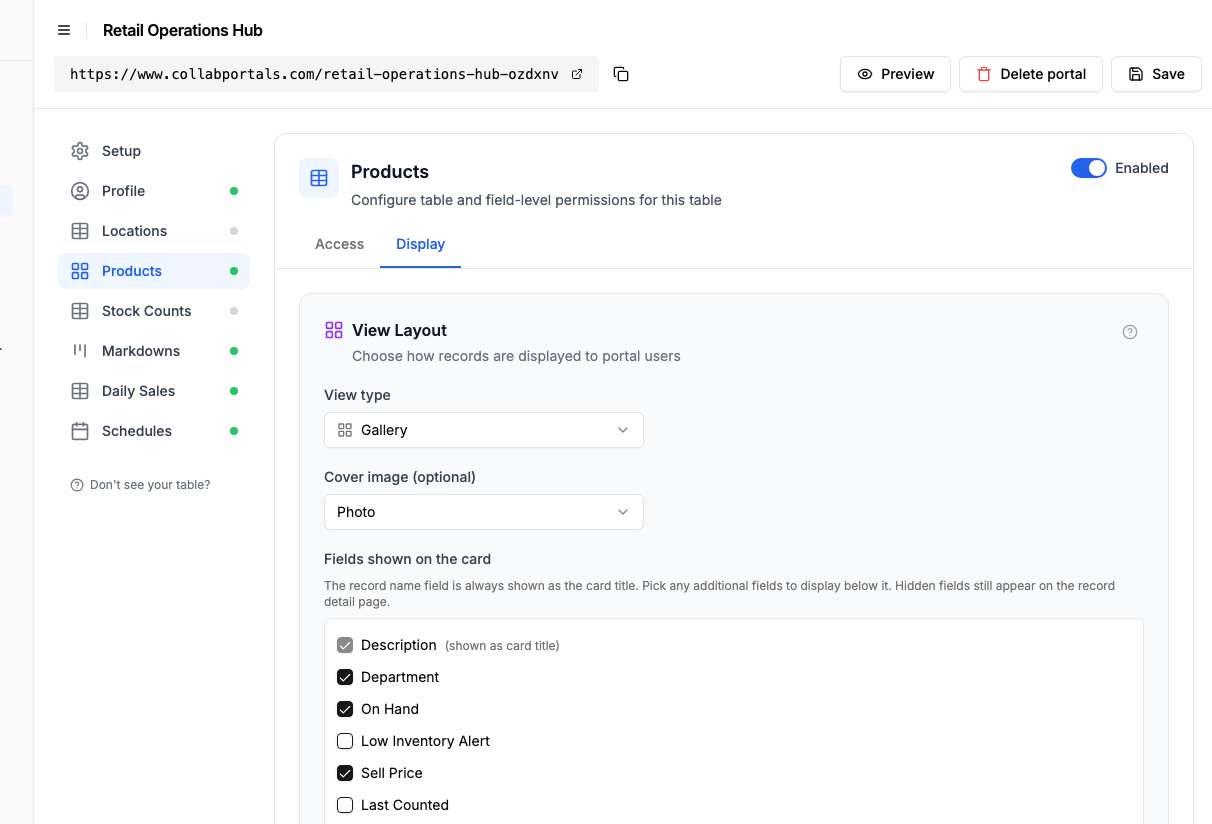
The Display tab turns each table into a gallery, kanban, calendar or table. - 5
Staff get a clean, branded app
The result is a simple portal in your colours. Staff browse products, log a markdown with a photo and a reason, enter the day's takings, and check the rota, all writing straight back to your Airtable base.
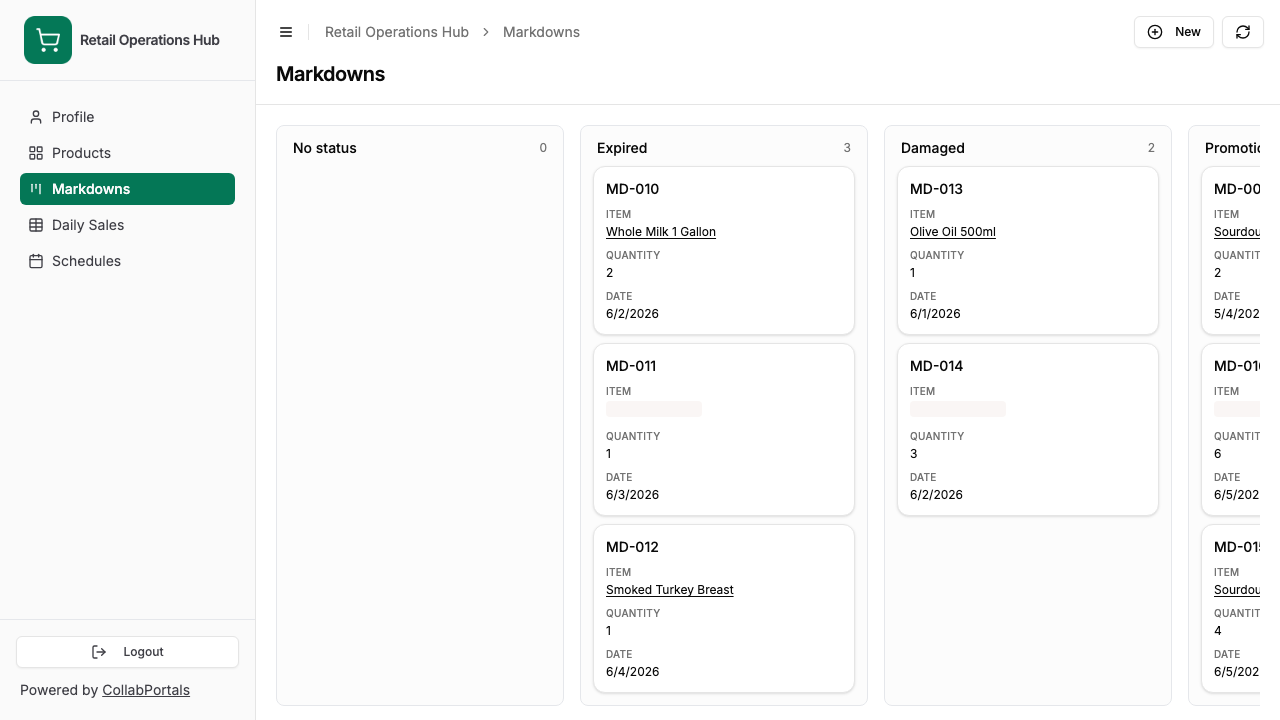
The Markdowns dump list as staff see it: pick a reason column, attach a photo, done. - 6
They log in with just their email
Share the link. Each staff member signs in with the email on their record and a one-time code, so there are no passwords to manage and no Airtable seats to buy. For a public example you can flip on a one-click demo user instead.
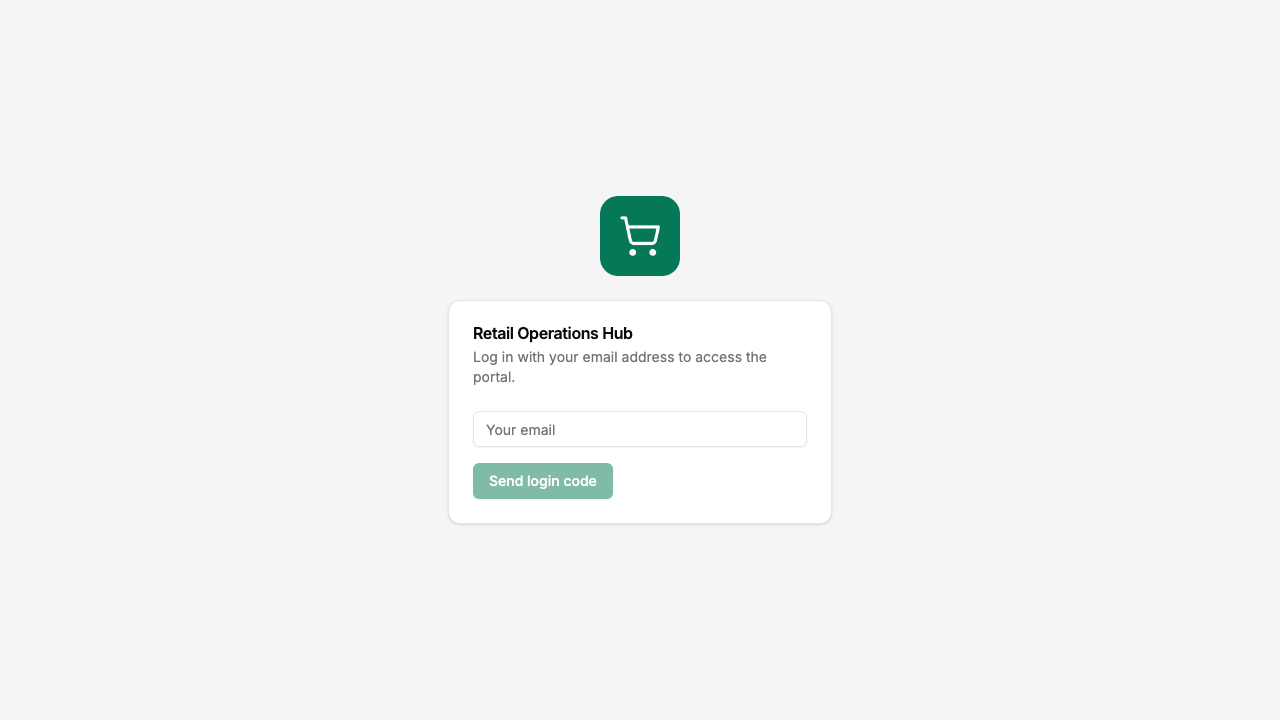
Email and one-time code login, branded with the shop's logo and colour.
Want to start from this exact setup? Open the live demo or copy the Airtable template and connect it to your own base in minutes.
Use Cases for Retail Operations Portals
Independent Grocery, Butcher, and Specialty Food
Track UPCs, vendor pricing, and daily sales in Airtable. Give floor staff a portal for counts, markdowns, and ordering flags.
- Products (view, edit), description, location, on-hand, low-inventory alert
- Markdowns / Dump List (create, edit), item, quantity, reason, photo
- Stock Counts (create, edit), date, counted-by, department, count
- Sales (edit), date, total, tender breakdown
- Hidden: cost price, margin, vendor name, supplier terms
Boutique Retail with Multiple Locations
Each store manages its own counts, markdowns, and reorder requests. Head office sees everything; each store sees only its own.
- Products (view), shared catalog with images, sell price, pack size
- Stock by Location (view, edit), on-hand at this store
- Reorder Requests (create, edit), what to bring in next week
- Markdowns (create, edit), items going on sale, reason
- Hidden: cost, margin, transfer-in-progress columns, other stores' data
Café and Restaurant Operations
Front-of-house and kitchen staff run prep counts, waste logs, and shift handovers in a portal. The owner runs the menu, costing, and supplier work in Airtable.
- Prep Counts (create, edit), item, par level, on-hand, prep needed
- Waste Log (create), item, quantity, reason, value
- Daily Sales (edit), shift, tender breakdown, voids
- Schedules (view), upcoming shifts
- Hidden: recipe costs, supplier pricing, payroll calculations
Multi-Site Hospitality Group
A small group with multiple cafés, bars, or restaurants runs one shared Airtable base for all sites. Each site only sees its own data, and the operations director sees the whole group.
- Site-scoped sales, schedules, counts for site managers
- Group-level rollups for the operator
- Hidden: payroll cost, contract terms, group P&L, sister-site numbers
What Makes This Better Than the Alternatives
| Capability | Paper sheets and rekeying | Airtable seats for staff | Lightspeed / Cin7 / Vend | CollabPortals |
|---|---|---|---|---|
| Staff enter counts and markdowns directly into your live data | No | Yes | Yes | Yes |
| Cost prices, margins, and supplier terms stay hidden | N/A | No | Yes | Yes |
| Each location and each role sees only its own rows | N/A | No | Yes | Yes |
| You keep working in Airtable (formulas, automations, views) | Yes | Yes | No, separate system | Yes |
| Per-employee cost | Free + transcription errors | $20/seat/month | $80 to $300+/site/month | $10/month flat |
| Time to set up | None, but ongoing pain | Quick, but unsafe | Weeks of migration | Around an hour |
For a side-by-side breakdown, see CollabPortals vs Softr and CollabPortals vs Miniextensions, or the roundup of the best Airtable portal builders.
Field-Level Permissions for Retail
Retail bases mix operational fields (count, on-hand, location, sell price) with commercial fields (cost, margin, supplier terms). CollabPortals lets you decide on a per-field basis what staff see:
- Show to staff: description, sell price, on-hand, low-inventory threshold, location, last counted, sell-by date
- Hide from staff: cost price, margin, supplier name, supplier item code, contract terms, internal notes
- Editable by staff: on-hand, count quantity, markdown reason, photo, daily sales totals
- Read-only for staff: description, sell price, schedule (unless they are a manager)
The same row, the same Airtable record, two completely different views.
Take It Further
The walkthrough above is the whole build. Two options are worth knowing once you are up and running:
- Roles. If your Employees table has a role field (Cashier, Shift Lead, Manager, Owner), each role can get its own table and field permissions, so a manager edits the schedule while a cashier only reads it.
- Record filters. Scope rows tighter still with a filter, so each person sees only their own schedule and each manager only their own location's sales.
- Nest counts and markdowns under each product. Turn on related tabs so a product's stock counts and markdowns show as tabs on the product record, scoped to it, instead of filtering the whole table.
- Let staff search the catalog. Turn on filter, search and sort controls so staff search a long product list and filter markdowns by reason instead of scrolling.
After the first day of set-up, every count, markdown, and shift change happens in the portal and lands straight in your Airtable base.
For the generic version that applies to any base, see the setup guide.
Frequently Asked Questions
Can I hide cost price and margin from staff?
Yes. Field-level permissions let you mark cost, margin, supplier name, and any other commercial field as hidden in the portal while leaving them in Airtable. Staff see the same product row, just without those columns.
Can shift leads enter daily sales totals from the portal?
Yes. If your Airtable base has a Daily Sales (or equivalent) table, you can give shift leads create or edit access. They enter total, tender breakdown, and notes; the row writes straight to Airtable.
How does the dump list or waste log work?
Add a Markdowns or Dump List table in Airtable with attachment, quantity, reason, and value fields. Make it visible and editable in the portal. Staff log waste with a photo on their phone; you see it in Airtable in real time, including for accounting and write-off reporting.
Can different roles see different things?
Yes. CollabPortals supports multiple roles per portal. A Cashier might only see their own schedule and the dump list; a Manager sees the full schedule, daily sales, and reorder requests; an Owner sees everything.
Does this replace my POS?
No. POS still rings up sales. CollabPortals is the operational layer around the data you keep in Airtable: catalog management, counts, markdowns, scheduling, daily totals. Many users export POS data into Airtable on a daily schedule and use the portal to act on it.
Can I run multiple sites from one base?
Yes. Add a Locations table, link products and schedules to a location, and set a record filter so each user only sees rows for their site. The owner or operations director sees all sites; each site only sees itself.

About the author
Matt Shepherd
Founder, CollabPortals
Matt is the founder of CollabPortals. A software engineer and Airtable power user who kept running into the same frustration: no easy way to give external users a simple and secure view to edit their data. He built CollabPortals as the lightweight solution to that problem, allowing you to set up a secure, permissioned portal in a few clicks.
Related use cases and guides
Inventory Management
Give warehouse staff, location managers, and external partners controlled access to your Airtable inventory base. Counts, reorders, and vendor pricing without exposing costs or other locations.
Use caseLocation Management
Give field teams, franchisees, and regional partners secure access to their location data in Airtable. Track sites, jobs, inventory, and tickets without sharing your entire base.
ComparisonCollabPortals vs Airtable Interface Designer: Can You Use Interfaces as a Portal?
Airtable Interface Designer is free, but can it replace a dedicated portal? Compare it to CollabPortals for sharing data with external users.
ComparisonCollabPortals vs Stacker: Simple Portal or Full App Builder?
Compare CollabPortals ($10/month) with Stacker Classic ($9+/month) for Airtable portals. Find out which tool fits your budget and use case.