An Activity Log for Your Airtable Portals: See Who Changed What
The Activity page in CollabPortals logs what your portal users do: records created, edited and deleted, exports, sign-ins and role switches, across every portal, with filters and charts.

Airtable can't tell you which portal user did it
When someone edits a record through a portal, the change reaches Airtable through its API, under the account that connected the base. To Airtable, every change your portal users make comes from the same place.
That's fine until a status flips that shouldn't have, or a record goes missing, or a client says they never received access. Then the first question is who did what, and Airtable can't answer it.
What the Activity page shows
CollabPortals now logs what your portal users do and shows it on one page, across all your portals. Every entry has the time, the portal, the user's email and their IP address, and one of seven actions:
- Create, edit and delete, with the record and its table. An edit names the fields that changed, such as "Changed Status".
- Export, with the format, the number of rows, and any fields the user filtered or sorted on before downloading.
- Login and logout, with whether the sign-in was a new sign-up.
- Role switch, with the role the user moved from and to.
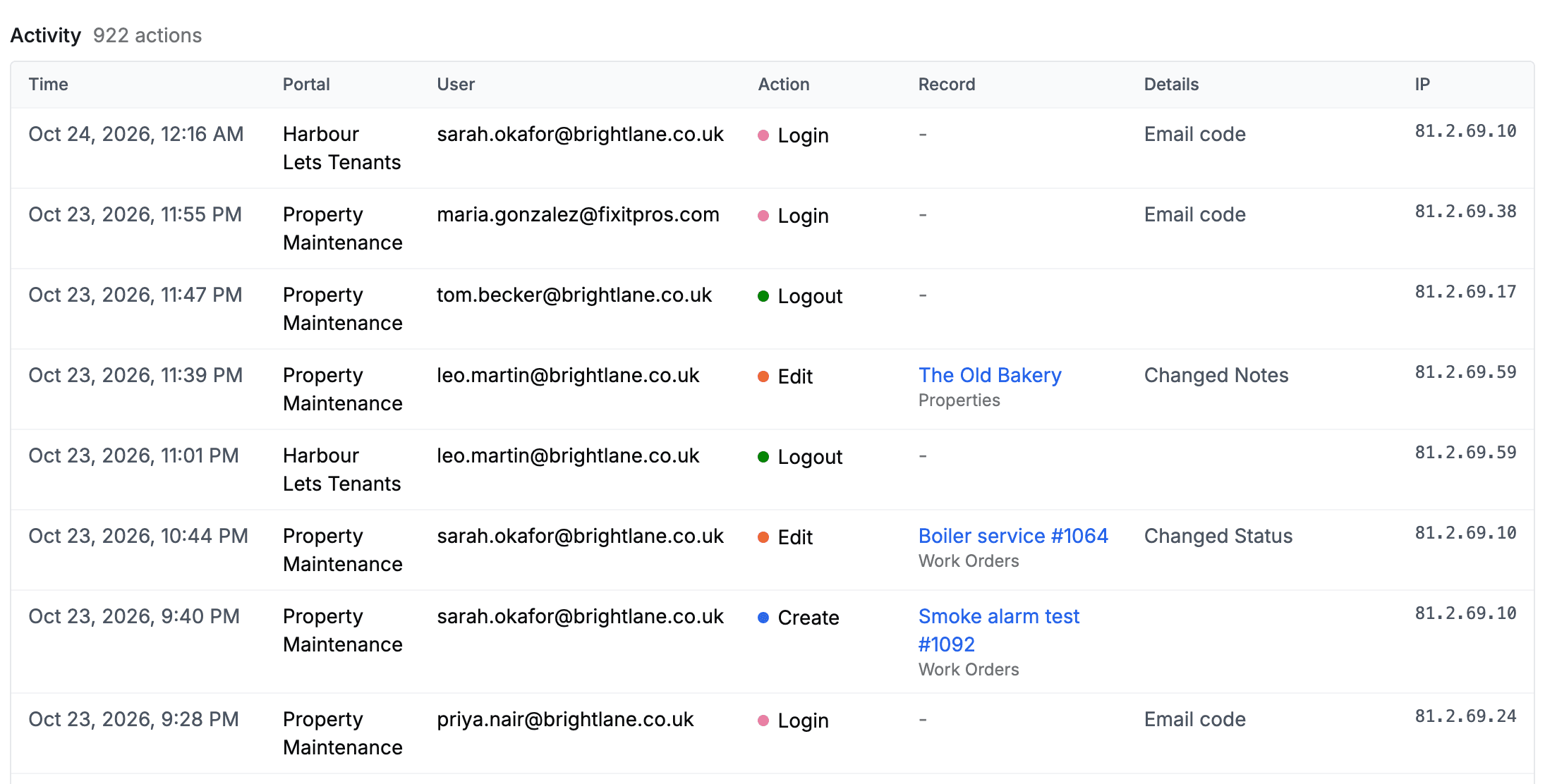
A bulk edit across fifty records logs fifty entries, each marked as part of the batch, so searching for one record still finds it.
Filters and charts
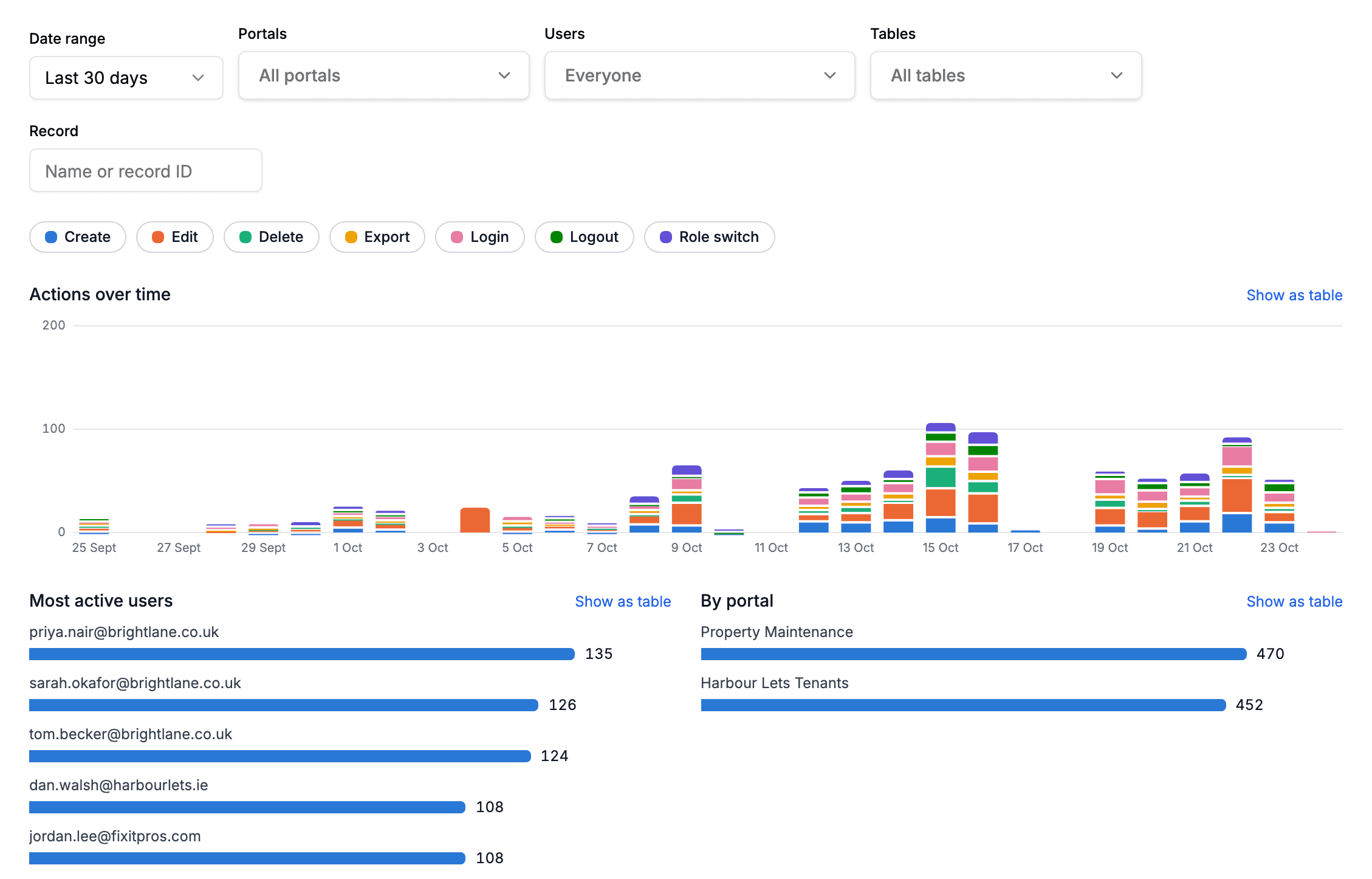
Pick a date range, then narrow by portal, user, table or record. Portals, users and tables each take several choices, and the user filter searches as you type, which matters once a portal has hundreds of users.
Above the list are three charts: actions per day stacked by type, your most active users, and a comparison of your portals. A row of toggles switches each action type on or off for the charts and the list together. Switch off everything except Login and you have sign-ins per day across every portal you run.
What it does not record
Only actions taken through a portal are logged. Changes made directly in Airtable or by your automations are not, and neither is opening a record. An edit records the names of the fields that changed and never their values, so the log doesn't become a second copy of your data.
Your own previews are left out, so testing a portal doesn't fill the log, and entries are deleted after 12 months.
Who this helps
- Client portals, checking whether a client has signed in before chasing them about a document
- Contractor compliance portals, seeing which contractor updated a certificate and when
- CRM portals and sales rep portals, finding who moved a deal or deleted a contact
- Anyone running several portals, who wants sign-ins across all of them on one chart
How it compares
Softr's own documentation says it has no built-in tracking of detailed user activity: its Users list shows when each user was last seen, and its App History covers changes to the app, not to records. The workaround its community suggests is a hidden field on each form that writes the user into a log table. More on that in CollabPortals vs Softr.
Noloco has record history, which keeps the old and new value of each changed field. That is more than CollabPortals stores for an edit, by design: we keep field names, not values.
Airtable's own audit log is part of its Enterprise Scale plan, and it records what happens in Airtable rather than in a portal.
Getting started
There is nothing to switch on. Open Activity under More in your dashboard sidebar and your portals' activity since 24 October 2026 is there. The activity log feature page has the overview, and the guide explains every entry and filter.
Let me know what you'd want it to answer next.

About the author
Matt Shepherd
Founder, CollabPortals
Matt is the founder of CollabPortals. A software engineer and Airtable power user who kept running into the same frustration: no easy way to give external users a simple and secure view to edit their data. He built CollabPortals as the lightweight solution to that problem, allowing you to set up a secure, permissioned portal in a few clicks.
Related reading
Activity Log for Your Airtable Portals
See what the users of your Airtable portals did: records created, edited and deleted, exports, sign-ins and role switches, across every portal, with filters by portal, user, table and record, and charts over time.
FeatureRoles: One Portal, A Different View for Each Person
Define roles like Admin, Editor and Viewer from a field in your user table. Each role gets a complete permission set of its own, in the same portal.
Use caseClients
Give your clients secure, branded access to their project data in Airtable. No extra seats, no code, no complex setup, just share a link.
ComparisonCollabPortals vs Softr: Lightweight Portal or Full App Builder?
Compare CollabPortals and Softr for Airtable portals. See how a $10/month focused portal tool stacks up against a full no-code app builder starting at $19/month billed annually.