Build an Airtable Order Tracking Portal
Let customers track orders, packages and deliveries from your Airtable base, with proof of delivery and invoices, while carrier costs stay internal.

See it working, then start from a ready-made Airtable base.
See a live demoCopy the Airtable templateThe Problem: Every Customer Wants to Know Where Their Order Is
Freight forwarders, parcel shippers, wholesalers and made-to-order shops run a lot of their operation in Airtable. Orders, packages, tracking numbers, delivery photos, invoices and claims all live in one base, linked together, with automations moving things along.
The customers are the problem. Every one of them wants to know where their goods are, whether the pallet arrived in one piece, and which invoices are still open. None of them should see your carrier costs, your margins, your routing notes, or any other customer's shipments. So the answers go out by hand.
You end up doing one of these:
- Answering "where is it?" emails by copying a tracking number and a status out of Airtable, one customer at a time.
- Sending a shared view link that shows every row in the view to anyone who has the link, so you build and maintain one filtered view per customer.
- Emailing invoices and delivery photos as attachments, then answering the follow-up about which invoice is which.
- Buying freight or order management software with a customer portal built in, usually priced per user or per shipment, and moving your operation out of the base you built.
How CollabPortals Works for Order Tracking
CollabPortals connects to your Airtable base and gives each customer a branded portal. They sign in with their email, see their own orders and nothing else, and can request a pickup or report a problem without emailing you. Carrier costs, margins and internal notes stay in Airtable, untouched.
Example: Freight and Parcel Forwarder Customer Portal
A freight forwarder collects goods from its business customers, moves them by truck, air or ocean, and delivers them to the customers' own stockists and stores. Their Airtable base tracks every order, every package and its latest scan, every delivery attempt with the driver's photo, and every invoice. The portal gives each customer their own view of that, and hides the commercial side.
| Table | Customer Access | Purpose |
|---|---|---|
| Orders | View, edit | A board of every order by status, from Booked to Delivered. Customers can update the PO number and delivery instructions |
| Collections | View, create, edit | Customers request pickups on a calendar; the team confirms them and assigns a driver |
| Packages | View only | Every carton, crate and pallet with its tracking number and latest scan |
| Deliveries (Proof of Delivery) | View only | The driver's photo, who signed and when, plus any failed attempt and the reason |
| Invoices | View only | The invoice PDF, amount and payment status, outstanding invoices first |
| Order Issues | View, create, edit | Customers report damage, delays, missing items, address changes and billing queries |
| Consignees (Address Book) | View, create, edit | The stockists and stores each customer ships to, with receiving hours and dock notes |
| Customers | Own profile, edit contact details | Account number, payment terms and account manager |
| Carrier cost, margin, routing notes | Hidden | Fields on Orders the customer never sees |
| Credit control and account notes | Hidden | Fields on Invoices and Customers kept for the accounts team |
Your ops team works the full base in Airtable. Each customer sees a clean, branded tracking portal with only their own shipments in it.
Build an Order Tracking Portal Step by Step
Here is how the live demo above is put together. The whole thing takes about an hour the first time, and there is no code involved.
- 1
Set up your Airtable base
Start in Airtable with one table per thing you track: Orders, Packages, Collections, Deliveries, Invoices, Order Issues and Consignees, plus a Customers table for the businesses you ship for. Customers is the hub: it holds each customer's email, and every other table has a link field back to it, which is what later lets the portal show each customer only their own records. The tables also link to each other the way the work does: an order has packages, deliveries and invoices, and it came from a collection and is going to a consignee.
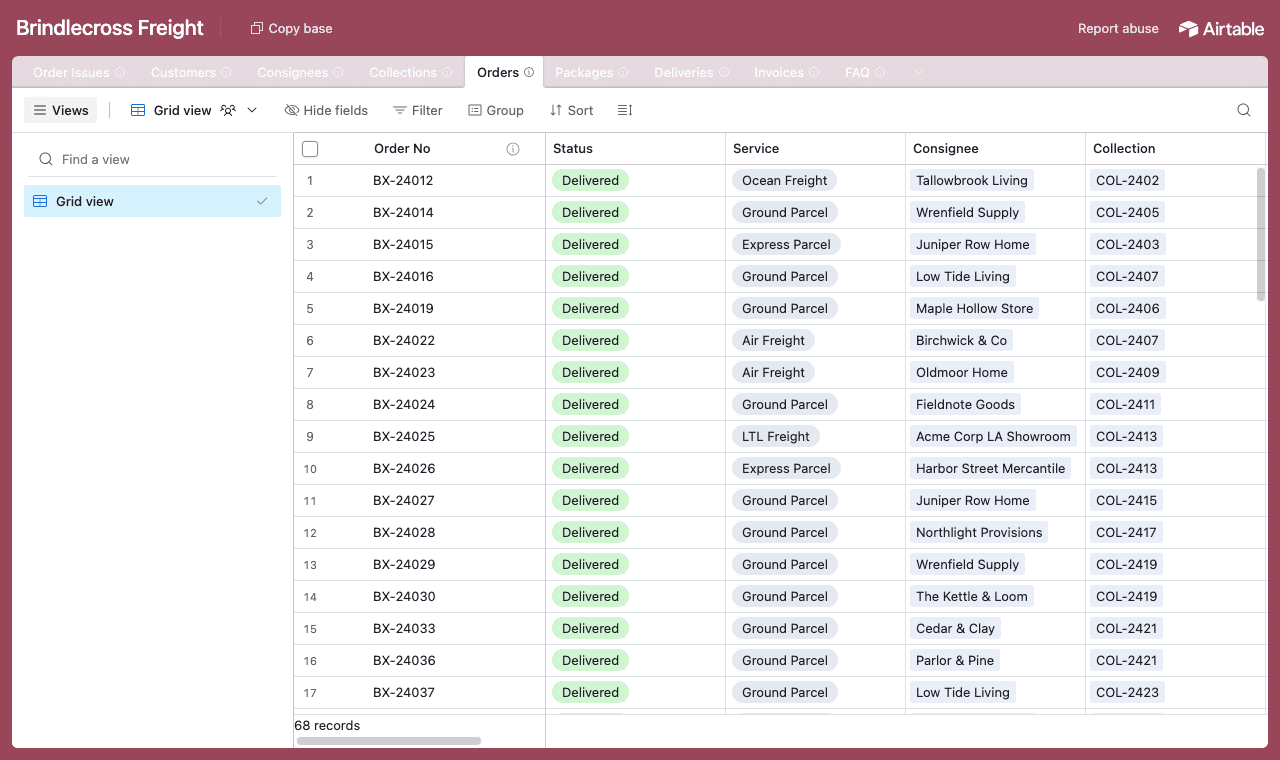
One table per thing, with a Customers table as the hub every other table links back to. - 2
Connect the base and pick the customer table
Point CollabPortals at that base, then choose the Customers table as your user table and Email as the login field. Each customer signs in with the email on their record, and CollabPortals matches them to it.
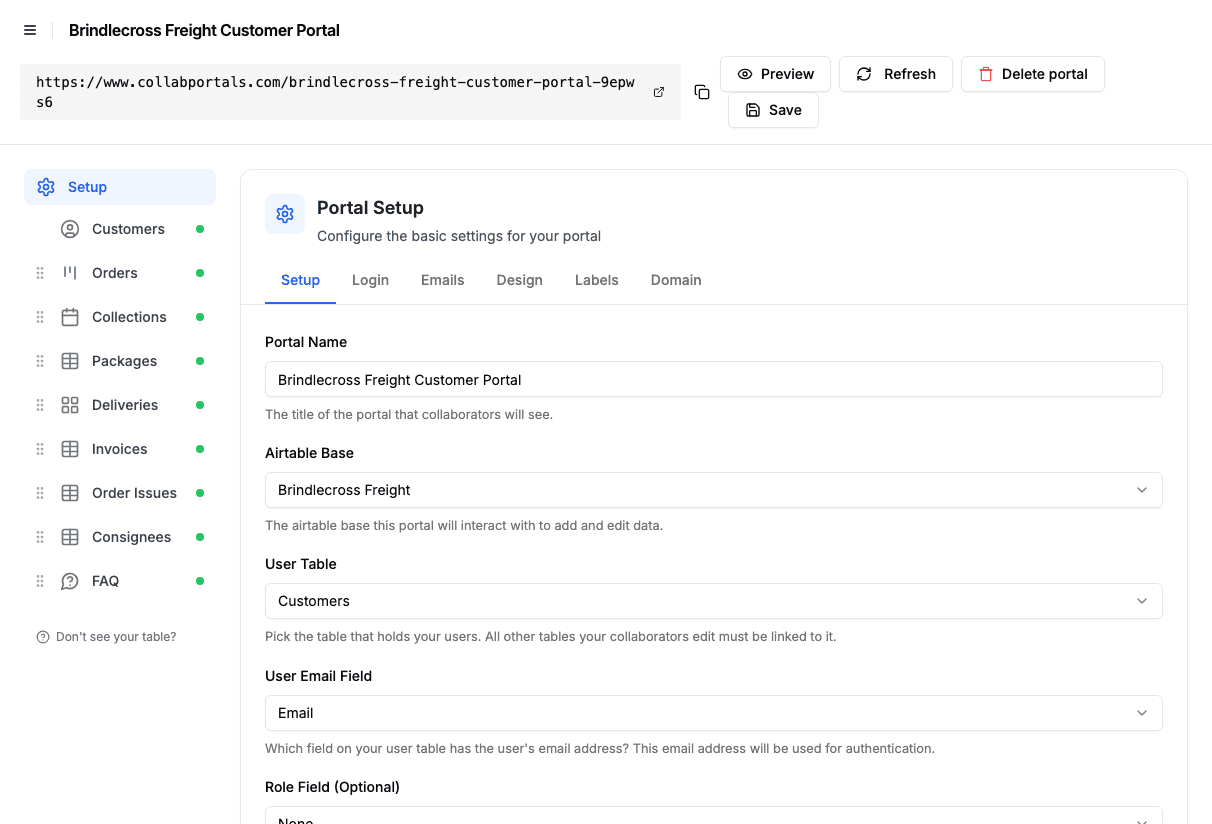
Connect the base, then point CollabPortals at the Customers table and its email field. - 3
Hide carrier costs and margins, keep the tracking fields
On each table you toggle fields on or off. On Orders, customers see the status, service, ETA, required-by date, consignee, quoted price, packages and invoices, while Carrier Cost, Margin and Internal Routing Notes stay hidden for the ops team. Table access is view and edit, with editing limited to the PO number and delivery instructions, and no creating or deleting.
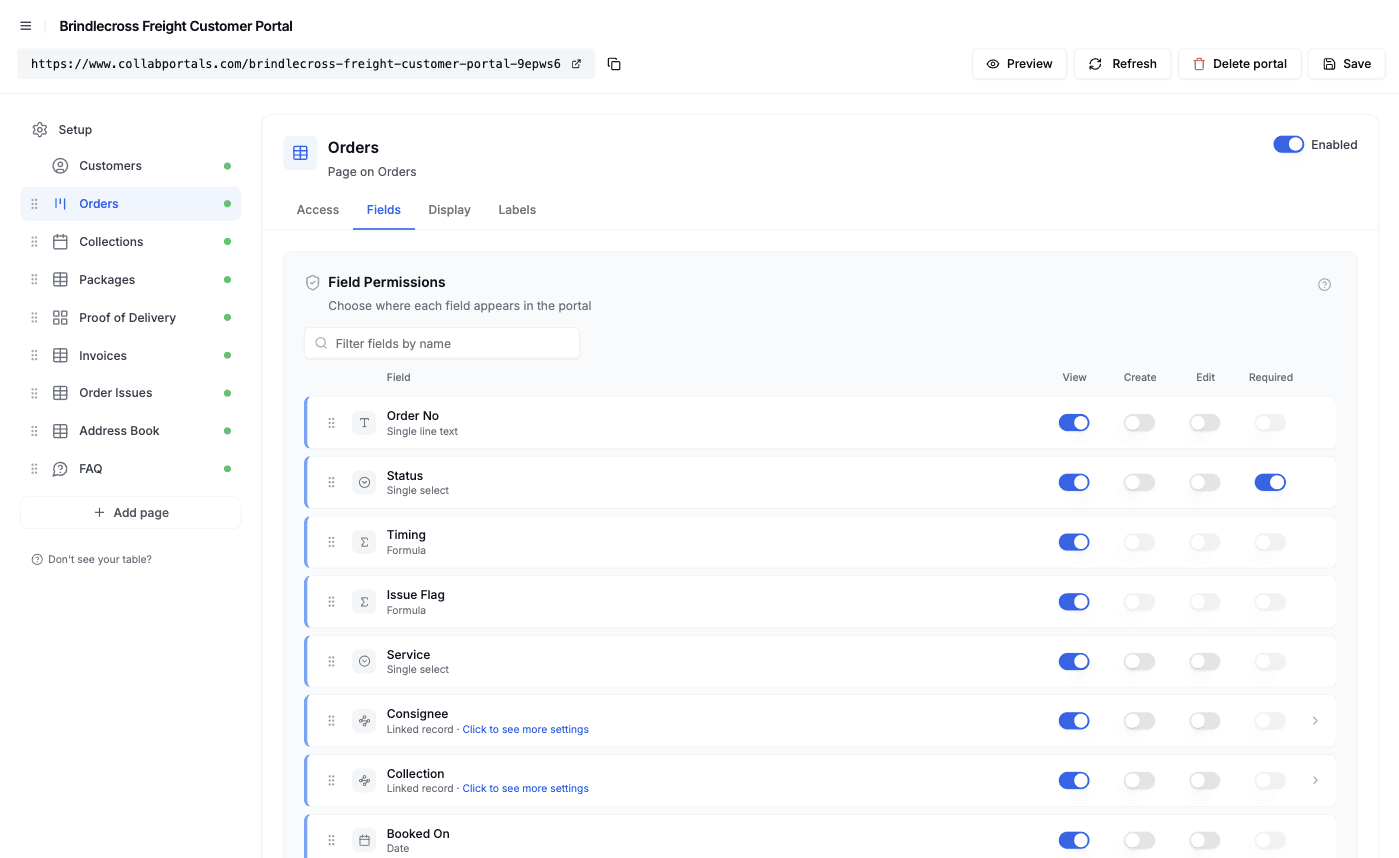
Field-level permissions: show the tracking fields, hide anything commercial. - 4
Give each table the view that fits
Pick how every table is shown. Orders as a kanban board grouped by status, Collections as a calendar by collection date, Deliveries as a gallery of proof-of-delivery photos, and Packages and Invoices as tables. Conditional formatting tints the exceptions: orders running late in orange, orders with an open issue in red.
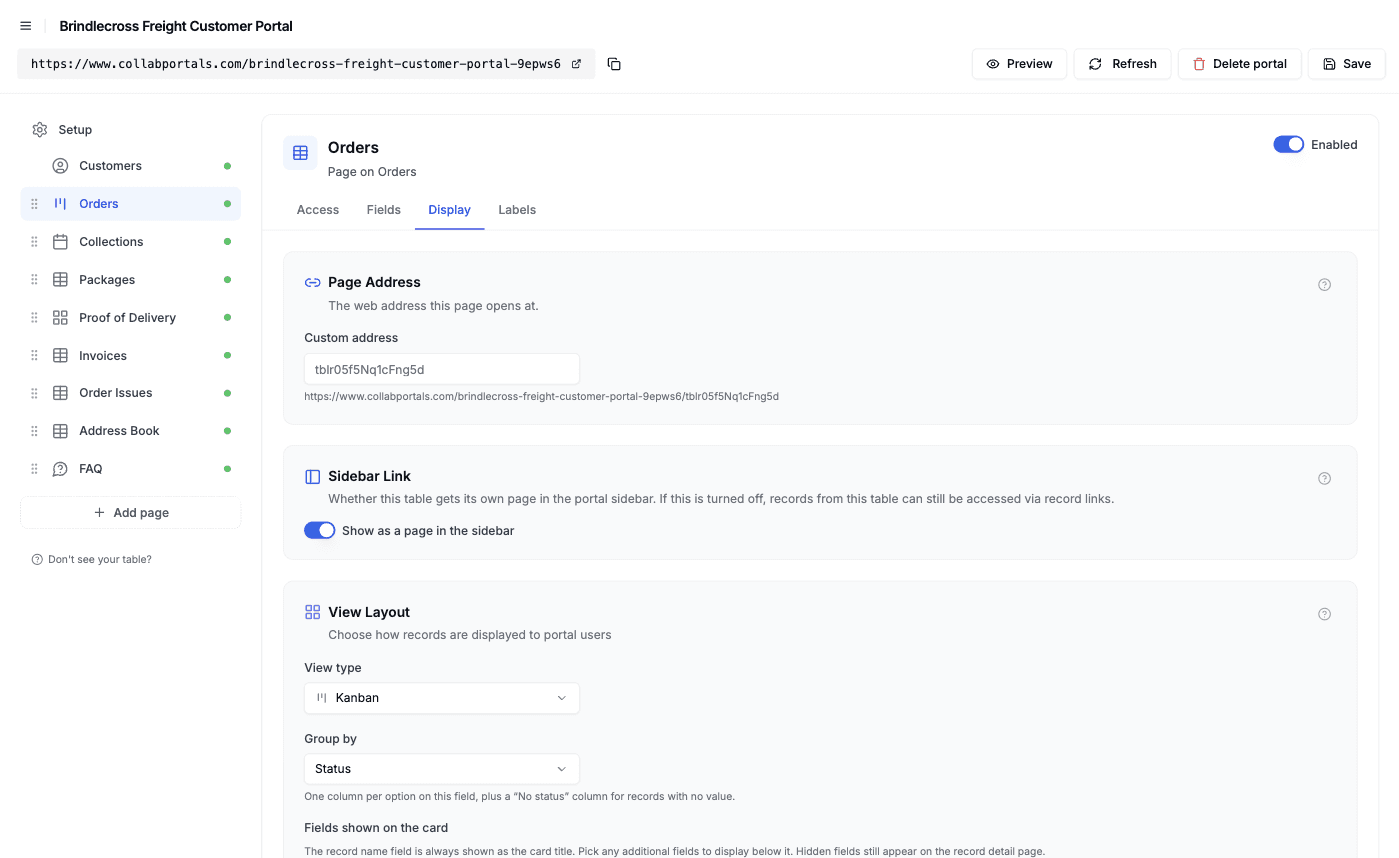
The Display tab turns each table into a kanban, calendar, gallery or table, and sets the highlight rules. - 5
Customers get a clean, branded tracking portal
The result is a portal in your colors. Customers see every order on a board, open one to find its packages, tracking numbers and invoices on the same page, check the driver's photo for proof of delivery, and request their next pickup, all reading from and writing back to your Airtable base.
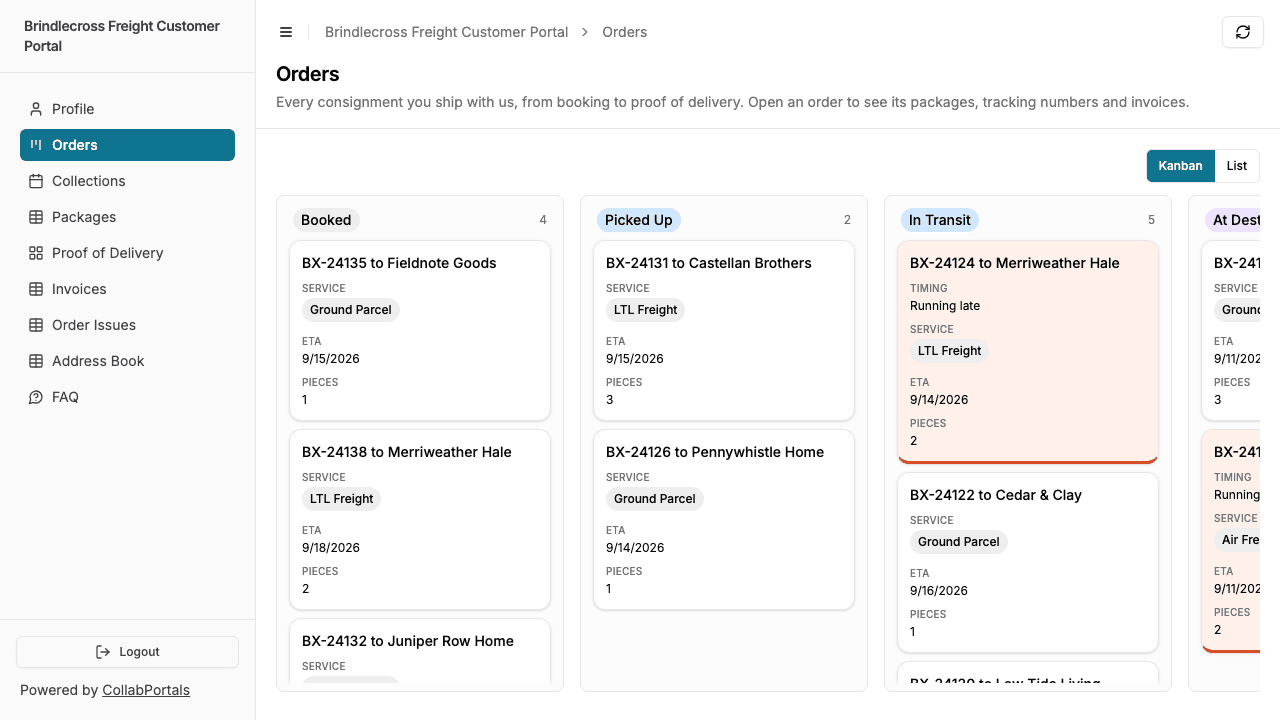
The Orders board as a customer sees it: every order by status, with the late ones tinted. - 6
They log in with just their email
Share the link. Each customer signs in with the email on their record and a one-time code, so there are no passwords to manage and no Airtable seats to buy. For a public example you can flip on a one-click demo user instead.
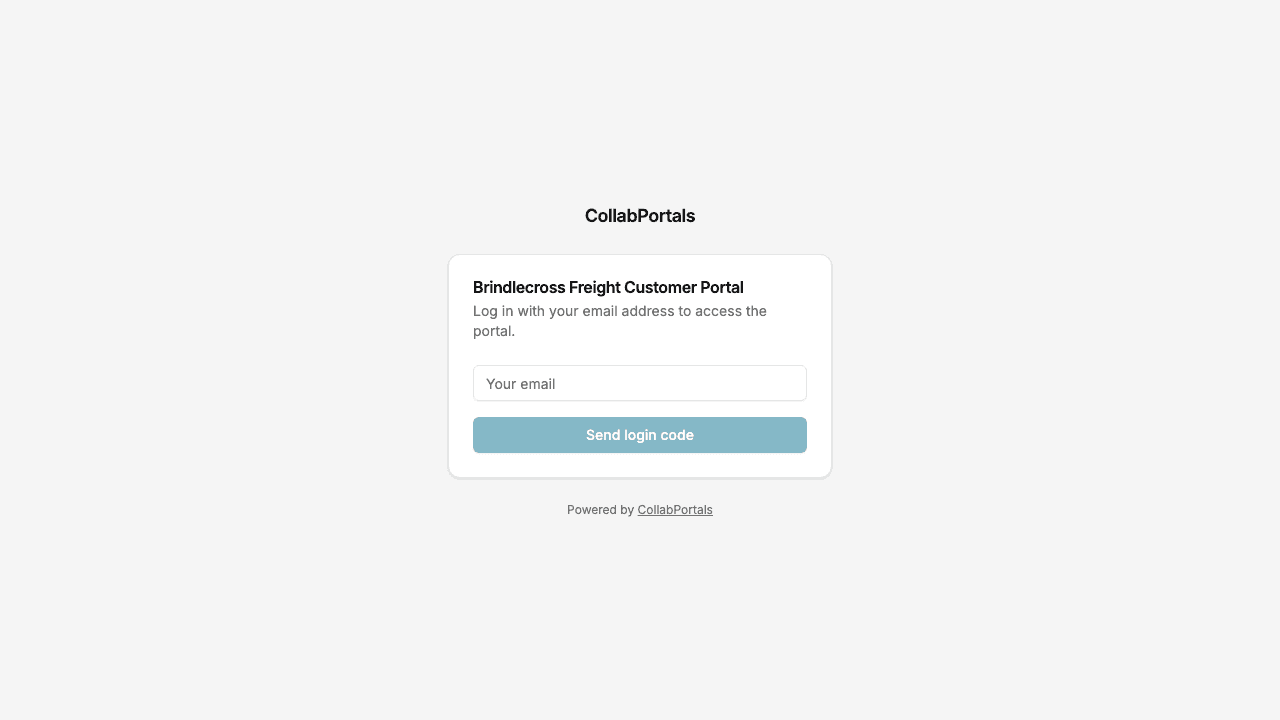
Email and one-time code login, in the forwarder's own color.
Want to start from this exact setup? Open the live demo or copy the Airtable template and connect it to your own base in minutes.
Use Cases for Order Tracking Portals
Freight Forwarding and Parcel Shipping
Business customers book collections and follow their goods from pickup to signature. The forwarder keeps rates, carriers and routing to itself.
- Orders (view, edit), status, service, ETA, consignee, delivery instructions
- Packages (view), tracking number, weight, latest scan, exceptions such as a customs hold
- Deliveries (view), proof-of-delivery photo, signed by, failed attempts
- Collections (create), pickup date, window and piece count
- Hidden: carrier cost, margin, subcontractor and routing notes
Wholesale and Distribution
Trade customers see what they ordered, what has shipped, and what they owe, without calling the sales desk.
- Orders (view), order date, status, expected ship date
- Shipments (view), carrier, tracking number, delivered date
- Invoices (view), PDF, amount, due date, payment status
- Order Issues (create), short shipments, damaged goods, returns
- Hidden: cost price, margin, supplier terms, credit notes
Personalized and Made-to-Order Products
Gift, print and custom-product shops let customers check the details of an order before it is made, then follow it to the door.
- Orders (view, edit), personalization details and delivery date
- Production Status (view), where the order is in production
- Shipments (view), courier and tracking number
- Problems (create), with photo uploads for anything that arrived wrong
- Hidden: supplier costs, production notes
Vendor Portals for Delivery Services
A delivery or logistics service gives the independent sellers who ship through it a portal to submit orders and see them delivered.
- Orders (create, edit), delivery address and handling notes
- Vendor Profile (edit), contact details
- Deliveries (view), delivered time and proof of delivery
- Hidden: internal logistics, pricing rules, other vendors' orders
What Makes This Better Than the Alternatives
| Capability | Email and PDFs | Shared Airtable views | Airtable seats for customers | Freight or order software | CollabPortals |
|---|---|---|---|---|---|
| Customers check status without emailing you | No | Yes | Yes | Yes | Yes |
| Each customer sees only their own orders | Yes, if you send the right file | Only with one view per customer | No | Yes | Yes |
| Carrier costs and margins stay hidden | Yes | Only if hidden in every view | No | Yes | Yes |
| Customers request pickups and report problems | By email | No, views are read-only | Yes | Yes | Yes |
| You keep working in Airtable (formulas, automations, views) | Yes | Yes | Yes | No, separate system | Yes |
| Cost | Free, plus your time | Free | $20/seat/month | Priced per user or per shipment | $12/month flat, or $10/month billed annually |
| Time to set up | None, but ongoing | Minutes per customer | Quick, but unsafe | Weeks of migration | Around an hour |
For a side-by-side breakdown, see CollabPortals vs Airtable Portals and CollabPortals vs Softr, or the roundup of the best Airtable portal builders.
Field-Level Permissions for Order Tracking
An order record mixes what the customer needs (status, ETA, tracking numbers, proof of delivery) with what only you should see (carrier cost, margin, routing). CollabPortals lets you decide per field:
- Show to customers: status, service, ETA, required-by date, consignee, tracking numbers, latest scan, quoted price, invoice amount and PDF, delivery photo and signature
- Hide from customers: carrier cost, margin, internal routing notes, subcontractor names, credit control notes, account notes
- Editable by customers: PO number, delivery instructions, collection requests, address book entries, order issues and their photos, their own contact details
- Read-only for customers: status, ETA, scans, deliveries, invoices and payment status
The same order record, two views: your ops team sees the carrier cost and the routing, and your customer sees where their goods are.
Take It Further
The walkthrough above is the whole build. A few options are worth knowing once you are up and running:
- Related records on the order page. Turn on related records so an order shows its packages and invoices under its own details, and a collection or a consignee lists its orders in a tab, each scoped to the record you opened.
- Highlight the exceptions. Conditional formatting tints the records that need attention. Rules match a value, so a condition like "running late" is an Airtable formula that compares the ETA with the required-by date and returns a label the rule can match.
- Let customers search. Turn on filter, search and sort controls so a customer can paste a tracking number or filter invoices by payment status instead of scrolling.
- Notifications. CollabPortals does not send notifications on its own. Use an Airtable automation to email a customer when an order goes out for delivery or a new invoice is added, with a link to the portal.
- Roles. If sellers or vendors use the portal as well as customers, a role field on the user table gives each group its own tables and fields.
After the first day of set-up, every "where is my order?" is answered by the portal, and every pickup request and damage report lands straight in your Airtable base.
For the generic version that applies to any base, see the setup guide.
Frequently Asked Questions
Can each customer see only their own orders?
Yes. Every table links back to the Customers table, and the portal shows each signed-in customer only the records linked to them. Other customers' orders, packages and invoices never reach their browser.
Can I hide carrier costs and margins from customers?
Yes. Field-level permissions let you hide carrier cost, margin, routing notes and any other internal field in the portal while leaving them in Airtable. Customers see the same order record without those fields.
Does the portal pull tracking updates from carriers?
No. The portal shows what is in your Airtable base. Scans and status changes get into Airtable however you already bring them in, whether that is a carrier integration, an automation, an import or your team updating records, and the portal shows them from there.
Can customers upload photos of damaged goods?
Yes. Give an Order Issues table create permission and an attachment field, and a customer can report damage against an order, pick the package it concerns, and attach photos from their phone. The record lands in Airtable for your team to work.
Can customers pay invoices in the portal?
No. CollabPortals does not take payments. Customers can view and download each invoice PDF and see its payment status. If you use a payment link from your billing tool, store it in a URL field on the invoice and it shows as a clickable link.
Can vendors or sellers use the same portal?
Yes. Add a role field to your user table and give each role its own table and field permissions, so a seller can create orders and see deliveries while a customer only tracks theirs.

About the author
Matt Shepherd
Founder, CollabPortals
Matt is the founder of CollabPortals. A software engineer and Airtable power user who kept running into the same frustration: no easy way to give external users a simple and secure view to edit their data. He built CollabPortals as the lightweight solution to that problem, allowing you to set up a secure, permissioned portal in a few clicks.
Related use cases and guides
Clients
Give your clients secure, branded access to their project data in Airtable. No extra seats, no code, no complex setup, just share a link.
Use caseInventory Management
Give warehouse staff, location managers, and external partners controlled access to your Airtable inventory base. Counts, reorders, and vendor pricing without exposing costs or other locations.
ComparisonCollabPortals vs Airtable Portals: Third-Party Tool or Native Feature?
Compare CollabPortals ($10/month, unlimited users) with Airtable's native Portals, where read-only guests are free and editing guests are sold in packs from $120/month. See which fits how your users actually work.
ComparisonCollabPortals vs Softr: Lightweight Portal or Full App Builder?
Compare CollabPortals and Softr for Airtable portals. See how a $10/month focused portal tool stacks up against a full no-code app builder starting at $49/month.