Turn an Airtable Table Into an FAQ Page
The FAQ view shows a table as an accordion: the question as the heading, the answer in the panel underneath. Point it at two fields and your portal has a help page.

Some tables are for reading, not working
Most of a portal is data people work with: their orders, their projects, their bookings. Then there is the table nobody wants to work with at all. The one that says how to submit a claim, what the delivery windows are, who to call when a phase slips.
That table has two columns that matter, a short one and a long one, and a table row is the wrong shape for it. The long column is the answer, and a row clips it after two lines, which is rarely far enough to reach the part the reader came for.
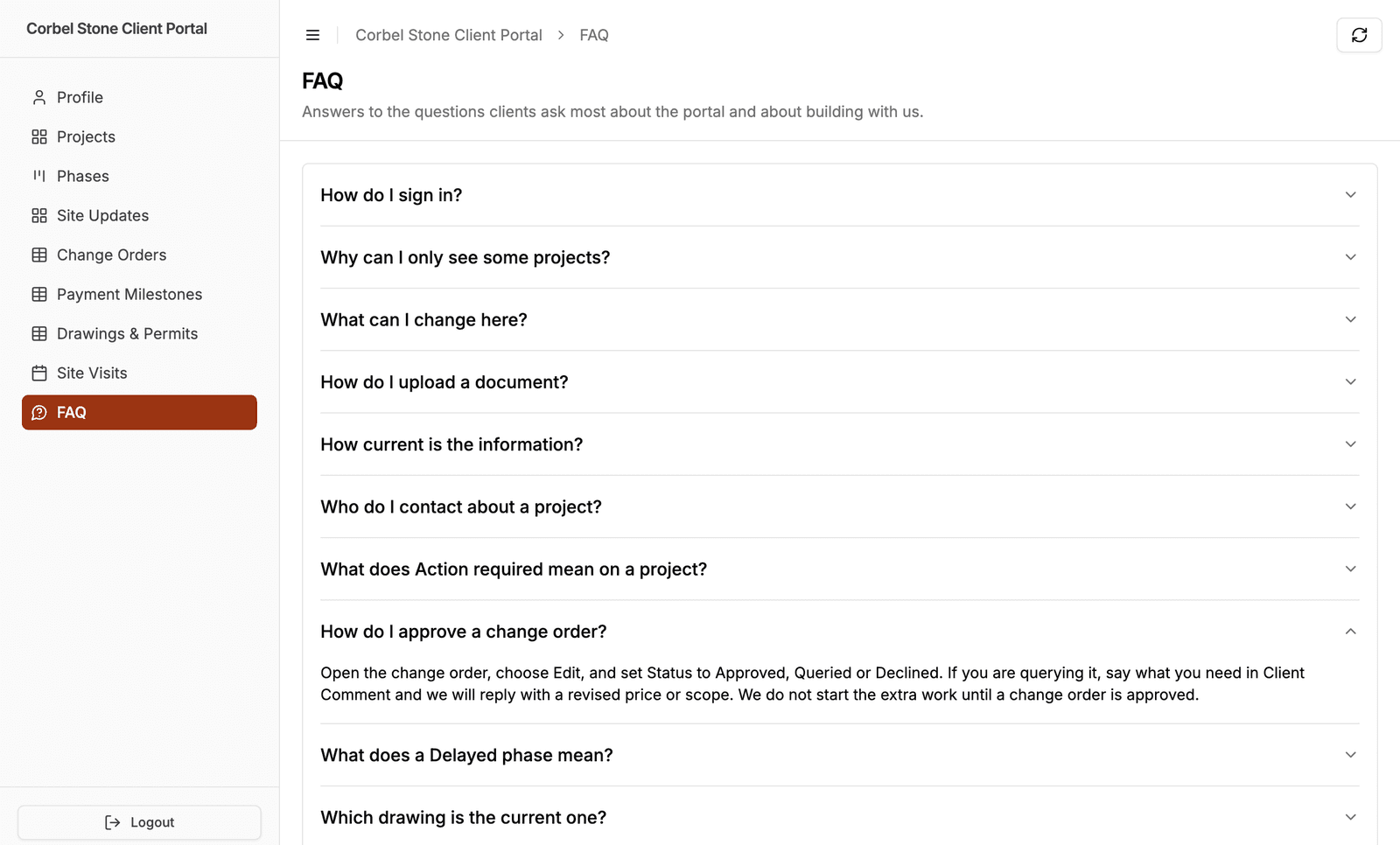
The FAQ view shows that table as an accordion instead: one row per record, the question as the heading, the answer in the panel that opens underneath.
Two dropdowns and you are done
Open the role, expand the table, and switch to the Display tab. Set View type to FAQ and three settings appear:
- Question field, the heading a reader clicks. Single line text or long text, or a formula or rollup that resolves to one of those.
- Answer field, the panel underneath. Anything that holds text, including rich text and long text, which both keep their formatting here. A multi-paragraph answer reads as one.
- Start answers expanded, which decides how the page first renders. Leave it off and readers get a list of questions to scan, which is how most FAQ pages work. Turn it on for a short page, or one people are meant to read start to finish.
That is the whole setup. The table is already in your portal, already filtered, already permissioned, and this changes how it is drawn.
It is still your portal's data
An FAQ page is not a special content type bolted on the side. It is one of your tables, so everything else still applies.
Roles get their own FAQ. The view type is set per role, so the same table can be an FAQ for clients and a plain table for the team maintaining it. Record filtering and record ownership work as they always do, so contractors and homeowners can read different questions from one table.
Turn on filter and sort controls, then pick the fields the search box should cover, and it appears above the questions. That is the control most FAQ pages actually want, and the question field is the one to cover: it lets someone type what they are looking for instead of reading the list. Sorting moves into those controls too, since an accordion has no column headers to click.
Editing is not offered. The panel holds the answer and nothing else, so there is no row to act on and no way through to the record. Give a role edit or delete permission on an FAQ table and it has no surface to use it on. Creating is the exception: a role with create permission still gets the New button in the page header, the same as on any other view, which is how you would run a question box. If people need to change the answers, show the table as a table.
One limit worth knowing: the FAQ view loads the whole table at once rather than a page at a time, so nobody has to page through to find their question, and it stops at 500 records, the same cap the kanban and calendar views have.
Who this helps
Any portal where the same questions arrive by email every week.
- Client portals, where "how do I approve this" is the question that generates the most email
- Membership portals carrying rules, benefits and renewal terms
- Student portals with course policies and deadlines people need twice a term
The answers live in Airtable, so whoever writes them does not need access to the portal admin. Add a record, and the page has a new question.
How it compares
Portal builders on Airtable tend to ship the same set of layouts. Noloco's documented display options are rows, cards, columns, tables, kanban, calendar, timeline, split-view, charts, maps and a single record view. Softr's data-connected blocks are list, grid, table, calendar, kanban, charts, maps, item details and summary cards. Neither list has an accordion in it, so an FAQ driven by a table is something you build rather than pick.
Ours is a view type like any other, which is the point: the questions are records and the answers are fields, so the page is never a second copy to keep in step with the base.
Getting started
Open your portal, pick the table, and set its view type to FAQ on the Display tab. The FAQ view documentation covers which fields each dropdown offers and why, what a reader sees when an answer is empty, and how it behaves across roles.
Let me know what you point it at, and whether the two fields were enough.

About the author
Matt Shepherd
Founder, CollabPortals
Matt is the founder of CollabPortals. A software engineer and Airtable power user who kept running into the same frustration: no easy way to give external users a simple and secure view to edit their data. He built CollabPortals as the lightweight solution to that problem, allowing you to set up a secure, permissioned portal in a few clicks.
Related reading
Clients
Give your clients secure, branded access to their project data in Airtable. No extra seats, no code, no complex setup, just share a link.
Use caseMembership Management
Give your members secure, self-service access to their profile, roster, and account data in Airtable. No extra seats, no member login headaches.
Use caseStudents
Give students self-service access to their records, licensing progress, and program status through a secure portal connected to your Airtable base.
ComparisonCollabPortals vs Softr: Lightweight Portal or Full App Builder?
Compare CollabPortals and Softr for Airtable portals. See how a $10/month focused portal tool stacks up against a full no-code app builder starting at $49/month.