Related Tabs: A Record's Linked Records, In Place
Surface linked records on a record's detail page, in a tab or underneath the record's own fields, so a project's invoices, files and tasks are on the project, not in a separate table.
Airtable models relationships with linked records, and a portal that flattens them back into separate tables throws that structure away. A client looking at a project should not have to open an Invoices table and work out which rows are theirs.
Related tabs put the linked records where they belong: on the record.
What it does
A record's detail page can carry tabs for its linked tables. Open a Project and its Tasks, Invoices and Documents are tabs beside the details, each showing only the records linked to that project.
- Any linked table can appear as a tab on the parent record
- Each tab lists only that record's linked rows, with no filtering for the user to do
- Users can add records from inside a tab, when their role allows it
- A record added in a tab is linked to its parent automatically
- Where the tab shows a table, they can edit and delete inline too
You also choose whether a linked table appears as its own page in the portal navigation, nested inside its parent record, or both.
Or under the record's own fields
A tab is right when a record has several sets of children a user dips into. It is one click too many when a single set is the reason the record gets opened at all. A conversation and its messages read as one page, and so do an invoice and its line items.
So the same linked field can render underneath the record's fields instead, headed by the field's name. Nothing else changes: the rows are still scoped to the record on screen, the child table's view type and permissions still apply, adding still links the new record to its parent, and search and filter controls still work if you turn them on.
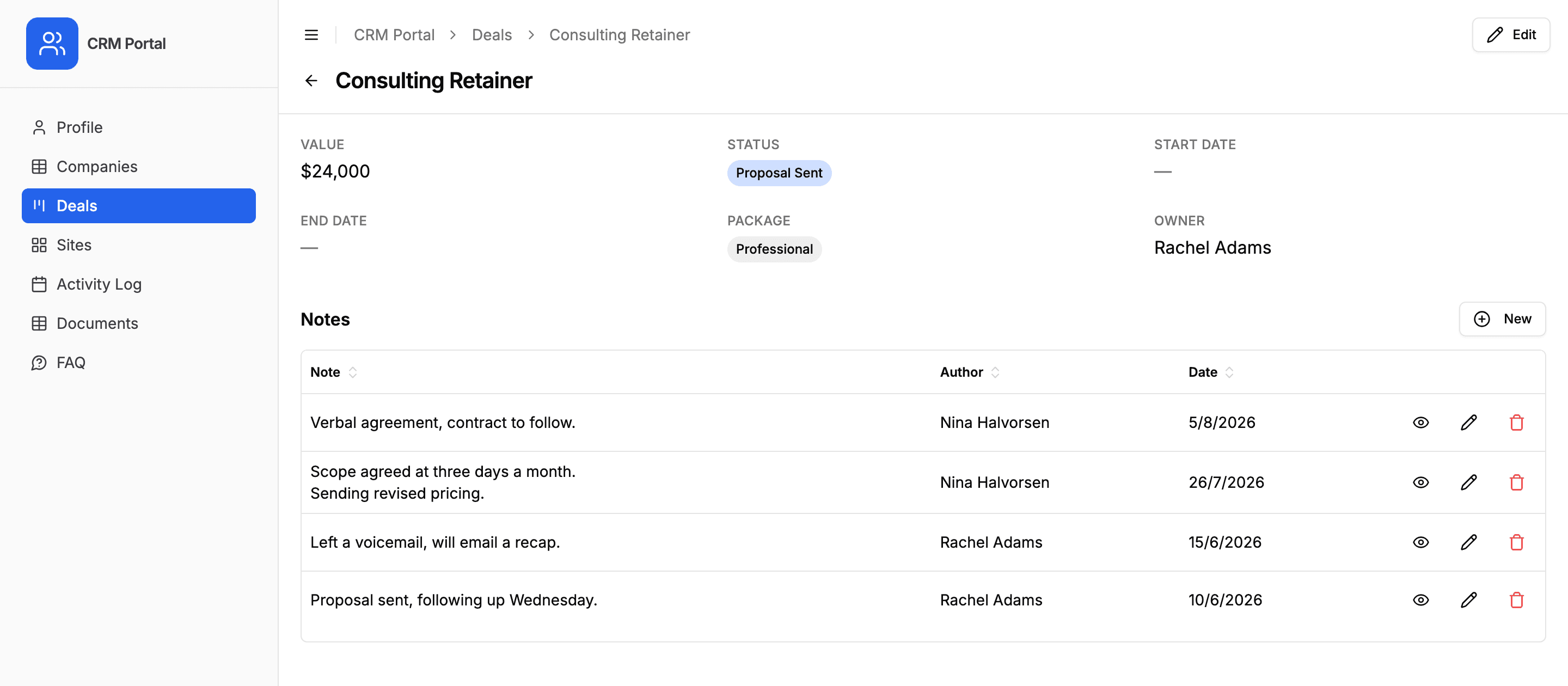
A record can mix the two, showing Deals in a tab and Notes on the page, and both placements apply on a user's own profile page as well.
Why it matters
It matches how people think about the work. Nobody asks "which invoices exist"; they ask "what has this client been billed". Tabs answer the second question, which is the one being asked.
It also removes the most common source of confusion in a portal: a table that is technically visible and practically unusable because the user cannot tell which rows relate to them.
Auto-linking is the quiet part
When someone adds a record from inside a tab, the link back to the parent is filled in for them. There is no dropdown asking a client to select which project this invoice belongs to, which means one fewer thing for them to get wrong.
That needs the link to work both ways, which is Airtable's default: creating a link field on Projects gives Tasks an inverse field pointing back. If a link is one-way, there is nothing to write the parent into, so the tab lists records without offering to add one.
A table can be a tab and not a page. Documents nested under a Project, with no Documents entry in the sidebar, is usually the right shape for a client-facing portal.
How it works
Two settings, in two places. Where a linked-record field's records appear is set from that field's own settings, in the field list on the page's Fields tab, so two pages of one table can show them differently. Linked records display offers three placements: Inline links among the record's other fields, Under details, below them, or As a tab, beside the record's details. Either of the last two renders whatever view the child table is set up with, and a separate switch keeps the inline links as well when you surface the records. Whether a table also appears as its own page in the navigation is on the Display tab. The related tabs guide covers both, plus inline create, edit and delete.
Where users do pick a link themselves, record ownership on the linked table keeps the options to their own records, and linked-record filtering can cut a picker down to a specific set of records you choose.
Who it is for
Any base with a parent-child shape, which is most real ones: project management with tasks under projects, client portals with invoices under clients, property management with units under sites, and event crews with shifts under events.
Try it on your own base
Connect Airtable, build a portal, and share it. Seven days free, no card needed.
Related guides and examples
Record Detail Pages and Summary Fields
Choose which fields appear on the row or card and which live on the record's dedicated detail page, so a list stays readable without hiding anything.
FeatureLet Portal Users Create, Edit and Delete Records
A portal is not read-only. Give people permission and they add records, update their own, and delete them, writing straight into your Airtable base.
Use caseProject Management
Give clients and external collaborators a branded view into their projects in Airtable, with controlled access to tasks, timelines, and deliverables.
GuideShow a Record's Linked Records as Tabs in Your Portal
A record's linked records can show as a tab on its detail page or underneath the record's own fields, scoped to that record, with inline create, edit and delete. Here is how related tabs and nested tables work, and how to turn them on.