Build an Airtable Employee Self-Service Portal
Run HR in Airtable and give every employee a portal for time off, timesheets, expenses, pay stubs and open shifts, with pay grades and HR notes kept private.

See it working, then start from a ready-made Airtable base.
See a live demoCopy the Airtable templateThe Problem: HR Runs in Airtable, but Your Staff Can't Get In
Plenty of care providers, schools, nonprofits and small employers run their people operations in Airtable. Time off requests, weekly timesheets, expense claims, pay stubs, training certificates and the shift rota all sit in one base, with automations doing the dull parts. For the HR team it works.
The people it doesn't work for are the employees. A support worker wants to book a week off, check whether last Saturday's extra shift was paid, and claim this month's mileage. None of them should see a colleague's pay, their own pay grade, or what their manager wrote about them. Adding them to the base as collaborators puts all of that one click away.
So you end up doing one of these:
- Email and paper forms. Staff email a request, HR retypes it into Airtable, and nobody can see whether it was approved without asking.
- A shared form with no way back. A form collects the request, but the employee never sees its status, their balance, or their pay stubs.
- Airtable Interfaces or Airtable seats for everyone. Every employee needs a paid seat at $20 a month, and keeping each person to their own rows is fiddly and easy to get wrong.
- A separate HR and payroll platform priced per employee per month, running alongside the Airtable base you already built and keeping the two in sync.
How CollabPortals Works for Employee Self-Service
CollabPortals connects to your Airtable base and gives every employee a branded portal. Each person signs in with their work email, sees only their own records, and can raise requests or update the fields you allow. Pay grades, disciplinary records and HR notes stay in Airtable, where only HR can see them.
Example: Staff Portal for a Community Care Provider
A nonprofit running four group homes and a day program has around a hundred hourly support workers. Its HR base tracks every employee, their weekly timesheets, biweekly pay stubs, time off, expense claims, training certificates and the open shifts that need cover. The portal gives each employee their own slice of it.
| Table | Employee Access | Purpose |
|---|---|---|
| Employees (Profile) | View, edit | Each person sees their role and PTO balance, and updates their phone, address and emergency contact |
| Time Off Requests | View, create, edit | Staff request vacation, sick and personal time and watch it move from Requested to Approved |
| Timesheets | View, edit | Payroll sets up each week with scheduled hours; staff add extra shifts and notes |
| Pay Stubs | View only | Every pay stub with its PDF, plus the timesheets and expense claims it paid |
| Expense Claims | View, create, edit | Mileage and out-of-pocket costs, with a receipt on every claim except mileage |
| Open Shifts | View only | Every shift that needs cover, across every home, on a calendar |
| Shift Requests | View, create, edit, delete | Staff ask to pick up a shift; the scheduler confirms one person per shift |
| Documents | View only | Offer letter, W-2s, benefits confirmations, training certificates and reviews |
| Policies and FAQ | View only | Answers on pay, time off, expenses and shifts |
| Pay grade, disciplinary record, manager notes | Hidden | Stay on the employee's record in Airtable for HR only |
HR keeps working in Airtable with the full picture. Each employee gets a simple portal that only ever shows their own records.
Build an Employee Portal Step by Step
Here is how the live demo above is put together. It takes about an hour the first time, with no code involved.
- 1
Set up your Airtable base
Start with one table per thing you track: Time Off Requests, Timesheets, Pay Stubs, Expense Claims, Open Shifts, Shift Requests, Documents, and an Employees table for your staff. Employees holds each person's work email, and every personal table has an Employee link back to it, which is what later lets the portal show each person only their own records. The tables also link to each other the way the work flows: each timesheet and expense claim links to the Pay Stub that paid it, and each shift request links to the Open Shift it is for.
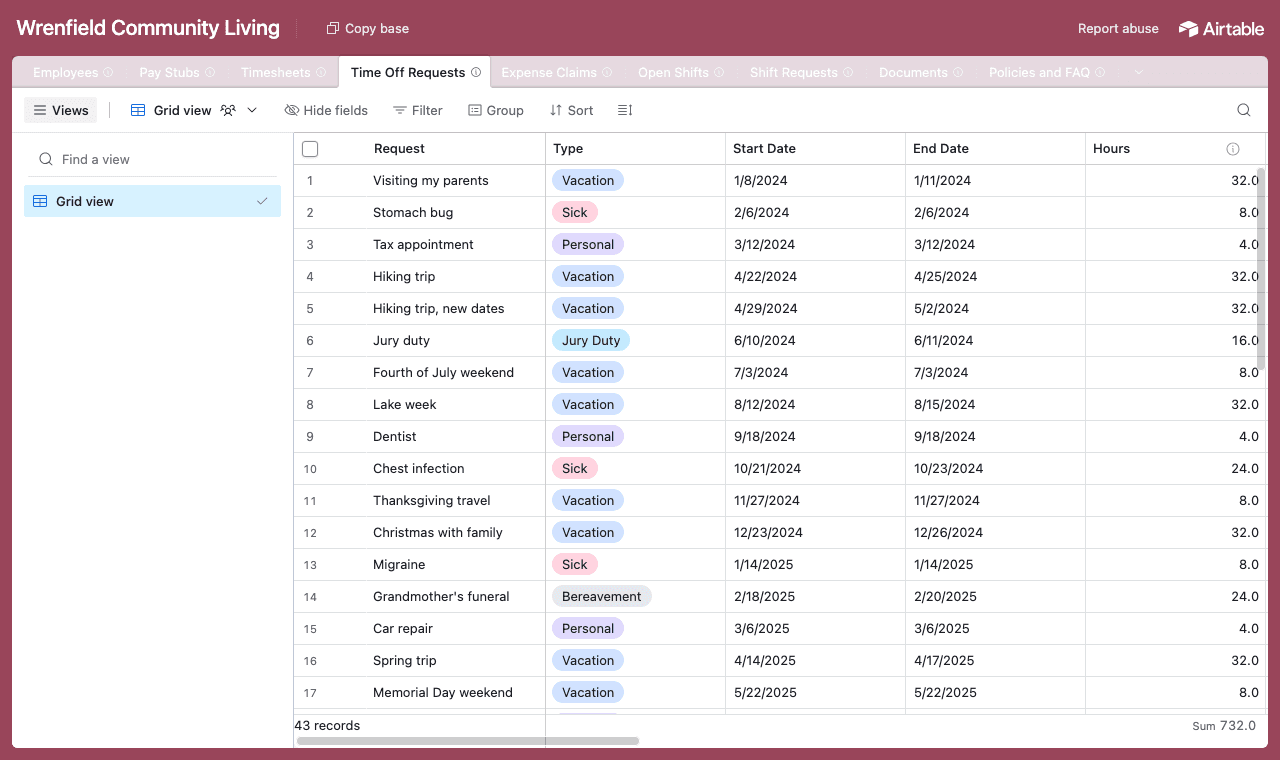
One table per thing, each linked back to the Employees table and to each other. - 2
Connect the base and pick the staff table
Point CollabPortals at the base, then choose Employees as your user table and Email as the login field. Everyone signs in with the email on their staff record, and CollabPortals matches them to their row.
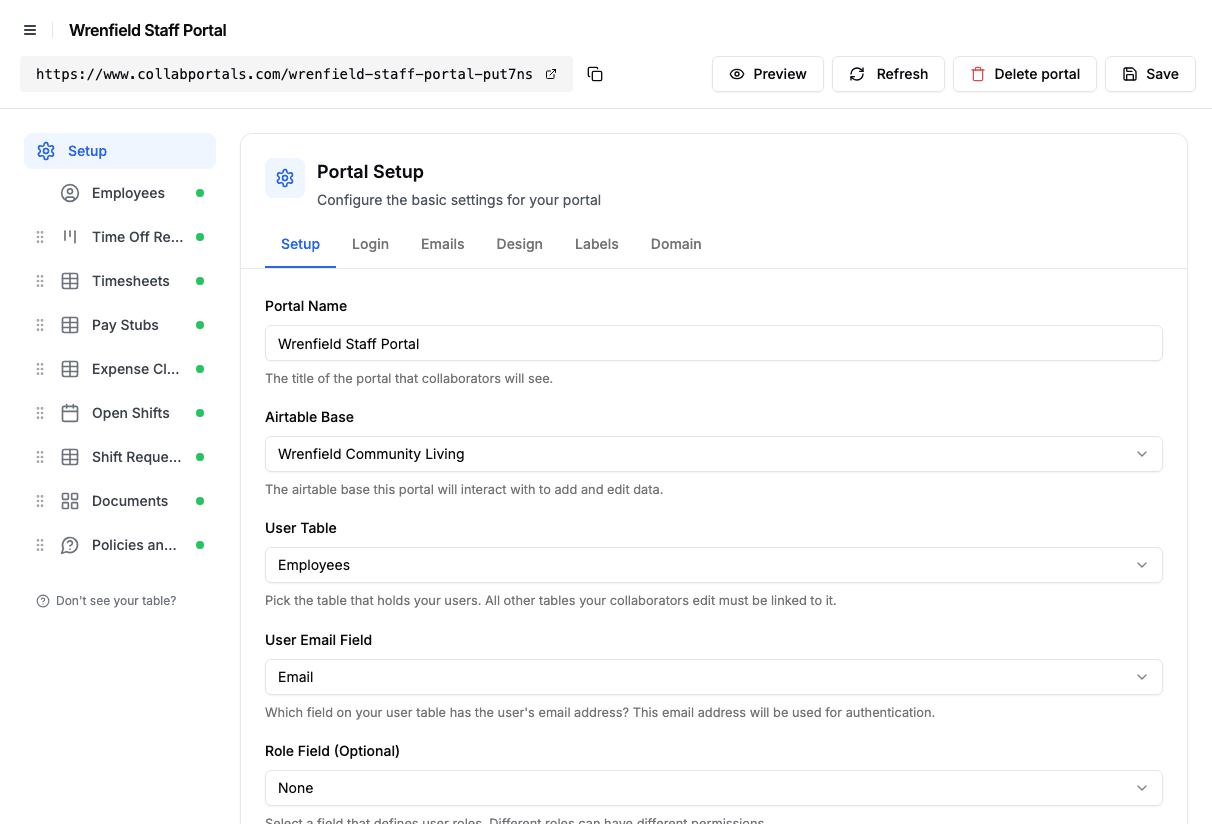
Connect the base, then point CollabPortals at the Employees table and its email field. - 3
Hide pay grades and HR notes, open up contact details
On each table you switch fields on or off. On Employees, staff see their job title, supervisor, start date and PTO balance, and can edit their Phone, Mailing Address and Emergency Contact. Pay Grade, Disciplinary Record and Manager Notes stay hidden, and so do the HR notes on time off and the finance notes on expense claims. Staff can edit their profile but not create or delete staff records.
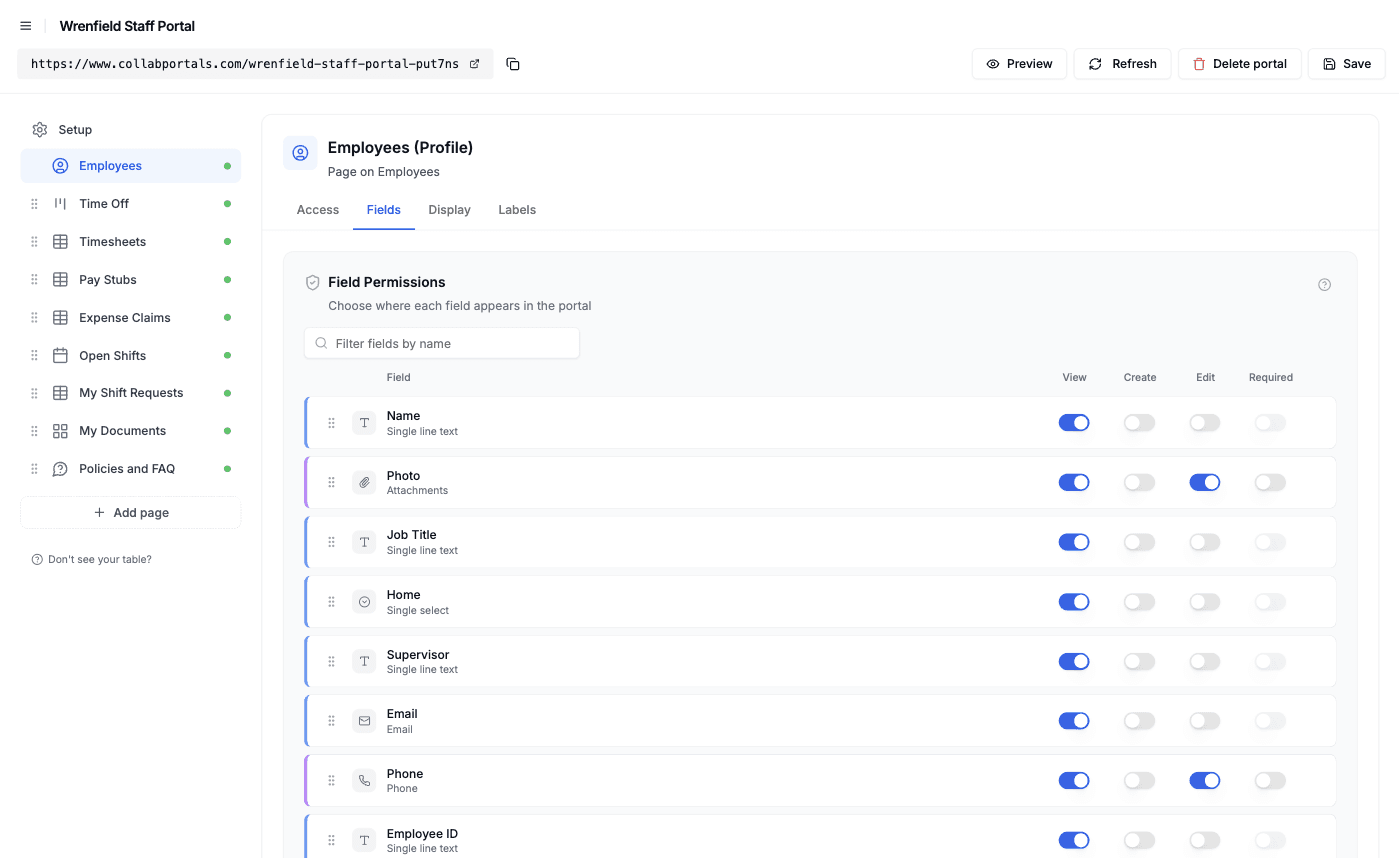
Field-level permissions: contact details editable, anything HR-only hidden. - 4
Give each table the view that fits
Pick how each table appears. Time Off Requests becomes a kanban board by status, Open Shifts a calendar, Documents a gallery of PDFs, and Timesheets, Pay Stubs and Expense Claims tables with filters. Conditional formatting picks out what needs attention: sick time on the board, a timesheet your supervisor queried, a claim with no receipt, and holiday shifts paid at time and a half.
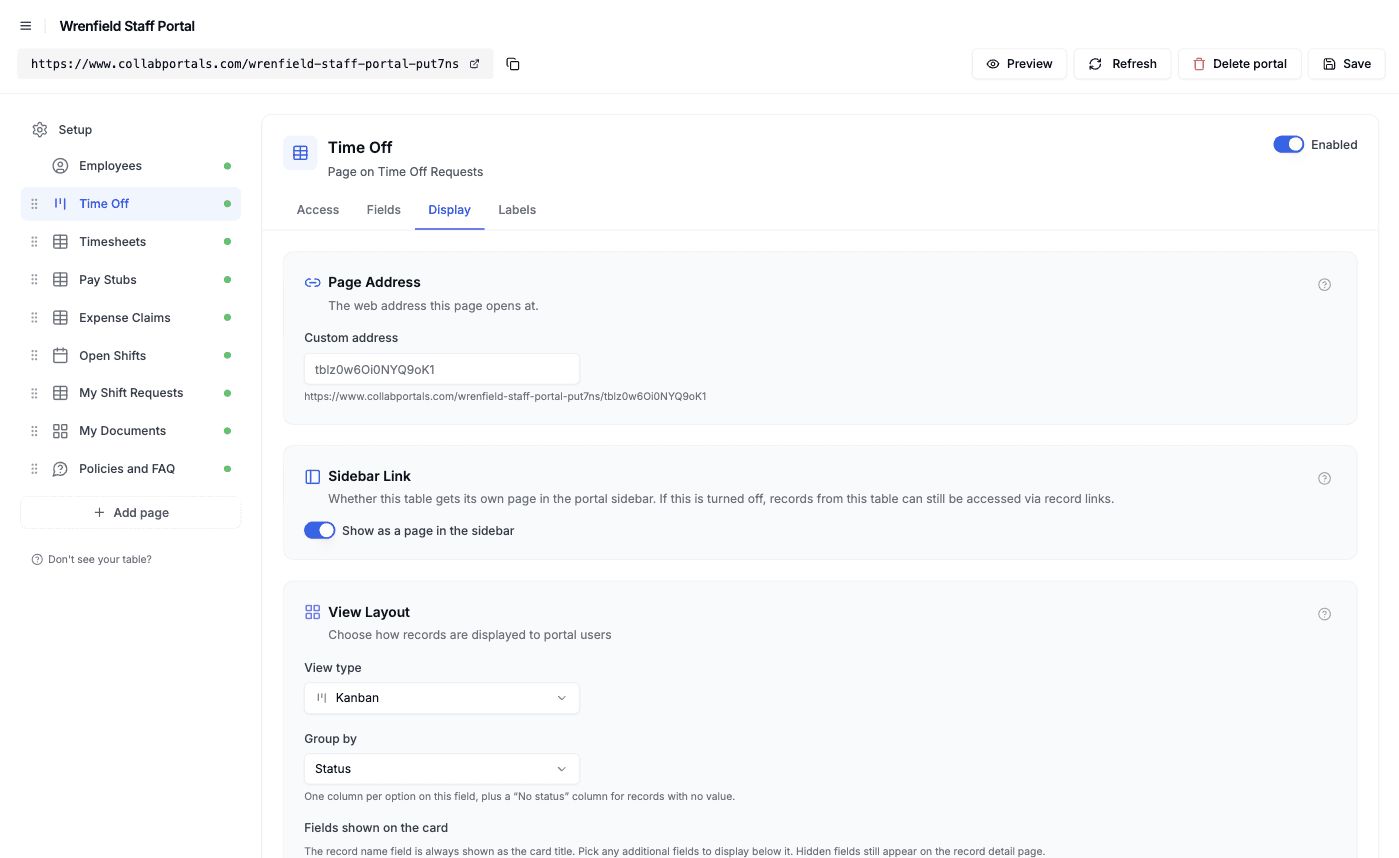
The Display tab turns each table into a kanban, calendar, gallery or table. - 5
Staff get a clean, branded portal
The result is a portal in your colors. Staff request time off and watch it move across the board, fill in their week, claim mileage with a receipt, open a pay stub to see the timesheets and claims it paid, and ask to pick up an open shift. It all writes straight back to your Airtable base.
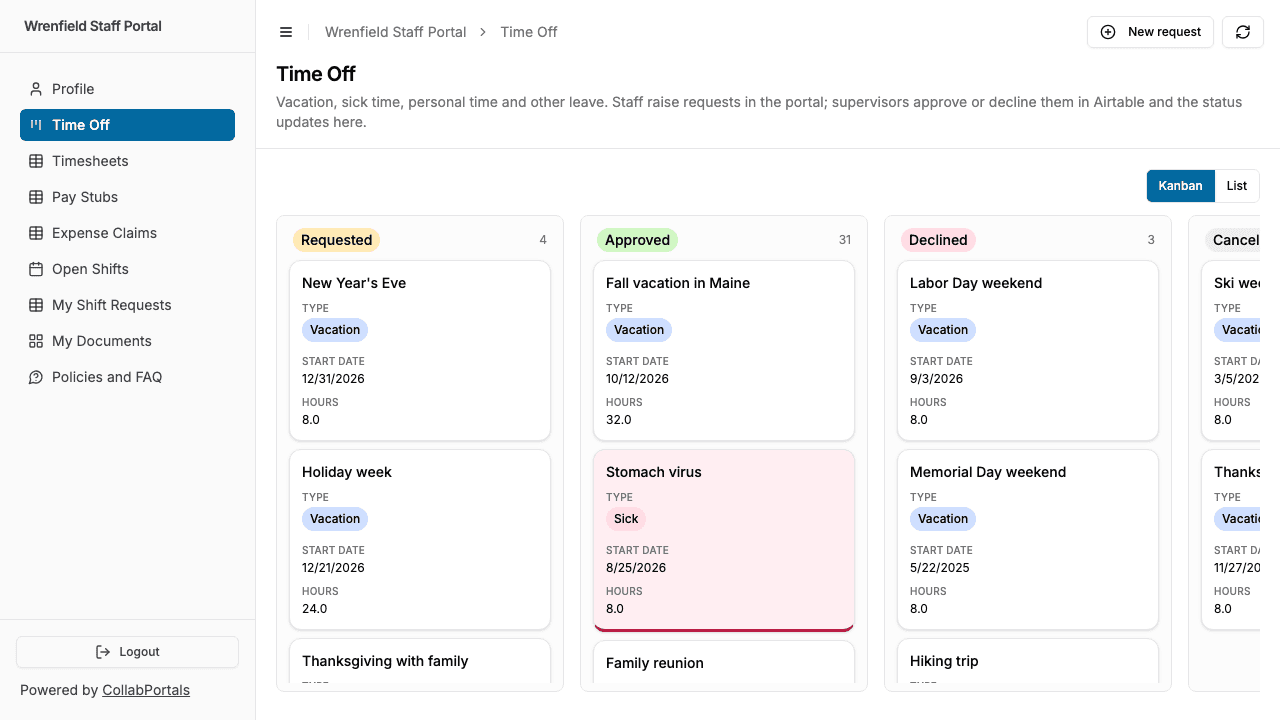
Time off as staff see it: every request and where it stands, with sick time highlighted. - 6
They log in with just their email
Share the link. Each employee signs in with their work email and a one-time code, so there are no passwords to manage and no Airtable seats to buy. For a public example like this one, you can switch on a one-click demo user instead.
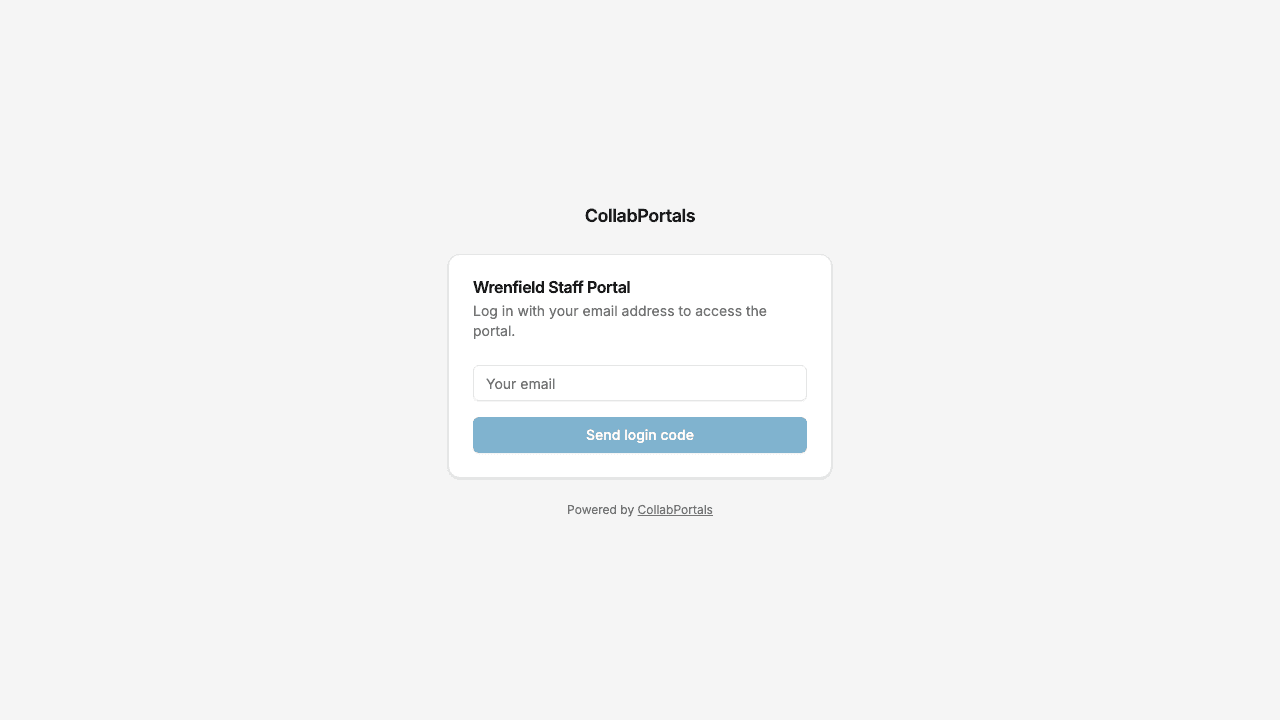
Email and one-time code login, in the organization's own color.
Want to start from this exact setup? Open the live demo or copy the Airtable template and connect it to your own base in minutes.
Use Cases for Employee Portals
Care Providers and Group Homes
Hourly support staff work shifts around the clock and pick up extra ones when a colleague is off. The portal covers the whole cycle from asking for a shift to seeing it paid.
- Time Off Requests (create, edit), type, dates, hours, status
- Timesheets (edit), scheduled hours, extra shift hours, notes
- Open Shifts (view), home, time, role needed, pay rate
- Shift Requests (create), which shift, a note for the scheduler
- Hidden: pay grade, disciplinary record, supervision notes
Schools and Education Groups
Teachers, teaching assistants and support staff request absence, check their pay and keep their certifications in one place, while leave balances and HR files stay with the business office.
- Absence Requests (create, edit), reason, dates, cover needed
- Pay Stubs (view), with the PDF and year-to-date totals
- Documents (view), contracts, certifications, background checks
- Policies and FAQ (view), leave rules and pay dates
- Hidden: salary scale placement, performance notes, safeguarding records
Nonprofits with Field Staff
Program staff drive between sites and spend out of pocket. The portal turns receipts and mileage into claims with a status, instead of envelopes on the finance desk.
- Expense Claims (create, edit), type, amount, miles, receipt photo
- Timesheets (edit), hours by week, with notes for grant-funded time
- Pay Stubs (view), reimbursements paid alongside net pay
- Documents (view), benefits guides and training certificates
- Hidden: budget codes, finance notes, funder allocations
Shift-Based Teams Filling Extra Shifts
Teams that run on a rota fill extra shifts from a list everyone can see. Staff ask for the shifts they want, and the scheduler picks in Airtable.
- Open Shifts (view), date, shift, location, rate
- Shift Requests (create, delete), the shift and a note, withdrawn if plans change
- Timesheets (edit), hours worked, linked to the shifts they came from
- Hidden: scheduler notes
What Makes This Better Than the Alternatives
| Capability | Email and paper forms | Airtable seats for staff | HR and payroll software | CollabPortals |
|---|---|---|---|---|
| Staff raise requests and log hours straight into your live data | No | Yes | Yes | Yes |
| Pay grades, disciplinary records and HR notes stay hidden | N/A | Hard to guarantee | Yes | Yes |
| Each employee sees only their own records | N/A | Hard to guarantee | Yes | Yes |
| You keep working in Airtable (formulas, automations, views) | Yes | Yes | No, separate system | Yes |
| Cost | Free, plus HR's time | $20/seat/month | Priced per employee | $12/month flat, or $10/month billed annually |
| Time to set up | None, but ongoing pain | Quick, but unsafe | Weeks of migration | Around an hour |
For side-by-side breakdowns, see CollabPortals vs Softr and CollabPortals vs Airtable Interfaces, or the roundup of the best Airtable portal builders. If what your staff need is to order a laptop or raise an IT ticket rather than manage their own HR records, see internal request portals.
Field-Level Permissions for Employee Records
An employee record mixes things a person should see about themselves with things only HR should see. CollabPortals decides per field:
- Show to staff: job title, home or team, supervisor, start date, scheduled hours, PTO allowance, used and remaining
- Hide from staff: pay grade, disciplinary record, manager notes, HR notes on time off, finance notes on claims
- Editable by staff: phone, mailing address, emergency contact, timesheet hours and notes, claim details and receipts
- Read-only for staff: approval status, supervisor comments, pay stubs, documents
The same Airtable record, two very different views.
Take It Further
The walkthrough above is the whole build. A few options are worth knowing once you are up and running:
- Supervisor roles. Add a role field to Employees and give supervisors their own role, with a record filter that shows the requests from their team, so they can review them in the portal as well as in Airtable.
- Linked records under the record. Pay stubs in the demo list their timesheets and expense claims under the stub's own fields, and each open shift has a Shift Requests tab where staff ask for it. See related tabs for both layouts.
- Let staff filter and search. Turn on filter, search and sort controls so a long list of timesheets or claims can be narrowed by status, type or amount.
- Notifications. CollabPortals does not send emails when a request changes. An Airtable automation can, for example emailing a supervisor when a new time off request arrives and the employee when it is approved.
For the generic version that applies to any base, see the setup guide.
Frequently Asked Questions
Can employees see each other's pay or time off?
No. Each table is scoped through its link to the Employees table, so a person only sees rows linked to their own record. Shared tables like Open Shifts and the FAQ are the exception, and only because you choose to show them to everyone.
Can I hide pay grades, disciplinary notes and manager comments?
Yes. Field-level permissions let you hide any field in the portal while it stays in Airtable. In the demo, pay grade, disciplinary record and manager notes are on the employee's own record and never reach the portal, along with HR notes on time off and finance notes on expense claims.
Who approves requests, and where?
In the demo, supervisors and HR approve in Airtable, and the portal shows the new status the next time the employee opens it. If you want supervisors to work in the portal instead, give them a role with a record filter that shows their team's requests.
Can employees upload receipts and documents?
Yes. Any attachment field can be made editable, so staff attach a receipt photo to an expense claim from their phone. Files you want to publish to them, like pay stub PDFs, W-2s and certificates, can be view only so they cannot be changed.
Does this replace our payroll software?
No. Payroll still runs where it runs. CollabPortals shows what you keep in Airtable, so if you add each pay stub and its PDF to a Pay Stubs table, whether by hand, by import or with an automation, employees can see them in the portal.
How do open shift sign-ups work?
Open Shifts is shared with every employee through a link to the Employees table. Staff open a shift and create a request from its Shift Requests tab, and the scheduler confirms one person per shift in Airtable. There is no availability engine: CollabPortals records who asked, and the decision stays with your scheduler.

About the author
Matt Shepherd
Founder, CollabPortals
Matt is the founder of CollabPortals. A software engineer and Airtable power user who kept running into the same frustration: no easy way to give external users a simple and secure view to edit their data. He built CollabPortals as the lightweight solution to that problem, allowing you to set up a secure, permissioned portal in a few clicks.
Related use cases and guides
Internal Requests
Let employees submit hardware requests, IT tickets, supply orders, and internal service requests through a portal connected to your Airtable operations base.
Use caseEvent Crew
Give event crew, temporary staff, and contractors a self-service portal to view schedules, assignments, and logistics, powered by your Airtable event database.
ComparisonCollabPortals vs Airtable Interface Designer: Can You Use Interfaces as a Portal?
Airtable Interface Designer is free, but can it replace a dedicated portal? Compare it to CollabPortals for sharing data with external users.
ComparisonCollabPortals vs Softr: Lightweight Portal or Full App Builder?
Compare CollabPortals and Softr for Airtable portals. See how a $10/month focused portal tool stacks up against a full no-code app builder starting at $49/month.